
Introduction
The Spigen ArcStation Essential 113W USB C Fast Car Charger is designed to provide efficient and rapid charging for multiple devices simultaneously in your vehicle. This manual provides essential information for the proper setup, operation, and maintenance of your car charger.
Key features include a total power output of 113W across three ports (two USB-C and one USB-A), support for various fast charging protocols, and an included 100W E-Marker USB-C to USB-C cable for optimal performance.
Package Contents
- 1 x Spigen ArcStation Essential 113W USB C Fast Car Charger
- 1 x 100W E-Marker USB-C to USB-C Cable (1 meter)
Product Overview
The ArcStation Essential car charger features a compact design with multiple charging ports to accommodate various devices.

Image: The Spigen ArcStation Essential 113W USB C Fast Car Charger, showcasing its two USB-C ports (65W and 30W) and one USB-A port (18W), along with the included USB-C to USB-C E-Marker cable.
- USB-C1 Port: Up to 65W Power Delivery (PD), supports Samsung Super Fast Charging 2.0 (45W PPS).
- USB-C2 Port: Up to 30W Power Delivery (PD), supports Samsung Super Fast Charging 1.0 (25W PPS).
- USB-A Port: Up to 18W Quick Charge (QC).
- Total Output: 113W maximum combined output.
- LED Indicator: A blue LED light illuminates the ports, indicating power status and adding visibility in low-light conditions.
Setup
Follow these steps to install and begin using your car charger:
- Ensure your vehicle's engine is off before installation.
- Locate the 12V or 24V cigarette lighter socket in your vehicle.
- Insert the Spigen ArcStation Essential car charger firmly into the socket until it is securely seated. The blue LED indicator will light up, confirming power connection.
- Start your vehicle's engine. The charger is now ready for use.

Image: The car charger is compatible with 12V-24V vehicle power outlets, suitable for trucks, MPVs, SUVs, and sedans. Dimensions are 36.0 x 36.0 x 74.9 mm (1.42 x 1.42 x 2.95 inches).
Operating Instructions
The charger is designed for optimal power delivery to connected devices.
- Connecting Devices: Use appropriate USB-C or USB-A cables to connect your devices to the corresponding ports on the car charger. For optimal fast charging, especially for high-power devices like laptops, use the included 100W E-Marker USB-C to USB-C cable with the USB-C1 port.
- Multi-Device Charging: The charger can charge up to three devices simultaneously. The built-in Smart Power Distribution technology automatically detects and delivers the optimal charging current for each connected device.
- Fast Charging: For devices that support Power Delivery (PD) or Quick Charge (QC), the charger will automatically engage the fastest possible charging speed. For example, a MacBook Air 13" M3 can charge up to 51% in 30 minutes, and a Galaxy S25 Ultra up to 70% simultaneously.
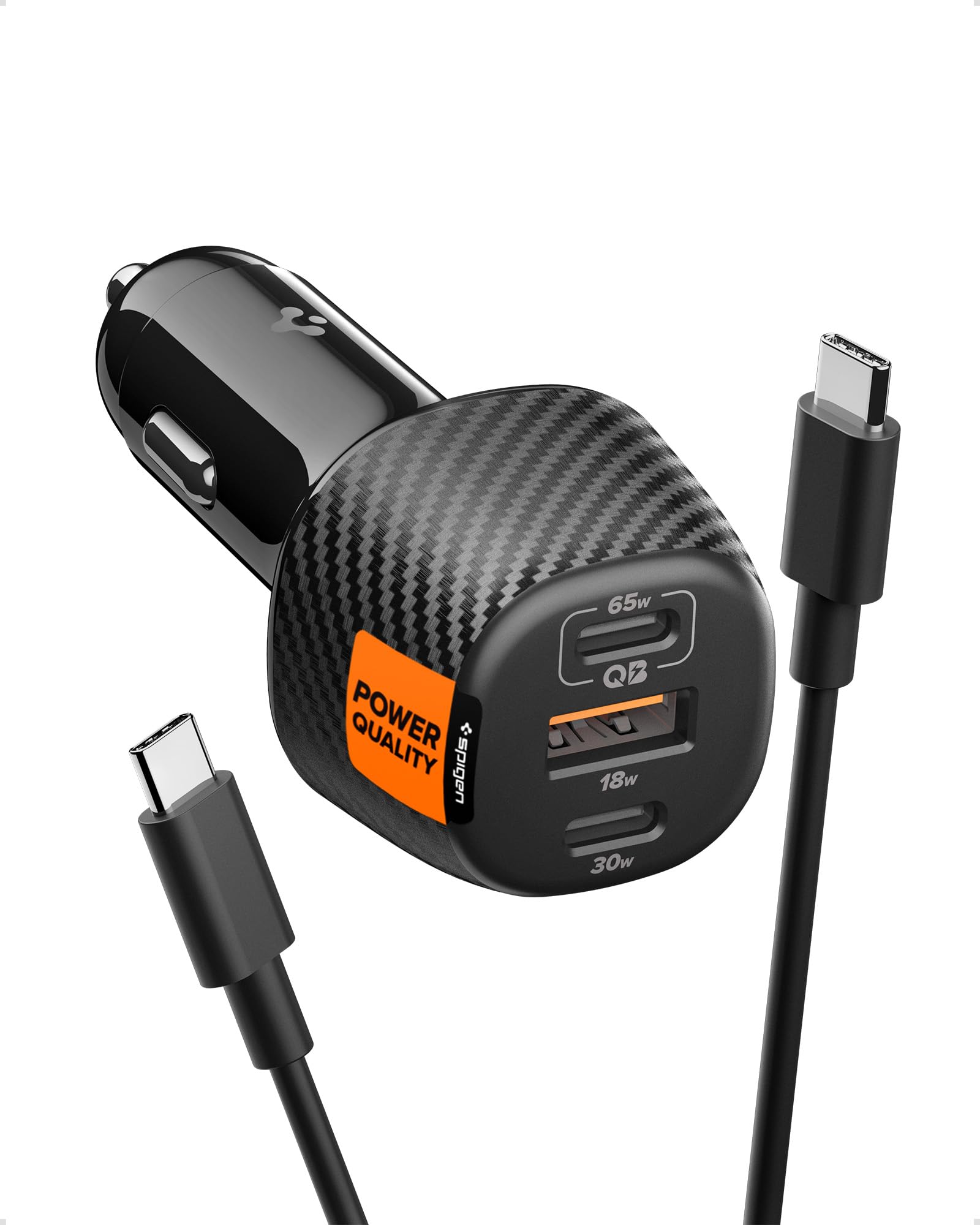
Image: The car charger connected to three devices via its USB-C1 (65W), USB-C2 (30W), and USB-A (18W) ports, demonstrating its 113W total output capability.

Image: A close-up view highlighting the high-speed 100W E-Marker USB-C cable, which supports safe and high-power output.
Safety Information
The Spigen ArcStation Essential car charger incorporates IntelligentSafety features for device protection:

Image: A visual representation of Spigen's Integrated Multi-Layer Battery Defense, detailing features like Overcharge Prevention, Temperature Control, Voltage/Current Matching, and Battery Discharge Prevention.
- Overcharge Prevention: Protects your devices from being overcharged, extending battery life.
- Temperature Control: Monitors and regulates the charger's temperature to prevent overheating.
- Voltage/Current Matching: Ensures stable and appropriate power delivery for each connected device.
- Battery Discharge Prevention: Safeguards against excessive battery discharge during charging.
Always ensure the charger is properly inserted into the vehicle's power socket. Do not expose the charger to extreme temperatures, moisture, or corrosive materials. Keep out of reach of children.
Maintenance
To ensure the longevity and optimal performance of your car charger, follow these simple maintenance guidelines:
- Cleaning: Disconnect the charger from the vehicle's power socket before cleaning. Use a soft, dry cloth to wipe the exterior. Avoid using liquid cleaners or solvents.
- Storage: When not in use for extended periods, store the charger in a cool, dry place away from direct sunlight and extreme temperatures.
- Cable Care: Avoid bending or twisting the charging cables excessively, as this can damage the internal wires.
Troubleshooting
If you encounter issues with your Spigen ArcStation Essential car charger, refer to the following common problems and solutions:
- Charger not powering on (LED not lit):
Ensure the charger is fully inserted into the vehicle's 12V/24V socket. Check if the vehicle's power socket is functional (e.g., by testing with another device). Verify the vehicle's engine is running, as some sockets only activate with the ignition on. - Device not charging or charging slowly:
Confirm the charging cable is securely connected to both the charger and your device. Try a different cable to rule out cable issues. Ensure your device supports the fast charging protocols (PD, QC, PPS) offered by the charger. If charging multiple devices, the total power output is shared, which might affect individual charging speeds. - Overheating:
If the charger feels excessively hot, disconnect it immediately. Ensure there is adequate ventilation around the charger. Avoid charging in direct sunlight or in enclosed spaces.
Specifications
| Feature | Detail |
|---|---|
| Model Number | ACP09543 |
| Total Wattage | 113W |
| Input Voltage | 12-24 Volts |
| Output Current | 5 A |
| Output Voltage | 9 Volts (variable based on PD/QC) |
| Connector Type | USB Type A, USB Type C |
| USB-C1 Output | 65W PD (supports Samsung SFC 2.0 45W PPS) |
| USB-C2 Output | 30W PD (supports Samsung SFC 1.0 25W PPS) |
| USB-A Output | 18W QC |
| Included Components | 100W E-Marker Cable |
| Dimensions | 36.0 x 36.0 x 74.9 mm (1.42 x 1.42 x 2.95 inches) |
| Weight | 41 g |
| Material | Copper (internal components) |
Warranty
This Spigen product is covered by a 24 Month Worry Free Warranty. Please retain your proof of purchase for warranty claims. For detailed warranty terms and conditions, please refer to the official Spigen website or contact customer support.
Support
For further assistance, technical support, or inquiries regarding your Spigen ArcStation Essential 113W USB C Fast Car Charger, please visit the official Spigen website or contact their customer service department. Contact information can typically be found on the product packaging or the Spigen brand website.


