
Suacopzar A50613-SL-US
Suacopzar 4LEDs Wireless Strobe Lights User Manual
Model: A50613-SL-US
Introduction
This user manual provides comprehensive instructions for the safe and effective use of your Suacopzar 4LEDs Wireless Strobe Lights. Please read this manual thoroughly before operating the product and retain it for future reference.
Package Contents
Verify that all items listed below are included in your package:
- 8 x 4LED Strobe Lights
- 1 x Remote Control
- 8 x Rubber Rings
- 16 x Hook-and-loop Fasteners
- 4 x 2-in-1 Type-C Charging Cables
- 1 x User Manual (this document)

Image: A visual representation of the package contents, including eight strobe lights, a remote control, charging cables, rubber rings, and hook-and-loop fasteners.
Setup
1. Initial Charging and Activation
- Remove Dust Plug: Locate and remove the dust plug on the back of each strobe light to access the Type-C charging port.
- Charge: Connect the strobe light to a power source using the provided Type-C charging cable. Charge for at least 5 seconds. The light will illuminate green during charging.
- Power Off: After 5 seconds of charging, disconnect the cable and power off the light. The LED light turning on indicates successful activation.
- Remote Pairing: Press any color key on the remote control. If the light switches color, it is successfully paired with the remote.
A full charge takes approximately 1 hour. Battery life varies by mode: 20-50 hours in slow flash mode, 3 hours in static pink/ice blue mode, 2 hours in static red, and 4 hours in static white.

Image: A close-up of the strobe lights connected to Type-C charging cables, illustrating the charging process and battery life information.
2. Installation Methods
The strobe lights offer two primary installation methods:
- Rubber Bands: Wrap a rubber band around both sides of the light and secure it to your desired mounting surface (e.g., bicycle frame, drone arm).
- Hook-and-loop Fasteners: Stick one side of the hook-and-loop fastener to the bottom of the strobe light and the other side to the mounting surface. This allows for easy attachment and removal.
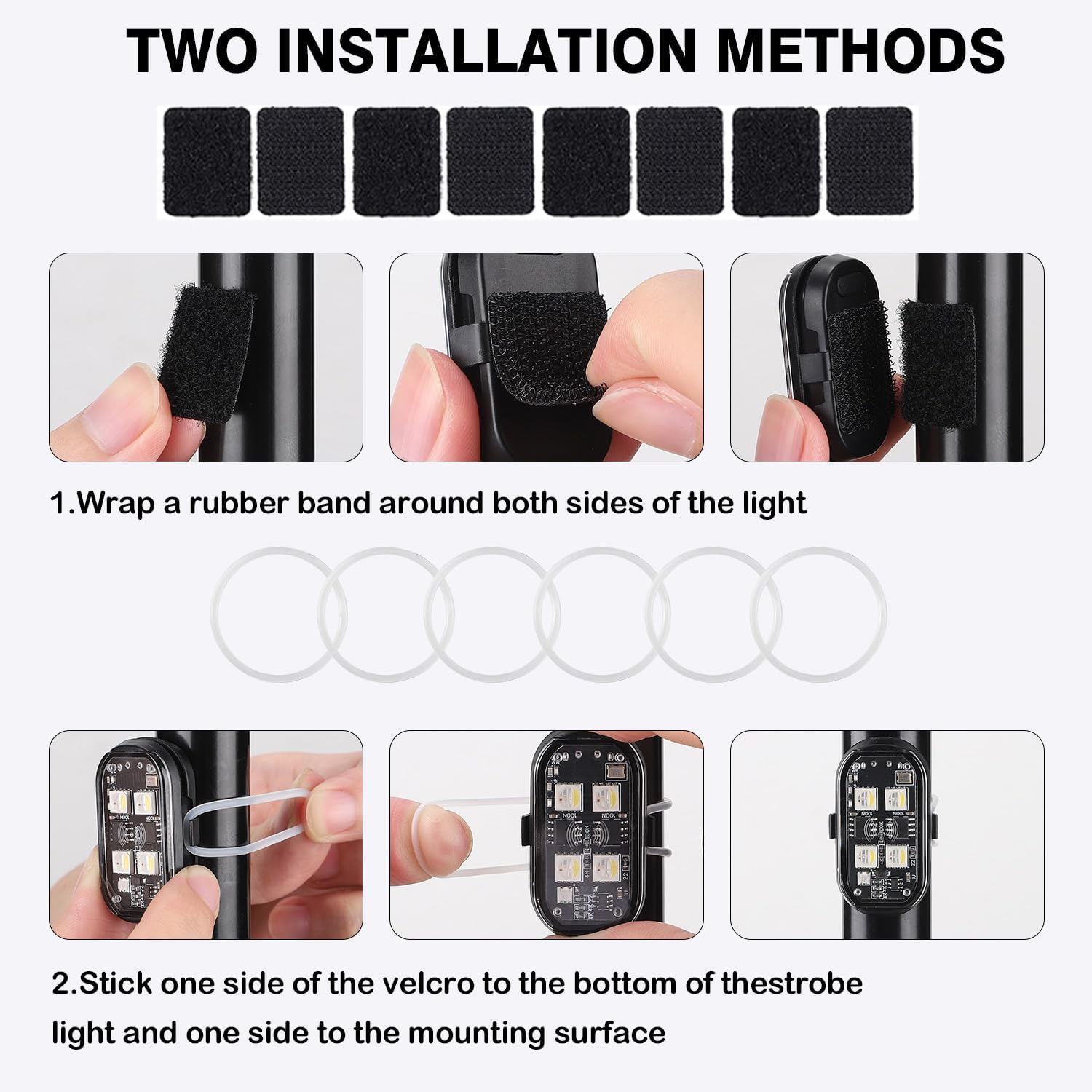
Image: A visual guide demonstrating how to attach the strobe lights using either rubber bands or hook-and-loop fasteners to various surfaces.
Operating Instructions
Remote Control Functions
The included remote control allows for easy adjustment of colors and modes within a 23ft (7m) range. It features a memory function, retaining your last settings.
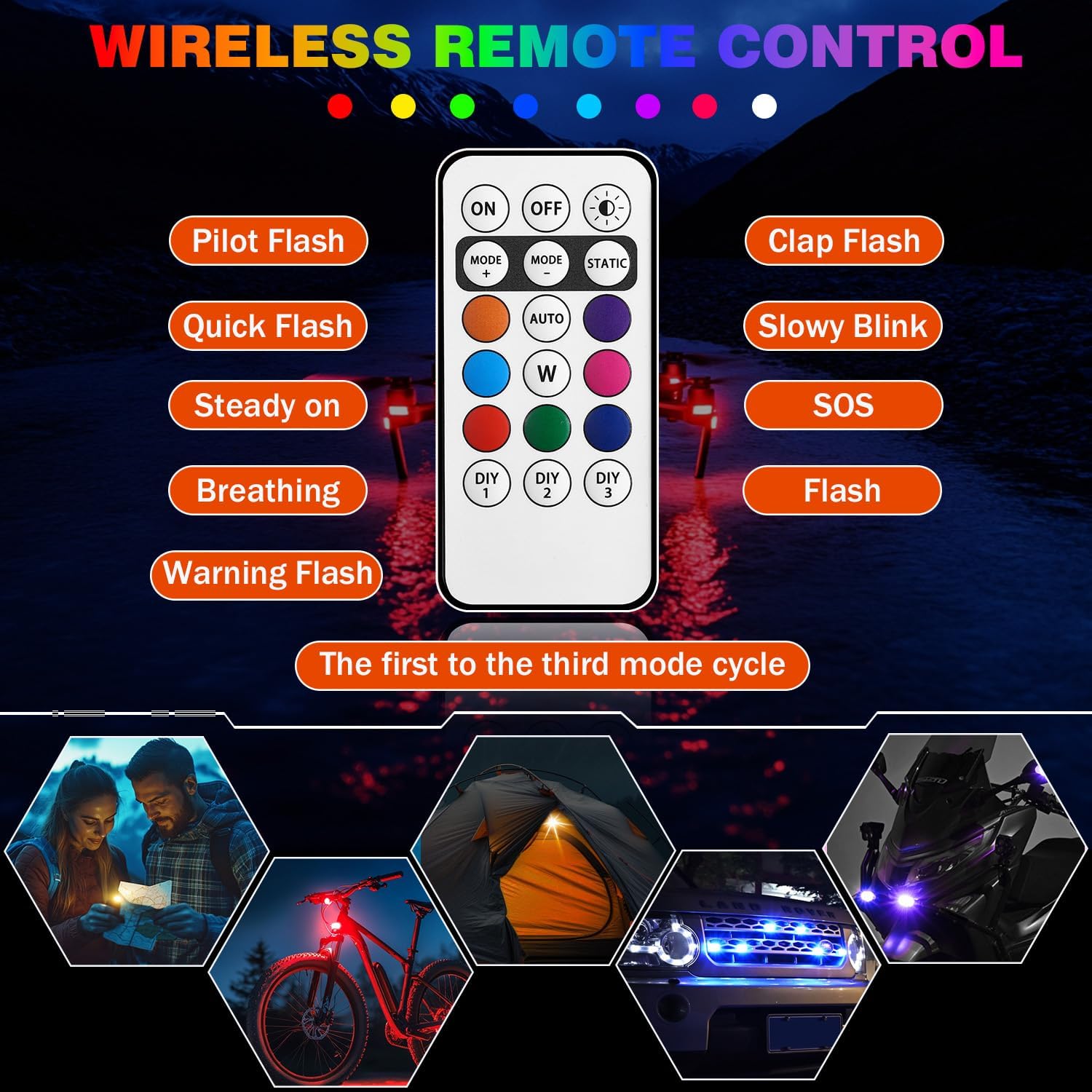
Image: An illustration of the remote control, highlighting buttons for power, mode selection, static color choices, and DIY modes.
- ON/OFF: Power the lights on or off.
- MODE: Cycle through 10 various modes, including static, fast flashing, breathing, warning flash, and slow blink.
- STATIC: Select from 8 static colors: white, red, green, blue, yellow, purple, pink, and ice blue.
- DIY 1, 2, 3: Access 3 customized modes.
Note: If the remote control is unused for over 60 seconds, it enters sleep mode. Long press any button to reactivate. The remote cannot be used during charging of the lights.
Application Examples
These versatile strobe lights are suitable for a wide range of applications:
- Vehicles: Motorcycles, cars, trucks, bikes for enhanced visibility and anti-collision warning.
- Drones: Improve visibility during flight, especially at night.
- Outdoor Activities: Camping, emergency lighting, or ambient decoration.

Image: Examples of the strobe lights installed on a car and a drone, showcasing their use for visibility and aesthetic purposes.
Video: This video demonstrates the Suacopzar 4LEDs Wireless LED Lights in action, showcasing their various brightness levels, flash modes, and color options. It also illustrates the charging process and installation methods on a bicycle.
Video: This video displays the Suacopzar Wireless LED Lights installed on a car, demonstrating how the remote control can be used to change colors and modes, enhancing the vehicle's appearance and visibility.
Maintenance
- Cleaning: Wipe the lights with a soft, damp cloth. Avoid abrasive cleaners or solvents.
- Waterproof Protection: Ensure the waterproof plug for the charging port is securely in place when not charging to maintain IP65 water resistance.
- Storage: Store the lights and remote in a cool, dry place when not in use. The standby time for the LED strobe lights is over a year when inactive without charging and 1.5 months when activated.
- Battery Care: Recharge the lights regularly to maintain battery health, especially if storing for extended periods.

Image: A strobe light attached to a motorcycle, shown in a rainy environment, emphasizing its IP65 waterproof design and the importance of keeping the charging port sealed.
Troubleshooting
| Problem | Possible Cause | Solution |
|---|---|---|
| Lights do not turn on. | Low battery; Not activated; Remote not paired. | Charge the lights fully. Ensure initial activation steps are followed. Re-pair the remote control. |
| Remote control unresponsive. | Remote in sleep mode; Out of range; Remote battery low (not replaceable). | Long press any button to reactivate. Ensure within 23ft (7m) range. If remote battery is depleted, a new remote may be required. |
| Lights fall off after installation. | Improper installation; Mounting surface not clean. | Ensure mounting surface is clean and dry. Reapply hook-and-loop fasteners firmly or use rubber bands for a more secure fit. |
| Short battery life. | Operating in power-hungry modes; Battery degradation over time. | Use slower flash modes for extended battery life. Ensure full charge before use. |
Specifications
- Model: A50613-SL-US
- Light Source: 4LEDs per strobe light
- Colors: 8 (White, Red, Green, Blue, Yellow, Purple, Pink, Ice Blue)
- Modes: 10 (Static, Fast Flashing, Breathing, Warning Flash, Slow Blink, and more), plus 3 customized modes
- Charging: Type-C USB, approximately 1 hour for full charge
- Battery Life: 20-50 hours (slow flash mode), 3 hours (static pink/ice blue), 2 hours (static red), 4 hours (static white)
- Waterproof Rating: IP65
- Remote Control Range: Up to 23ft (7m)
- Material: Plastic
- Item Weight (per light): Approximately 5 ounces (0.14 kg)
- Dimensions (per light): Approximately 1.6 inches (4.1 cm) x 1 inch (2.6 cm)
Warranty and Support
For warranty information or technical support, please contact Suacopzar customer service through the retailer where the product was purchased. Please have your model number (A50613-SL-US) and purchase date available.
Manufacturer: Subloom
Ask a question about this manual
Ask about setup, troubleshooting, compatibility, parts, safety, or missing instructions. Manuals+ will review the question and use this page’s manual context to help answer it.