
Introduction
Product Overview
The AC Infinity Controller AI+ and Water Detection Sensor bundle provides comprehensive control over your grow environment. The Controller AI+ is an AI-driven universal grow controller capable of managing up to 32 smart devices within the AC Infinity UIS platform, including fans, lights, heaters, and humidifiers. It continuously learns and adapts to your environment, utilizing real-time data to optimize temperature, humidity, and VPD (Vapor Pressure Deficit).
Paired with the IP68-rated Water Sensor, this system offers advanced water-level awareness. The sensor detects the presence or absence of water, enabling leak detection, automated watering, and precise moisture control. When connected to the Controller AI+, the sensor can trigger devices like pumps and valves, providing real-time responses to low water levels or leaks.
Both devices integrate with the AC Infinity mobile app via Wi-Fi, offering remote access, grow recipes, alerts, and chatbot support for both novice and experienced growers.
Key Features
- Intelligent Water Management: Seamlessly integrates leak detection and water presence monitoring into your automated grow setup, triggering pumps, shutoffs, or alerts in real time via the AI controller.
- Smarter Automation, Safer Systems: Protect your grow space with proactive responses to water presence or leaks, preventing damage and ensuring plants thrive under optimal conditions.
- Fully Connected Control: Both devices sync with the AC Infinity app, enabling remote monitoring, advanced analytics, and real-time AI-powered recommendations, including instant water-level alerts.
- Precision Meets Versatility: With dual-zone climate data and water-level awareness, your setup achieves an unmatched level of environmental control, ideal for hydroponics, aquariums, and smart irrigation.
- Effortless Installation, Maximum Adaptability: Use magnetic or suction mounting to position the water sensor anywhere, then let the AI controller take over, learning your environment and adjusting devices accordingly.

Setup Guide
Unpacking and Inspection
Carefully remove all components from the packaging. Verify that all items listed in the product contents are present and undamaged. If any items are missing or damaged, contact AC Infinity customer support immediately.
Controller AI+ Placement
Place the Controller AI+ in a central location within your grow environment, ensuring it is away from direct heat sources, excessive moisture, or areas with significant air currents that could affect its temperature and humidity readings. Ensure the Wi-Fi antenna has clear line of sight for optimal signal strength.
Water Sensor Placement
Position the Water Detection Sensor in areas where water leaks or spills are most likely to occur, such as near water reservoirs, irrigation lines, or at the lowest point of your grow tent or tray. The sensor can be mounted using its magnetic base or suction cup. Ensure the sensor's detection surface is in direct contact with the area to be monitored.
Initial Power-On and App Connection
- Connect the Controller AI+ to a power outlet using the provided power adapter.
- The controller will power on and display initial setup prompts.
- Download the AC Infinity app from your device's app store (available for iOS and Android).
- Open the app and follow the on-screen instructions to create an account or log in.
- Add your Controller AI+ to the app by following the pairing process, typically involving connecting to the controller's temporary Wi-Fi network and then connecting it to your home Wi-Fi network.
- Once the Controller AI+ is connected, plug the Water Detection Sensor into an available port on the controller. The app will automatically detect the sensor.


Operating Instructions
Understanding the Controller AI+ Interface
The Controller AI+ features a clear digital display showing real-time environmental data such as temperature, humidity, and VPD. It also displays the status of connected devices and current settings. Use the physical buttons on the controller to navigate menus, adjust settings, and view device information directly.
Basic Climate Control
Through the controller or the mobile app, you can set target temperature, humidity, and VPD levels. The Controller AI+ will automatically activate or deactivate connected devices (e.g., fans, humidifiers, heaters) to maintain these desired conditions. You can set schedules, minimum/maximum thresholds, and cycle timers for precise control.
Advanced AI Features
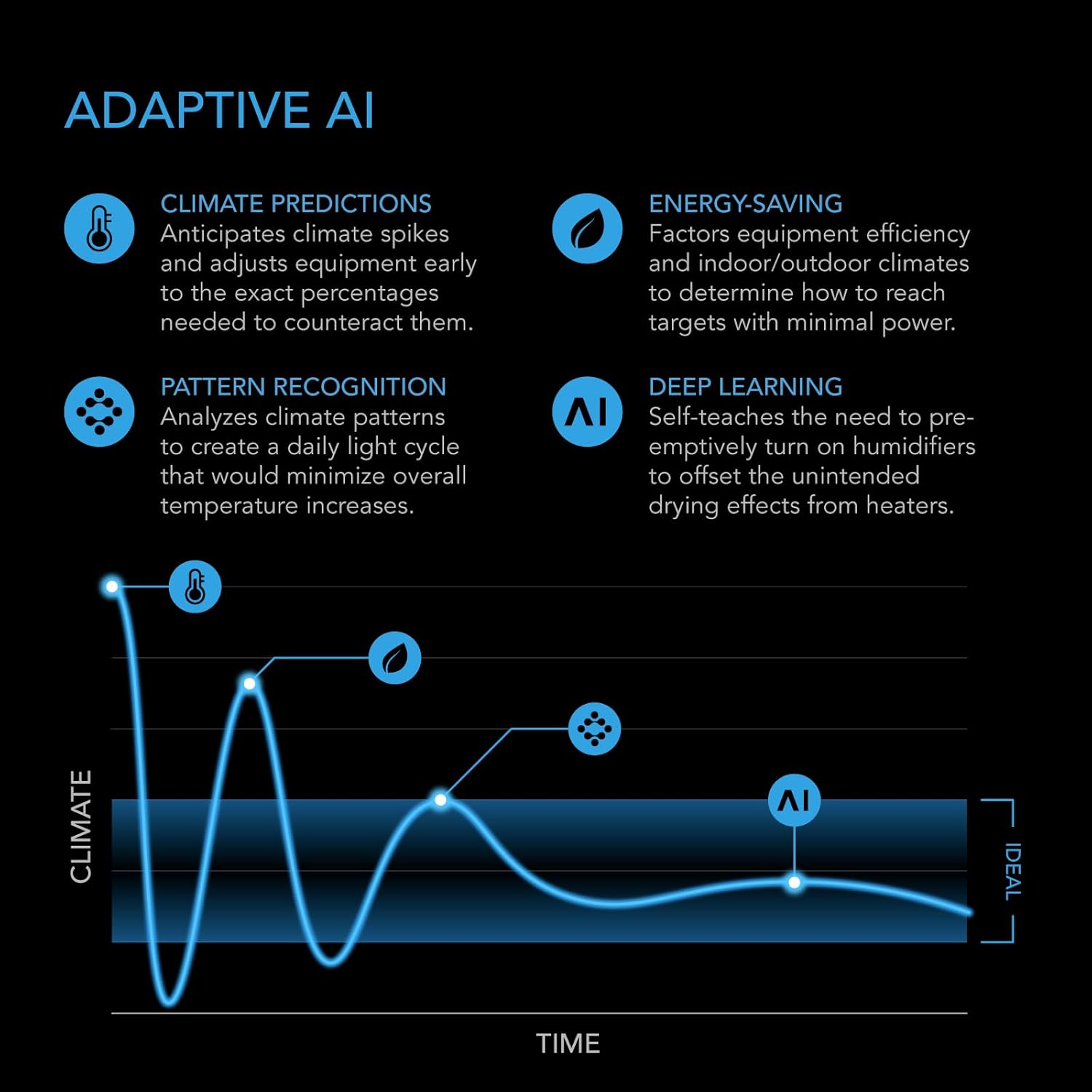
The Controller AI+ utilizes adaptive AI to optimize your environment:
- Climate Predictions: Anticipates climate spikes and adjusts equipment early to counteract them.
- Energy-Saving: Factors equipment efficiency and indoor/outdoor climates to determine how to reach targets with minimal power consumption.
- Pattern Recognition: Analyzes climate patterns to create optimal daily light cycles.
- Deep Learning: Self-teaches to preemptively turn on humidifiers to offset drying effects from heaters.
Water Detection Sensor Operation
The Water Detection Sensor continuously monitors for the presence of water. When water is detected, it sends a signal to the Controller AI+. You can configure the controller to perform various actions upon water detection, such as:
- Sending instant alerts to your mobile device.
- Activating or deactivating connected pumps or valves to manage water levels.
- Shutting down other connected devices to prevent damage from leaks.
The sensor can also be used for automated watering systems, triggering pumps when water levels drop below a set threshold.


Expanding Your System
The Controller AI+ is part of the larger AC Infinity UIS ecosystem, allowing you to connect and control up to 32 smart grow devices. This includes various fans, lights, humidifiers, heaters, and other sensors (sold separately) like CO2, hydro, and soil sensors, providing a comprehensive and integrated grow solution.


Maintenance
Cleaning the Controller
To ensure optimal performance, periodically wipe the Controller AI+ display and casing with a soft, dry cloth. Avoid using abrasive cleaners or solvents, as these can damage the surface. Ensure no liquids enter the device.
Cleaning the Water Sensor
The Water Detection Sensor is IP68 rated and can be rinsed with clean water if it becomes dirty. Ensure the detection surface is free of debris or mineral buildup, which could affect its accuracy. Allow it to air dry completely before re-deployment.
Software Updates
Regularly check the AC Infinity app for available firmware updates for your Controller AI+. Updates often include performance improvements, new features, and bug fixes. Follow the in-app instructions to perform updates.
Troubleshooting
Common Issues and Solutions
- Controller not powering on: Ensure the power adapter is securely connected to both the controller and a working power outlet. Try a different outlet.
- Inaccurate readings: Verify that the controller's sensors are not obstructed and are placed in an area representative of the overall environment. Clean sensors if necessary.
- Devices not responding: Check that devices are properly plugged into the controller and that their settings are correctly configured in the app or on the controller.
Connectivity Problems
- Cannot connect to Wi-Fi: Ensure your Wi-Fi network is 2.4GHz (5GHz is not supported). Check your Wi-Fi password. Move the controller closer to your router or consider a Wi-Fi extender.
- App not syncing: Ensure your mobile device has a stable internet connection. Close and reopen the app. Restart the Controller AI+.
Sensor Malfunctions
- Water sensor not detecting: Ensure the sensor's detection surface is clean and in direct contact with the area to be monitored. Verify the sensor is securely plugged into the Controller AI+.
- False water detection: Check for condensation or residual moisture on the sensor. Ensure it is placed on a dry surface when not intended to detect water.
For persistent issues, refer to the AC Infinity support resources available through their website or contact customer service directly.
Specifications
| Feature | Detail |
|---|---|
| ASIN | B0FFLFKNR6 |
| Connectivity | Wi-Fi (2.4GHz) |
| Max Devices Controlled | Up to 32 UIS devices |
| Water Sensor Rating | IP68 Waterproof |
Warranty and Support
Information regarding the specific warranty period and detailed support procedures for the AC Infinity Controller AI+ and Water Detection Sensor was not available in the provided product data. Please refer to the official AC Infinity website or the product packaging for the most current warranty information and customer support contacts.
For technical assistance, troubleshooting, or warranty claims, please visit the AC Infinity support page or contact their customer service team directly.


