
Introduction
Thank you for choosing the BoxWave ClearTouch Anti-Glare ToughShield 9H Screen Protector for your LXNAV LX8030. This manual provides essential information for the proper installation, use, and maintenance of your new screen protector, ensuring optimal performance and longevity.
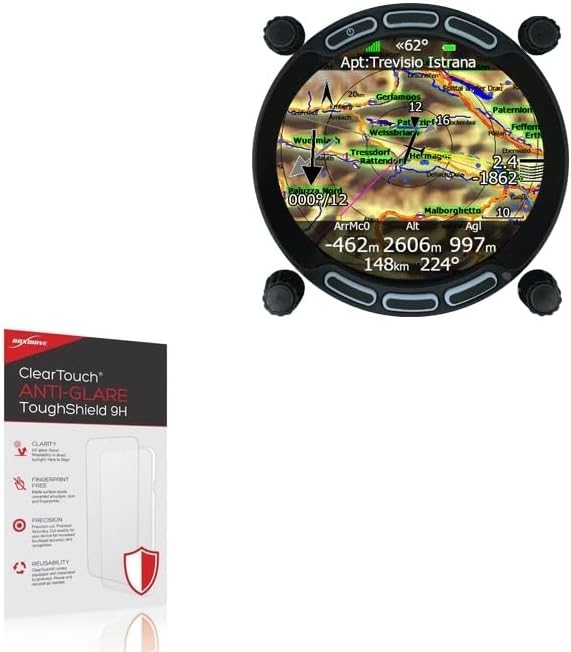
Image: The BoxWave ClearTouch Anti-Glare ToughShield 9H Screen Protector packaging alongside the LXNAV LX8030 device, illustrating the product and its intended use.
Product Features
- 9H Hardness Rating: Engineered with a 9H hardness rating, providing robust protection against scratches and impacts, similar to glass but without the risk of chipping or cracking.
- Anti-Glare Surface: Features an anti-glare matte finish that disperses light, significantly reducing reflections and eye strain, enhancing screen visibility in various lighting conditions. Reduces 90% of UV rays caused by reflected light.
- Smooth, Paper-like Feel: The ultra-smooth matte surface offers a tactile experience similar to writing on paper, ideal for stylus use and comfortable touch interactions.
- Fingerprint-Free: Designed to repel unwanted smudges, dust, and fingerprints, keeping your screen clean and clear.
- Precision Cut: Each protector is precision-cut to perfectly match the exact dimensions, contours, and cut-outs of your LXNAV LX8030 device, ensuring full functionality.
- Reusable: Equipped with installation forgiveness, allowing for reusability and reinstallation if needed.
- Two-Pack: Each package includes two (2) ClearTouch Anti-Glare ToughShield 9H screen protectors and necessary installation accessories.

Image: The product packaging detailing key features such as clarity, fingerprint-free surface, precision, and reusability.

Image: A visual representation of the screen protector's scratch-resistant properties, showing it withstands contact with sharp objects like a knife and key.

Image: This image illustrates the "Strong and Impact Resistant" nature of the screen protector, contrasting its flexible, non-shattering material with a depiction of shattered glass.
What's Included
Your BoxWave ClearTouch Anti-Glare ToughShield 9H Screen Protector package includes the following items:
- Two (2) ClearTouch Anti-Glare ToughShield 9H Screen Protectors
- Installation Accessories (e.g., cleaning cloth, dust removal stickers, squeegee card)

Image: The contents of the two-pack, showing two screen protectors, a cleaning cloth, and an applicator card.
Installation Guide
Follow these steps carefully for a bubble-free installation of your screen protector.
- Prepare Your Workspace: Choose a clean, dust-free environment. Wash your hands thoroughly to avoid transferring oils or dirt to the screen.
- Clean the Device Screen: Use the provided cleaning cloth to meticulously clean the screen of your LXNAV LX8030. Ensure all dust, smudges, and fingerprints are removed. For stubborn marks, a screen cleaner designed for electronics can be used sparingly.
- Remove Dust: Use the dust removal sticker (if provided) to lift any remaining dust particles from the screen. Lightly dab the sticker across the screen surface.
- Align the Protector: Carefully peel back a small portion of the protective film from the adhesive side of the screen protector (usually marked "Step 1" or similar). Align the exposed adhesive edge with one side of your device screen, ensuring precise alignment with all cut-outs (e.g., sensors, camera).
- Apply and Smooth: Slowly peel off the rest of the protective film while simultaneously applying the screen protector to the device screen. Use the provided squeegee card or a soft, lint-free cloth to gently push out any air bubbles towards the edges as you apply.
- Final Touches: Once the protector is fully applied, gently press down on the edges to ensure a secure seal. If small bubbles remain, try to push them towards the nearest edge with the squeegee. Minor bubbles may dissipate over 24-48 hours.
Note: The ClearTouch Anti-Glare ToughShield is designed with installation forgiveness, allowing for careful repositioning if the initial alignment is not perfect. Lift gently from an edge and re-align.
Operating and Usage
Once installed, the BoxWave ClearTouch Anti-Glare ToughShield 9H Screen Protector operates seamlessly with your LXNAV LX8030, enhancing its usability and protection.
- Touch Sensitivity: The protector maintains full touch screen sensitivity, ensuring accurate and responsive interactions with your device.
- Stylus Compatibility: The paper-like surface is optimized for stylus use, providing a natural writing and drawing experience.
- Glare Reduction: Enjoy improved visibility in bright conditions due to the anti-glare properties.

Image: A close-up of a device screen with the screen protector applied, showing a stylus being used, illustrating the paper-like feel for writing and drawing.

Image: This image visually compares a clean, anti-smudge surface (left) with a heavily smudged screen (right), highlighting the fingerprint-resistant quality of the BoxWave screen protector.
Maintenance and Care
To ensure the longevity and clarity of your screen protector, follow these simple maintenance guidelines:
- Cleaning: Use a soft, lint-free cloth (like the one provided) to gently wipe the screen protector. For tougher smudges, slightly dampen the cloth with water or a screen cleaner specifically designed for electronics. Avoid harsh chemicals or abrasive materials.
- Avoid Sharp Objects: While the protector is highly durable, excessive force or direct contact with extremely sharp objects can still cause damage.
- Storage: If you remove the protector for any reason, store it flat and clean to prevent dust accumulation and maintain its adhesive properties.
Troubleshooting
Here are solutions to common issues you might encounter during or after installation:
| Problem | Solution |
|---|---|
| Bubbles Under the Protector | Small bubbles can often be pushed out to the nearest edge using the squeegee card. For larger bubbles, gently lift the nearest edge of the protector and re-apply, pushing the air out as you go. Minor bubbles may disappear on their own within 24-48 hours. |
| Dust Particles Trapped | If dust is trapped, carefully lift the nearest edge of the protector. Use a dust removal sticker or a piece of tape to gently dab and lift the dust particle from both the screen and the adhesive side of the protector. Re-apply the protector. |
| Protector Not Sticking | Ensure the screen was thoroughly cleaned and free of oils or residues before application. If the adhesive is compromised, you may need to use the second protector provided in the pack. |
| Reduced Touch Sensitivity | This is rare with ClearTouch protectors. Ensure the protector is fully adhered without air gaps. If the issue persists, verify it's not a device setting or a device-specific issue. |
Specifications
| Attribute | Detail |
|---|---|
| Brand | BoxWave |
| Model Compatibility | LXNAV LX8030 |
| Hardness Rating | 9H |
| Type | Anti-Glare, Flexible Film Screen Protector |
| Pack Quantity | 2-Pack |
| Item Weight | 1.6 ounces |
| ASIN | B0FFJQGXKD |
| Date First Available | March 5, 2024 |
Warranty and Support
BoxWave products are designed for quality and performance. For any questions, concerns, or support needs regarding your ClearTouch Anti-Glare ToughShield 9H Screen Protector, please contact BoxWave customer service. Refer to the product packaging or the official BoxWave website for the most current contact information and warranty details.
Online Support: Visit www.boxwave.com for FAQs, product information, and support resources.