
1. Introduction
Thank you for choosing the T-SUN Rechargeable Portable LED Work Light. This versatile flood light is designed for various applications, offering multiple lighting modes, a power bank function, and flexible mounting options. Please read this manual carefully before use to ensure proper operation and to maximize the product's lifespan.
2. Safety Information
- Do not disassemble or modify the product. Unauthorized modifications may cause damage or injury.
- Keep the device away from extreme temperatures, direct sunlight, and open flames.
- Avoid direct eye exposure to the LED light.
- Ensure the charging port is dry before connecting the USB cable.
- Dispose of batteries according to local regulations.
3. Package Contents
Verify that all items are present in your package:
- 2 x T-SUN Rechargeable Portable LED Work Lights
- 2 x USB Charging Cables
- 1 x Instruction Manual
Note: Mounting hardware and AA batteries are mentioned in specifications but the product description states built-in 4000mAh battery. The included components list does not mention AA batteries. The product is rechargeable with a built-in battery.
4. Product Overview
Familiarize yourself with the components of your T-SUN Work Light:
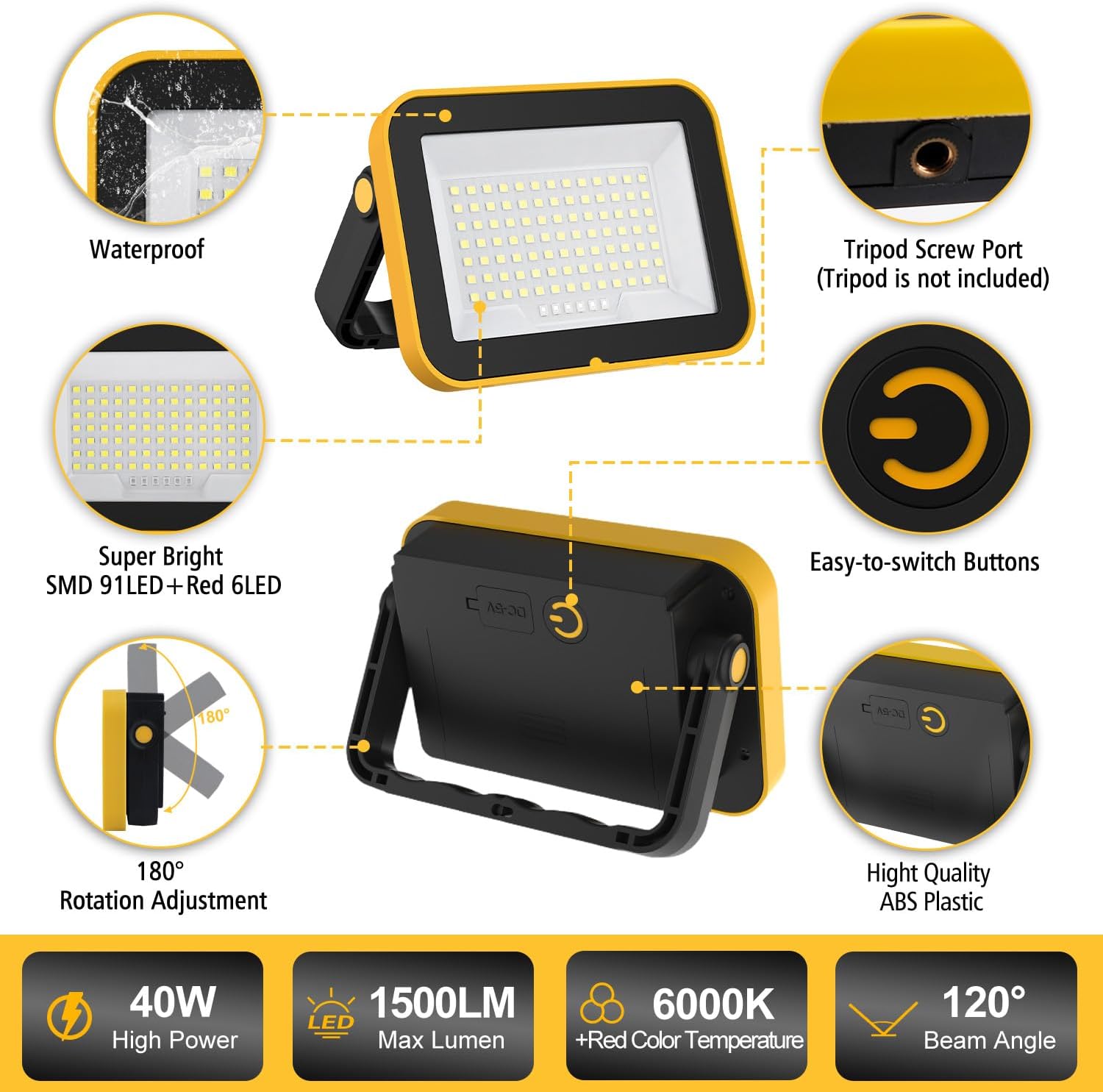
Image 4.1: Key Features and Components of the T-SUN Work Light. This diagram highlights the waterproof construction, the LED array, the adjustable stand, and the control button.

Image 4.2: Detailed view of the T-SUN Portable Floodlight's ports and mounting features. It shows the USB input/output ports, the 180-degree rotating stand, the integrated hanging hook, and the tripod screw port.
- LED Panel: Provides illumination with 91 SMD LEDs and 6 Red LEDs.
- Power Button: Controls power and cycles through lighting modes.
- USB Charging Port (Input): For recharging the work light.
- USB Output Port: For charging external devices.
- Adjustable Stand: Allows for 180-degree rotation and stable positioning.
- Hanging Hook: Integrated for suspending the light.
- Tripod Hole: For mounting on a standard tripod (tripod not included).
5. Setup
5.1 Initial Charging
Before first use, it is recommended to fully charge the work light. Connect the provided USB charging cable to the light's input port and a suitable USB power source (e.g., wall adapter, computer USB port, power bank). The charging indicator will show its status.
5.2 Battery Insulation Removal
Important: Before initial use, open the battery compartment and remove any insulating tape from the battery's negative electrode. Failure to do so will prevent the light from functioning.
6. Operating Instructions
6.1 Power On/Off
- To turn the light ON, press the power button once.
- To turn the light OFF, long-press the power button for 2 seconds from any mode, or cycle through all modes until it turns off.
6.2 Lighting Modes
The T-SUN Work Light features 5 distinct lighting modes. Press the power button repeatedly to cycle through them:
- High Brightness: Maximum illumination for demanding tasks.
- Medium Brightness: Balanced light output for general use.
- Low Brightness: Extended runtime for less intense lighting needs.
- Red Light: For preserving night vision or as a subtle indicator.
- SOS Red Flashing: Emergency signaling mode.

Image 6.1: Visual representation of the 5 available lighting modes.
7. Charging Instructions & Power Bank Function
7.1 Recharging the Work Light
To recharge the internal 4000mAh battery:
- Connect the provided USB cable to the light's input port.
- Connect the other end of the USB cable to a power source such as a wall adapter, car charger, power bank, or laptop.
- The charging indicator light will blink red while charging and turn solid red when fully charged.

Image 7.1: Charging the T-SUN Work Light from various power sources. The image illustrates the input connection and the charging indicator.
7.2 Using as a Power Bank
The work light can also serve as a portable power bank to charge your electronic devices:
- Connect your device's charging cable to the light's USB output port.
- The work light will begin charging your device.
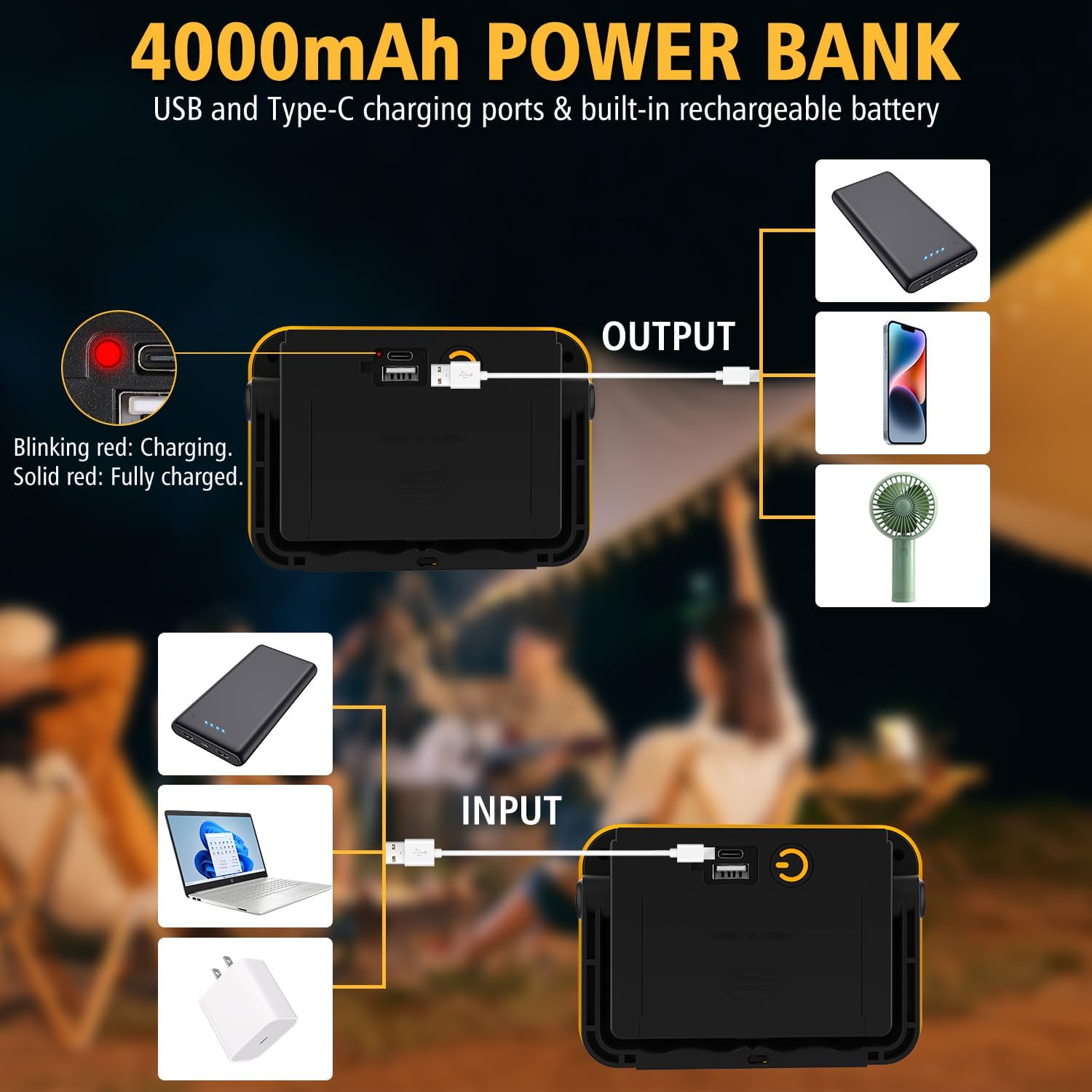
Image 7.2: Using the T-SUN Work Light as a power bank to charge external devices.
8. Mounting Options
The T-SUN Work Light offers multiple ways to position it for optimal lighting:
- Adjustable Stand: The integrated stand can be rotated 180 degrees to direct the light beam precisely where needed.
- Hanging Use: Utilize the built-in hook to suspend the light from various fixtures or ropes.
- Tripod Use: A standard tripod can be attached to the tripod screw port for elevated and stable lighting (tripod not included).

Image 8.1: Versatile usage methods including handheld, hanging, and tripod mounting.

Image 8.2: Examples of tripod and hanging applications for the work light.

Image 8.3: Overview of the light's versatile design for different scenarios and compact storage.
9. Maintenance
- Cleaning: Wipe the light with a soft, damp cloth. Do not use abrasive cleaners or solvents.
- Storage: Store the work light in a cool, dry place when not in use. If storing for extended periods, charge the battery every 3-6 months to maintain battery health.
- Water Resistance: The light is IP65 waterproof, meaning it is protected against splashing water. Do not submerge the light in water.
10. Troubleshooting
- Light not turning on:
- Ensure the battery is charged.
- Verify that the insulating tape has been removed from the battery's negative electrode (refer to Section 5.2).
- Device not charging from work light (power bank function):
- Ensure the work light has sufficient battery charge.
- Check the connection cable between the work light and your device.
- Short battery life:
- Ensure the battery is fully charged before use.
- Operating in high brightness mode will consume battery faster.
11. Specifications
| Feature | Detail |
|---|---|
| Brand | T-SUN |
| Model Name | Battery Work Light |
| Item Model Number | TS-F0210-60 |
| Power Source | Battery Powered (Built-in 4000mAh) |
| Wattage | 40 watts |
| Brightness | 1500 Lumens (Max) |
| Color Temperature | 6000 Kelvin (Cool White), Red |
| Light Source Type | LED (91 SMD LED + 6 Red LED) |
| Number of Light Sources | 97 |
| Beam Angle | 120 degrees |
| Working Time | 4-12 hours (depending on mode) |
| Water Resistance Level | IP65 Waterproof |
| Material | Acrylonitrile Butadiene Styrene, Plastic, Polycarbonate |
| Product Dimensions | 5.2"L x 1.6"W x 3.6"H |
| Item Weight | 1.32 pounds |
12. Warranty and Support
T-SUN is committed to providing high-quality products and customer satisfaction. Your purchase is backed by our dedicated support.
- Warranty: This product comes with an extended warranty. Please refer to the product packaging or retailer's policy for specific details.
- Customer Support: For any questions, concerns, or assistance, please contact our 24/7 US-based customer support. Contact information can typically be found on the product packaging or the retailer's website.