
1. Introduction
The Siindoo JH-ANC930Plus Hybrid ANC Wireless Headphones are designed to provide a superior audio experience with advanced features. These headphones combine hybrid active noise cancellation, a multi-functional magnetic touch control LED screen, and built-in 1GB MP3 storage for versatile use. They offer both wireless Bluetooth 5.3 and wired 3.5mm AUX connectivity, ensuring compatibility with a wide range of devices.

Image 1.1: Siindoo JH-ANC930Plus Hybrid ANC Wireless Headphones, showcasing the overall design and the integrated LED touch screen.
2. What's in the Box
Upon opening the package, ensure all the following components are present:
- Siindoo JH-ANC930PLUS Headphone with LCD screen
- 0.5m Type-C charging cable
- 1.2m AUX cable
- Protective Case
- User Manual

Image 2.1: All items included in the Siindoo JH-ANC930Plus retail package, including the headphones, cables, protective case, and user manual.
3. Product Overview
Familiarize yourself with the various parts and controls of your Siindoo JH-ANC930Plus headphones.

Image 3.1: Detailed view of the headphone's physical controls and ports, including the Power/Play/Pause button, Volume Up/Next Song, Volume Down/Previous Song, Type-C Charging Port, Charging Indicator, Calling Microphone, 3.5mm AUX Jack Port, ANC Button, Communication Pin, and Power Button.
3.1. Controls and Ports
- Power ON/OFF / Music Play/Pause Button: Located on the right earcup, this button controls power and music playback.
- Volume Up / Next Song Button: Adjusts volume up and skips to the next track.
- Volume Down / Previous Song Button: Adjusts volume down and goes to the previous track.
- ANC Button: Toggles Active Noise Cancellation and Transparency modes.
- Type-C Charging Port: Used for charging the headphones.
- 3.5mm AUX Jack Port: For wired audio connection.
- Charging Indicator: Shows charging status.
- Calling Microphone: For voice calls and voice assistant.
- Multifunctional Magnetic Touch Control LED Screen: Provides access to various settings and functions via touch.
4. Setup
4.1. Charging the Headphones
Before first use, fully charge your headphones. Connect the supplied Type-C charging cable to the charging port on the headphones and the other end to a USB power source (e.g., computer USB port, wall adapter). The charging indicator will show the charging status. A full charge provides approximately 40 hours of playtime with ANC enabled. A quick 10-minute charge can provide up to 2 hours of playtime.

Image 4.1: The headphones connected for charging, highlighting the 40 hours of playtime with ANC on and the quick charge feature.
4.2. Power On/Off
- To Power On: Press and hold the Power ON/OFF button until the indicator light illuminates.
- To Power Off: Press and hold the Power ON/OFF button until the indicator light turns off.
4.3. Bluetooth Pairing
The headphones use Bluetooth 5.3 for a stable wireless connection.
- Ensure the headphones are powered on and in pairing mode (usually indicated by a flashing light).
- On your device (smartphone, tablet, laptop), enable Bluetooth.
- Search for "ANC930" or "Siindoo JH-ANC930Plus" in the list of available devices.
- Select the headphones to connect. Once connected, the indicator light will stop flashing.
Note: Bluetooth connection is required for Active Noise Cancellation (ANC) functionality. ANC is not available when using the 3.5mm audio cable.
4.4. Wired Connection (AUX Mode)
To use the headphones in wired mode, connect one end of the 1.2m AUX cable to the 3.5mm AUX Jack Port on the headphones and the other end to your audio device's 3.5mm audio output. The headphones will automatically switch to wired mode.
4.5. APP Download and Connection
Enhance your experience by downloading the official JoyAudio APP. The APP allows for additional control and customization of your headphones.
- Scan the QR code displayed on the headphone screen or visit the official download link: https://download.joygem.net/joyaudio to download the JoyAudio APP.
- Install the APP on your mobile phone.
- Open the APP and follow the on-screen instructions to connect to your headphones. The APP may prompt you to scan a QR code on the headphone screen or select the device from a list (e.g., "ANC930" with Bluetooth address 46:98:0a:47:f7:fe).

Image 4.2: Visual guide for downloading the JoyAudio APP via QR code and connecting it to the headphones for enhanced control.
4.6. Using the Built-in 1GB MP3 Memory
The headphones feature 1GB of internal storage, allowing you to store and play music directly without a connected device. Refer to the on-screen interface or the JoyAudio APP for instructions on how to transfer music files to the headphone's internal memory.
5. Operation
5.1. Multifunctional Magnetic Touch Control LED Screen
The integrated LED touch screen provides intuitive control over various headphone functions. Navigate the screen by swiping and tapping.

Image 5.1: A comprehensive display of the LED touch screen's interface, illustrating icons for music playback, volume, ANC modes, EQ adjustment, alarm, brightness, language, lock screen, wallpaper, light, weather, date/time, photo taking, liking, virtual fish game, and QR codes for APP and connection.
Key Screen Functions:
- Music Playback: Control play, pause, next/previous track.
- Volume Adjustment: Precisely adjust audio volume.
- ANC Mode: Switch between Hybrid Active Noise Cancellation and Transparency modes.
- EQ Adjustment: Customize sound equalization settings.
- Alarm: Set alarms directly from the headphones.
- Brightness of Screen: Adjust screen brightness (10 levels available).
- Language Switch: Select from 18 supported languages.
- Lock Screen / Wallpaper: Customize lock screen and choose from 3 wallpapers.
- Light: Control any integrated lighting features.
- Weather Details: View current weather information (requires APP connection).
- Date & Time Setting: Set the current date and time.
- Take Photos: Remote control for taking photos on a connected device.
- Give a Like: Functionality for social interaction or content liking.
- Virtual Fish Game: An integrated mini-game.
- Connection QR Code / Jjay Audio QR Code: For quick APP download and device pairing.
5.2. Active Noise Cancellation (ANC) and Transparency Mode
The Siindoo JH-ANC930Plus headphones feature professional hybrid active noise cancellation, reducing up to 33dB of ambient noise. The Transparency Mode allows you to hear your surroundings while still enjoying your audio.
- Switching Modes: Use the dedicated ANC button on the earcup or the touch screen interface to toggle between ANC On, Transparency Mode, and ANC Off.

Image 5.2: Demonstrates the effectiveness of hybrid active noise cancellation in various environments, such as blocking airplane engine noise, providing hearing protection, and aiding focus.
5.3. Audio Quality and Calls
Equipped with 40mm drivers, these headphones deliver a full range of frequencies, providing deep, powerful, and immersive sound. The built-in high-definition microphone ensures clear voice capture for calls, video conferences, and voice assistants. Beamforming microphones focus on your voice and suppress background noise for clear communication.
5.4. Comfort and Design
The headphones are designed for extended wear with ultra-soft noise isolation padding and slow-rebound memory foam earcups. The adjustable lightweight headband accommodates various head shapes. The earcups feature 90° inward rotation and 120° inward folding for maximum comfort and portability.
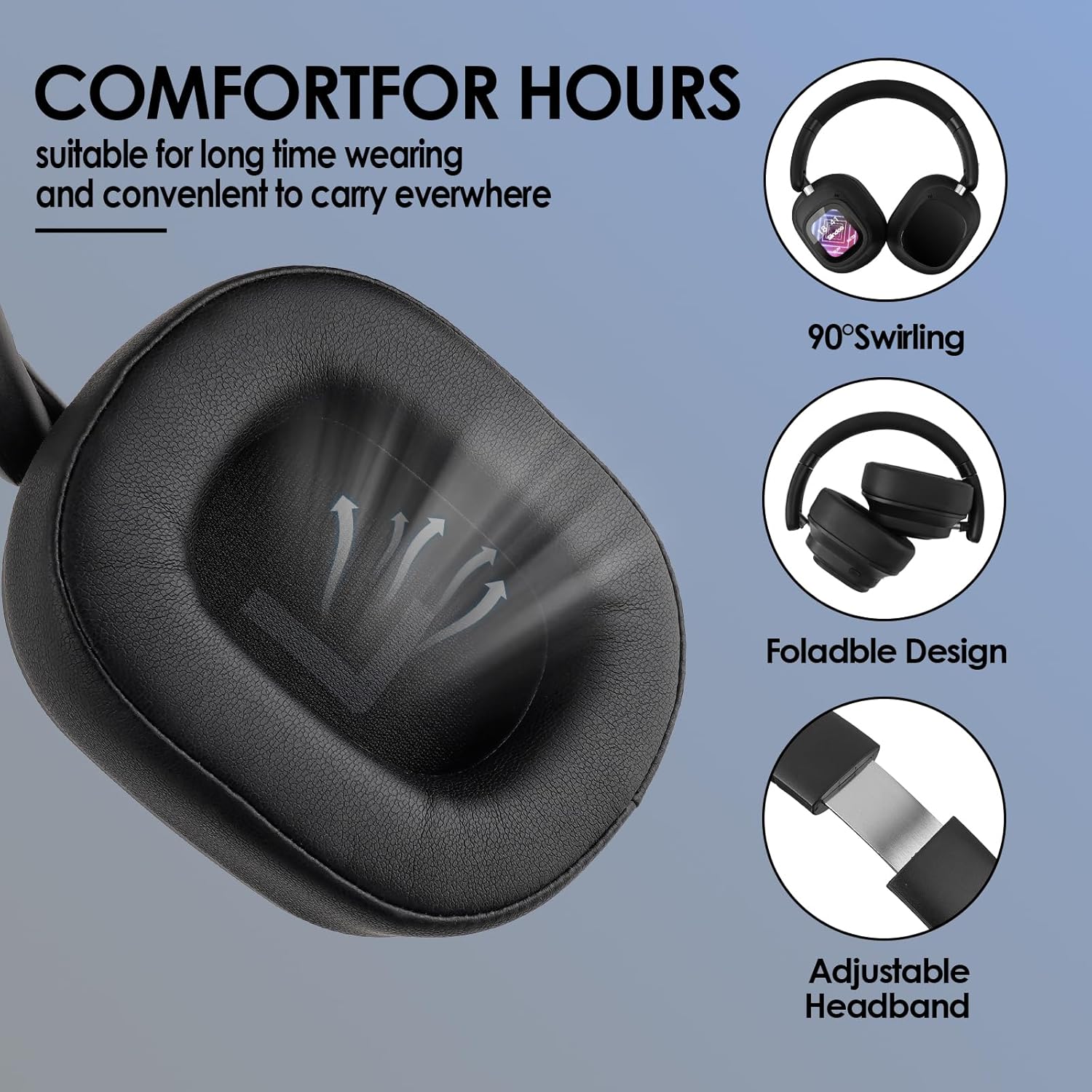
Image 5.3: Illustrates the comfort-enhancing features of the headphones, including 90° swirling earcups, foldable design for portability, and an adjustable headband for a customized fit.
5.5. Sound Modes
The Siindoo JH-ANC930Plus offers five distinct sound modes to optimize your listening experience for different genres and preferences:
- Normal Mode
- Rock Mode
- Pop Mode
- Classical Mode
- Jazz Mode
These modes can be selected via the touch screen interface or the JoyAudio APP.
6. Maintenance
To ensure the longevity and optimal performance of your Siindoo JH-ANC930Plus headphones, follow these maintenance guidelines:
- Cleaning: Use a soft, dry cloth to clean the headphones. Do not use abrasive cleaners, alcohol, or chemical solvents. For the earcups, gently wipe with a slightly damp cloth if necessary, and allow to air dry completely before use.
- Storage: When not in use, store the headphones in the provided protective case to prevent dust accumulation and physical damage. Store in a cool, dry place away from direct sunlight and extreme temperatures.
- Avoid Moisture: Do not expose the headphones to water or excessive moisture. If they get wet, dry them thoroughly before storing or using.
- Handle with Care: Avoid dropping the headphones or subjecting them to strong impacts. Do not twist or bend the cables excessively.
7. Troubleshooting
If you encounter issues with your headphones, refer to the following common problems and solutions:
| Problem | Possible Cause | Solution |
|---|---|---|
| Headphones do not power on. | Low battery. | Charge the headphones fully using the provided Type-C cable. |
| Cannot pair via Bluetooth. | Headphones not in pairing mode; Bluetooth disabled on device; interference. | Ensure headphones are powered on and in pairing mode. Enable Bluetooth on your device. Move closer to the device and away from other wireless devices. Try restarting both devices. |
| No sound in wireless mode. | Not connected; volume too low; incorrect audio output selected. | Ensure headphones are successfully paired. Increase volume on both headphones and connected device. Check your device's audio output settings. |
| ANC function not working. | ANC is off; headphones in wired mode. | Press the ANC button to activate ANC. Ensure headphones are connected via Bluetooth, as ANC does not work in wired mode. |
| Touch screen unresponsive. | Temporary software glitch; screen lock enabled. | Restart the headphones. Check if the screen lock function is enabled on the touch screen. |
| Poor call quality. | Microphone obstructed; weak Bluetooth connection; environmental noise. | Ensure the microphone is clear. Move closer to your connected device. Use ANC to reduce environmental noise. |
8. Specifications
| Feature | Detail |
|---|---|
| Model Name | JH-ANC930PLUS (siindoo-ANC5) |
| Brand | Siindoo |
| Noise Control | Hybrid Noise Cancellation (up to 33dB reduction) |
| Connectivity Technology | Wired (3.5mm Jack), Wireless (Bluetooth 5.3) |
| Frequency Response | 20000 Hz |
| Sensitivity | 108 dB |
| Impedance | 32 Ohm |
| Control Type | Touch Control (Magnetic LED Screen) |
| Built-in Memory | 1GB (for MP3) |
| Battery Life (ANC On) | Approx. 40 hours |
| Charging Time | Approx. 2.49 Hours |
| Material | ABS, Metal, Plastic, Silicone, Stainless Steel |
| Item Weight | 1.37 Pounds (approx. 621 grams) |
| Package Dimensions | 8.66 x 7.8 x 3.15 inches |
| Manufacturer | JIUHU |
| First Available Date | June 25, 2025 |
9. Warranty and Support
Siindoo products are manufactured by JIUHU. For warranty information and technical support, please refer to the warranty card included in your product packaging or visit the official Siindoo website. Please retain your proof of purchase for warranty claims.
For further assistance, you may also contact the seller directly through the platform where the product was purchased.
