
1. Introduction
Thank you for choosing the FANMIS Classic Digital Sports Watch Model 1888. This timepiece combines a retro-inspired design with modern digital functionality, offering features such as dual time zones, an alarm, a stopwatch, and a countdown timer. This manual provides detailed instructions to help you understand and operate your watch effectively.
2. Product Overview
The FANMIS Classic Digital Sports Watch is designed for durability and functionality. It features a robust zinc alloy case, a comfortable stainless steel band, and a clear digital display with an EL backlight for visibility in low-light conditions.
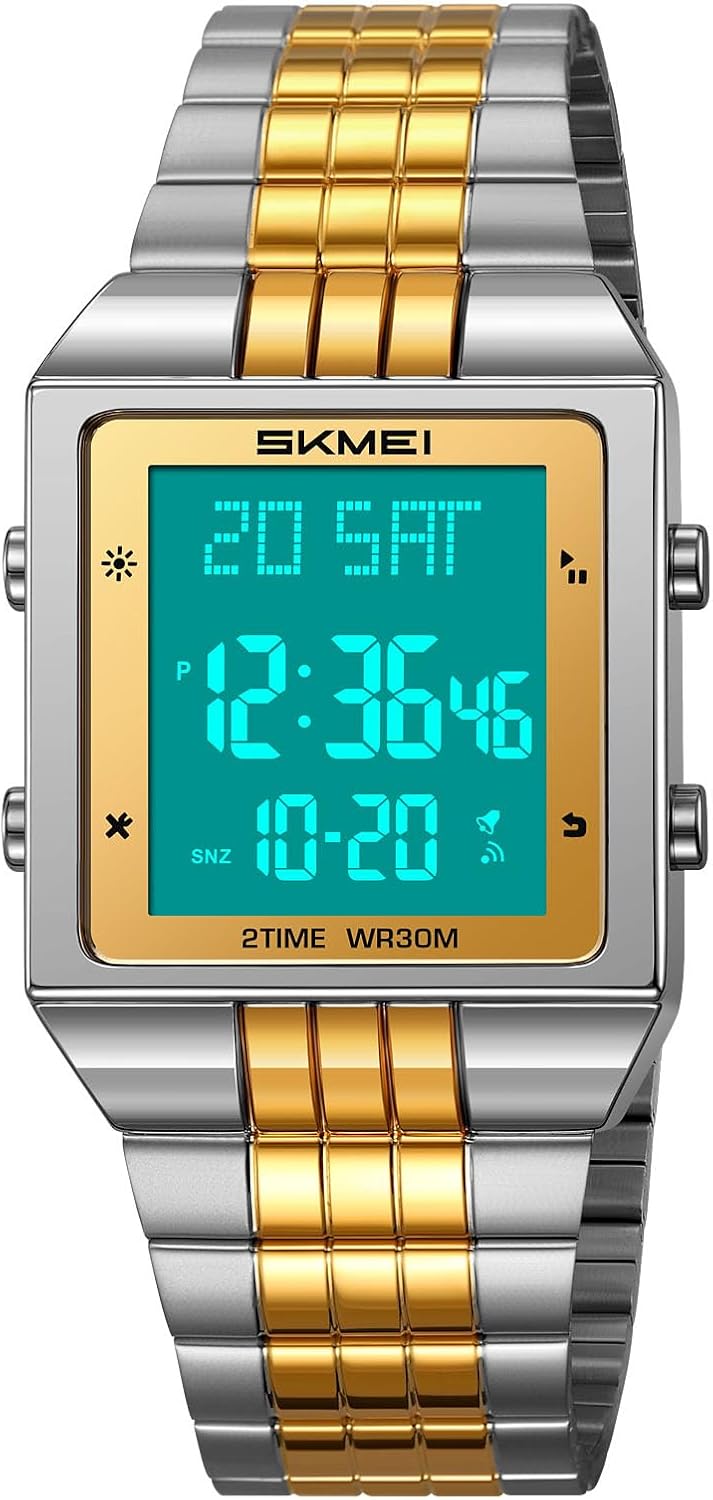
Front view of the FANMIS Classic Digital Sports Watch, showcasing its square digital display, gold-tone bezel, and two-tone stainless steel band. The display shows time, date, and day of the week.
Key Features:
- Retro-Inspired Digital Design: Classic square styling with a digital display.
- Multi-functional: Includes dual time zones, date and week display, stopwatch, countdown timer, and alarm.
- Durable Construction: Crafted with a zinc alloy case and a stainless steel band and buckle.
- 30M Water Resistance: Suitable for hand washing, rain, and light splashes. Not for swimming or diving.
- EL Backlight: Ensures easy time reading in low-light conditions.
Button Functions:
The watch features four buttons, typically located on the sides of the watch case. For the purpose of this manual, they are referred to as A, B, C, and D:
- Button A (Top Left): Activates the EL Backlight.
- Button B (Bottom Left): Cycles through different modes (Time, Alarm, Stopwatch, Countdown, Dual Time).
- Button C (Top Right): Used for Start/Stop in Stopwatch mode, displaying the date in Time mode, and adjusting values in setting modes.
- Button D (Bottom Right): Used for Reset in Stopwatch mode, setting/adjusting values in setting modes, and turning the alarm on/off.
3. Setup and Initial Configuration
Setting Time and Date:
- In normal Time mode, press Button B three times to enter the Time Setting mode. The seconds will begin to flash.
- Press Button C to reset the seconds to zero.
- Press Button D to move the flashing selection to the hour digits.
- Press Button C to adjust the hour. Pay attention to the AM/PM indicator if using 12-hour format.
- Press Button D to move the flashing selection to the minute digits.
- Press Button C to adjust the minutes.
- Continue pressing Button D to cycle through year, month, and day settings, adjusting each with Button C.
- Once all settings are correct, press Button B to exit the Time Setting mode and return to normal Time mode.
12/24 Hour Format:
While in Time Setting mode (seconds flashing), press Button C when the hour digits are flashing to toggle between 12-hour (with AM/PM indicator) and 24-hour formats.
4. Operating Instructions
Using the EL Backlight:
Press Button A (Top Left) at any time to illuminate the display for a few seconds, providing visibility in dark environments.
Alarm Function:
- From normal Time mode, press Button B once to enter Alarm mode.
- Press Button C to toggle the alarm ON or OFF. An alarm icon will appear when the alarm is active.
- To set the alarm time, press Button D. The hour digits will flash.
- Press Button C to adjust the hour.
- Press Button D to move to the minute digits.
- Press Button C to adjust the minutes.
- Press Button D again to exit alarm time setting.
- Press Button B to return to normal Time mode.
Stopwatch Function:
- From normal Time mode, press Button B twice to enter Stopwatch mode. The display will show '00:00:00'.
- Press Button C to start the stopwatch.
- Press Button C again to pause the stopwatch.
- Press Button D to reset the stopwatch to '00:00:00' while it is paused.
- To continue timing after a pause, press Button C.
- Press Button B to return to normal Time mode.
Countdown Timer Function:
- From normal Time mode, press Button B three times to enter Countdown Timer mode.
- To set the countdown time, press Button D. The hour digits will flash.
- Press Button C to adjust the hour.
- Press Button D to move to the minute digits.
- Press Button C to adjust the minutes.
- Press Button D again to exit countdown time setting.
- Press Button C to start the countdown.
- Press Button C again to pause the countdown.
- Press Button D to reset the countdown to the set time while it is paused.
- Press Button B to return to normal Time mode.
Dual Time Function:
- From normal Time mode, press Button B four times to enter Dual Time mode.
- To set the second time zone, press Button D. The hour digits will flash.
- Press Button C to adjust the hour.
- Press Button D to move to the minute digits.
- Press Button C to adjust the minutes.
- Press Button D again to exit dual time setting.
- Press Button B to return to normal Time mode.
5. Maintenance
Water Resistance:
The watch is rated for 30 meters (3ATM) water resistance, meaning it can withstand splashes, rain, and brief immersion like hand washing. It is not suitable for swimming, showering, or diving. Important: Do not press any buttons underwater. Pressing buttons underwater can compromise the watch's water resistance and lead to internal damage.
Temperature Exposure:
Avoid exposing the watch to extreme hot or cold temperatures, as this can affect its performance and battery life.
Cleaning:
To clean your watch, wipe it gently with a soft, dry cloth. For the stainless steel band, a slightly damp cloth can be used, followed by immediate drying. Avoid using harsh chemicals or abrasive materials.
Battery Replacement:
When the display dims or functions become erratic, it may be time to replace the battery. It is recommended to have the battery replaced by a qualified watch technician to ensure proper sealing and maintain water resistance.
6. Troubleshooting
Display is blank or dim:
- The battery may be low. Consider replacing the battery.
- Ensure the watch is not exposed to extreme temperatures.
Buttons are unresponsive:
- Check if the watch is in a specific mode that restricts button functionality.
- If the watch has been exposed to water, ensure it is completely dry.
Mist or droplets inside the watch:
If mist or droplets are found inside the watch surface, contact the manufacturer or a qualified service center immediately for maintenance. This prevents moisture corrosion of the internal components.
Time is inaccurate:
- Re-set the time following the instructions in the 'Setting Time and Date' section.
- A low battery can sometimes affect timekeeping accuracy.
7. Specifications

The FANMIS Classic Digital Sports Watch displayed on a person's wrist, illustrating its size and fit. The watch features a two-tone gold and silver stainless steel band and a clear digital display.
| Feature | Detail |
|---|---|
| Model Number | 1888 |
| Movement | Original Quartz Digital Movement |
| Case Material | Zinc Alloy |
| Band Material | Stainless Steel |
| Buckle Material | Stainless Steel (Deployment Clasp With Safety) |
| Crystal Material | Glass |
| Case Diameter | 29.8mm x 40.2mm (1.17in x 1.58in) |
| Case Thickness | 9.7mm (0.38in) |
| Band Width | 21.7mm (0.85in) |
| Watch Length | 23cm (9.06in) |
| Weight | Approximately 84.4g |
| Water Resistance | 30M (3ATM) - Splash/Rain Resistant |
| Functions | Time (12/24 hour), Date, Week, EL Light, Alarm, Stopwatch, Countdown Timer, Dual Time |
8. Warranty and Support
For any questions, technical support, or warranty inquiries regarding your FANMIS Classic Digital Sports Watch Model 1888, please refer to the retailer where the product was purchased or contact FANMIS customer service directly. Please retain your proof of purchase for warranty claims.
For more information, you may visit the official FANMIS store: FANMIS Store on Amazon