
Introduction
The Redroad W15 Pro is a versatile 3-in-1 wet dry vacuum cleaner designed for efficient floor cleaning. It combines vacuuming, mopping, and self-cleaning functionalities, featuring a 180° lie-flat design, self-propulsion, and smart controls for a comprehensive cleaning experience. This manual provides essential information for the safe and effective use of your device.
Setup
1. Unpacking and Components
Carefully unpack all components and ensure everything is present. The package typically includes:
- Main unit × 1
- Handle × 1
- Charging dock × 1
- Roller brush × 2
- Replacement filter × 2
- Cleaning brush × 1
- Adapter × 1
- User Manual × 1

Image: Redroad W15 Pro Wet Dry Vacuum Cleaner with included accessories.
2. Assembly
Insert the handle into the main body until it clicks securely into place. Ensure all connections are firm before use.
3. Charging
Place the main unit onto the charging dock. Plug the power cord into a wall outlet. The LED display will indicate the charging status. Ensure the device is fully charged before its first use (approximately 60 minutes runtime on a full charge).
4. Filling the Clean Water Tank
Press the release button on the clean water tank and pull it outward to detach. Fill the tank with clean water. For deeper cleaning, add a recommended cleaning solution. Reattach the tank securely to the vacuum cleaner.
Video: Demonstrates the process of detaching and filling the water tank, as well as general washing operation.
5. Voice Prompt Settings
The device features voice prompts for guidance. Refer to the user manual for specific instructions on adjusting volume or toggling voice prompts on/off.
Operating Instructions
1. Power On/Off
To power on, step lightly on the brush cover and tilt the vacuum to an inclined angle (do not exceed 160 degrees). Press the power button on the handle. To power off, stand the vacuum upright.
2. Cleaning Modes
The Redroad W15 Pro offers multiple cleaning modes:
- Mop Mode: Ideal for daily freshening and cleaning hard floors like tile and wood.
- Dry Vac Mode: Quickly sucks up spills and leaves floors dry.
- Steam Mode: Uses high-temperature steam for deep cleaning sticky messes and grime, suitable for kitchens, bathrooms, and pet areas.
Press the mode switch button on the handle to cycle through the available modes.

Image: Illustrates the different cleaning modes (Dry, Wash, Max) suitable for various floor types and messes.
3. Self-Propelled System
The vacuum features a self-propelled design, making it effortless to maneuver across floors during cleaning.

Image: Shows the self-propulsion system in action, highlighting ease of use.
4. 180° Lie-Flat Design
The vacuum can lie flat at 180°, allowing it to easily reach under low furniture and hidden areas for thorough cleaning.

Image: Demonstrates the 180° lie-flat design for cleaning under low furniture.
5. Edge Cleaning Technology
Equipped with edge cleaning technology, the vacuum can clean within 0.2 inches of walls and corners, ensuring no dirt is left behind.
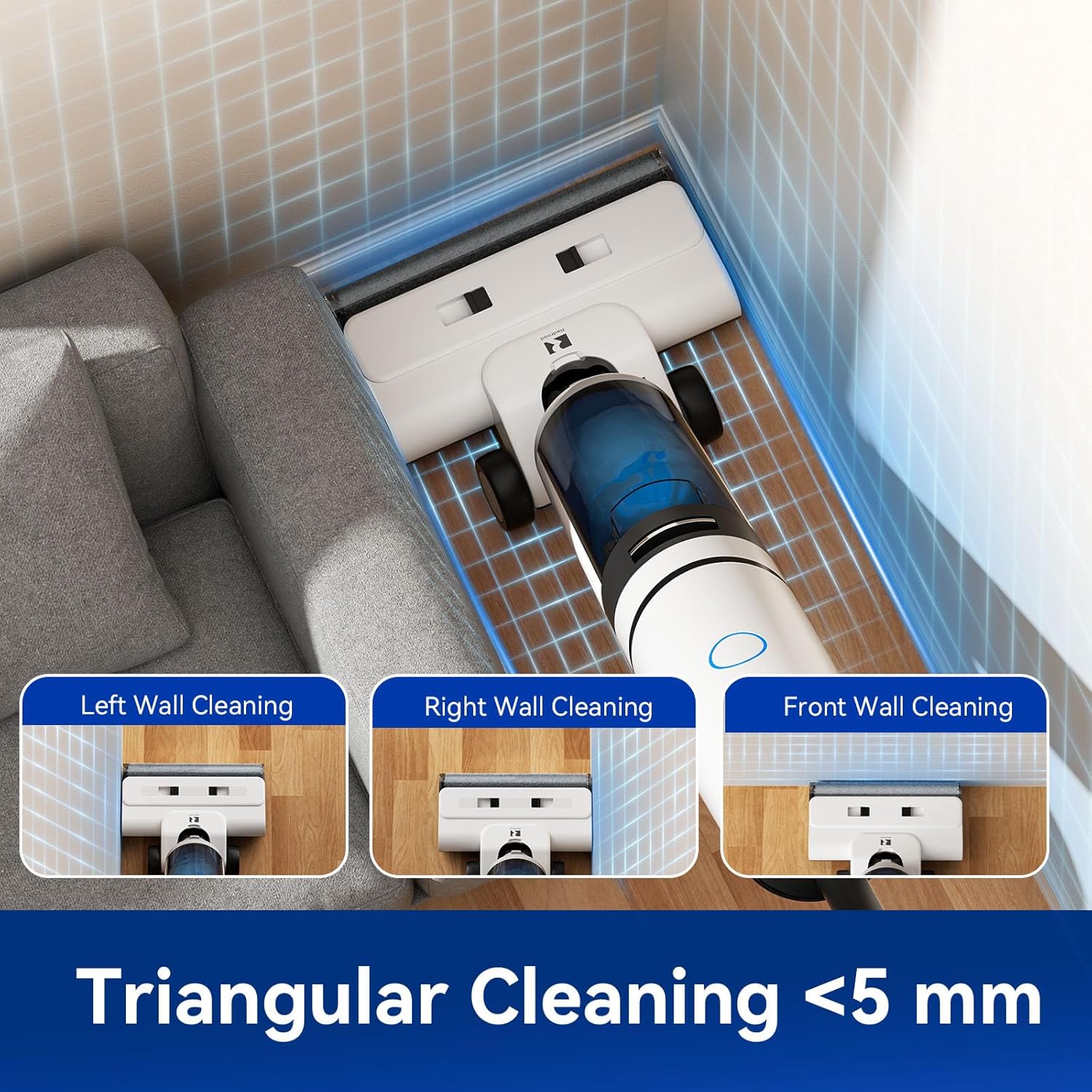
Image: Highlights the triangular cleaning head for effective edge and corner cleaning.
6. LED Digital Display and Voice Prompts
The clear LED display provides real-time information on battery life, current mode, and water levels. Voice prompts guide you through operations and alert you to important statuses (e.g., low battery, dirty water tank full).

Image: Shows the LED digital display with various indicators and voice prompt examples.
Maintenance
1. Self-Cleaning and Hot-Air Drying
After use, place the vacuum on its charging dock. The advanced self-cleaning system automatically rinses the brush roll with 100°C hot water, followed by 85°C warm air drying to prevent odors and bacterial growth. This process is activated at the touch of a button.

Image: Illustrates the one-touch self-cleaning process with fresh water and hot-air drying.
2. Emptying and Cleaning the Dirty Water Tank
After each use, especially after self-cleaning, detach the dirty water tank. Empty its contents and rinse thoroughly with clean water. Ensure it is completely dry before reattaching.
3. Brush Roll Maintenance
Periodically remove the brush roll for manual cleaning, especially if you notice tangled hair or debris. The anti-tangle design helps minimize hair wrapping.

Image: Shows the anti-tangle design of the brush roll with a comb scraper.
4. Filter Maintenance
The device uses a HEPA filter. Clean the filter regularly by rinsing it under running water. Ensure the filter is completely dry before re-inserting it. Replace the filter every 6 months or as needed to maintain optimal performance.
Troubleshooting
- Reduced Suction: Check if the dirty water tank is full or if the filter is clogged. Clean the tank and filter. Ensure the brush roll is free from obstructions.
- Unpleasant Odor: Ensure the dirty water tank and brush roll are thoroughly cleaned and dried after each use. The hot-air drying function helps prevent odors.
- Device Not Powering On: Check battery level and ensure the device is properly charged. Verify that the handle is securely attached.
- Water Leaking: Ensure both clean and dirty water tanks are correctly installed and sealed. Check for any cracks or damage to the tanks.
Specifications
- Brand: Redroad
- Model Number: W15 Pro
- Color: White
- Product Dimensions: 12.5 x 8 x 29.49 cm
- Item Weight: 699 g
- Capacity (Water Tanks): 0.7 Liters (combined)
- Power/Wattage: 550 watts
- Voltage: 12 Volts
- Noise Level: 65 Decibels
- Runtime: Up to 1 hour (60 minutes)
- Special Features: Cordless, High Power, Low Noise, Self-Propelled, Wet/Dry, Self-Cleaning, Hot-Air Drying, 180° Lie-Flat, LED Digital Display, Voice Prompts
- Filter Type: HEPA Filter
- Surface Recommendation: Hard Floor
- Power Source: Battery Powered
Warranty and Support
The Redroad W15 Pro Wet Dry Vacuum Cleaner comes with a 2-year extended warranty and lifetime technical support. For any inquiries or assistance, please contact Redroad customer service.


