Introduction
This manual provides essential instructions for the safe operation and maintenance of your WeFone WF33 GPS Foldable FPV Drone. Please read this manual thoroughly before operating the drone to ensure proper functionality and to maximize your flying experience. The WeFone WF33 is a lightweight, foldable drone equipped with a 4K camera, 5G FPV transmission, GPS-assisted navigation, and efficient brushless motors, designed for both beginners and experienced pilots.

Image: WeFone WF33 GPS Drone with 4K Camera and Integrated HD Display.
What's in the Box
Verify that all components listed below are included in your package:
- Drone (1)
- Remote Control with 4.5" LCD Screen (1)
- Batteries (2)
- 8GB MicroSD Card (1)
- English Manual (1)
- Propellers (8)
- Screws (8)
- Screwdriver (1)

Image: All components included in the WeFone WF33 package, including the drone, remote control, batteries, and accessories.
Video: An overview of the WF33 Drone with its LED screen controller and accessories, demonstrating its compact and portable design.
Setup
1. Battery Installation
Insert the fully charged flight battery into the drone's battery compartment until it clicks securely into place. Ensure the battery is flush with the drone's body.
2. Controller Setup
Extend the antennas on the remote control. Power on the remote control by pressing and holding the power button. The 4.5-inch LCD screen will display the startup sequence.
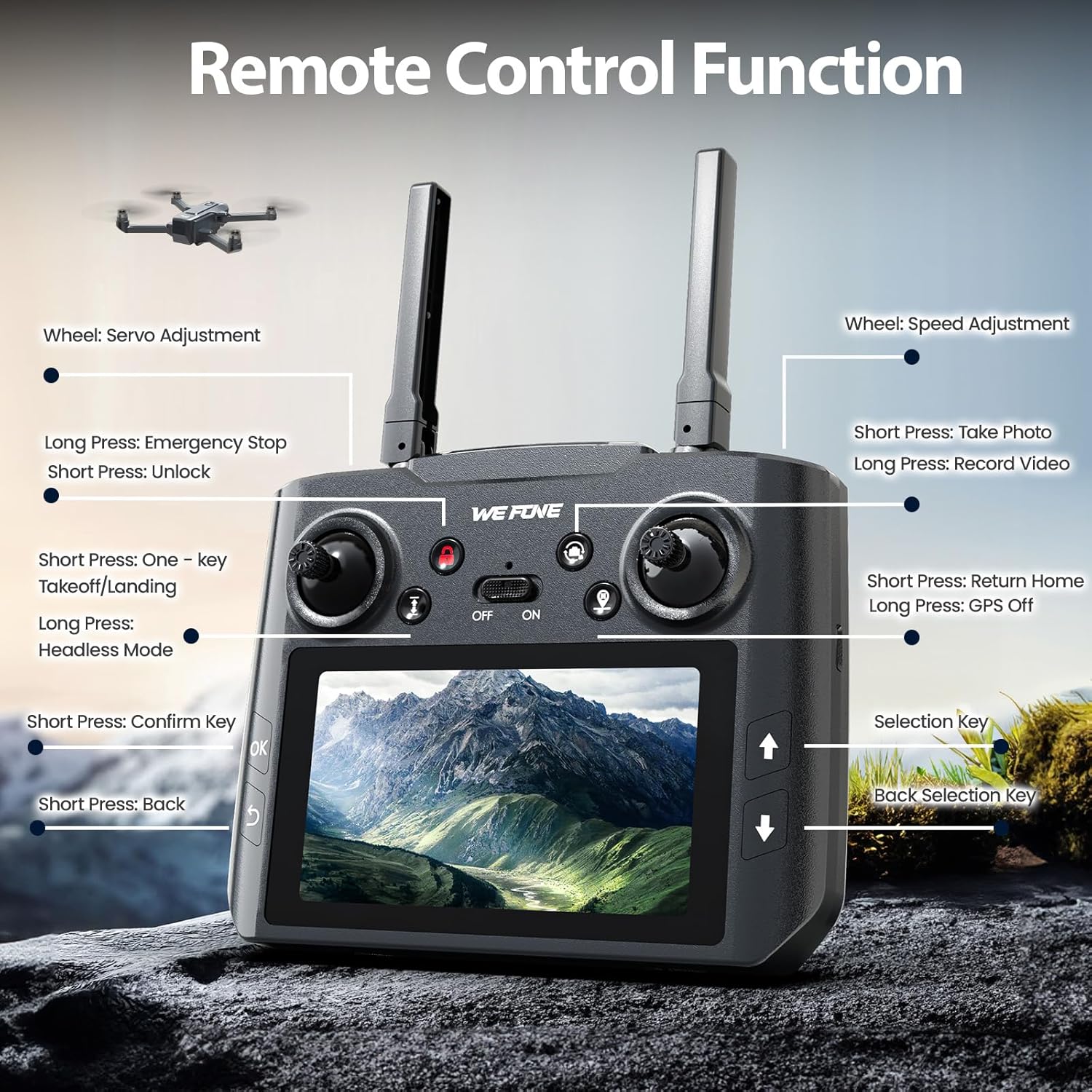
Image: Detailed layout of the remote control functions, including joysticks, buttons for photo/video, takeoff/landing, and GPS.
3. Calibration
After powering on both the drone and controller, wait for them to connect. The controller screen will indicate 'connected'. Perform gyroscope and compass calibration as prompted by the on-screen instructions. This typically involves rotating the drone horizontally and vertically multiple times to ensure accurate flight data.
Operating
1. Takeoff and Landing
Press the one-key takeoff/landing button on the remote control to initiate automatic takeoff or landing. For manual control, gently push the left joystick upwards to ascend and downwards to descend.
2. Flight Modes
- Altitude Hold: Maintains a stable altitude, allowing you to focus on directional control.
- Headless Mode: Eliminates the need to adjust the drone's position before flight, as the forward direction is always the direction the pilot is facing.
- Follow-Me Mode: The drone automatically follows the remote control, capturing footage as you move.
- Point of Interest: The drone flies in a circular path around a designated point, ideal for capturing panoramic video.

Image: The drone utilizing Follow Me mode, tracking a subject for dynamic video capture.
3. Speed Adjustment
The drone features 2-speed adjustment settings, allowing you to switch between slower, more stable flight for beginners and faster, more agile flight for experienced users. Use the dedicated speed button on the controller to toggle between modes.

Image: Visual representation of the drone's 2-speed adjustment capability, suitable for various pilot skill levels.
4. GPS-Assisted Navigation & Return-to-Home (RTH)
The integrated GPS module provides stable hovering and precise positioning. The one-tap Return-to-Home (RTH) function automatically recalls the drone to its takeoff point in case of signal loss or low battery, enhancing flight safety.
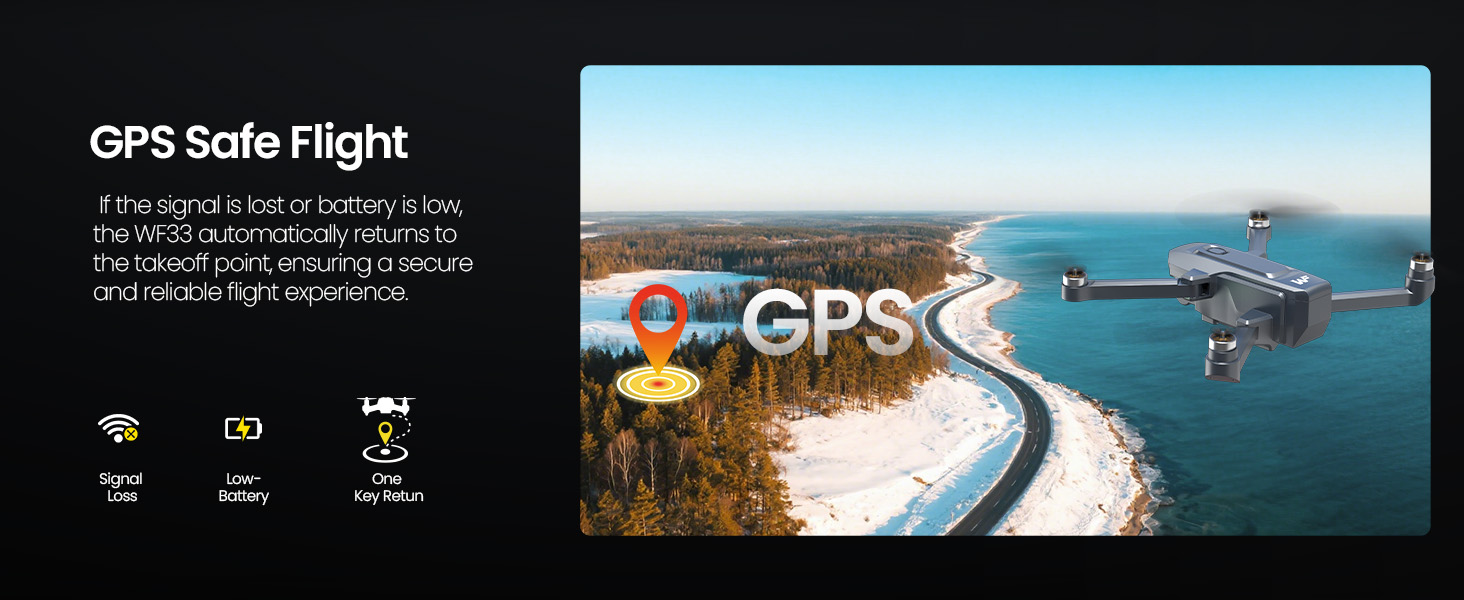
Image: Illustration of GPS Safe Flight features, including signal loss and low-battery return functions.
Camera Features
The WeFone WF33 is equipped with a high-resolution 4K UHD camera for capturing stunning aerial photos and videos. The camera offers a 90-degree adjustable angle for versatile shooting perspectives.

Image: Close-up of the drone's 4K Ultra HD camera, highlighting its 90-degree adjustable feature.
5G FPV Transmission & Built-in Display
Experience real-time, low-latency First-Person View (FPV) directly on the remote control's integrated 4.5-inch HD screen. This advanced 5G transmission eliminates the need for a smartphone, providing a seamless and immersive flying experience.

Image: Remote control displaying real-time visual transmission from the drone's camera.
Storage
An 8GB MicroSD card is included for immediate storage of your captured photos and videos. The drone supports expandable memory for extended recording sessions.

Image: Illustration highlighting the included 8GB SD card for media storage.
Performance
Brushless Motors
The WeFone WF33 is powered by high-efficiency brushless motors, providing smoother, quieter, and more durable performance compared to brushed motors. These motors also offer improved wind resistance for stable flight.

Image: Diagram illustrating the brushless motor technology for enhanced flight stability and efficiency.
Flight Time
The drone includes two rechargeable batteries, offering up to 40 minutes of total flight time (20 minutes per battery) for extended aerial exploration. Ensure batteries are fully charged before each flight.

Image: Visual highlighting the 40 minutes of extended flight time provided by two batteries.
Portability
The compact, foldable frame of the WF33 ensures easy portability, making it convenient to carry and fly anywhere. It weighs under 249g, complying with many drone regulations.

Image: The drone and its carrying case, emphasizing its easy-to-carry and portable design.
Specifications
| Feature | Specification |
|---|---|
| Brand | WeFone |
| Model Name | WF33-US |
| Color | Gray |
| Video Capture Resolution | 4K |
| Connectivity Technology | Wi-Fi |
| Skill Level | Beginner |
| Item Weight | 210 Grams (7.4 ounces) |
| Battery Capacity | 1.2 Amp Hours |
| Video Capture Format | MP4 |
| Control Type | Remote Control |
| Wireless Communication Technology | 5G |
| Battery Cell Composition | Lithium Ion |
| Product Dimensions | 11.81"L x 9.69"W x 2.09"H |
Maintenance
Regular maintenance ensures the longevity and optimal performance of your WeFone WF33 drone.
- Propeller Inspection: Regularly check propellers for any signs of damage, cracks, or bends. Replace damaged propellers immediately using the provided spares and screwdriver.
- Cleaning: Keep the drone's body, camera lens, and motors free from dust, dirt, and debris. Use a soft, dry cloth for cleaning. Avoid using liquids directly on electronic components.
- Battery Care: Store batteries in a cool, dry place away from direct sunlight. Do not overcharge or over-discharge batteries. If storing for extended periods, charge batteries to approximately 50-60% capacity.
- Firmware Updates: Check the official WeFone website periodically for any available firmware updates to ensure your drone has the latest features and performance enhancements.
Troubleshooting
If you encounter issues with your WeFone WF33 drone, refer to the following common troubleshooting steps:
- Drone Not Powering On: Ensure the battery is fully charged and correctly inserted. Check for any visible damage to the battery or drone's power port.
- Controller Not Connecting: Verify both the drone and controller are powered on. Ensure they are within range and attempt to re-pair them according to the quick start guide.
- GPS Signal Issues: Fly in an open outdoor area away from tall buildings, trees, or strong electromagnetic interference. Allow sufficient time for the drone to acquire enough GPS satellites before takeoff.
- Unstable Flight: Perform a full calibration (gyroscope and compass) as described in the setup section. Check propellers for damage and ensure they are installed correctly.
- Poor Video Quality/Transmission: Ensure the 5G transmission is active and there is minimal interference. Check the MicroSD card for proper insertion and sufficient free space.
For further assistance, please contact WeFone customer support.
Warranty and Support
For warranty information, product support, or to purchase replacement parts, please visit the official WeFone website or contact their customer service. Keep your purchase receipt as proof of purchase for warranty claims.
WeFone Customer Support: Visit the WeFone Store on Amazon
