
1. Introduction
Thank you for purchasing the VOKSUN Weather Station Model 3378YC. This device provides accurate indoor and outdoor temperature and humidity readings, weather forecasts, time, date, and other useful meteorological data. Please read this manual carefully before use to ensure proper operation and to maximize the product's lifespan.
2. Safety Information
- Do not expose the main unit or outdoor sensor to extreme temperatures, direct sunlight, or moisture.
- Avoid dropping the device or subjecting it to strong impacts.
- Do not attempt to disassemble or repair the unit yourself. Contact customer support for assistance.
- Keep batteries out of reach of children. Dispose of used batteries properly according to local regulations.
- Ensure the power adapter is compatible with your local power supply.
3. Package Contents
- 1 x VOKSUN Weather Station Main Unit
- 1 x Wireless Outdoor Sensor
- 1 x AC/DC Power Adapter
- 1 x User Manual

Image: The VOKSUN Weather Station main unit and its wireless outdoor sensor, showcasing the multi-functional display.
4. Product Overview
4.1 Main Unit (Weather Station)
The main unit features a 7.5-inch VA color display that shows indoor/outdoor temperature and humidity, weather forecast, time, date, moon phase, atmospheric pressure, and comfort level. It can be powered by an AC adapter or AA batteries.

Image: Front and back view of the main weather station unit with labeled components for display and controls.
Part A: Positive LCD Display Elements
- A1: Outdoor wireless channel and receiving icon
- A2: Indoor Temperature
- A3: Indoor Humidity
- A4: Indoor comfort indicator
- A5: Time
- A6: Month and date
- A7: Week
- A8: Weather forecast
- A9: Outdoor Temperature
- A10: Atmospheric pressure
- A11: Outdoor Humidity
- A12: Histogram of historical pressure trends
- A13: Outdoor comfort indicator
- A14: Sunrise time
- A15: Moon phase
- A16: Selected city
- A17: Tide level
- A18: Sunset time
Part B: Back Buttons and Power Ports
- B1: "/zz" Touch field (Snooze/Light)
- B3: Support frame
- B4: Battery compartment
- B5: Hanging hole
- B6: "▼" Button
- B7: "▲/" Button
- B8: "" Button
- B9: "" Button
- B10: "" Button
- B11: "" Button
- B12: Power supply socket
- B13: USB charger output socket
4.2 Wireless Outdoor Sensor
The wireless sensor measures outdoor temperature and humidity and transmits data to the main unit. It is battery-powered and designed for outdoor placement.

Image: The wireless remote sensor with its components labeled, including the LCD display, transmit signal LED, °C/°F button, channel switch, and battery compartment.
- C1: LCD display - Temperature
- C2: LCD display - Humidity
- C3: Transmit signal LED
- C4: "°C/°F" button
- C5: "TX" button
- C6: "CHANNEL 1 or 2 or 3" switch
- C7: Battery compartment
5. Setup
5.1 Power Installation
The main unit can be powered by the included AC adapter or 2 x AA batteries (not included). The outdoor sensor requires 2 x AA batteries (not included).
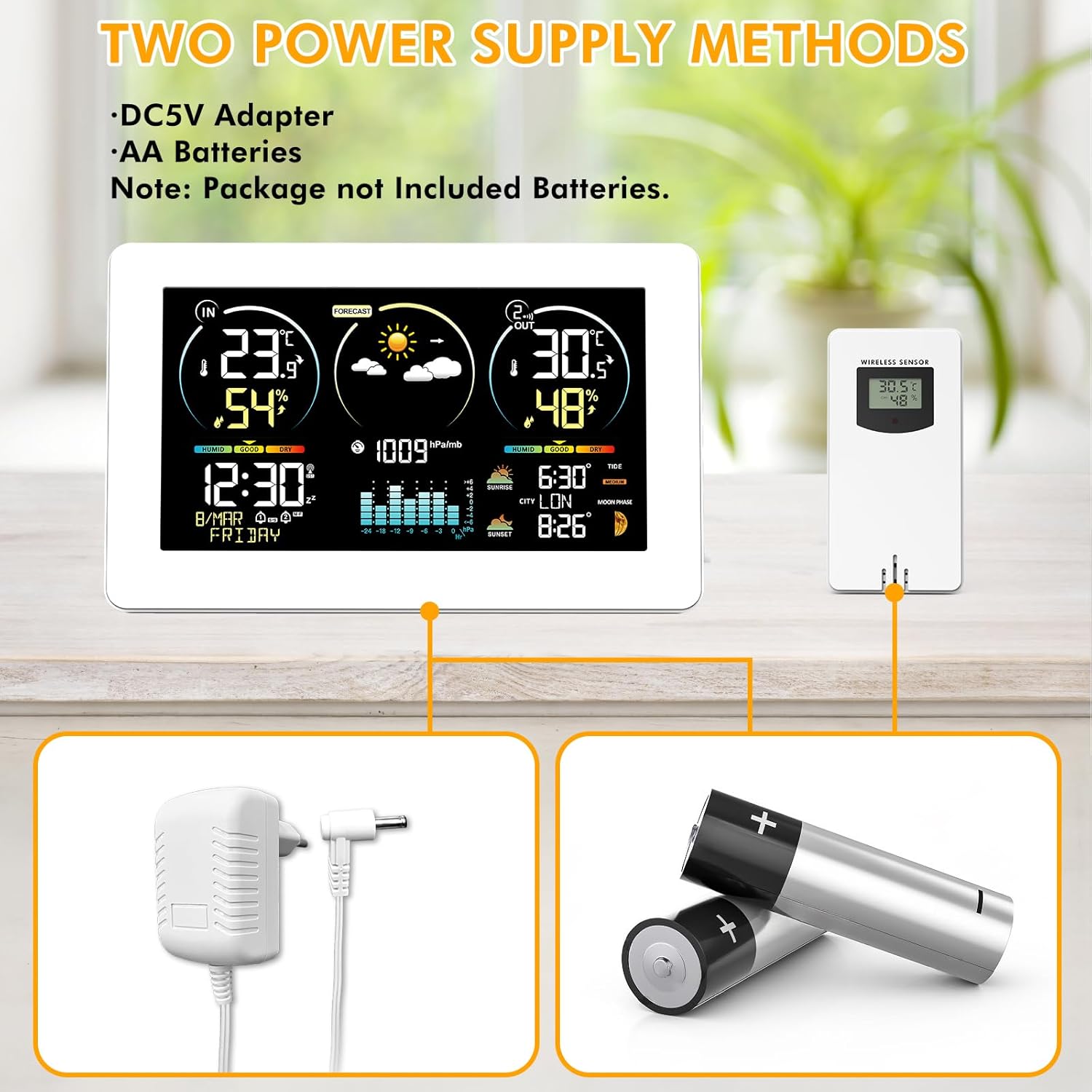
Image: Illustration of the weather station and sensor powered by either an AC adapter or AA batteries.
- For Outdoor Sensor: Open the battery compartment (C7) on the back of the wireless sensor. Insert 2 x AA batteries, observing the correct polarity (+/-). Close the compartment.
- For Main Unit: Open the battery compartment (B4) on the back of the main unit. Insert 2 x AA batteries, observing the correct polarity (+/-). Alternatively, connect the AC adapter to the power supply socket (B12) and plug it into a wall outlet.
- Note: If using only batteries for the main unit, the backlight will only illuminate temporarily for 15 seconds when a button is pressed. For continuous backlight, use the AC adapter.
5.2 Sensor Pairing
The main unit will automatically search for the outdoor sensor upon initial power-up. Ensure the sensor is within range (up to 60 meters / 200 feet in open air).
Image: The weather station and its outdoor sensor, demonstrating their wireless connection.
- Place the outdoor sensor near the main unit during the initial setup.
- Ensure the channel switch (C6) on the outdoor sensor is set to Channel 1 (default). If you have multiple sensors, set them to different channels (1, 2, or 3).
- The main unit will display outdoor temperature and humidity once connected. If connection fails, press and hold the "" button (B8) on the main unit for 3 seconds to initiate a manual search.
5.3 Initial Settings (Time, Date, City, Units)
The weather station supports DCF Radio Controlled Clock (RCC) function for automatic time synchronization in regions with DCF signal coverage (e.g., Europe).

Image: The weather station on a wooden table, illustrating the DCF radio-controlled time synchronization feature across Europe.
- Time Synchronization (RCC): After power-up, the unit will automatically attempt to synchronize the time via the DCF signal. This process may take several minutes. The RCC icon will flash during synchronization and become solid once successful.
- Manual Time/Date Setting: If RCC is not available or desired, press and hold the "" button (B9) to enter time setting mode. Use the "▲/" (B7) and "▼" (B6) buttons to adjust values, and "" (B9) to confirm and move to the next setting (Time Zone, 12/24H format, Hour, Minute, Year, Month, Day, Temperature Unit °C/°F, Pressure Unit hPa/inHg).
- City Selection: Press the "" button (B10) to select your city. This affects sunrise/sunset times and tide information. Use "▲/" (B7) and "▼" (B6) to navigate through cities.
6. Operating Instructions
6.1 Display Overview
The main display is divided into several zones, providing a comprehensive overview of weather data and time information.
Video: A product overview of the VOKSUN Weather Station, demonstrating its various display zones and features.
- Zone 1: Indoor Temperature and Humidity
- Zone 2: Weather Forecast
- Zone 3: Outdoor Temperature and Humidity
- Zone 4: Comfort Level, Time, Date
- Zone 5: Barometric Pressure History
- Zone 6: Sunrise/Sunset, City Code, Tides, Moon Phases
6.2 Weather Forecast
The weather station provides a 12-hour weather forecast based on changes in atmospheric pressure. The forecast icons include Sunny, Slightly Cloudy, Cloudy, Rainy, Stormy, and Snowy.
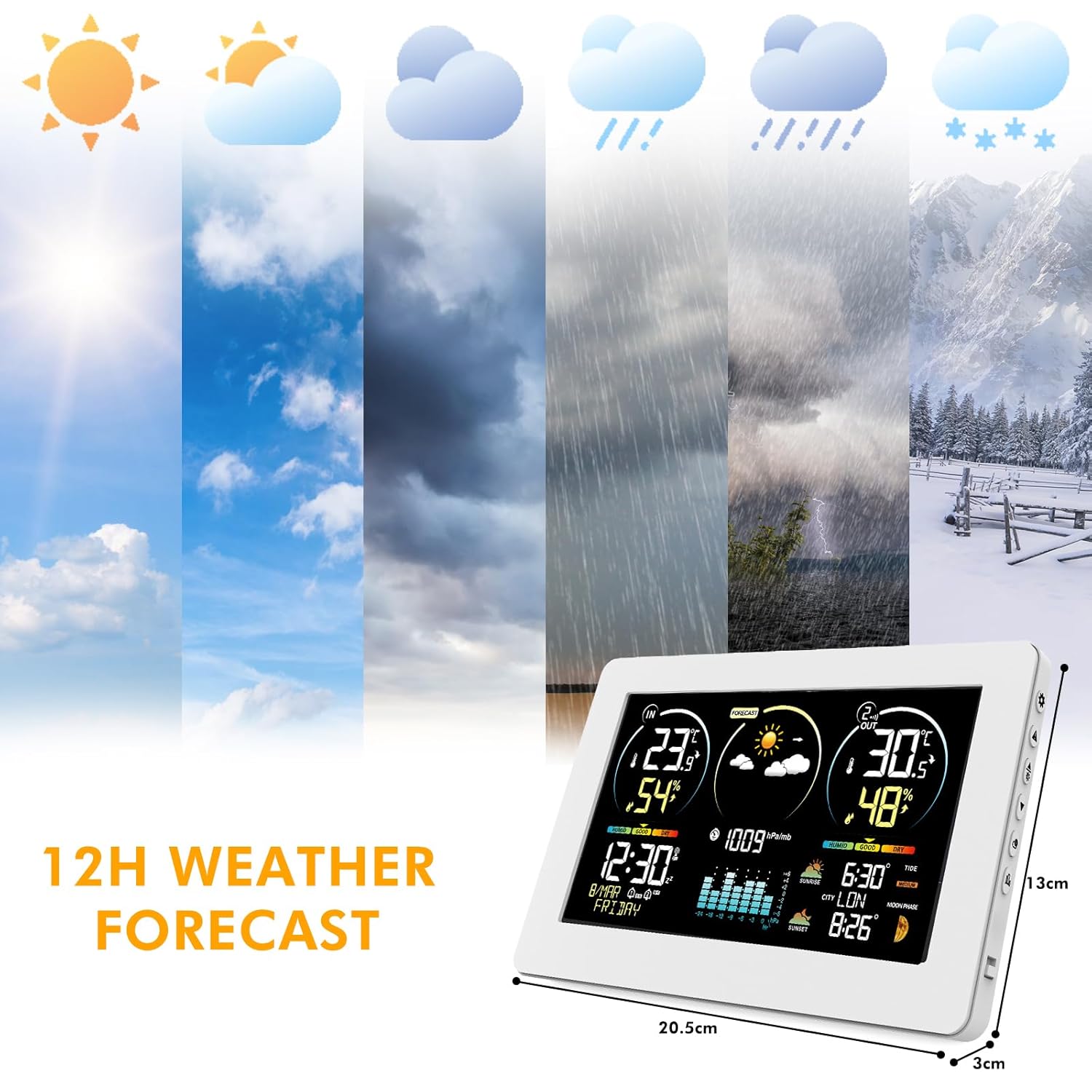
Image: Visual representation of the 12-hour weather forecast icons, from sunny to snowy conditions.
6.3 Temperature and Humidity Monitoring
The station continuously monitors indoor and outdoor temperature and humidity. The outdoor sensor has a wireless transmission range of up to 60 meters (200 feet).

Image: The weather station displaying indoor and outdoor readings, suitable for various locations in a home.
- Indoor Temperature Range: -9.9 °C to +50 °C (14.2 °F to 122 °F)
- Outdoor Temperature Range: -40 °C to +70 °C (-40 °F to 158 °F)
- Humidity Range: 20% to 95% RH
- If temperature exceeds range, "LL.L" or "HH.H" will be displayed.
- The station supports up to three wireless outdoor sensors (additional sensors sold separately).
6.4 Comfort Indicator
The comfort indicator provides a visual representation of the indoor environment's comfort level based on humidity.

Image: The weather station's comfort display, showing categories like DRY, GOOD, and HUMID based on humidity percentages.
- DRY: 1-35% RH
- GOOD: 35-44% RH (Dry), 45-65% RH (Comfort)
- WET: 66-80% RH (Wet), 80-99% RH (To Wet)
6.5 Alarms and Snooze Function
The weather station includes an alarm clock with a snooze function.

Image: The weather station acting as a bedside alarm clock with snooze function, next to a sleeping person.
- Setting Alarm: Press the "" button (B11) to view alarm times. Press and hold "" (B11) to enter alarm setting mode. Use "▲/" (B7) and "▼" (B6) to adjust hour/minute, and "" (B11) to confirm.
- Activating Snooze: When the alarm sounds, touch the "/zz" field (B1) to activate snooze. The alarm will sound again after 5-60 minutes (adjustable in settings).
6.6 Moon Phases and Tides
The display shows 12 different moon phases and 3 types of tide levels based on the set calendar and selected city.

Image: The weather station displaying moon phases and tide information, set against a nighttime ocean backdrop.
6.7 Adjustable Backlight
The main unit features an adjustable backlight with four levels of brightness (L1-L4) when powered by the AC adapter. This allows for comfortable viewing in various lighting conditions.
7. Maintenance
- Cleaning: Wipe the display and unit surfaces with a soft, damp cloth. Do not use abrasive cleaners or solvents.
- Battery Replacement: Replace batteries in both the main unit and outdoor sensor when the low battery indicator appears on the display. Ensure correct polarity.
- Placement: For optimal performance, place the outdoor sensor in a shaded, dry location, protected from direct rain and sunlight. Ensure it is within the wireless range of the main unit.
8. Troubleshooting
| Problem | Possible Cause | Solution |
|---|---|---|
| No display on main unit | No power or dead batteries. | Connect AC adapter or replace AA batteries in the main unit. |
| Outdoor temperature/humidity not displayed | Sensor out of range, dead sensor batteries, or interference. | Move sensor closer to main unit. Replace sensor batteries. Press and hold "" button (B8) on main unit to re-establish connection. Avoid placing near large metal objects or electronics. |
| Incorrect time/date | RCC signal not received or manual settings incorrect. | Ensure unit is in an area with good RCC reception. Manually set time and date if RCC signal is weak or unavailable. |
| Weather forecast inaccurate | Weather forecasts are based on atmospheric pressure changes and are predictive, not absolute. | This is normal. The forecast provides a general trend for the next 12 hours. |
| "LL.L" or "HH.H" displayed | Temperature or humidity is outside the measurable range. | Move the unit or sensor to an environment within the specified operating range. |
9. Specifications
- Model: 3378YC
- Indoor Temperature Range: -9.9 °C to +50 °C (14.2 °F to 122 °F)
- Outdoor Temperature Range: -40 °C to +70 °C (-40 °F to 158 °F)
- Temperature Accuracy: ±1 °C
- Humidity Range: 20% to 95% RH
- Wireless Transmission Range: Up to 60 meters (200 feet) in open air
- Power Source (Main Unit): AC/DC Adapter (included) or 2 x AA batteries (not included)
- Power Source (Outdoor Sensor): 2 x AA batteries (not included)
- Display Type: Color VA LCD
- Connectivity Technology: Wireless
- UPC: 774300101834
10. Warranty and Support
VOKSUN products are designed and manufactured to the highest quality standards. This product comes with a standard manufacturer's warranty. For specific warranty details, please refer to the warranty card included in your package or contact VOKSUN customer support.
If you encounter any issues or have questions regarding your VOKSUN Weather Station, please contact our customer support team:
- Email: [Insert Customer Support Email Here]
- Phone: [Insert Customer Support Phone Number Here]
- Website: [Insert VOKSUN Support Website Here]
Please have your model number (3378YC) and purchase information ready when contacting support.


