
LEVOIT LTF-F422-WUS
User Manual for LEVOIT Classic 42-inch Tower Fan
Model: LTF-F422-WUS
1. Introduction
Thank you for choosing the LEVOIT Classic 42-inch Tower Fan. This manual provides essential information for setting up, operating, and maintaining your fan to ensure optimal performance and longevity. Please read it thoroughly before use and retain it for future reference.
This tower fan is designed to provide powerful and quiet air circulation, featuring VORTEXAIR TECHNOLOGY for up to 1472 CFM airflow. It offers customizable comfort with multiple modes and speeds, 90° horizontal oscillation, and 60° vertical airflow adjustment. Its quiet operation, with noise levels as low as 22dB, makes it ideal for any room, including bedrooms.
2. Product Overview
Familiarize yourself with the key features and components of your LEVOIT Classic 42-inch Tower Fan.

Figure 2.1: Overall view of the LEVOIT Classic 42-inch Tower Fan, highlighting its sleek design and remote control.

Figure 2.2: Illustrates the powerful 1472 CFM airflow generated by the fan, providing a strong breeze.

Figure 2.3: Demonstrates the 90° horizontal oscillation feature, ensuring air circulation throughout the room.

Figure 2.4: Shows the adjustable 60° vertical airflow, allowing for personalized comfort.

Figure 2.5: Highlights the fan's quiet operation (22dB) in Advanced Sleep Mode, ideal for undisturbed rest.
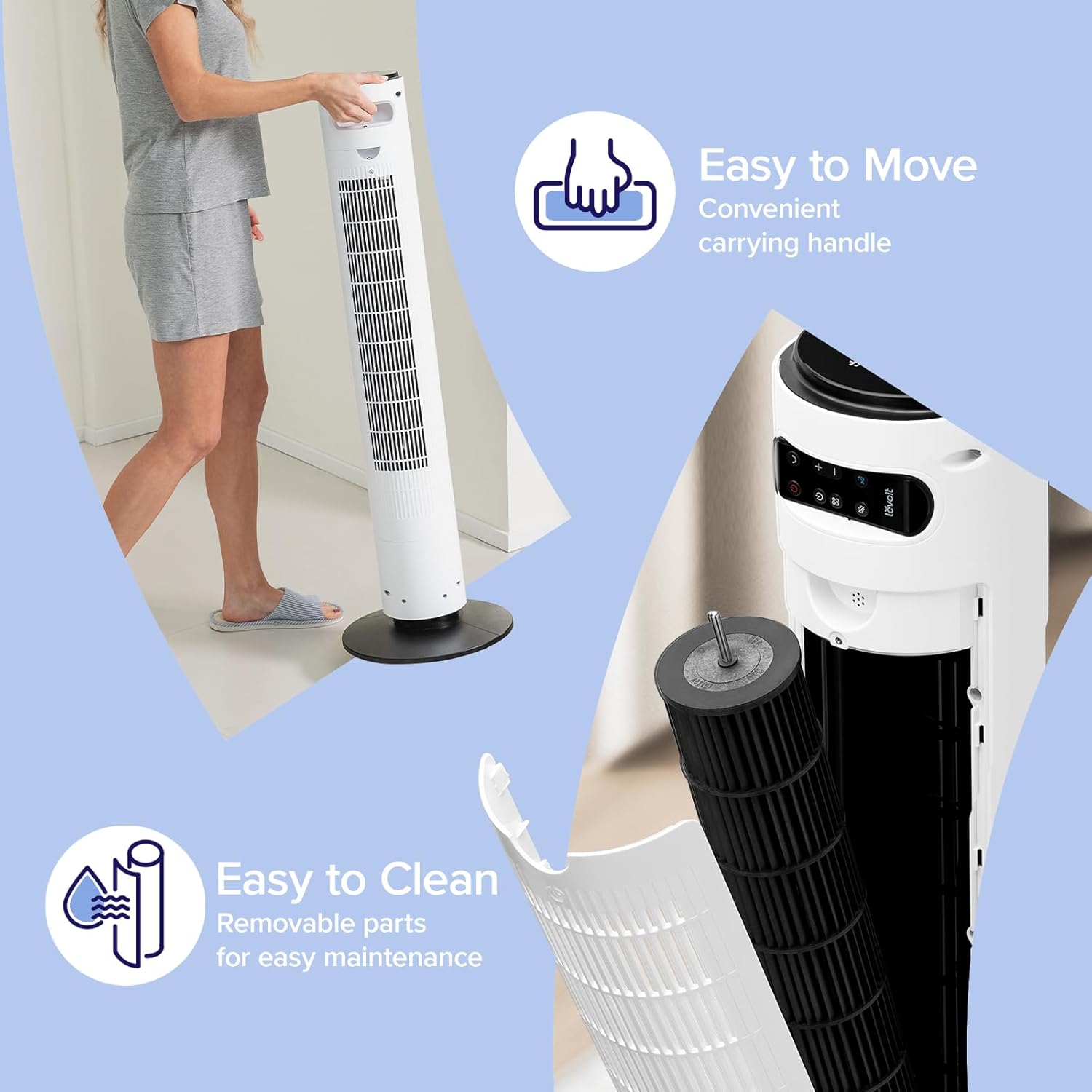
Figure 2.6: Illustrates the convenient carrying handle and detachable back cover for easy maintenance.

Figure 2.7: Shows the washable back cover and fan blade, simplifying the cleaning process.
3. Setup
The LEVOIT Classic 42-inch Tower Fan is designed for quick and easy assembly. Simply unscrew the base, place the fan unit onto it, and screw it back up. No complex tools or steps are required.
4. Operating Instructions
Your tower fan offers various settings to customize your cooling experience. All controls are accessible via the top control panel or the included remote control.
4.1 Fan Modes
- Normal Mode: Manually control the tower fan’s speed. This is the default mode.
- Auto Mode: Automatically adjusts fan speed according to room temperature.
- Turbo Mode: Quickly circulates air. Automatically oscillates at the highest fan speed and decreases fan speed when the temperature falls. Then, automatically adjusts fan speed according to room temperature.
- Advanced Sleep Mode: Optimized air flow for sleep, taking into account the stages before bed. The display and sound will automatically turn off after 5 seconds.
- The starting fan speed is determined by the current fan speed when this mode is selected.
- After one hour, oscillation will begin and the fan speed will decrease as temperature stabilizes.
- Then, the fan speed will automatically adjust according to room temperature.
4.2 Fan Speeds
The fan features 5 adjustable speeds to suit your preference, from a gentle breeze to powerful airflow.
4.3 Oscillation
Activate 90° horizontal oscillation to distribute air across a wider area. You can also adjust the vertical airflow by 60° (Up and Down) for targeted cooling.
4.4 Timer
Set the fan to automatically turn off after a specified period, up to 12 hours.
4.5 Temperature Sensor
The built-in temperature sensor allows the fan to automatically adjust its speed based on the room's ambient temperature, providing consistent comfort.
4.6 Remote Control
All functions can be controlled conveniently using the provided remote control. The fan features a built-in compartment for remote storage.
5. Maintenance
Regular cleaning ensures optimal performance and extends the lifespan of your fan.
- Easy Cleaning: The fan includes a detachable back cover for effortless cleaning of internal components.
- Fan Blade Installation: When reassembling after cleaning the fan blade, ensure the screws are aligned with the flat surface of the motor shaft, not the curved surface. Incorrect alignment can reduce air output.
6. Troubleshooting
| Problem | Solution |
|---|---|
| Fan suddenly starts to oscillate. | This is normal behavior in Advanced Sleep Mode. By default, the fan will begin oscillating after one hour in this mode. |
| Air output decreases after cleaning the fan blade. | Ensure the screws are aligned with the flat surface of the motor shaft during installation, not the curved surface. Incorrect alignment will reduce air output. |
| Fan suddenly stops. | You may have set a timer. Check the fan's timer settings and try operating it again. |
| Top control panel is not responsive. | Check if your fan is in Advanced Sleep Mode or if the display was manually turned off. When the display is off, the control panel enters sleep mode to prevent accidental changes. To change a setting, tap any button twice: the first tap wakes the display, and the second tap adjusts the setting. |
7. Specifications
- Brand: LEVOIT
- Model Name: Classic 42-white
- Model Number: LTF-F422-WUS
- Color: White
- Product Dimensions: 6.3"D x 6.7"W x 42.4"H
- Item Weight: 12.9 pounds
- Power Source: AC
- Special Features: Bladeless, Oscillating, Temperature Sensor
- Recommended Uses: Refresh Air, Air Circulation, Ventilating
- Batteries: 1 12V battery required (included for remote)
- Assembly Required: Yes
- Country of Origin: China
- UPC: 810123675487
Related documentsLTF-F422-WUS


Ask a question about this manual
Ask about setup, troubleshooting, compatibility, parts, safety, or missing instructions. Manuals+ will review the question and use this page’s manual context to help answer it.