
1. Introduction
Thank you for purchasing the MXV 80" Fireplace TV Stand with a 36 Inch Electric Fireplace. This entertainment center is designed to accommodate TVs up to 90 inches and features an integrated electric fireplace with LED flame effects and ambient lighting. This manual provides essential information for safe assembly, operation, and maintenance of your new product. Please read all instructions carefully before beginning assembly or operation.

Image 1.1: The MXV 80" Fireplace TV Stand with a television and various media devices, showcasing its modern design and integrated electric fireplace.
2. Safety Information
To reduce the risk of fire, electric shock, or injury, always follow these basic precautions:
- Read all instructions before using this appliance.
- Do not operate any fireplace with a damaged cord or plug, or if the heater malfunctions or has been dropped or damaged in any manner.
- Always unplug the fireplace when not in use.
- Keep combustible materials, such as furniture, pillows, bedding, papers, clothes, and curtains at least 3 feet (0.9 m) from the front of the heater.
- Do not insert or allow foreign objects to enter any ventilation or exhaust opening as this may cause an electric shock or fire, or damage the heater.
- This TV stand is intended for indoor use only.
- Assembly requires two people for safety and ease.
3. Package Contents
Your MXV Fireplace TV Stand will arrive in two separate boxes. Please ensure you have received both packages and all components are present before beginning assembly. Refer to the included parts list in your physical instruction manual for detailed component identification.

Image 3.1: Illustration depicting the delivery process, indicating that the product ships in two separate boxes which may arrive on different days.
4. Assembly Instructions
The MXV Fireplace TV Stand is designed for straightforward assembly. Follow the step-by-step instructions provided in the physical manual included with your product. All parts are numbered, and pre-drilled holes are present to facilitate the process.
- Preparation: Clear a spacious area for assembly. It is recommended to have two people for assembly to ensure stability and prevent damage.
- Tools Required: Basic household tools may be needed. A power drill is not strictly necessary but can expedite the process.
- Follow Steps: Adhere strictly to the numbered steps in the provided manual.
- Component Identification: Match numbered parts with the diagrams in the manual.
- Secure Connections: Ensure all screws and fasteners are tightened securely.
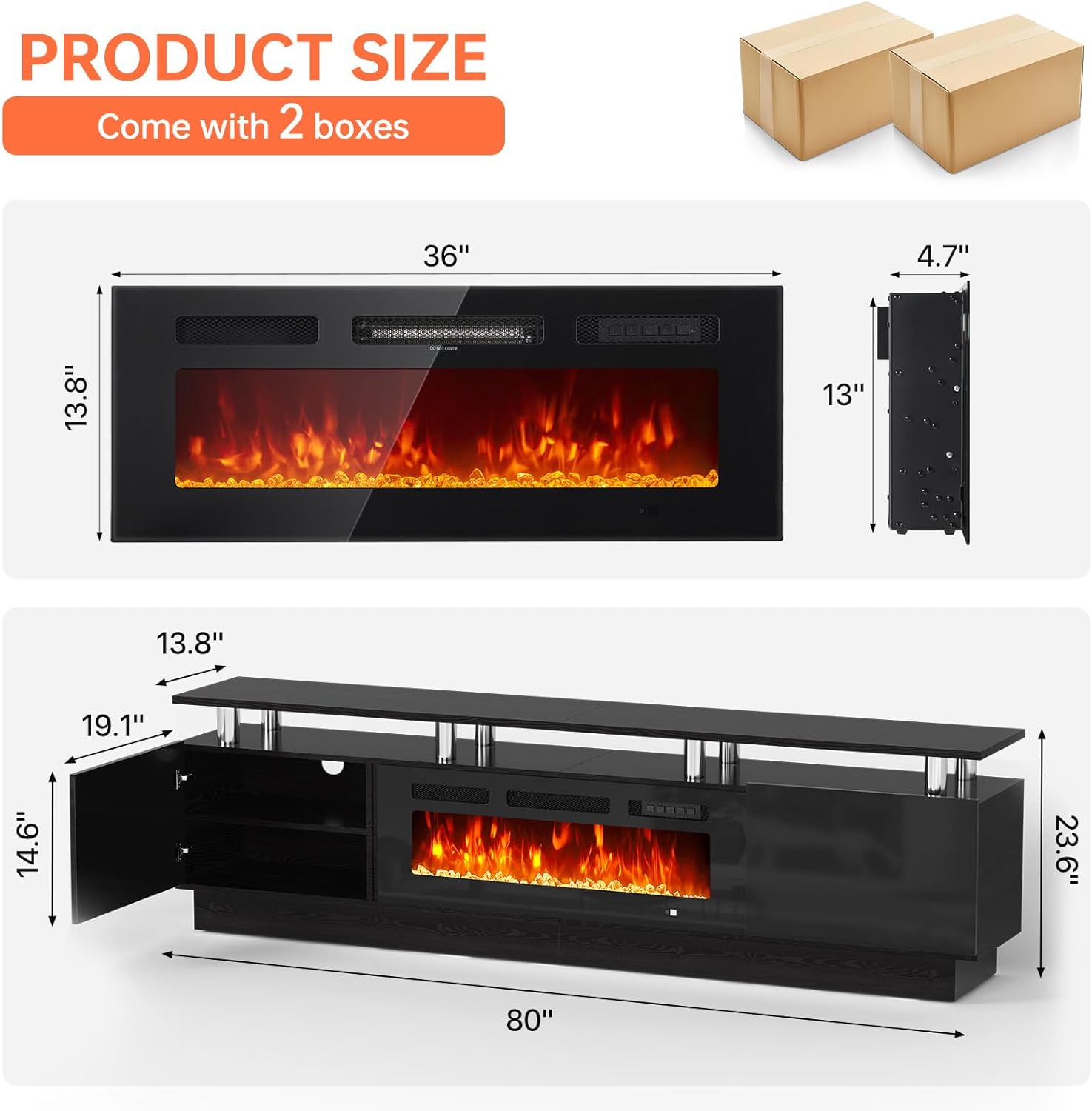
Image 4.1: Detailed product dimensions for both the 36-inch electric fireplace and the 80-inch TV stand, illustrating the overall size and component fit.

Image 4.2: The eight stainless steel supports are crucial for the stand's structural integrity, offering enhanced sturdiness and stability.
5. Operating Instructions
5.1 Electric Fireplace Operation
The 36-inch electric fireplace can be controlled using the included remote control or the control panel on the unit. It offers 12 flame colors, 5 dimmer levels, and adjustable heat settings.

Image 5.1: Overview of the electric fireplace's controls and features, including heat settings, temperature range, timer, and remote functionality.
- Power On/Off: Press the power button on the remote or control panel.
- Flame Color Adjustment: Use the flame button to cycle through 12 different flame colors.
- Flame Brightness: Long press the flame button for 3 seconds to adjust the brightness (5 levels: L1-L5).
- Heat Settings: Select between 750W and 1500W heat output. The temperature can be set from 62°F to 82°F.
- Timer Function: Set the operational timer from 0 to 8 hours.
- Overheating Protection: The fireplace includes an automatic shut-off feature to prevent overheating.

Image 5.2: The electric fireplace offers a wide range of 12 flame colors and 5 adjustable brightness levels to create various ambient effects.
5.2 LED Ambient Lighting
The TV stand features integrated LED ambient lighting with 12 color options to complement your room's atmosphere.

Image 5.3: The TV stand's LED lighting system provides 12 distinct colors, allowing users to customize the ambiance of their living space.
- Color Selection: Use the remote control to cycle through the 12 available LED colors.
- Brightness: Adjust the brightness of the LED lights to your preference.
6. Maintenance
Regular maintenance will help prolong the life and appearance of your TV stand and electric fireplace.
- Cleaning: Wipe surfaces with a soft, damp cloth. Avoid harsh chemicals or abrasive cleaners. For the high-gloss finish, use a non-abrasive cleaner specifically designed for glossy surfaces.
- Dusting: Regularly dust the unit, especially around the fireplace vents, to ensure proper airflow.
- Electrical Components: Ensure the power cord is not pinched or damaged. Do not attempt to service the electrical components yourself.

Image 6.1: The high-gloss finish of the TV stand requires gentle cleaning to maintain its appearance.
7. Troubleshooting
If you encounter issues with your MXV Fireplace TV Stand, refer to the following common problems and solutions:
| Problem | Possible Cause | Solution |
|---|---|---|
| Fireplace not turning on. | No power, power cord loose, unit overheated. | Check power connection. Ensure the unit is plugged into a working outlet. Unplug and allow to cool for 15 minutes if overheating is suspected. |
| No heat output. | Heat function not activated, temperature set too low. | Activate the heat function via remote or control panel. Increase the temperature setting. |
| LED lights not working. | Lights turned off, remote control battery low. | Ensure LED lights are turned on. Replace remote control batteries. |
| Doors do not close properly. | Hinges misaligned, assembly error. | Adjust hinges as per assembly instructions. Recheck assembly steps for door installation. |
8. Specifications
| Feature | Specification |
|---|---|
| Brand | MXV |
| Model Name | 21014 tv stand with fireplace |
| Item Model Number | IF-36FSB |
| Product Dimensions | 13.8"D x 80"W x 23.6"H |
| Material | Engineered Wood |
| Finish Type | Painted (High-Gloss) |
| Installation Type | Freestanding |
| Power Source | Corded Electric |
| Heat Output | 750W / 1500W |
| Temperature Range | 62°F – 82°F |
| Special Feature | Adjustable Flame, LED Lighting, Remote Control, Overheating Protection |
| Item Weight | 80 pounds |
| Max TV Size | Up to 90 inches |

Image 8.1: Visual guide demonstrating the suitable TV sizes for the 80-inch TV stand, accommodating televisions up to 80 inches for optimal fit.
9. Warranty and Support
The MXV Fireplace TV Stand comes with a limited warranty. For specific warranty details, please refer to the documentation included with your purchase. If you require assistance with assembly, operation, or have any questions, please contact MXV customer support through the retailer where the product was purchased.