
1. Introduction
Thank you for choosing the Makayuron Smart Door Lock M305TTBle. This smart lock offers advanced security and convenience with multiple access methods. This manual provides essential information for the proper installation, operation, and maintenance of your new smart lock. Please read it thoroughly before use.
2. Safety Information
- Important Pre-Installation Step: Before permanently installing the smart door lock on your door, it is crucial to connect it to your mobile phone first. This ensures all functions are working correctly. We recommend completing the pairing and testing process before proceeding with permanent installation.
- Ensure the lock is installed on doors with a thickness between 35mm and 65mm for optimal performance and security.
- Do not expose the lock to extreme temperatures or direct water contact.
- Use only the specified AA batteries. Do not mix old and new batteries or different types of batteries.
- Keep mechanical keys in a safe place outside your home for emergency access.
3. Package Contents
Please verify that all items are present in your package:
- Smart Door Lock Assembly
- 4 x AA Batteries
- 7 x Access Cards
- User Manual (this document)
- Installation Accessories (screws, spindle, etc.)
4. Product Overview
The Makayuron Smart Door Lock M305TTBle offers five convenient ways to unlock your door, ensuring flexible and secure access for various users and situations.
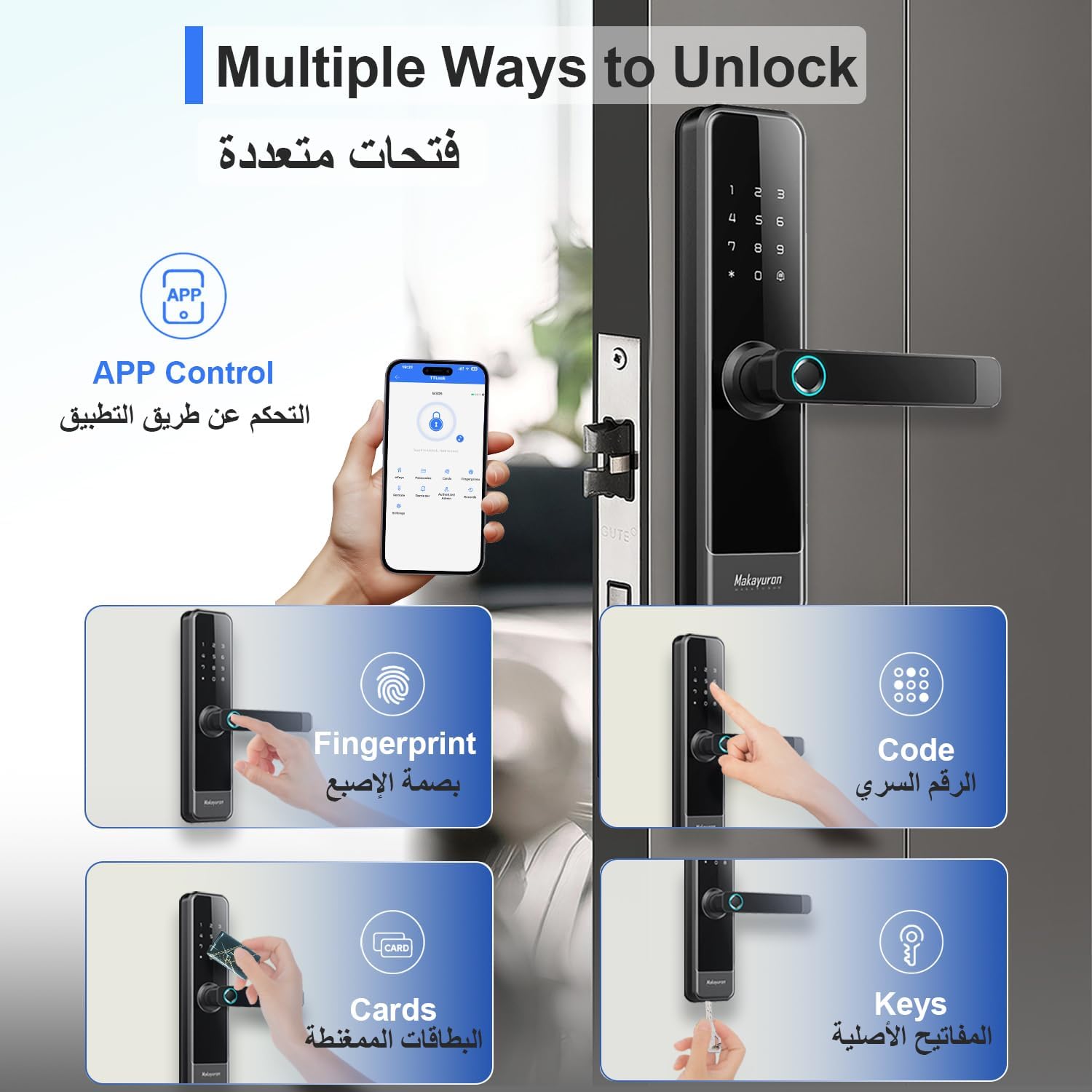
Figure 4.1: Multiple Ways to Unlock
This image illustrates the five primary methods for unlocking the Makayuron Smart Door Lock: via the TT Lock app, fingerprint recognition, numerical code entry, RFID cards, and traditional mechanical keys.
4.1. Key Features
- 5-in-1 Access: Unlock using Fingerprint, TT Lock App (Bluetooth), Passcode, RFID Card, or Mechanical Key.
- High-Security Fingerprint Sensor: Fast and reliable fingerprint recognition with a response time of less than 0.3 seconds and a high success rate. Supports up to 100 unique fingerprints.
- TT Lock App Control: Manage access remotely, generate one-time, timed, or permanent passcodes, grant access, and view access history from your smartphone.
- Emergency Backup: Includes a mechanical key override and an emergency USB power supply port for situations where batteries are depleted.
- Durable Construction: Made from aluminum with a polished glossy finish, designed for modern homes and offices.
- Long Battery Life: Powered by 4 AA batteries, providing approximately 8 months of usage depending on actual use and environmental factors.

Figure 4.2: Fingerprint Quick Unlock
This image demonstrates the speed and efficiency of the fingerprint sensor, capable of recognizing fingerprints in under 0.3 seconds with a high success rate.

Figure 4.3: Easily Control With APP
This image highlights the convenience of managing the smart lock via the TT Lock application, allowing users to control keyless entry, grant access, generate passcodes remotely, and view access logs.
5. Setup and Installation
This section provides general guidelines for setting up your Makayuron Smart Door Lock. For detailed step-by-step installation instructions, please refer to the separate installation guide included in your package.
5.1. Pre-Installation Check
- Ensure your door thickness is between 35mm and 65mm.
- Verify all package contents are present and undamaged.
- Crucial Step: Before mounting the lock on the door, insert the batteries and pair the lock with the TT Lock app on your mobile phone. Test all unlocking functions (fingerprint, passcode, card, app) to ensure they operate correctly. This helps identify any issues before permanent installation.
5.2. Mechanical Installation
Follow the detailed instructions in the separate installation guide for drilling holes, installing the mortise, and mounting the interior and exterior panels of the lock. Ensure all cables are connected correctly and securely.
6. Operating Instructions
Your Makayuron Smart Door Lock offers multiple ways to secure and access your property.
6.1. Unlocking Methods
- Fingerprint Unlock: Place your registered finger on the fingerprint sensor. The lock will unlock if the fingerprint is recognized.
- Passcode Unlock: Enter your registered passcode on the keypad, then press the '#' key.
- Card Unlock: Present a registered RFID card to the card reader area on the lock.
- TT Lock App Unlock (Bluetooth): Open the TT Lock app on your smartphone, ensure Bluetooth is enabled, and tap the unlock icon when near the lock.
- Mechanical Key Unlock: Insert the mechanical key into the backup keyhole and turn to unlock. This method is for emergency use.

Figure 6.1: Code Unlock - Guest Friendly
This image demonstrates how to generate and use temporary passcodes via the TT Lock app, making it easy to provide access to guests or service providers.
6.2. Locking the Door
The lock features an automatic deadbolt mechanism. After closing the door, the deadbolt will engage automatically to secure your home. You can also manually lock it from the inside by turning the knob or handle, or via the app.

Figure 6.2: Secure Your Home
This image highlights the robust deadbolt mechanism and the 'Trial and Error Alarm' feature, which activates after multiple incorrect attempts, enhancing the security of your home.
6.3. TT Lock App Functions
- User Management: Add, modify, or delete fingerprints, passcodes, and cards.
- Passcode Generation: Create permanent, timed, one-time, or recurring passcodes for different users (e.g., family, visitors, cleaners, workers).
- Access Logs: View a history of who entered and when.
- Remote Control: With a compatible gateway (sold separately), you can control the lock remotely over Wi-Fi.
- Settings: Adjust lock settings, such as auto-lock timer and volume.

Figure 6.3: Smart Codes for Smart Living
This image details the four types of passcodes that can be generated: permanent for family, time-limited for visitors, recurring for regular service providers like cleaners, and one-time for temporary access.
7. Maintenance
7.1. Battery Replacement
The lock is powered by 4 AA batteries. When the battery level is low, the lock will provide an audible warning. Replace all four batteries promptly to ensure continuous operation. Use only high-quality alkaline AA batteries.
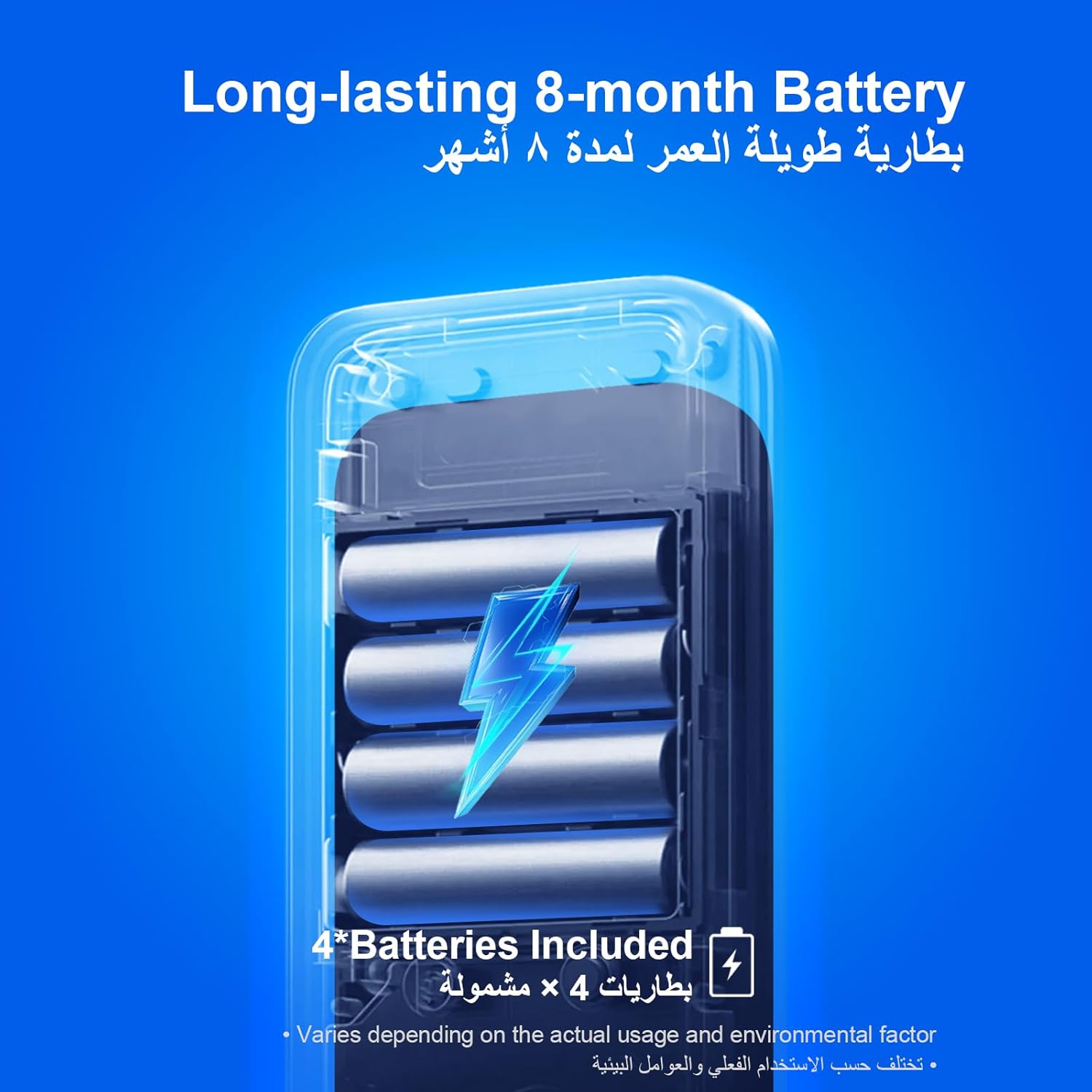
Figure 7.1: Long-lasting 8-month Battery
This image displays the internal battery compartment, confirming the use of 4 AA batteries and highlighting the extended battery life, which can vary based on usage.
7.2. Cleaning
Wipe the lock's exterior with a soft, dry cloth. Avoid using abrasive cleaners, solvents, or harsh chemicals, as these can damage the finish and electronic components.
7.3. Emergency Access
In case of complete battery depletion or electronic malfunction, you can use the mechanical key to unlock the door. Additionally, an emergency USB power supply port is available to temporarily power the lock using a power bank, allowing you to use electronic unlocking methods.

Figure 7.2: Well-considered Emergency Design
This image illustrates the critical emergency features: a discreet backup keyhole for mechanical key access and a USB port for temporary power supply using an external power bank.
8. Troubleshooting
If you encounter issues with your smart door lock, please refer to the following common problems and solutions:
| Problem | Possible Cause | Solution |
|---|---|---|
| Lock does not respond | Dead batteries | Replace all 4 AA batteries. Use the emergency USB power port if needed. |
| Fingerprint not recognized | Finger is wet, dirty, or improperly placed; unregistered fingerprint | Ensure finger is clean and dry. Reposition finger. Re-register fingerprint via the app if necessary. |
| Passcode not working | Incorrect passcode entered; passcode expired (for timed/one-time codes) | Verify the passcode. Check the passcode validity period in the TT Lock app. |
| App cannot connect to lock | Bluetooth off; app not paired; lock out of range | Ensure Bluetooth is enabled on your phone. Re-pair the lock in the app. Move closer to the lock. |
| Trial and Error Alarm activates | Multiple incorrect attempts to unlock | This is a security feature. Wait for the alarm to reset or use a valid unlocking method. |
9. Specifications
| Feature | Detail |
|---|---|
| Model Number | M305TTBle |
| Brand | Makayuron |
| Dimensions | 6.5 x 7.5 x 26.5 cm |
| Item Weight | 2.5 kg |
| Material | Aluminum |
| Color | Black |
| Finish Type | Polished Glossy |
| Lock Type | Deadbolt, Semi-automatic Smart Lock, Biometrics |
| Special Features | Fingerprint, Biometric, Passcode Unlock |
| Control Method | Via App (TT Lock App) |
| Communication Protocol | Bluetooth |
| Power Source | 4 x AA Batteries (included) |
| Recommended Uses | Home, Hotel, Office, Apartment, Bedroom |
| Door Thickness Compatibility | 35mm to 65mm |
10. Warranty and Support
Specific warranty information for the Makayuron Smart Door Lock M305TTBle is not provided in this manual. Please refer to the product packaging, the retailer's website, or contact Makayuron customer support directly for details regarding warranty coverage and technical assistance.
For further support or inquiries, please visit the official Makayuron website or contact their customer service department.