
1. Introduction
Thank you for choosing the Pawstastic ASCL01 Automatic Self-Cleaning Litter Box. This device is designed to provide a convenient and hygienic solution for cat owners, eliminating the need for manual scooping and maintaining a fresh environment for your feline companions. This manual provides essential information for the safe and efficient operation and maintenance of your new litter box.

Image 1.1: The Pawstastic ASCL01 Automatic Self-Cleaning Litter Box, designed for convenience and hygiene.
2. Safety Information
Your safety and the safety of your pets are paramount. Please read and understand all safety instructions before operating the device.
- Dual Safety Protection: The litter box is equipped with 12 infrared sensors, 2 hall effect sensors, and 1 proximity sensor to accurately monitor your cat's presence.
- Automatic Pause: The cleaning process will automatically stop if a cat enters or is detected during a cleaning cycle, preventing any potential harm.
- Pinch Point Prevention: The design ensures that the opening remains accessible and avoids pinch points or "scissor angles" for your cat's safety.
- Weight Limit: This device is suitable for cats weighing between 3.3 lbs and 24.2 lbs. Do not use for cats outside this weight range.
- Placement: Place the litter box on a flat, stable surface away from direct sunlight and heat sources.
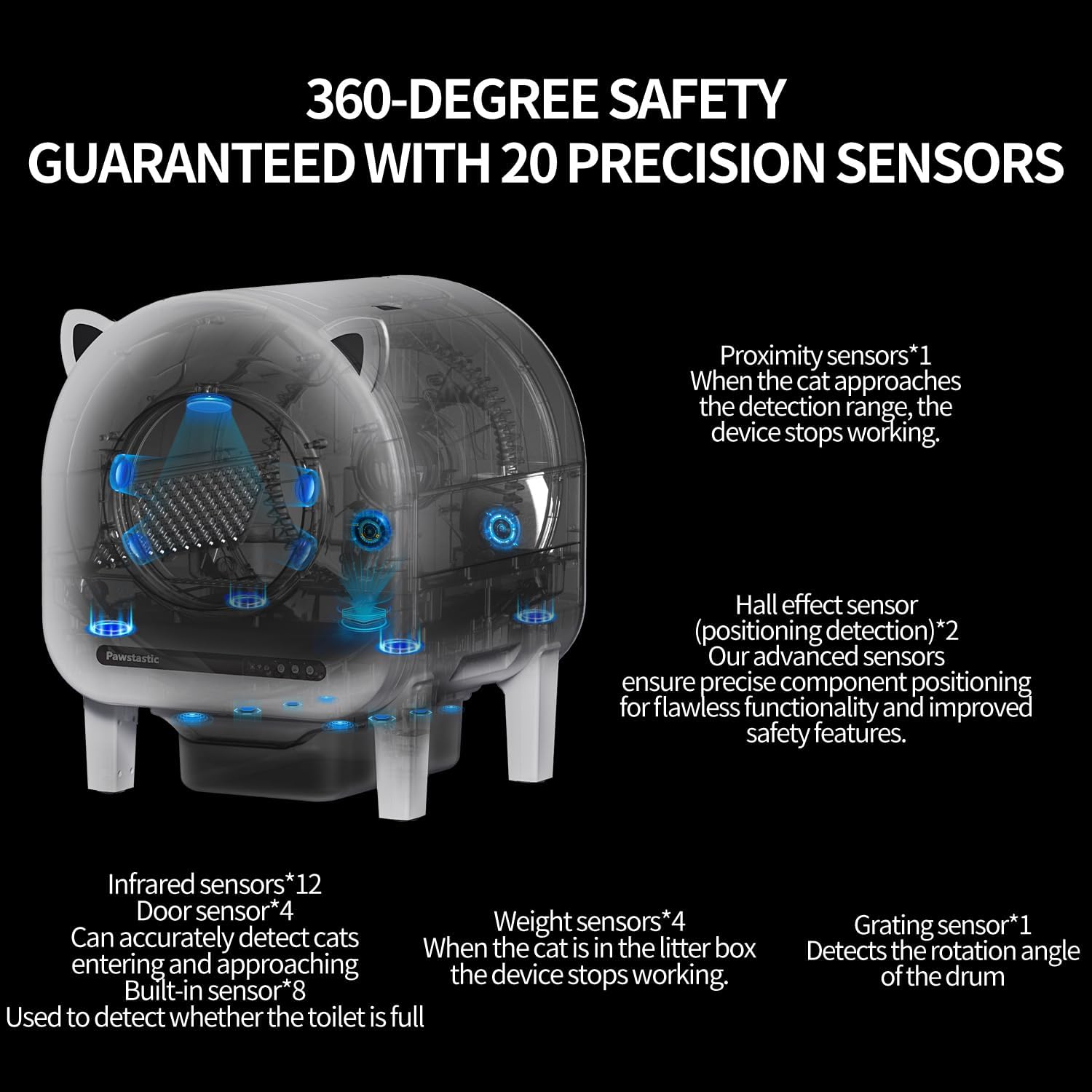
Image 2.1: Illustration of the 20 precision sensors ensuring cat safety.
3. Product Overview
3.1 Components
The Pawstastic ASCL01 Automatic Self-Cleaning Litter Box package includes the following items:
- Pawstastic Paw101 Main Unit
- Cat Litter Mat (1)
- Exhaust Fan (1)
- Power Adapter (1)
- Litter Sifter (1)
- User Manual (1)
- Quick Start Guide (1)
- Support Legs (4)
- Waste Bags (2 rolls)
- DIY Sticker (1)

Image 3.1: Included components of the Pawstastic ASCL01 for a complete setup.
3.2 Key Features
- Large Capacity: 68L cylinder capacity and a 10L waste bin, suitable for multiple cats and extended periods without scooping (up to 15 days).
- Odor Control: Features a built-in exhaust fan and a sealed waste bin to effectively minimize odors.
- Quiet Operation: Operates at a whisper-quiet level of less than 35 dB, ensuring minimal disturbance.
- App Control: Connects via 2.4GHz Wi-Fi to the Tuya app for remote monitoring and control.
- Health Monitoring: Track your cat's weight and toilet habits in real-time through the app.
- Litter Compatibility: Compatible with various types of clumping cat litter, including Bentonite, Tofu, and Mixed litter.
4. Setup
Follow these steps to set up your Pawstastic ASCL01 Automatic Self-Cleaning Litter Box:
- Unpack: Carefully remove all components from the packaging.
- Assemble Legs: Attach the four support legs to the main unit as indicated in the Quick Start Guide.
- Install Waste Bag: Place one of the provided waste bags into the 10L waste bin.
- Add Litter: Fill the litter compartment with your preferred clumping cat litter. Ensure the litter level does not exceed the 'MAX' line.
- Connect Power: Plug the power adapter into the unit and then into a wall outlet.
- Placement: Position the litter box in a suitable location, ensuring the cat litter mat is placed directly in front of the entrance.
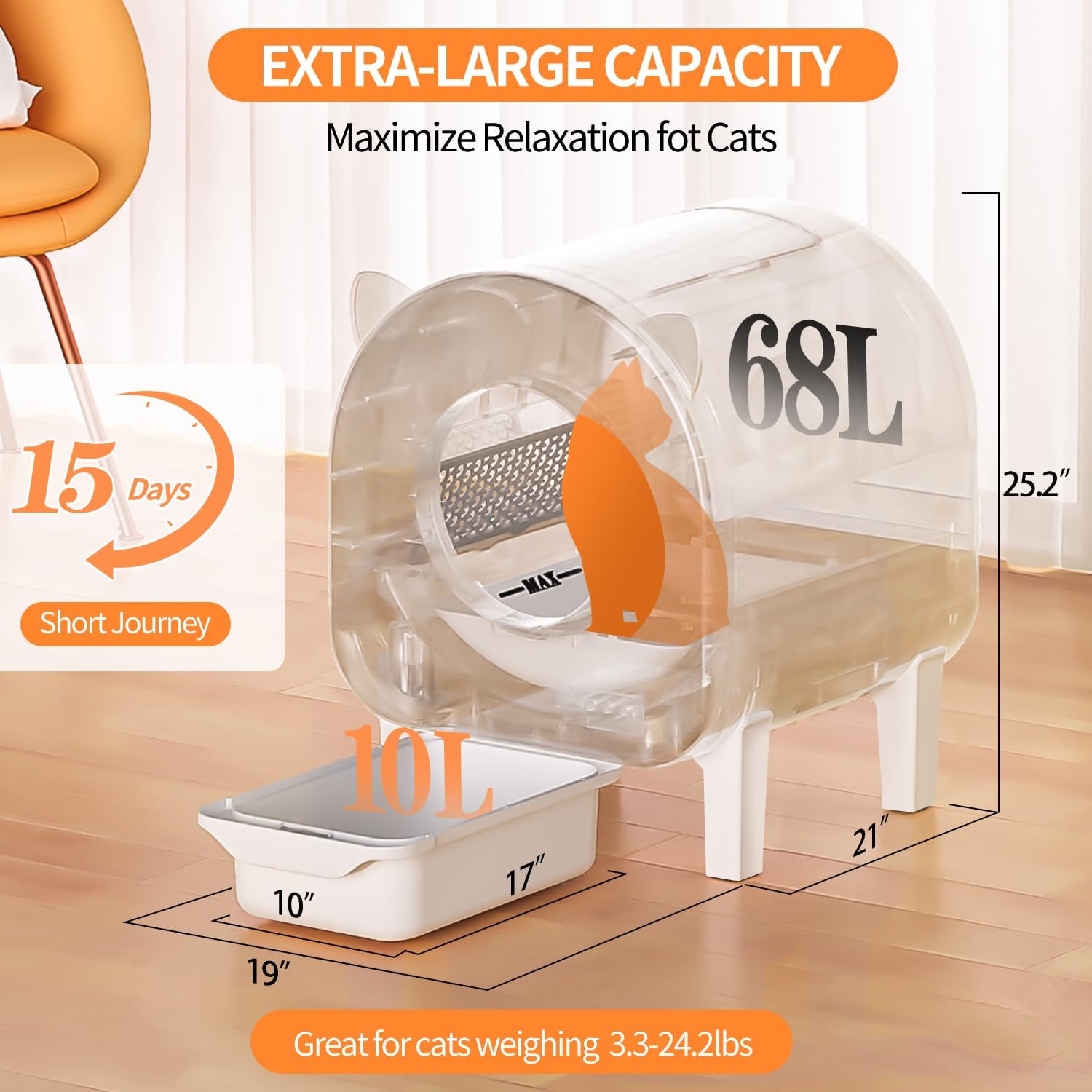
Image 4.1: The spacious 68L interior of the litter box, providing ample space for cats.
5. Operating Instructions
The Pawstastic ASCL01 operates automatically, but you can also control it via the app.
5.1 Automatic Operation
Once powered on, the litter box will detect when your cat uses it. After a set delay (customizable via the app), it will initiate a self-cleaning cycle. The internal mechanism sifts the litter, separating waste into the sealed trash bin below.
Video 5.1: Demonstration of the automatic self-cleaning process, showing waste separation.
5.2 App Control & Monitoring
Download the Tuya app from your device's app store and connect it to your litter box via 2.4GHz Wi-Fi. The app allows you to:
- Initiate cleaning cycles manually.
- Customize cleaning schedules and settings.
- Monitor your cat's usage, weight, and health data.
- Receive notifications for waste bin status and other alerts.

Image 5.2: The Tuya app provides remote control and health monitoring features for your litter box.
6. Maintenance & Cleaning
Regular maintenance ensures optimal performance and hygiene.
6.1 Waste Bin Emptying
The 10L waste bin can hold waste for up to 15 days for a single cat. When the app indicates the bin is full, or you notice it needs emptying:
- Pull out the waste drawer from the bottom of the unit.
- Tie off the waste bag and dispose of it.
- Insert a new waste bag into the bin and slide the drawer back into place.

Image 6.1: The cat litter mat helps keep your home clean by trapping litter from paws.
6.2 Odor Control System
The built-in exhaust fan and blue light sterilization system work to keep the air fresh and eliminate bacteria. Ensure the exhaust fan is clear of obstructions.

Image 6.2: The integrated exhaust fan and blue light system for effective odor and bacteria control.
6.3 Litter Refills
The Pawstastic ASCL01 is compatible with various clumping litters. Regularly check the litter level and refill as needed, ensuring it stays below the 'MAX' indicator.
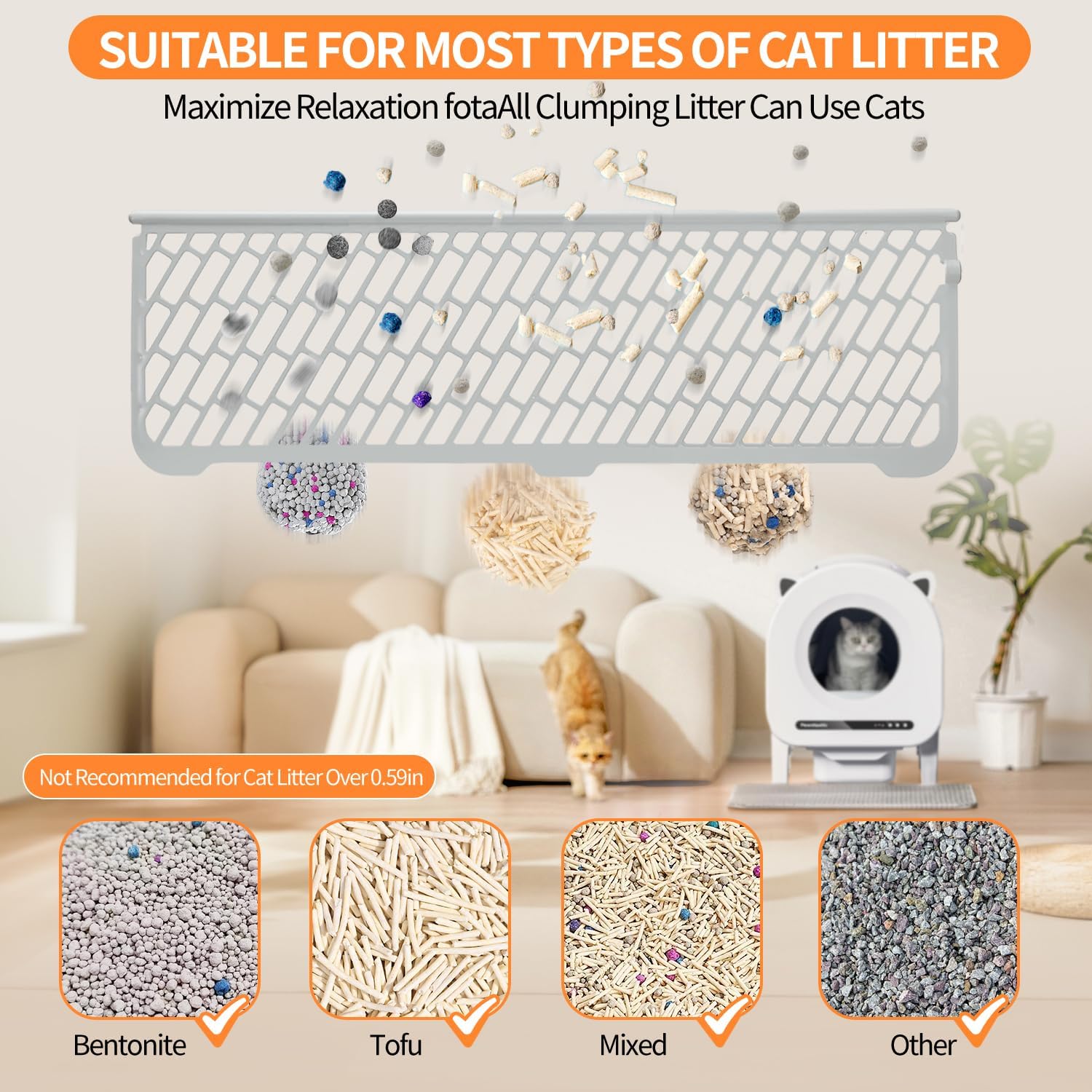
Image 6.3: The litter box supports various clumping litter types for user convenience.
7. Troubleshooting
If you encounter any issues with your Pawstastic ASCL01, please refer to the following common solutions:
- Device Not Responding: Ensure the power adapter is securely connected and the unit is receiving power. Check for any obstructions in the rotating drum.
- Cleaning Cycle Stops Unexpectedly: This is often due to the safety sensors detecting a cat. Ensure no cat is near or inside the unit. Clean sensors if they appear dirty.
- Odor Persistence: Verify the waste bin is properly sealed and emptied regularly. Check if the exhaust fan is operating correctly and not blocked.
- App Connectivity Issues: Ensure your device is connected to a 2.4GHz Wi-Fi network. Restart the app and the litter box if connection problems persist.
- Litter Not Sifting Properly: Check the litter level and type. Ensure it is clumping litter and not exceeding the recommended size (not over 0.59 inches).
For further assistance, please contact Pawstastic customer support.
8. Specifications
| Feature | Specification |
|---|---|
| Model Number | ASCL01 |
| Product Dimensions (L x W x H) | 21" x 19" x 25.2" |
| Weight | 33.95 Pounds |
| Color | White |
| Size | Large/Extra-Large |
| Material | Acrylonitrile Butadiene Styrene (ABS), PP, POM |
| Litter Box Type | Automated Self-Cleaning Litter Box |
| Pet Type | Cat |
| Applicable Cat Weight | 3.3 lbs to 24.2 lbs |
| Cylinder Capacity | 68 L |
| Waste Bin Capacity | 10 L |
| Noise Level | ≤ 35 dB |
| Cleaning Time | Around 4 Minutes |
| Compatible System | Android & iOS (2.4GHz Wi-Fi) |
9. Warranty and Support
For warranty information, please refer to the documentation included with your product or visit the official Pawstastic website. If you require technical assistance, have questions about operation, or need to report an issue, please contact Pawstastic customer support through their official channels. Please have your model number (ASCL01) ready when contacting support.