
TWOFISH M5-pro-e
TWOFISH M5-PRO-E Electric Scooter User Manual
Model: M5-PRO-E
1. Introduction
Thank you for choosing the TWOFISH M5-PRO-E Electric Scooter. This manual provides essential information for the safe operation, maintenance, and troubleshooting of your new electric scooter. Please read this manual thoroughly before your first ride to ensure proper use and to maximize the lifespan of your product.
The TWOFISH M5-PRO-E is designed for urban commuting and leisure rides, featuring a robust design and EEC certification for legal use on public roads.

Image: The TWOFISH M5-PRO-E Electric Scooter, showcasing its overall design and green color.
2. Safety Information
Your safety is paramount. Always adhere to local traffic laws and regulations. This scooter is EEC certified, meaning it meets European safety standards for road use. However, specific local regulations regarding helmet use, insurance, and age limits may apply.
- Helmet Use: Always wear a certified helmet when riding the scooter.
- Pre-Ride Check: Before each ride, inspect the brakes, tires, and all components to ensure they are in good working order.
- Weight Limit: Do not exceed the maximum load capacity of 120 kg.
- Road Conditions: Exercise caution on wet, uneven, or slippery surfaces.
- Visibility: Ensure the headlight and reflectors are clean and functional, especially when riding at night.
- Insurance: Verify if specific insurance is required for electric scooters in your region.
3. Setup and Assembly
Your TWOFISH M5-PRO-E Electric Scooter comes partially assembled. Follow these steps for initial setup:
- Unpacking: Carefully remove all components from the packaging. Verify that all included items are present:
- Electric Scooter × 1
- Charger × 1
- User Manual × 1
- Phone Holder × 1
- Bicycle Lock × 1
- Tool Bag × 1
- Handlebar Installation: Securely attach the handlebars to the stem. Ensure all bolts are tightened.
- Seat Adjustment: Adjust the seat height for comfortable riding. Note that the seat has limited adjustability.
- Initial Charge: Before first use, fully charge the scooter's battery. Connect the charger to the charging port and then to a power outlet. The charging indicator on the charger will change when fully charged. Charging typically takes 6-8 hours.
- Tire Inflation: Check and inflate tires to the recommended pressure, if necessary.
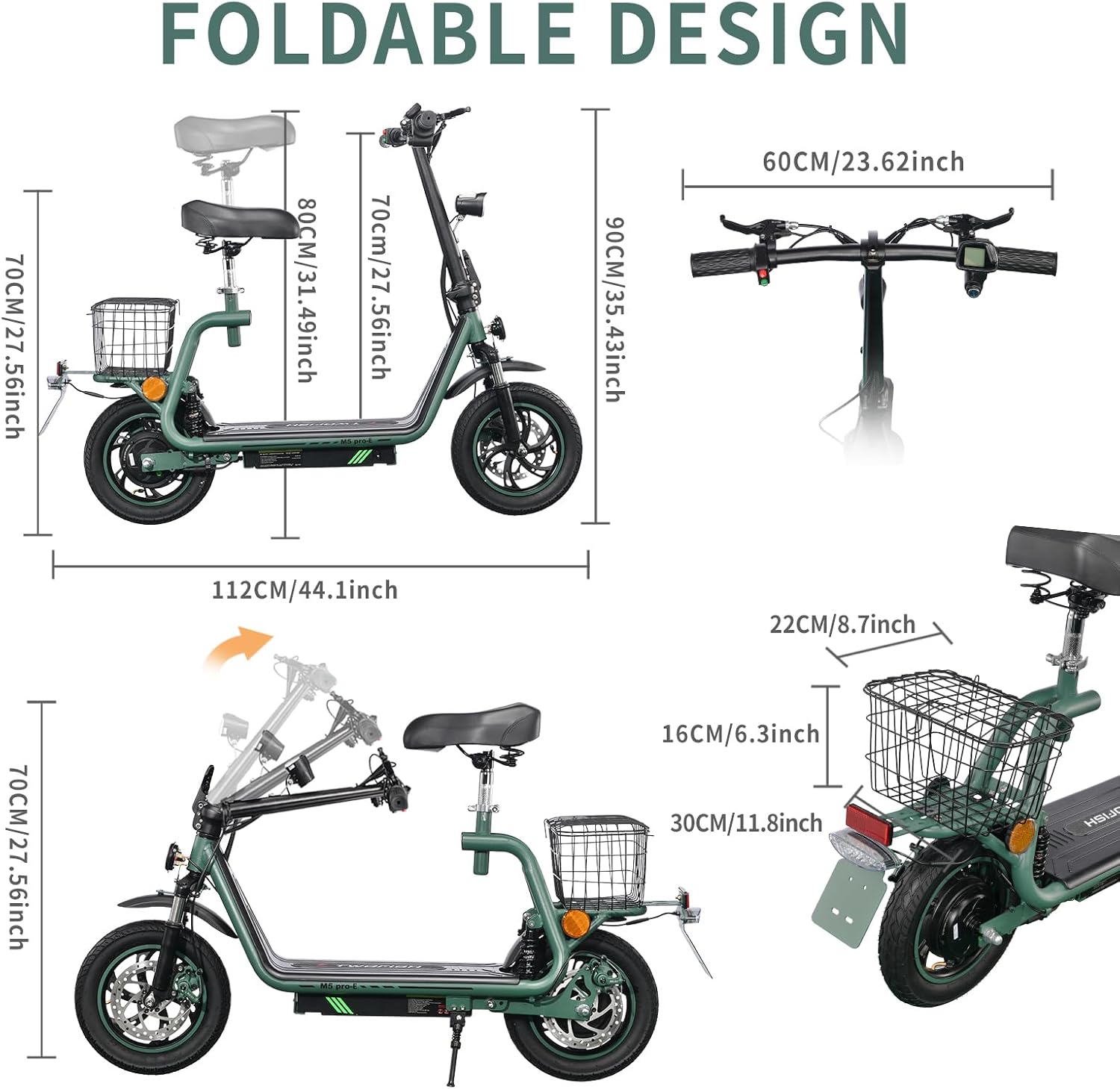
Image: Illustration of the scooter's foldable design and key dimensions for storage and transport.
4. Operating Instructions
4.1 Powering On/Off
To power on the scooter, press and hold the power button on the LED display. To power off, press and hold the same button until the display turns off.
4.2 LED Display Functions
The integrated LED display provides real-time information:
- Speed: Shows current riding speed.
- Battery Level: Indicates remaining battery charge.
- Mileage: Displays total distance traveled.
- Assist Level: Shows the current speed mode.

Image: Close-up of the LED display, illustrating its various indicators for speed, battery, and distance.
4.3 Speed Modes
The scooter features three adjustable speed modes to suit different riding conditions:
- Mode 1: Approximately 20 km/h
- Mode 2: Approximately 30 km/h
- Mode 3: Approximately 40 km/h (Maximum Speed)
Switch between modes using the designated button on the display or handlebar controls.

Image: Visual representation of the scooter's key performance metrics, including range, motor power, and speed settings.
4.4 Braking System
The TWOFISH M5-PRO-E is equipped with dual-disc brakes (front and rear) for reliable stopping power. Always apply both brakes simultaneously for optimal braking performance and safety.

Image: Detailed view of the scooter's robust dual-disc braking system and durable 12-inch tires.
4.5 Suspension and Tires
The scooter features full suspension with front and rear shock absorbers, providing a comfortable ride even on uneven surfaces. The large 12-inch air tires offer excellent grip and stability.

Image: Illustration highlighting the scooter's front and rear double suspension for enhanced ride comfort.
4.6 Additional Features
- Foldable Design: The scooter can be folded for easier storage and transport.
- Removable Basket: A large, removable basket is included for carrying personal items.
- Removable Seat: The seat can be removed if preferred for standing operation.
- Headlight and Reflectors: Equipped with a bright LED headlight and reflectors for improved visibility.
- Dual Rearview Mirrors: For enhanced situational awareness.

Image: Overview of various practical features such as the foldable frame, storage basket, and lighting system.
5. Maintenance
Regular maintenance ensures the longevity and safe operation of your scooter.
- Battery Care:
- Charge the battery regularly, even if not in use, to maintain its health.
- Avoid completely draining the battery before recharging.
- Store the scooter in a cool, dry place when not in use for extended periods.
- Tire Maintenance:
- Check tire pressure monthly and inflate to the recommended PSI (refer to tire sidewall for details).
- Inspect tires for wear, punctures, or damage.
- Brake Inspection:
- Regularly check brake pads and discs for wear. Replace if necessary.
- Ensure brake levers provide firm and responsive braking. Adjust if they feel loose.
- Cleaning:
- Clean the scooter with a damp cloth. Do not use high-pressure water jets or corrosive cleaners.
- Avoid getting water into electrical components.
- General Check: Periodically check all bolts and fasteners for tightness.
6. Troubleshooting
This section addresses common issues you might encounter.
| Problem | Possible Cause | Solution |
|---|---|---|
| Scooter does not power on. | Low battery; loose connection; power button issue. | Charge the battery fully. Check all cable connections. Ensure power button is pressed correctly. |
| Reduced range or power. | Under-inflated tires; battery degradation; heavy load; uphill riding. | Check tire pressure. Ensure battery is fully charged. Reduce load. Note that performance decreases on inclines. |
| Brakes squeak or feel weak. | Worn brake pads; dirty discs; loose brake cable. | Inspect and clean brake discs. Check brake pads for wear and replace if necessary. Adjust brake cable tension. |
| Display shows incorrect speed/mileage. | Sensor issue; calibration needed. | Restart the scooter. If problem persists, contact customer support. |
| Handlebar grips feel sticky. | Material degradation. | Clean grips with a mild soap solution. Consider using grip covers if discomfort persists. |
If you encounter issues not listed here or if solutions do not resolve the problem, please contact TWOFISH customer support.
7. Specifications
Key technical specifications for the TWOFISH M5-PRO-E Electric Scooter:
| Feature | Detail |
|---|---|
| Model Name | M5-PRO-E |
| Brand | TWOFISH |
| Motor Power | 500W |
| Battery | 48V 13Ah Lithium-ion |
| Max Range | Up to 30 km |
| Max Speed | Up to 40 km/h (3 speed modes) |
| Max Load Capacity | 120 kg |
| Tire Size | 12 inch air tires |
| Brake Type | Dual-disc brakes (front and rear) |
| Suspension | Full suspension (front and rear shock absorbers) |
| Frame Material | Alloy Steel / Carbon Steel |
| Dimensions (L×W×H) | 112 × 60 × 93 cm |
| Net Weight | 25 kg |
| Certification | EEC certified for road use |

Image: Internal view illustrating the 48V 13Ah battery and 500W motor, highlighting long range and high performance.
8. Warranty and Support
For warranty information, please refer to the documentation provided with your purchase or contact the seller directly. TWOFISH is committed to providing quality products and customer satisfaction.
If you have any questions, require technical assistance, or need to report an issue, please contact TWOFISH customer support. They are generally responsive and helpful.
Contact Information: Please refer to your purchase receipt or the official TWOFISH website for the most current contact details.
Related documentsM5-pro-e


Ask a question about this manual
Ask about setup, troubleshooting, compatibility, parts, safety, or missing instructions. Manuals+ will review the question and use this page’s manual context to help answer it.