
Jocoevol C-1627
Jocoevol Queen Size Floating Bed Frame User Manual
Model: C-1627
Introduction
Thank you for choosing the Jocoevol Queen Size Floating Bed Frame. This bed frame features a unique visual floating design with integrated LED lights, an ergonomic hidden storage headboard, and a convenient charging station. This manual provides detailed instructions for assembly, operation, maintenance, and troubleshooting to ensure you get the most out of your new bed frame.
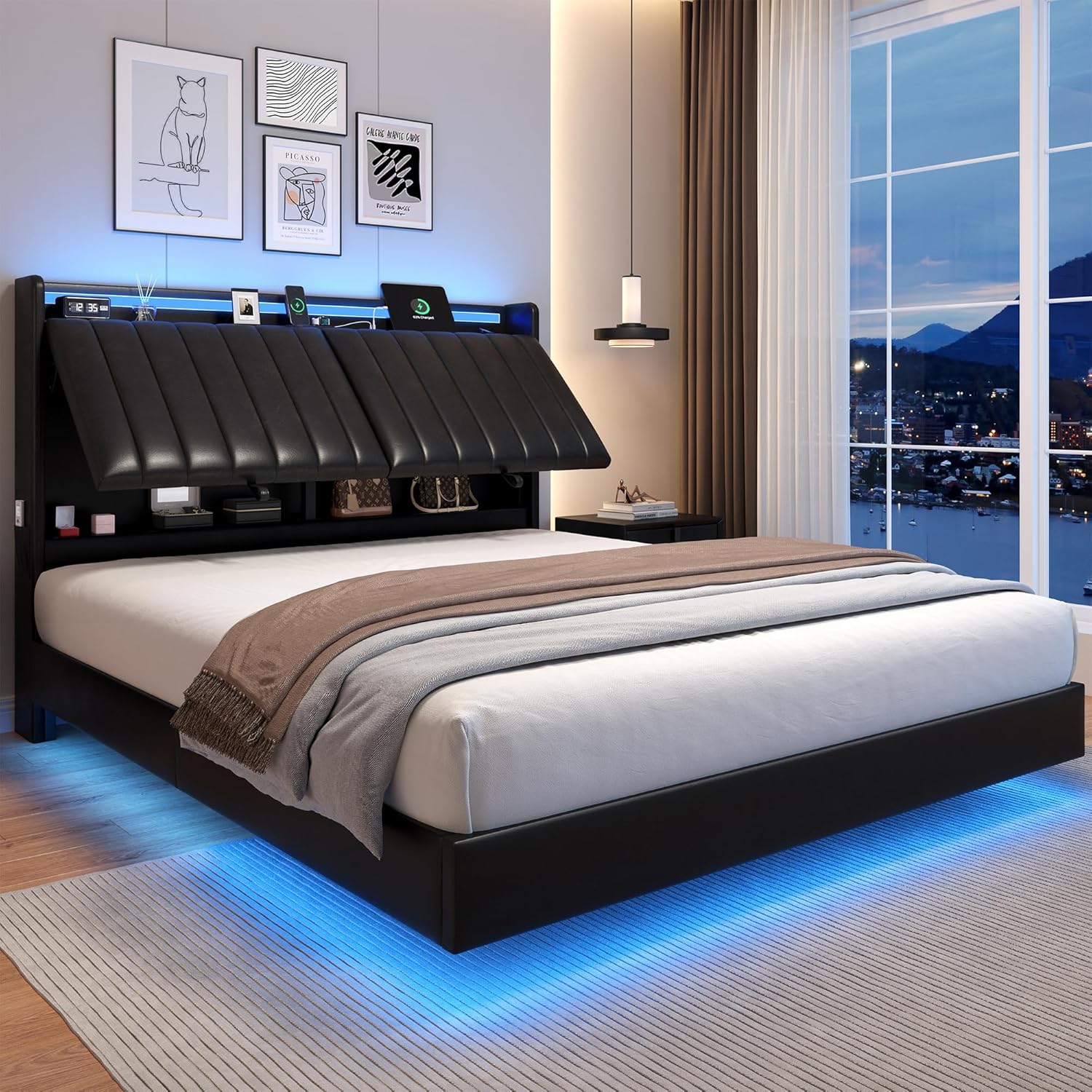
Image: The Jocoevol Queen Size Floating Bed Frame, showcasing its modern design with integrated LED lighting and the ergonomic headboard with hidden storage.
Safety Information
Please read and understand all safety warnings and instructions before assembly and use. Failure to follow these instructions may result in injury or damage to the product.
- Avoid overloading the bed frame. The maximum weight capacity is 1000 lbs.
- Ensure all bolts are securely tightened during assembly and periodically check for tightness.
- Keep small parts and packaging materials away from children to prevent choking hazards.
- Do not stand or jump on the bed frame.
- Use only the recommended mattress thickness of 8-10 inches (not exceeding 12 inches) for optimal performance and safety.
Key Features
- Visual Floating Design: Unique hidden bed foot design combined with three-side light strips under the bed creates a floating illusion.
- Adjustable Ergonomic Headboard: Crafted with 2-inch thick high-density foam and premium PU leather, offering three adjustable angles for optimal comfort (15, 30, 45 degrees).
- Multi-Function RGB LED Bed: Built-in smart RGB LED light strip in the headboard (housed in a transparent aluminum casing) controllable via buttons, app, or remote. Offers over 16 million colors, 20+ preset lighting effects, and intelligent music sync mode.
- Storage Headboard with Charging Station: Features a 6.7-inch deep open shelf and 15.7-inch high hidden private storage space. Includes 2 standard outlets, 1 USB port, and 1 Type-C port. Side storage pockets are also included.
- Noise-Free Design: Silent sponge strips on the middle beam reduce friction and prevent squeaking.
- Sturdy Frame Construction: Stable metal framework and closely arranged wood slats support up to 1000 lbs. Features 9 metal legs, including 3 adjustable ones for stability on uneven surfaces.
- Easy Assembly: Designed for straightforward assembly with clear instructions, labeled parts, and all necessary tools included.

Image: The adjustable headboard shown at different angles, highlighting its ergonomic design for various activities like reading or watching TV.

Image: A close-up of the headboard's storage compartments and integrated charging station with AC outlets, USB, and Type-C ports.
Specifications
| Attribute | Detail |
|---|---|
| Size | Queen |
| Product Dimensions | 87.4"L x 62.2"W x 41.3"H |
| Color | Black |
| Finish Type | Upholstered |
| Compatible Mattress Size | Queen (Recommended 8-10" thickness, max 12") |
| Weight Capacity | Up to 1000 lbs |
| Item Weight | 114 pounds |
| Assembly Required | Yes |
| Special Features | Adjustable Ergonomic Headboard, Floating Design, No Box Spring Needed, Smart RGB LED Light, Storage Headboard with Charging Station |

Image: Detailed dimensions of the Queen Size Floating Bed Frame, including length, width, and height, along with recommended mattress thickness.
Assembly Instructions
Please follow these steps carefully. It is recommended to assemble the bed frame with two people. Ensure all parts are present before beginning.
Assembly Video Guide
Video: An official assembly guide for the Jocoevol Floating Bed Frame, demonstrating each step of the construction process.
Step-by-Step Assembly
- Prepare the Headboard Components: Begin by attaching the charging station to the designated slot on the headboard frame. Ensure all screws are finger-tightened initially.
- Assemble the Headboard Frame: Connect the main headboard sections and secure them with bolts. Do not fully tighten yet.
- Attach Headboard Support Legs: Fasten the vertical support legs to the headboard frame. Tighten these bolts to 80% capacity.
- Install Headboard Panels: Secure the upholstered headboard panels to the frame using the provided hardware.
- Connect Headboard Crossbar: Attach the lower crossbar to the headboard legs, ensuring it faces outward as indicated.
- Secure Back Panel: Slide and secure the back panel into place on the headboard.
- Assemble Side Rails: Connect the two sections of each side rail and attach the support brackets.
- Connect Frame Sections: Join the headboard assembly to the side rails, and then connect the footboard to the side rails. Tighten all bolts to 100% once the full frame is assembled.
- Install Center Support System: Assemble the central support beams and legs within the bed frame.
- Place Slats: Lay the wooden slats across the bed frame, ensuring they are evenly spaced and securely seated in their holders.
- Install LED Light Strip: Carefully peel the adhesive backing and stick the LED light strip along the bottom edge of the bed frame, as indicated in the diagram. Route the cable neatly and secure it with the provided clips.

Image: A close-up view of the innovative hidden support legs, designed to prevent accidental bumps and enhance the floating aesthetic.

Image: The bed frame illuminated by its under-bed LED lights, creating the visual floating effect.
Operating Instructions
LED Lights Operation
The integrated RGB LED lights can be controlled using the included remote control, a dedicated mobile application, or the buttons located on the headboard. Refer to the separate LED light controller manual for detailed instructions on pairing with the app and using various lighting modes (e.g., color selection, brightness adjustment, music sync, timing functions).

Image: The bed frame with its LED lights displaying various colors, illustrating the multiple control options including remote and app.
Charging Station Usage
The headboard features a built-in charging station with 2 standard AC outlets, 1 USB port, and 1 Type-C port. Simply plug your devices into the appropriate ports for convenient bedside charging. Ensure the bed frame is connected to a power source for the charging station to function.
Maintenance
- Cleaning: Wipe the upholstered surfaces with a soft, damp cloth. For the metal frame, use a dry cloth. Avoid harsh chemicals or abrasive cleaners.
- Bolt Tightness: Periodically check all bolts and screws to ensure they remain tight. Re-tighten as necessary to maintain stability and prevent squeaking.
- LED Lights: If the LED lights malfunction, check the power connection and ensure the remote control batteries are not depleted. If issues persist, contact customer support.
- Charging Station: Keep the charging ports free of dust and debris. Do not force plugs into the ports.
Troubleshooting
| Problem | Possible Cause | Solution |
|---|---|---|
| Bed frame squeaks | Loose bolts; friction between metal parts. | Tighten all assembly bolts. Ensure silent sponge strips are correctly installed on the middle beam. |
| LED lights not working | Power connection issue; remote battery low; light strip damage. | Check power plug. Replace remote batteries. Inspect light strip for visible damage. Contact support if problem persists. |
| Charging station not working | No power to the bed frame; device not properly connected. | Ensure bed frame is plugged into a working outlet. Check device cable connection. |
| Headboard does not adjust smoothly | Mechanism obstruction; loose bolts. | Check for any objects obstructing the adjustment mechanism. Ensure all headboard assembly bolts are tightened. |
Warranty and Support
For any questions or assistance with your Jocoevol bed frame, please contact our dedicated support team. We aim to respond within 24 hours.
Protection plans are available for extended coverage:
- 2-Year Protection Plan
- 3-Year Protection Plan
- Complete Protect: One plan covers all eligible past and future purchases (monthly billing option available).
This product is eligible for 30-day easy returns through Amazon.com.
Ask a question about this manual
Ask about setup, troubleshooting, compatibility, parts, safety, or missing instructions. Manuals+ will review the question and use this page’s manual context to help answer it.