
Introduction
Thank you for choosing the Blukar LED Headlamp K9129. This manual provides detailed instructions for the safe and efficient use of your new headlamp. Please read this manual thoroughly before operation and retain it for future reference.

Image: The Blukar LED Headlamp K9129, featuring a black body with a red and black adjustable headband. The main light is illuminated.
Product Overview
Key Features
- Dual Color Temperatures: Features both super bright white light (XPG) and warm white light (COB) options.
- Multiple Lighting Modes: Offers 12 distinct lighting modes, including XPG White, XPG Warm, COB White, XPG+COB White, COB Red, and COB Red Strobe.
- Stepless Dimming: Adjustable brightness from 100% to 30% for all modes.
- Motion Sensor Control: Hands-free operation with a wave of the hand.
- Rechargeable Battery: Built-in 1200mAh Lithium Polymer battery with USB-C charging.
- Long Runtime: Up to 30 hours in soft light mode, 4 hours in ultra-bright mode.
- Comfortable Design: Lightweight (84g), adjustable elastic headband, and 45° tilt capability.
- Durable & Waterproof: IPX5 water resistance for use in various weather conditions.
Components
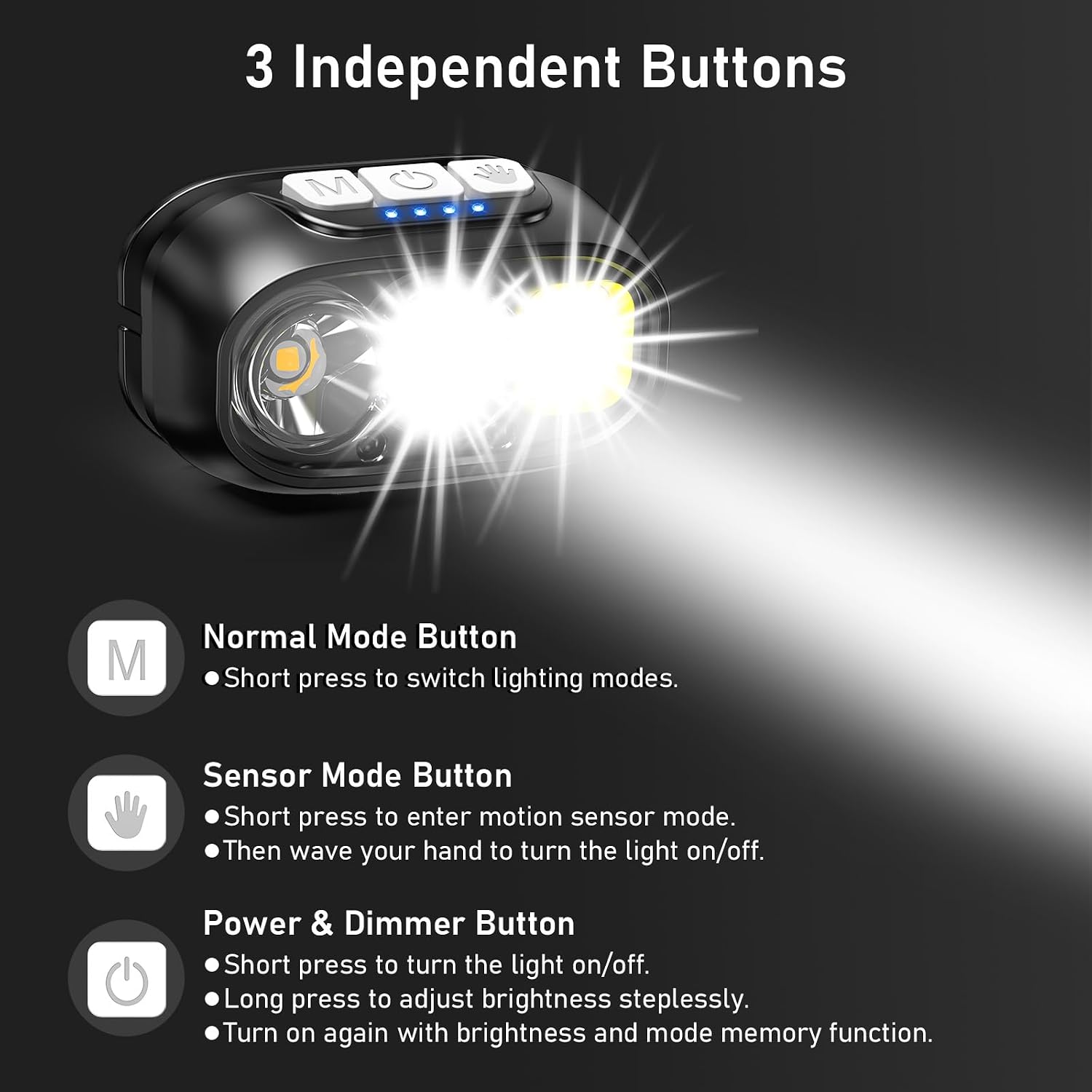
Image: Close-up of the Blukar headlamp showing the three independent control buttons and battery indicator lights.
- Normal Mode Button (M): Short press to cycle through lighting modes.
- Sensor Mode Button (Hand Icon): Short press to activate motion sensor mode.
- Power & Dimmer Button (Power Icon): Short press to turn the light on/off. Long press for stepless dimming.
- Battery Indicator Lights: Four blue LEDs indicate remaining power.
- USB-C Charging Port: Located on the bottom, protected by a silicone flap.
- Adjustable Headband: Elastic and breathable for comfortable wear.
- Helmet Clips: Included for secure attachment to helmets.
Setup
Charging the Headlamp
Before first use, fully charge the headlamp.
- Locate the USB-C charging port on the bottom of the headlamp, protected by a silicone flap.
- Connect the included USB-C charging cable to the port.
- Connect the other end of the USB cable to a compatible USB power source (e.g., AC charger, power bank, computer USB port).
- The battery indicator lights will illuminate and blink during charging, indicating the current charge level.
- Charging typically takes 2-3 hours. All four indicator lights will be solid blue when fully charged.
- Once charging is complete, disconnect the cable and securely close the silicone flap to maintain IPX5 water resistance.

Image: Illustration showing the Blukar headlamp being charged via USB-C from various power sources like an AC adapter, power bank, and computer.
Wearing the Headlamp
- Adjust the elastic headband to fit comfortably and securely around your head.
- The headlamp unit can be tilted up or down by 45° to direct the light as needed.
- For helmet use, attach the included helmet clips to secure the headband to your helmet.

Image: Diagram illustrating the comfortable features of the Blukar headlamp, including the sponge pad, breathable design, adjustable headband, 45° tilt, and compact size.
Operating Instructions
Power On/Off and Dimming
- To Turn On/Off: Short press the Power & Dimmer Button (power icon).
- To Adjust Brightness (Stepless Dimming): While the light is on, long press the Power & Dimmer Button. The brightness will cycle between 100% and 30%. Release the button at your desired brightness level. The headlamp will remember the last brightness setting for each mode.
Switching Lighting Modes
Short press the Normal Mode Button (M) to cycle through the following 6 standard lighting modes:
- XPG White Light (Spotlight)
- XPG Warm Light (Spotlight)
- COB White Light (Floodlight)
- XPG + COB White Light (Spotlight + Floodlight)
- COB Red Light (Steady)
- COB Red Light Strobe (Flashing)

Image: Visual representation of the 12 lighting modes available on the Blukar headlamp, including various white, warm, and red light combinations, along with an illustration of the stepless dimming function.
Motion Sensor Mode
The headlamp features a motion sensor for hands-free operation.
- To Activate Sensor Mode: Short press the Sensor Mode Button (hand icon). A green indicator light will turn on, confirming sensor mode is active.
- To Use Sensor Control: Wave your hand within 15cm (approximately 6 inches) in front of the headlamp to turn the light on or off.
- To Deactivate Sensor Mode: Short press the Sensor Mode Button again. The green indicator light will turn off.
Note: If the light turns off unexpectedly, it may be reacting to nearby movement in sensor mode. Deactivate sensor mode if not needed for specific tasks.

Image: A person demonstrating the motion sensor mode of the Blukar headlamp, waving a hand in front of it to control the light while working on a car engine.
Light Sources and Beam Types
The Blukar K9129 headlamp offers versatile lighting options:
- White Light (XPG): Suitable for general illumination and tasks requiring clear visibility.
- Warm Light (COB): Ideal for reducing eye strain, especially in foggy conditions or for extended use.
- Red Light (COB): Preserves night vision and is useful for signaling or emergency situations.
- Spotlight: Provides a focused beam for long-distance illumination (up to 150m/500ft).
- Floodlight: Offers a wider, more diffused beam for close-range area lighting.

Image: Three scenarios demonstrating the different light sources: white light for daily tasks, warm light for snow/fog, and red light for night fishing or warnings.

Image: An illustration showing the headlamp's super bright output illuminating up to 150 meters (500 feet), with examples of its focused spotlight (60° beam) and wide floodlight (120° beam).
Maintenance
- Cleaning: Wipe the headlamp body with a soft, damp cloth. Do not use abrasive cleaners or solvents.
- Headband: The elastic headband is removable and washable. Hand wash with mild soap and water, then air dry.
- Storage: Store the headlamp in a cool, dry place away from direct sunlight when not in use. For long-term storage, charge the battery every 3-6 months to maintain its lifespan.
- Water Resistance: The headlamp is IPX5 waterproof, meaning it can resist water splashes from all angles. Do not submerge the headlamp in water. Ensure the USB-C port cover is securely closed to maintain water resistance.

Image: The Blukar headlamp being splashed with water, demonstrating its IPX5 waterproof capability.
Troubleshooting
| Problem | Possible Cause | Solution |
|---|---|---|
| Headlamp does not turn on. | Battery is depleted. | Charge the headlamp using the provided USB-C cable. |
| Light turns off unexpectedly in sensor mode. | Accidental activation of the motion sensor by nearby objects or movements. | Deactivate sensor mode by pressing the Sensor Mode Button if not required for the current task. |
| Cannot adjust brightness. | Not using the correct button or method. | Ensure the light is on, then long press the Power & Dimmer Button to activate stepless dimming. |
| Water ingress despite IPX5 rating. | USB-C port cover not securely closed or headlamp submerged. | Ensure the USB-C port cover is fully sealed. Avoid submerging the headlamp in water. |
Specifications
| Feature | Detail |
|---|---|
| Model Number | K9129 |
| Brand | Blukar |
| Color | Black |
| Material | ABS |
| Product Dimensions | 2.61"D x 1.61"W x 1.38"H (6.64cm x 4.10cm x 3.51cm) |
| Item Weight | 84 Grams (2.96 ounces) |
| Battery Type | Lithium Polymer |
| Battery Capacity | 1200mAh |
| Charging Time | 2-3 hours (via USB-C) |
| Runtime | Up to 4 hours (ultra-bright mode), up to 30 hours (soft light mode) |
| Water Resistance | IPX5 |
| Included Components | Headlamp, USB-C Charging Cable, Helmet Clips |
Safety Information
Please observe the following safety precautions:
- Keep away from fire, flammable gases, corrosive liquids, or extreme temperatures.
- Avoid damaging, cutting, disassembling, or replacing parts of the headlamp.
- Do not look directly into the light source to prevent eye injury.
- This product contains a Lithium Polymer battery. Dispose of it responsibly according to local regulations.

Image: The back of the Blukar headlamp packaging, displaying safety warnings in multiple languages.
Warranty and Support
The Blukar LED Headlamp K9129 comes with a 3-year warranty.
Image: A shield icon indicating a 3-year warranty for the Blukar product.
For any issues or support inquiries, please contact us:
- Email: support@blukar.com
- Website: www.blukar.com


