
1. Introduction
Thank you for choosing the Bellemave Queen Size Wooden Bunk Bed. This manual provides essential information for the safe assembly, operation, and maintenance of your new bunk bed. This queen-over-queen bunk bed features built-in shelves, a storage box, an LED light, and a USB charging station, designed to maximize space and convenience in your bedroom.
2. Safety Information
WARNING: Failure to follow these safety instructions could result in serious injury.
- Exercise caution when using the ladder to access the upper bed.
- Do not exceed the maximum weight capacity of 650 lbs per bed.
- Ensure all connections are securely fastened during assembly and periodically check for tightness.
- Only use mattresses that comply with the recommended dimensions for queen-size beds.
- The top bunk is not suitable for children under six years of age.
- Always use the guardrails on the upper bunk.
- Do not attach or hang items on any part of the bunk bed that are not designed for use with the bed, for example, but not limited to, hooks, belts, or ropes.
3. Package Contents
Your Bellemave Queen Size Wooden Bunk Bed is shipped in two separate packages. Please ensure you have received both packages and all components are present before beginning assembly. Refer to the detailed assembly instructions included with your product for a complete list of parts and hardware.
Typical components include:
- Wooden bed frame components (headboards, footboards, side rails, slats)
- Ladder
- Guardrails
- Built-in shelves and storage box components
- LED light unit
- USB charging station module
- Metal clothes hooks
- Assembly hardware (screws, bolts, nuts, etc.)
- Assembly tools (usually an Allen wrench)
4. Setup and Assembly
Assembly of the Bellemave Queen Size Wooden Bunk Bed requires two adults and approximately 2-3 hours. Detailed step-by-step assembly instructions with diagrams are provided in the packaging. Please follow these instructions carefully to ensure proper and safe construction.
Key Assembly Points:
- Lay out all parts and hardware before starting.
- Do not fully tighten all bolts until the entire bed frame is assembled.
- Ensure the ladder is securely attached.
- Verify that all guardrails are correctly installed on the upper bunk.
- Connect the LED light and USB charging station according to the electrical connection instructions provided.

Figure 4.1: Bellemave Queen Size Wooden Bunk Bed with integrated features.

Figure 4.2: The Bellemave bunk bed in a bedroom setting, highlighting its storage and desk features.
5. Operating Instructions
5.1 LED Light
The integrated LED light is located under the storage box on the upper bed, providing illumination for the lower bed area. To operate the LED light, locate the switch (typically a small button or toggle) near the light fixture. Press the switch to turn the light on or off.
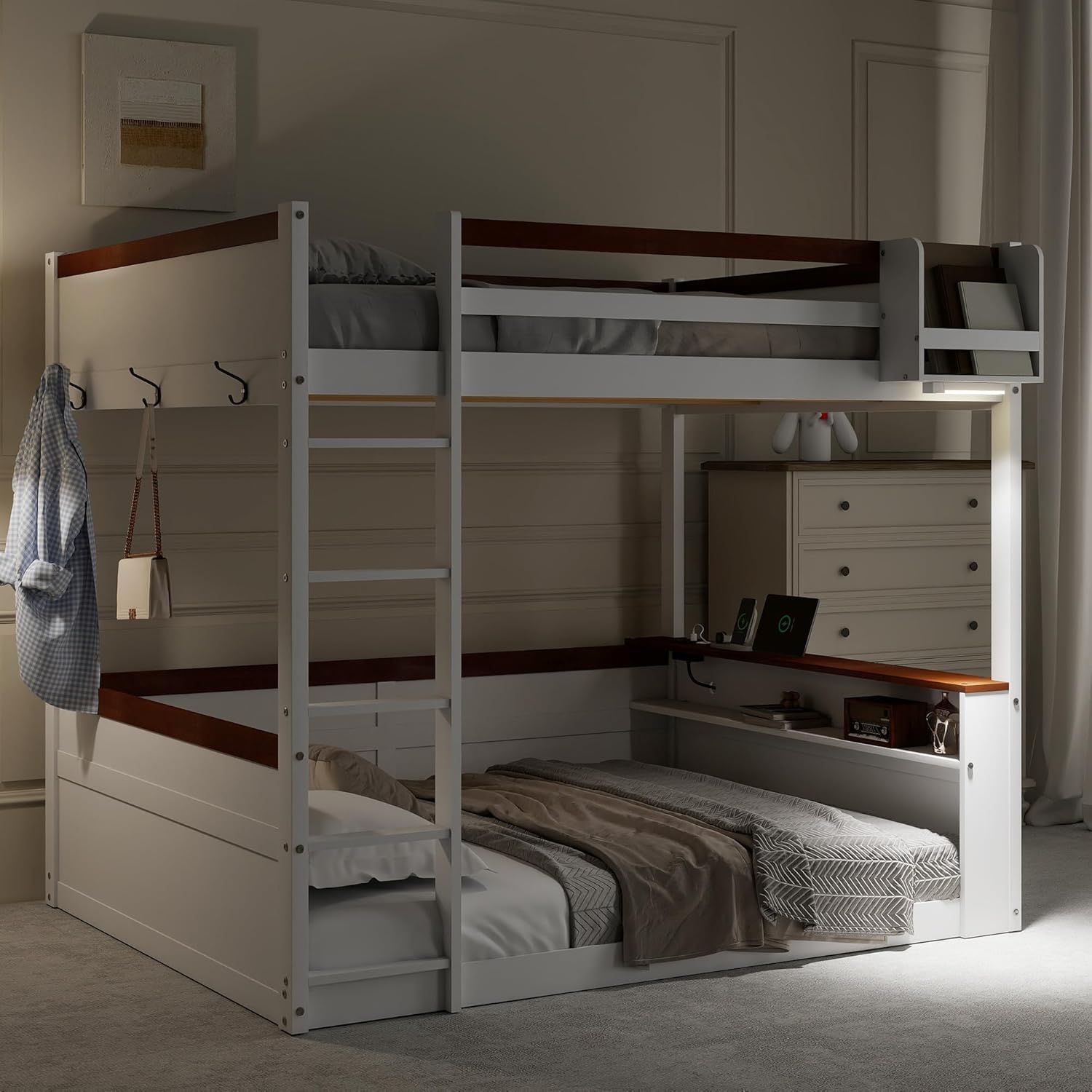
Figure 5.1: The bunk bed illuminated by its integrated LED light, showcasing the lower bed's desk area.
5.2 USB Charging Station
The USB charging station is conveniently located on the lower bed's storage shelf. It allows you to charge electronic devices such as smartphones and tablets. Simply plug your device's USB charging cable into the available USB port. Ensure the bunk bed is connected to a power source for the charging station to function.

Figure 5.2: Detailed view of the sturdy metal clothes hooks, LED light, and USB charging station.
6. Maintenance
Regular maintenance will help prolong the life and appearance of your bunk bed.
- Cleaning: Wipe down wooden surfaces with a soft, damp cloth. Avoid harsh chemicals or abrasive cleaners that may damage the finish.
- Hardware Check: Periodically check all bolts, screws, and connections to ensure they remain tight. Re-tighten as necessary to maintain stability and safety.
- Wood Care: Protect the wood from direct sunlight and extreme temperature changes to prevent warping or cracking.
- Electrical Components: Ensure the LED light and USB charging station cables are not pinched or damaged. If any electrical component malfunctions, discontinue use and contact support.
7. Troubleshooting
If you encounter any issues with your Bellemave bunk bed, refer to the following common problems and solutions:
- Bed feels wobbly: Check all assembly hardware. Ensure every bolt and screw is securely tightened.
- LED light not working: Verify that the bed's power connection is secure and the wall outlet is functional. Check the light switch for proper operation.
- USB charging station not working: Ensure the bed is plugged into a live power outlet. Try a different USB cable or device to rule out cable/device issues.
- Missing parts: If you find any parts missing during assembly, please contact customer support immediately with your purchase details.
8. Specifications

Figure 8.1: Dimensions of the Bellemave Queen Size Wooden Bunk Bed.
| Feature | Detail |
|---|---|
| Size | Queen over Queen |
| Product Dimensions | 82.7"L x 63.6"W x 63.2"H |
| Material | Solid Pine Wood and MDF |
| Color | White |
| Weight Capacity (per bed) | 650 lbs |
| Special Features | Built-in Shelves, Storage Box, LED Light, USB Charging Station, Metal Clothes Hooks |
| Assembly Required | Yes (Detailed instructions included) |
| Compatible Mattress Size | Queen (No Box Spring Needed) |
| Item Weight | 45.2 pounds (shipping weight will be higher) |
9. Warranty and Support
For any questions, concerns, or assistance with assembly or product use, please contact Bellemave customer support. While specific warranty details are not provided in this manual, please retain your proof of purchase for any warranty claims.
Customer Support Email: US-VC@bellemavehome.com


