
1. Introduction
This instruction manual provides detailed guidance for assembling and operating your ROBOTIME DIY Miniature House Kit, specifically the Christmas Candy Stand model RBT-DS043. This kit is designed for individuals aged 14 and up, offering an engaging building experience to create a festive miniature display.
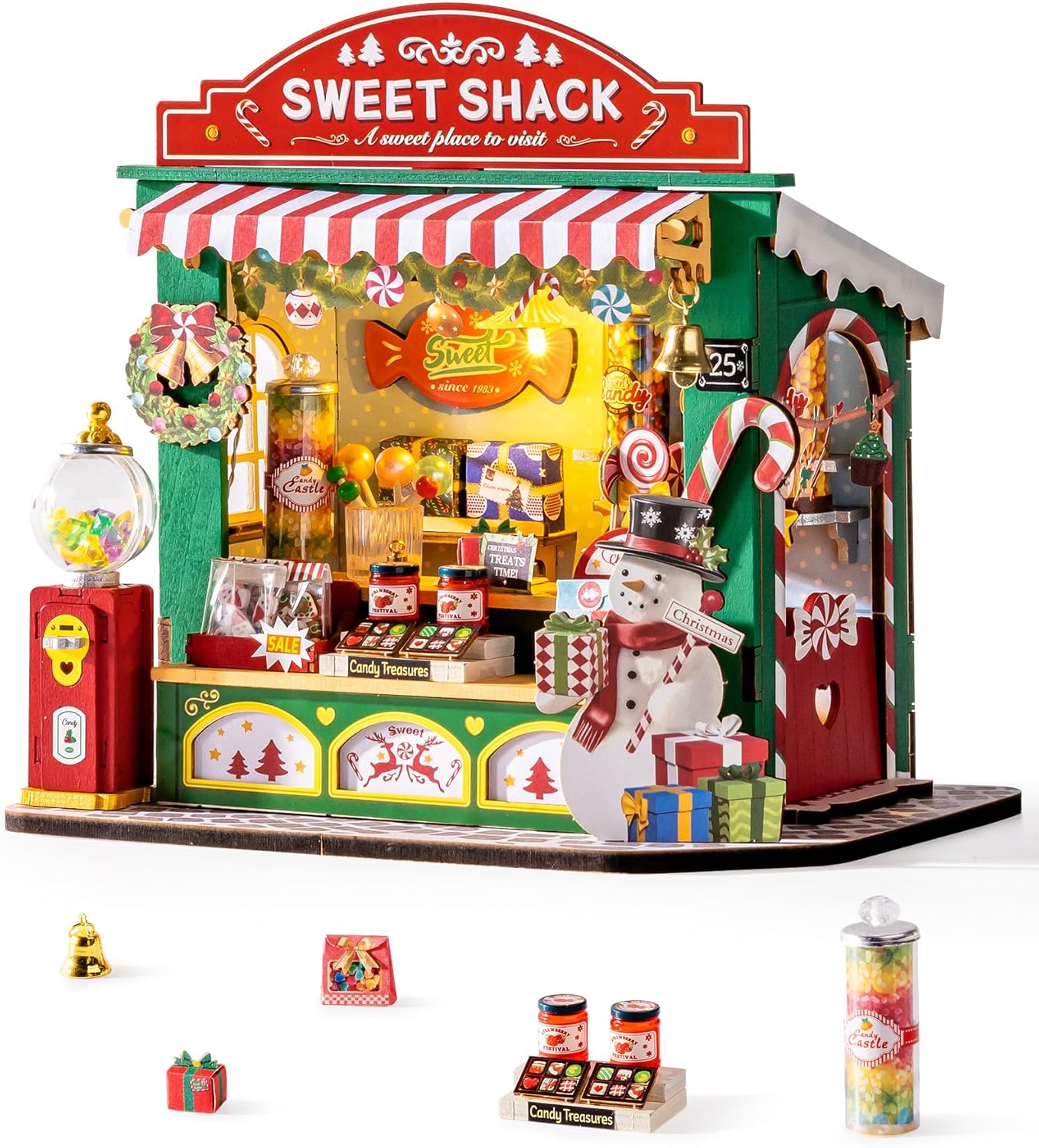
Figure 1: Completed Christmas Candy Stand Miniature Kit.
This image displays the fully assembled ROBOTIME Christmas Candy Stand, showcasing its intricate details, festive decorations, and miniature candy items. The stand features a "Sweet Shack" sign, a red and white striped awning, a snowman figure, and various tiny candy jars and gifts.
2. Safety Information
Please read and understand all safety warnings before beginning assembly.
- This product contains small parts and is not suitable for children under 3 years old due to choking hazards.
- Recommended age for assembly is 14 years and up.
- Exercise caution when handling sharp tools (e.g., scissors, craft knife) if used during assembly.
- Keep batteries out of reach of small children. If swallowed, seek immediate medical attention.
- Dispose of packaging materials responsibly.
3. Package Contents
Verify that all components are present before starting assembly. The kit includes:
- Pre-cut wooden sheets for structural components.
- Paper cutouts and stickers for decorative elements.
- Various miniature plastic figures and accessories (e.g., candy jars, gifts, bells).
- LED light components and battery box (requires 2 AAA batteries, not included).
- Instruction manual with clear illustrations.
- Double-sided adhesive tape.
- Small tools (e.g., tweezers) may be included.

Figure 2: Kit Contents Overview.
This image shows the various components included in the ROBOTIME Christmas Candy Stand kit, such as wooden sheets, paper elements, small accessories, and the instruction booklet, laid out before assembly.
4. Setup and Assembly
Follow the numbered steps in the included instruction booklet for detailed assembly. The general process involves:
- Preparation:
- Clear a well-lit, flat workspace.
- Unpack all components and organize them by type or sheet number.
- Gather necessary tools: scissors, craft knife (optional, for precision cuts), and 2 AAA batteries for the LED lights.
- Component Removal:
Carefully punch out or cut the wooden pieces from their sheets. Be gentle with delicate parts to prevent breakage.
- Structural Assembly:
Assemble the main structure of the candy stand by slotting the wooden pieces together as indicated in the manual. The kit is designed for a glue-free assembly, but for enhanced durability, especially for long-term display, a small amount of craft glue (not included) can be applied to joints.
- Decorative Elements:
Attach paper cutouts, stickers, and miniature accessories using the provided double-sided tape. For smaller or more intricate details, additional craft glue may provide a stronger hold.

Figure 3: Assembly in Progress.
This image illustrates the hands-on assembly process, showing various pre-cut components and the instruction booklet, highlighting the detailed nature of the kit.
- LED Light Installation:
- Locate the LED light components and the battery box.
- Insert 2 AAA batteries into the battery box, ensuring correct polarity.
- Integrate the LED lights into the designated areas of the miniature stand as per the instructions. Secure the wiring and battery box discreetly.
- Final Touches:
Place all remaining miniature items and ensure all parts are securely attached.

Figure 4: Detailed Miniature Accessories.
This image provides close-up views of various miniature accessories, including candy jars, lollipop cups, and jam jars, demonstrating the intricate details that enhance the finished model.
5. Operating Instructions (LED Lights)
The Christmas Candy Stand features built-in LED lights to enhance its festive appearance.
- Battery Installation: Ensure 2 AAA batteries are correctly installed in the battery box (refer to Section 4, Step 4 for details).
- Power On/Off: Locate the switch on the battery box. Flip the switch to the "ON" position to illuminate the LED lights. Flip it to "OFF" to turn them off.
- Placement: The battery box is typically placed discreetly within the stand. Ensure it is accessible for switching the lights on and off.
6. Maintenance
To ensure the longevity and appearance of your miniature house kit, follow these maintenance guidelines:
- Cleaning: Gently dust the model with a soft, dry brush or cloth. Avoid using water or cleaning solutions, as they may damage the wooden and paper components.
- Storage: Store the assembled model in a dry place away from direct sunlight and extreme temperatures to prevent warping or fading.
- Battery Care: If the LED lights will not be used for an extended period, remove the AAA batteries from the battery box to prevent leakage and potential damage.
- Handling: Handle the model with care, as some delicate parts may be fragile.
7. Troubleshooting
Refer to the following table for common issues and their solutions:
| Problem | Possible Cause | Solution |
|---|---|---|
| LED lights do not turn on. |
|
|
| Pieces do not fit together properly. |
|
|
| Decorative elements fall off. |
|
|
| Battery box is not secure. |
|
|
8. Specifications
| Feature | Detail |
|---|---|
| Product Dimensions | 6.7 x 4.5 x 6.3 inches (17 x 11.4 x 16 cm) |
| Item Weight | 1.1 pounds |
| Model Number | RBT-DS043 |
| Recommended Age | 14 years and up |
| Assembly Time (Approx.) | 2 hours (as per manufacturer, actual time may vary) |
| Number of Components | 170 pieces (as per manufacturer) |
| Power Source for LED | 2 x AAA batteries (not included) |
| Main Materials | Wood, Paper, Plastic |

Figure 5: Key Product Information.
This infographic summarizes key product details including recommended age (14+), number of pieces (170), estimated assembly time (2 hours), presence of LED lights, and a difficulty rating.
9. Warranty and Support
ROBOTIME is committed to providing quality products. For any missing parts, assembly assistance, or product-related inquiries, please contact ROBOTIME customer service. Specific warranty details may vary by region and retailer. Please retain your proof of purchase.
For customer support, refer to the contact information provided on the product packaging or the official ROBOTIME website.


