
DeWin GC-03
DeWin GC-03 Multifunction Radiation Detector User Manual
Model: GC-03 | Brand: DeWin
1. Introduction
The DeWin GC-03 is a versatile 3-in-1 detector designed for the simultaneous measurement of electric fields, magnetic fields, and nuclear radiation. This device provides comprehensive environmental monitoring with a user-friendly interface and robust alarm features.
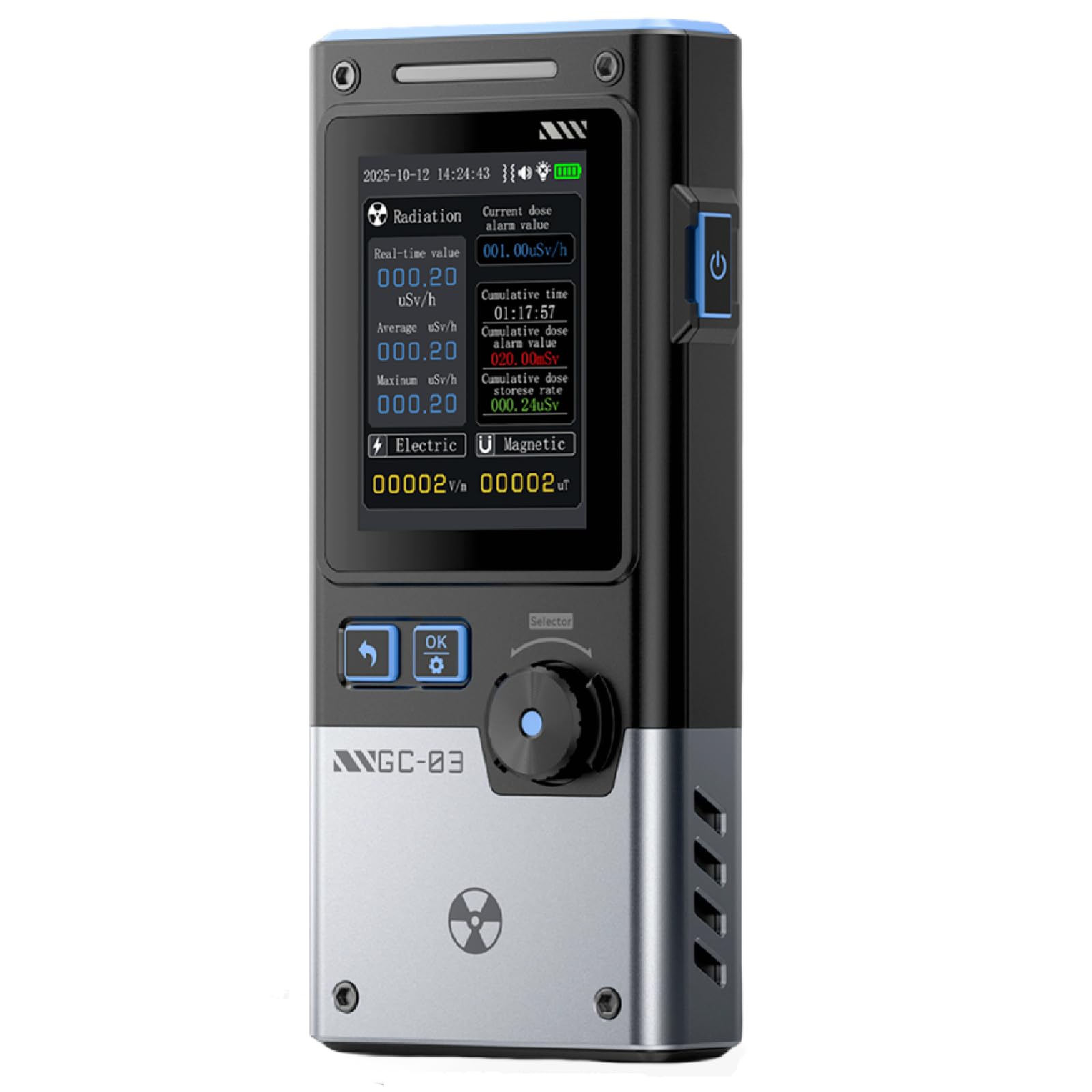
Image: The DeWin GC-03 detector, highlighting its 3-in-1 functionality for electric, magnetic, and nuclear radiation detection, along with features like 1500mAh battery and alarm modes.
2. Key Features
- Multifunctional 3-in-1 Detection: Measures electric fields (1V/m to 1999V/m), magnetic fields (0.01µT to 99.99µT), and nuclear radiation (0.01µSv/h to 999.99µSv/h).
- Adjustable Automatic Alarm: Features a customizable alarm threshold with triple alerts (audible, visual, vibrating) for immediate notification of hazardous conditions.
- Curve Recording Mode: Displays real-time radiation variations over a cycle and stores up to 50 records of limit exceedances for later analysis.
- 2.4-inch Backlit Color Screen: High-resolution display with adjustable backlight ensures clear visibility of data in various lighting conditions.
- Long-lasting 1500 mAh Battery: Integrated high-capacity battery provides over 12 hours of standby time and is conveniently rechargeable via a Type-C port.

Image: The DeWin GC-03 detector illustrating its three customizable alarm modes: visual, red LED flash, and audible alerts.
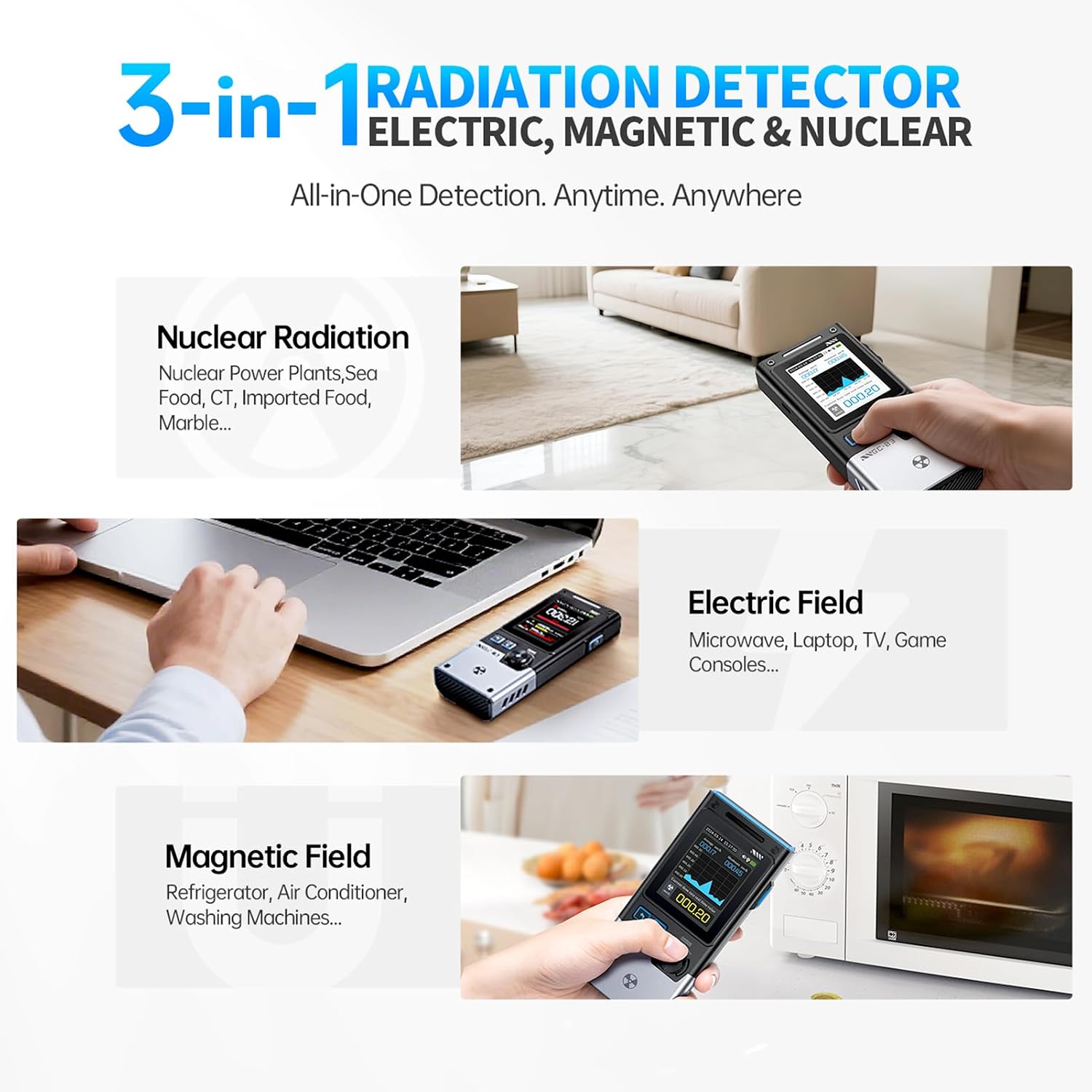
Image: Applications of the DeWin GC-03, demonstrating its use for detecting nuclear radiation, electric fields (near laptops and microwaves), and magnetic fields (near refrigerators).
3. Initial Setup
3.1 Charging the Device
Before first use, fully charge the GC-03 detector using the provided Type-C USB cable. Connect the cable to the device's Type-C port and a compatible USB power adapter (not included). The battery indicator on the screen will show charging status.
3.2 Power On/Off
- To power on: Press and hold the power button (usually located on the side or top) until the screen illuminates.
- To power off: Press and hold the power button until the device shuts down.
3.3 Basic Settings
Upon powering on, you may need to adjust basic settings such as language, date, and time. Navigate through the menu using the rotary knob and selection buttons. Refer to the 'Operating' section for detailed navigation instructions.
4. Operating Instructions
4.1 Mode Selection
The GC-03 features a smooth rotary knob for easy navigation and mode selection. Rotate the knob to switch between Electric Field (EF), Magnetic Field (MF), and Nuclear Radiation detection modes. Press the 'OK' button to confirm your selection.

Image: The DeWin GC-03's intuitive rotary knob control, demonstrating how to switch between different measurement displays for radiation, electric, and magnetic fields.
4.2 Taking Measurements
- Electric Field: Select EF mode. Hold the device in the area you wish to measure. The screen will display the electric field strength in V/m.
- Magnetic Field: Select MF mode. Hold the device in the area you wish to measure. The screen will display the magnetic field strength in µT.
- Nuclear Radiation: Select Nuclear mode. The device will continuously monitor for α, β, γ, and X-rays. Readings will be displayed in µSv/h.
4.3 Alarm Settings
To adjust alarm thresholds:
- Navigate to the 'Alarm Settings' menu using the rotary knob.
- Select the desired field (Electric, Magnetic, or Nuclear) to set its alarm threshold.
- Adjust the value using the navigation buttons and confirm with 'OK'.
- When a measurement exceeds the set threshold, the device will activate audible, visual (screen flash), and vibration alarms.
4.4 Curve Recording
The curve recording mode allows you to visualize changes in radiation levels over time. To activate and review:
- In Nuclear Radiation mode, navigate to the 'Curve Recording' option.
- Activate recording. The device will plot real-time radiation values on a graph.
- To review past recordings or alarm history, access the 'History' menu. The device stores up to 50 records of limit exceedances.
4.5 Operational Demonstration Video
Video: This video demonstrates the key functions and user interface of the DeWin GC-03 Multifunction Radiation Detector, including navigation and measurement display.
5. Maintenance
5.1 Cleaning
Wipe the device with a soft, dry cloth. Do not use abrasive cleaners or solvents, as these can damage the screen or casing. Ensure no liquids enter the device.
5.2 Battery Care
The GC-03 is equipped with a built-in 1500 mAh rechargeable battery. For optimal battery life:
- Recharge the device when the battery indicator is low.
- Avoid fully discharging the battery frequently.
- Store the device in a cool, dry place if not used for extended periods.
6. Troubleshooting
| Problem | Possible Cause | Solution |
|---|---|---|
| Device does not power on | Low battery; Power button not pressed long enough | Charge the device; Press and hold the power button for 3-5 seconds |
| Inaccurate readings | Interference from other electronic devices; Device not calibrated | Move away from other electronics; Refer to advanced settings for calibration options (if available) or contact support |
| Alarm not sounding | Alarm volume too low; Alarm threshold not set correctly; Alarm disabled | Check volume settings; Adjust alarm thresholds; Ensure alarm is enabled in settings |
| Screen is dim or unreadable | Backlight setting too low; Low battery | Adjust backlight brightness in settings; Charge the device |
7. Specifications
| Feature | Detail |
|---|---|
| Model | GC-03 |
| Detection Types | Electric Field (EF), Magnetic Field (MF), Nuclear Radiation (α, β, γ, X-rays) |
| Nuclear Radiation Range | 0.01µSv/h to 999.99µSv/h |
| Electric Field Range | 1V/m to 1999V/m |
| Magnetic Field Range | 0.01µT to 99.99µT |
| Display | 2.4-inch High-Resolution Color Screen with adjustable backlight |
| Alarm Modes | Audible, Visual (LED flash), Vibration |
| Battery | 1500 mAh rechargeable (Type-C charging) |
| Standby Time | Over 12 hours |
| Dimensions (L x W x H) | 16 x 14 x 3.99 cm (approx. 138mm x 63mm x 32mm) |
| Weight | 218 grams |
| Manufacturer Reference | RIYAREEDI-GS99549 |

Image: Dimensions of the DeWin GC-03 detector, showing its compact size.

Image: A comparison chart detailing the features of the GC-01, GC-02, and GC-03 models, emphasizing the GC-03's comprehensive detection capabilities and battery life.
8. Warranty Information
The DeWin GC-03 Multifunction Radiation Detector comes with a standard manufacturer's warranty. Please refer to the product packaging or the official DeWin website for specific warranty terms and conditions, including duration and coverage details. Keep your purchase receipt as proof of purchase for any warranty claims.
9. Support
For technical assistance, troubleshooting not covered in this manual, or general inquiries, please contact DeWin customer support. Contact information can typically be found on the official DeWin website or on the product packaging.
Online resources and FAQs may also be available on the manufacturer's support pages.
Ask a question about this manual
Ask about setup, troubleshooting, compatibility, parts, safety, or missing instructions. Manuals+ will review the question and use this page’s manual context to help answer it.