
1. Introduction
The Pulsetto FIT (V2) is a portable vagus nerve stimulation device designed to promote relaxation, improve sleep quality, and effectively reduce stress. This non-invasive, drug-free solution helps to quickly achieve a state of calm and makes the body more stress-resistant. It is developed by experts in Europe and based on modern science.
Experience noticeable relaxation and renewed energy in as little as 4 minutes. Its portable design allows for convenient use at home, in the office, or while traveling. The accompanying mobile application provides personalized sessions, progress tracking, and the option to integrate with your preferred music for an enhanced relaxation experience.

Image: The Pulsetto FIT (V2) device being worn, demonstrating its comfortable fit and integration with the mobile application for session control.

Image: Explanation of Vagus Nerve Stimulation. The fast pace of life often keeps our nervous system on high alert, leading to stress impacting mental and physical health. Vagus nerve stimulation helps achieve a state of calm and increases the body's stress resistance.
2. Safety Information
Please read all instructions and safety warnings before using the Pulsetto FIT (V2) device. Keep this manual for future reference.
- Do not use if you have an implanted medical device (e.g., pacemaker, defibrillator).
- Consult a healthcare professional before use if you have any medical conditions, are pregnant, or have sensitive skin.
- Use only the provided conductive gel or a compatible medical-grade conductive gel.
- Do not use on broken, irritated, or sensitive skin.
- Keep out of reach of children.
- Do not immerse the device in water.
- Avoid using the device while driving or operating heavy machinery.
- If you experience any discomfort or adverse reactions, discontinue use immediately and consult a healthcare professional.
3. Package Contents
Ensure all items are present in your Pulsetto FIT (V2) package:
- User Manual
- Two Soft Padding Options
- Conductive Gel
- USB-C Charging Cord
- Pulsetto Wellness Wearable Device
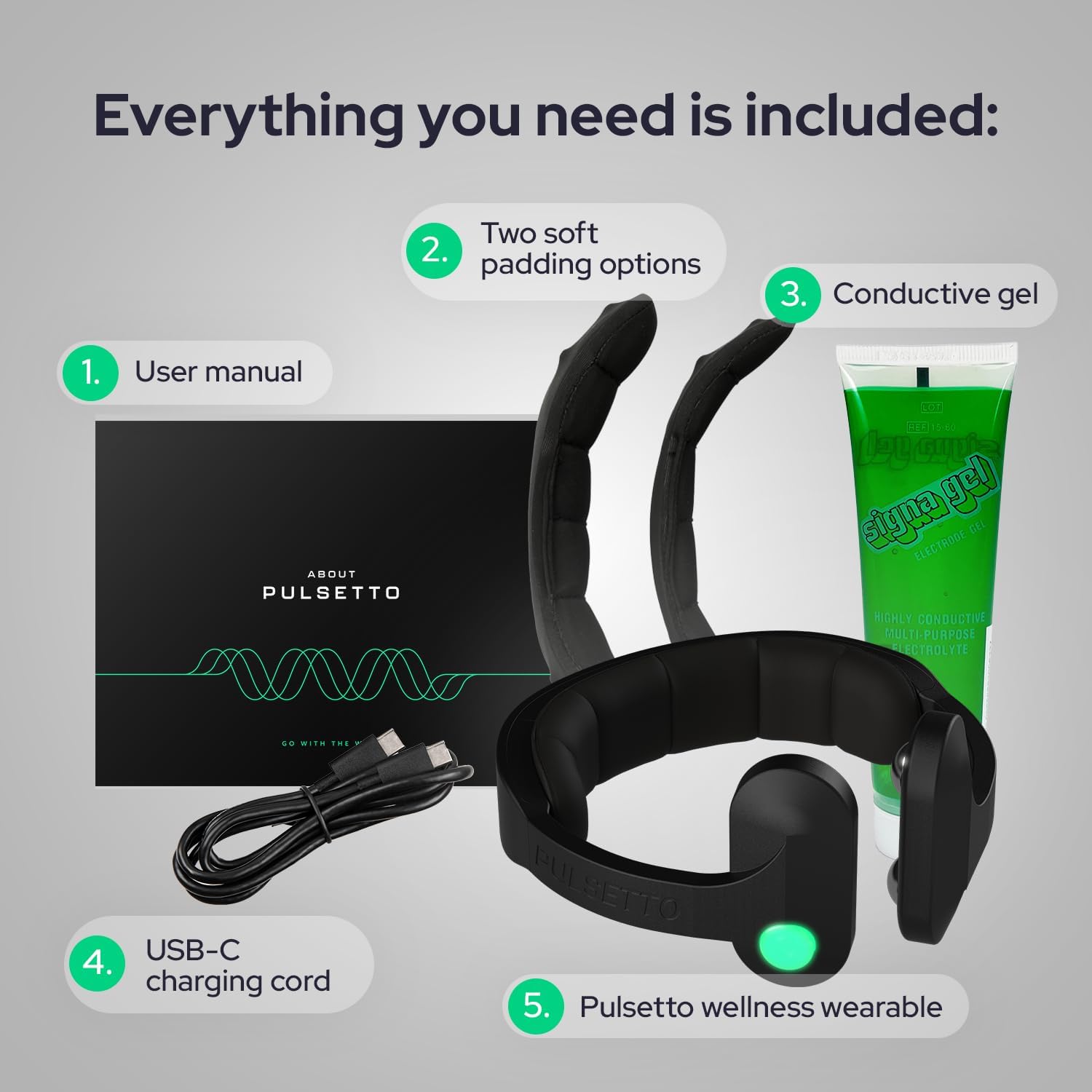
Image: All components included in the Pulsetto FIT (V2) package: user manual, two soft padding options, conductive gel, USB-C charging cord, and the Pulsetto wellness wearable.
4. Setup Guide
Follow these steps to set up your Pulsetto FIT (V2) device for first use:
- Apply Conductive Gel: Apply a small amount of the provided conductive gel to the areas of your neck where the device electrodes will make contact. Ensure even coverage for optimal conductivity.
- Connect the Wearable: Place the Pulsetto device around your neck. Ensure it fits comfortably and securely.
- Connect to the App: Download the Pulsetto mobile application (available for iOS 12.0+ and Android 6.0+). Open the app and follow the on-screen instructions to pair your device via Bluetooth.
- Select and Start a Program: Once connected, browse the available wellness programs in the app. Select your desired program and start the session.
- Relax and Enjoy: Adjust the intensity to a comfortable level within the app. Relax and allow the device to work.

Image: Step-by-step guide showing how to apply gel, connect the wearable, link to the app, and start a wellness program.
5. Operating Instructions
The Pulsetto FIT (V2) is operated primarily through its dedicated mobile application. The app allows you to customize your experience and track your progress.
5.1. Device Pairing
Ensure Bluetooth is enabled on your smartphone. Open the Pulsetto app, and it will guide you through the pairing process. The device's LED indicator will confirm successful connection.
5.2. Session Selection and Customization
The app offers various programs tailored for different needs, such as relaxation, sleep improvement, and stress reduction. You can adjust the intensity of the stimulation to your comfort level. Some programs allow for integration with your personal music library for a more immersive experience.

Image: Users engaging with the Pulsetto FIT (V2) device, highlighting its comfortable and durable design for daily wellness routines.
5.3. Recommended Usage
For optimal results, use the Pulsetto device at least twice daily on a regular schedule. The app allows you to set reminders and track your completed sessions.

Image: A user wearing the device, illustrating the benefits of use including support for restful sleep, feeling more at ease, settling into relaxation, finding focus, and improving daily well-being.
6. Programs
The Pulsetto app provides a range of programs to address different wellness goals. Core programs are included with your purchase, while additional premium options are available through an upgrade.
6.1. Core Programs
- Rest: Designed to promote deep relaxation and prepare your body for sleep.
- Daily Reset: Helps to calm the nervous system and reduce daily stress.
- Balance: Aims to restore equilibrium and promote overall well-being.
6.2. Premium Programs
Additional programs are available with a Premium upgrade, offering more specialized sessions for various needs.

Image: A user with the device, illustrating the app's program selection, including core programs like Rest, Daily Reset, and Balance, plus options for premium upgrades.
7. Maintenance
7.1. Cleaning the Device
After each use, gently wipe the electrode areas and the device body with a soft, damp cloth. Do not use abrasive cleaners or immerse the device in water. Ensure the device is completely dry before storing.
7.2. Battery Charging
The Pulsetto FIT (V2) is equipped with a rechargeable Lithium-ion battery. Use the provided USB-C charging cord to charge the device. Connect the USB-C end to the device and the USB-A end to a compatible power adapter (not included) or computer USB port. The LED indicator on the device will show charging status.
7.3. Storage
Store the device in a cool, dry place away from direct sunlight and extreme temperatures. Keep the conductive gel sealed to prevent drying out.
8. Troubleshooting
If you encounter issues with your Pulsetto FIT (V2), refer to the following common solutions:
- Device not turning on: Ensure the device is fully charged. Connect it to the charging cable and allow it to charge for at least 30 minutes.
- Device not pairing with app: Make sure Bluetooth is enabled on your phone and the device is within range. Restart both the device and the app. If issues persist, try unpairing and re-pairing the device in your phone's Bluetooth settings.
- No sensation during a session: Verify that sufficient conductive gel has been applied to your neck. Increase the intensity level gradually within the app. Ensure the device electrodes are making firm contact with your skin.
- Discomfort during a session: Reduce the intensity level in the app. Ensure proper application of conductive gel. If discomfort persists, discontinue use.
- App not responding: Close and reopen the Pulsetto app. If the problem continues, restart your smartphone.
For further assistance, please contact Pulsetto customer support.
9. Specifications
| Brand | Pulsetto |
| Model Number | B0FF52W7X7 |
| Battery Composition | Lithium-polymer |
| Rechargeable Battery | Yes |
| Included Batteries | 1 Lithium-ion (included) |
| App Compatibility | iOS 12.0 or higher, Android 6.0 or newer |
| Manufacturer | Pulsetto |
10. Warranty and Support
Pulsetto devices are designed for durability and performance. For information regarding your product's warranty, please refer to the warranty card included in your package or visit the official Pulsetto website.
For technical support, troubleshooting assistance, or any questions about your Pulsetto FIT (V2) device, please contact Pulsetto customer service through the contact information provided on our official website or within the mobile application.
Online Resources: For additional tips, FAQs, and product updates, please visit the official Pulsetto website.


