
T4TREAM VSC48CVD
T4TREAM Makeup Vanity Desk VSC48CVD User Manual
Model: VSC48CVD | Brand: T4TREAM
1. Introduction
This manual provides essential information for the assembly, operation, and maintenance of your T4TREAM Makeup Vanity Desk, model VSC48CVD. This vanity desk features a 3-way mirror with adjustable lighting, a built-in charging station, and ample storage solutions, designed to enhance your daily routine.

Image 1.1: T4TREAM Makeup Vanity Desk, Light Rustic Oak.
2. Safety Information
- Read all instructions carefully before assembly and use.
- Keep all small parts and packaging materials away from children.
- Ensure all connections for the charging station and mirror lights are secure and correctly installed to prevent electrical hazards.
- Do not overload electrical outlets.
- Place the vanity on a flat, stable surface to prevent tipping.
- Avoid exposing the vanity to excessive moisture or direct sunlight.
3. Package Contents
Before beginning assembly, verify that all components are present and undamaged. Refer to the included assembly guide for a detailed list of parts and hardware. If any parts are missing or damaged, contact customer support immediately.
4. Assembly Instructions
Assembly of the T4TREAM Makeup Vanity Desk requires careful attention to detail. Please follow the step-by-step instructions provided in the separate assembly manual included with your product. It is recommended to have at least two people for assembly due to the size and weight of some components.
- Identify all parts and hardware before starting.
- Use the appropriate tools as specified in the assembly guide.
- Do not overtighten screws to avoid damaging the wood.
- Ensure all connections are secure before moving or using the vanity.
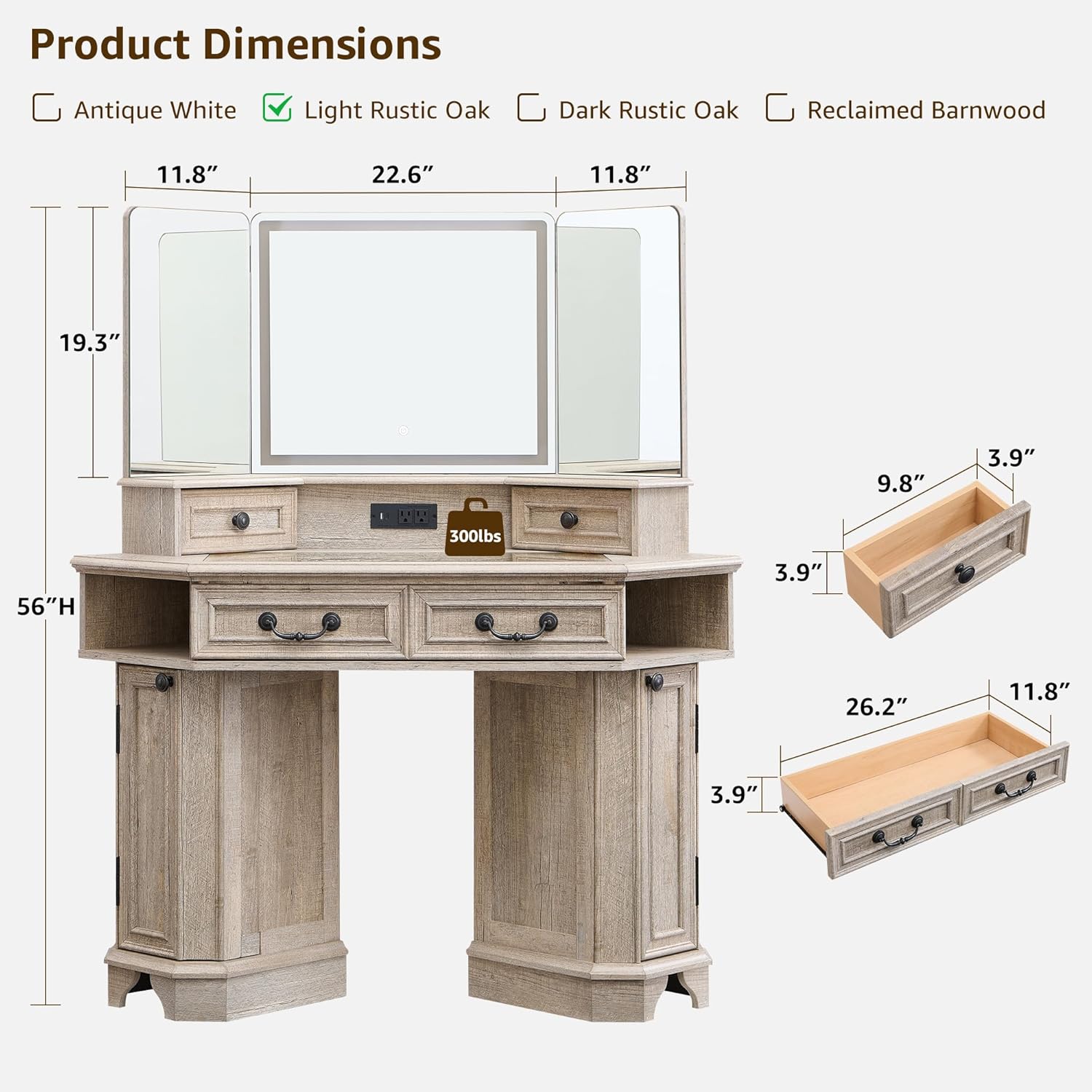
Image 4.1: Product dimensions and drawer measurements.
5. Operating Instructions
5.1. 3-Way Mirror and Lighting System
The vanity features a 3-way mirror with integrated LED lighting. The center mirror (23 inches) is equipped with touch controls for lighting adjustments, flanked by two 12-inch side mirrors for comprehensive viewing angles.
- Power On/Off: Tap the power icon on the center mirror to turn the lights on or off.
- Change Lighting Mode: Tap the mode icon to cycle through three color modes:
- Cold Daylight (6000K): Ideal for daily makeup application.
- Natural Light (4000K): Suitable for outdoor makeup or general use.
- Warm White (3000K): Best for evening makeup or softer illumination.
- Adjust Brightness: Press and hold the brightness icon to increase or decrease the light intensity. Release when the desired brightness is reached.
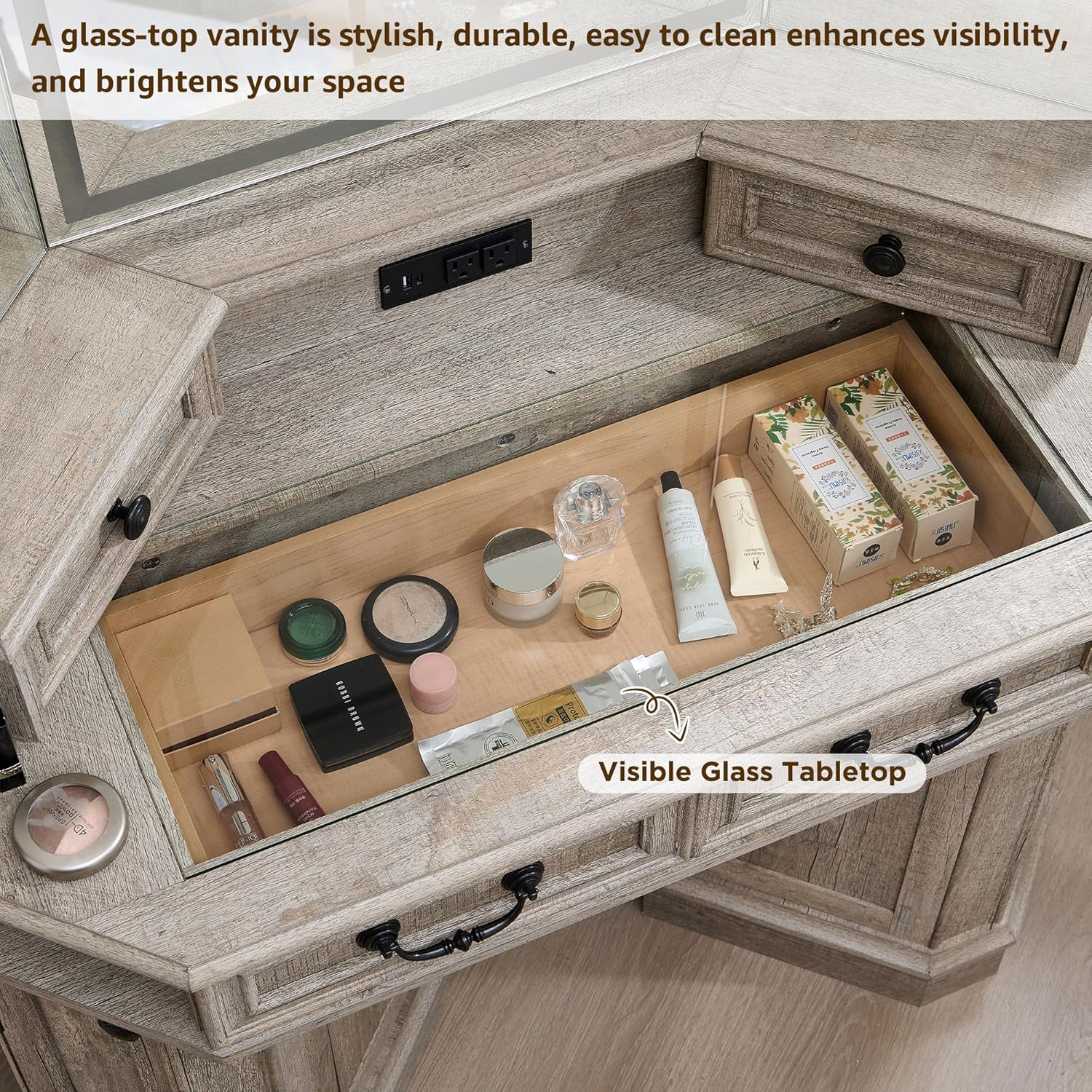
Image 5.1: Three-way mirror with touch controls for lighting modes and brightness adjustment.
5.2. Built-in Charging Station
The vanity includes a convenient charging station to power your electronic devices and styling tools.
- The charging station features two 125V/12A AC outlets, one 5V/2.1A USB port, and one 5V/2.1A Type-C port.
- Connect the vanity's power cord to a standard wall outlet.
- Plug in hair dryers, curling irons, mobile phones, tablets, or other compatible devices into the respective ports.
- Ensure devices are compatible with the provided voltage and current specifications.

Image 5.2: Detail of the built-in charging station.
5.3. Storage Features
The vanity offers extensive storage to keep your items organized.
- Transparent Tempered Glass Tabletop: Provides a clear view of cosmetics and accessories stored beneath, facilitating easy access and organization.
- Top Drawers: Two smaller drawers located on the vanity top for quick access items.
- Middle Drawer: One 28-inch wide drawer for larger items.
- Side Cubbies: Two semi-open cubbies on either side of the main tabletop for display or easy reach.
- Storage Cabinets: Dual cabinets with adjustable shelves provide concealed storage for various-sized items.

Image 5.3: Overview of the vanity's storage capacity.

Image 5.4: Detail of the transparent tempered glass tabletop.
6. Maintenance
- Cleaning: Wipe surfaces with a soft, damp cloth. Avoid abrasive cleaners or harsh chemicals that may damage the finish.
- Mirror Care: Clean the mirror with a glass cleaner and a lint-free cloth. Do not spray cleaner directly onto the mirror to prevent liquid from entering the electrical components.
- Electrical Components: Ensure the charging station and mirror lights are unplugged before cleaning. Do not immerse any electrical parts in water.
- General Care: Periodically check all screws and fasteners to ensure they remain tight. Retighten as necessary.
7. Troubleshooting
| Problem | Possible Cause | Solution |
|---|---|---|
| Mirror lights not turning on. | Power cord not plugged in; loose connection; power outage. | Ensure the vanity is properly plugged into a working outlet. Check all electrical connections. Verify power to the outlet. |
| Charging station not working. | Vanity not powered; device not compatible; faulty cable. | Confirm the vanity is plugged in. Check if the device requires specific voltage/current. Try a different charging cable or device. |
| Drawers or doors are stiff. | Misalignment during assembly; debris in tracks. | Check assembly for proper alignment. Clear any obstructions from drawer slides or door hinges. |
8. Specifications
| Brand | T4TREAM |
| Model Number | VSC48CVD |
| Color | Light Rustic Oak |
| Product Dimensions (L x W x H) | 48" x 21.44" x 56" (121.9 cm x 54.5 cm x 142.2 cm) |
| Item Weight | 139 pounds (63 kg) |
| Frame Material | Engineered Wood |
| Mirror Type | 3-Way Mirror with LED Lights |
| Lighting Modes | Cold Daylight, Natural Light, Warm White |
| Charging Station | 2 AC Outlets (125V/12A), 1 USB Port (5V/2.1A), 1 Type-C Port (5V/2.1A) |
| Assembly Required | Yes |
9. Warranty and Support
For warranty information, technical support, or to report missing/damaged parts, please refer to the contact information provided in your product packaging or visit the official T4TREAM website. Keep your purchase receipt for warranty claims.
Ask a question about this manual
Ask about setup, troubleshooting, compatibility, parts, safety, or missing instructions. Manuals+ will review the question and use this page’s manual context to help answer it.