
1. Introduction
Thank you for choosing the Vaczon VCZ070WH 47-inch Corner Fireplace TV Stand. This manual provides essential information for the safe assembly, operation, and maintenance of your new entertainment center. Designed to maximize space with its corner shape, this unit accommodates TVs up to 55 inches and features an integrated 18-inch electric fireplace, along with ample storage options. Please read this manual thoroughly before use and retain it for future reference.
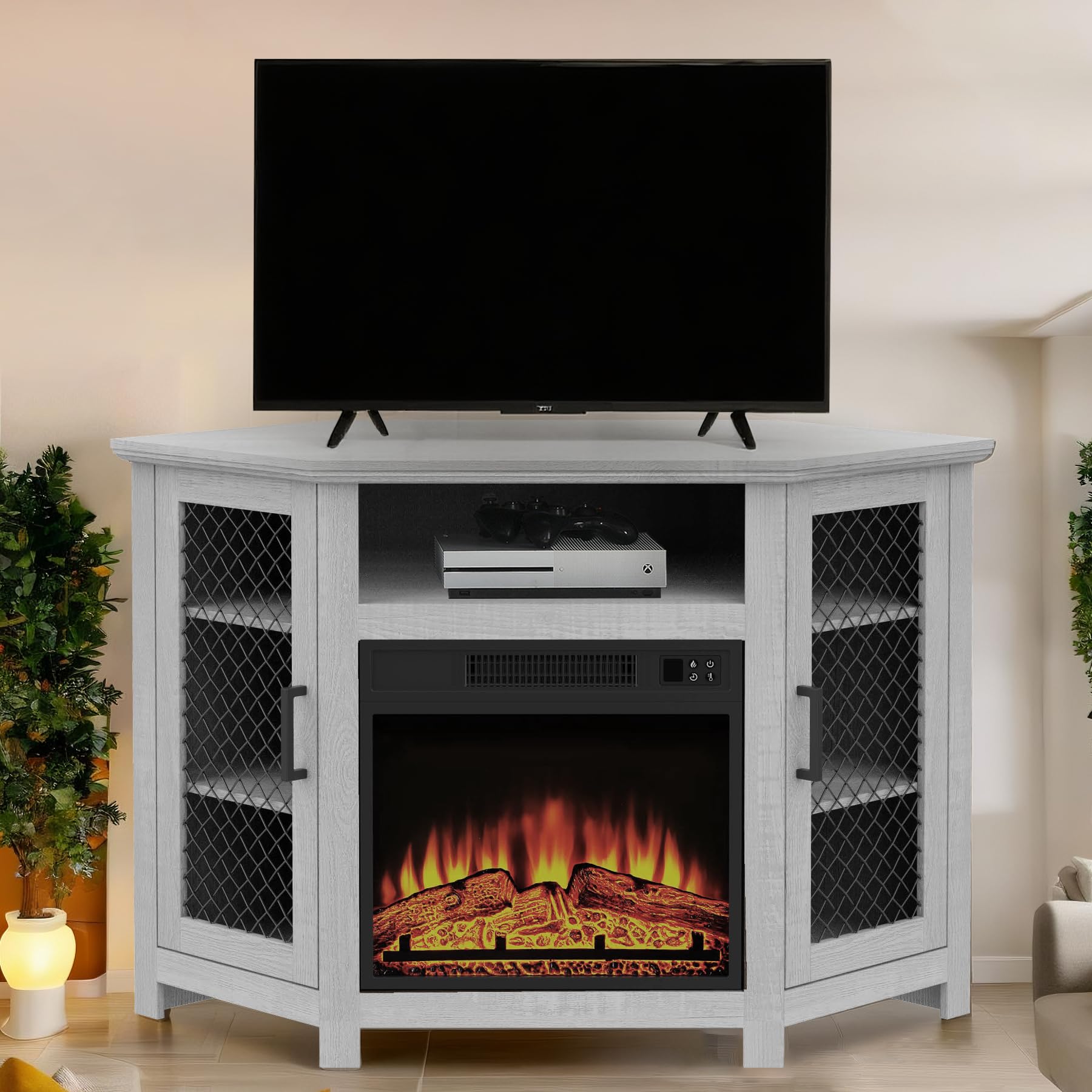
Figure 1: Vaczon 47-inch Corner Fireplace TV Stand. This image displays the assembled TV stand, highlighting its corner design and integrated electric fireplace.
2. Safety Information
To ensure safe operation and prevent damage, observe the following safety guidelines:
- Tip-Over Prevention: Always secure this furniture to the wall using the provided anti-tip hardware to prevent accidental tip-over.
- Placement: Do not place the unit on uneven surfaces or near high-traffic areas where it could be easily bumped. Ensure adequate clearance around the fireplace for proper ventilation.
- Electrical Safety: Connect the electric fireplace to a properly grounded outlet. Do not overload electrical circuits. Keep flammable materials away from the fireplace heater outlet.
- Overheat Protection: The electric fireplace is equipped with overheat protection, which automatically shuts off the unit if it reaches an unsafe temperature. If this occurs, unplug the unit, allow it to cool, and check for any obstructions before restarting.
- Children and Pets: Keep children and pets away from the fireplace, especially when the heater is active, as surfaces can become hot.
3. Setup and Assembly
Assembly of the Vaczon VCZ070WH TV Stand is required. Please follow the step-by-step instructions provided in the packaging. Ensure all parts are present before beginning assembly.
3.1. Unpacking and Part Identification
- Carefully unpack all components and hardware from the box.
- Verify that all pieces are accounted for against the included parts list.
- Inspect all parts for any damage. Contact customer support immediately if any parts are missing or damaged.
3.2. Assembly Steps
Follow the detailed diagrams and instructions provided in your assembly guide. Most pieces are secured using cam screws and dowels for a straightforward process. A power drill may be helpful for some steps.
- Begin by assembling the main frame of the TV stand.
- Attach the side panels and the central support structure.
- Install the adjustable shelves in the side cabinets. These shelves can be positioned at one of three levels to accommodate items of varying heights.
- Secure the top panel to complete the main structure.
- Attach the mesh metal doors to the side cabinets. The doors feature push-to-open/close mechanisms and metal handles.
- Finally, carefully insert the 18-inch electric fireplace into its designated opening.

Figure 2: Ample Storage Options. This image shows the side cabinets with mesh metal doors and adjustable shelves, along with the open central shelf above the fireplace.
4. Operating Instructions
4.1. Electric Fireplace Operation
The 18-inch electric fireplace can be operated using the control panel on the unit or the included remote control.

Figure 3: Fireplace Control Panel. This image details the buttons on the fireplace unit for power, flame control, heater, and timer.
- Power On/Off: Press the power button on the control panel or remote to turn the fireplace on or off.
- Flame Brightness: Adjust the flame brightness to one of 3 levels using the flame control button. This allows you to customize the ambiance.
- Heater Function: Press the heater button to activate the 1400W heater. The temperature can be set within a range of 62°F to 82°F. The heater will automatically turn off once the desired temperature is reached, while the flame effect can remain active.
- Timer Setting: Utilize the timer function to set the fireplace to operate for 0.5 to 6 hours.
- Flame-Only Mode: The fireplace can be used in flame-only mode to enjoy the visual effect without heat, suitable for year-round ambiance.

Figure 4: Fireplace Features and Remote. This image illustrates the various features of the electric fireplace, including heating capacity, timer, temperature range, and remote control.
4.2. Storage and Cable Management
The TV stand offers versatile storage solutions:
- Side Cabinets: Use the two side cabinets with adjustable shelves for storing media, DVDs, books, or decorative items.
- Open Shelf: The central open shelf above the fireplace is ideal for media devices such as receivers, gaming consoles, or soundbars.
- Cable Management: Utilize the cutouts in the back panel for organized cable routing, keeping your entertainment area tidy.
5. Maintenance
Regular maintenance will help prolong the life and appearance of your TV stand:
- Cleaning: Dust the surfaces regularly with a soft, dry cloth. For deeper cleaning, use a slightly damp cloth and mild detergent, then wipe dry immediately. Avoid abrasive cleaners or harsh chemicals.
- Fireplace Cleaning: Ensure the fireplace is unplugged and cool before cleaning. Wipe the glass and exterior with a soft, damp cloth. Do not spray water directly into the unit.
- Electrical Check: Periodically inspect the power cord and plug for any signs of damage. Ensure all electrical connections are secure.
- Structural Integrity: Periodically check all screws and fasteners to ensure they are tight. Re-tighten if necessary to maintain stability.
6. Troubleshooting
If you encounter issues with your Vaczon TV Stand or electric fireplace, refer to the following common solutions:
- Fireplace Not Turning On:
- Ensure the power cord is securely plugged into a functional electrical outlet.
- Check if the circuit breaker has tripped.
- Verify that the main power switch on the fireplace unit is in the 'ON' position.
- No Heat Output:
- Confirm the heater function is activated via the control panel or remote.
- Check the temperature setting; ensure it is set higher than the ambient room temperature.
- If the overheat protection has activated, unplug the unit for 10-15 minutes to reset it.
- Unstable Unit:
- Ensure all assembly screws and fasteners are properly tightened.
- Verify the unit is placed on a flat, level surface.
- Confirm the anti-tip hardware is correctly installed and secured to the wall.
- Remote Control Not Working:
- Replace the batteries in the remote control.
- Ensure there are no obstructions between the remote and the fireplace unit's sensor.
If problems persist after attempting these solutions, please contact Vaczon customer support.
7. Specifications
Key specifications for the Vaczon VCZ070WH Corner Fireplace TV Stand:

Figure 5: Product Dimensions. This diagram provides key measurements of the TV stand, including width, height, and fireplace insert size.
| Feature | Detail |
|---|---|
| Brand | Vaczon |
| Model Name | VCZ070WH |
| Color | Grey |
| Size | 47 inch |
| Product Dimensions | 47 x 47 x 47 inches |
| Item Weight | 29.9 Pounds |
| Material | Engineered Wood, Laminate |
| Mounting Type | Floor Mount |
| Installation Type | Freestanding |
| Special Feature | Integrated 18-inch Electric Fireplace |
| Electric Fireplace Output | 1400W |
| Heating Area | Up to 400 square feet |
| Temperature Range | 62°F - 82°F |
| Timer Function | 0.5H - 6H |
| Flame Brightness Levels | 3 |
| Number of Shelves | 2 (adjustable) |
| Storage Options | Closed (cabinets) and open (shelves) |
| Assembly Required | Yes |
| UPC | 749874210572 |
8. Warranty and Support
For warranty information, claims, or technical support, please refer to the documentation included with your product or contact Vaczon customer service directly. Keep your purchase receipt as proof of purchase for any warranty-related inquiries.