
Pinmoco L103880Y-YBLK
Pinmoco 70 Inch High Gloss TV Stand
Gaming Entertainment Center with LED Lights
Model: L103880Y-YBLK
1. Introduction
Thank you for purchasing the Pinmoco 70 Inch High Gloss TV Stand. This entertainment center is designed to provide a sleek, modern, and functional solution for your media and gaming setup. Featuring a high-gloss finish, integrated RGB LED lighting, and ample storage, it enhances any living space while keeping your devices organized.
Please read this manual thoroughly before assembly and use to ensure proper setup, operation, and maintenance of your new TV stand.
2. Safety Instructions
- Always assemble the unit on a soft, clean surface to prevent scratches.
- Ensure all screws and fasteners are securely tightened before use. Periodically check and re-tighten as necessary.
- Do not exceed the maximum weight capacity of 100 lbs (45 kg) for the top surface and 33 lbs (15 kg) for each shelf.
- Keep small parts and packaging materials away from children and pets to prevent choking hazards.
- Do not stand or climb on the TV stand.
- Place the TV stand on a level and stable surface to prevent tipping.
- For LED lights, use only the provided power adapter. Do not expose LED components to water or excessive moisture.
- If any parts are missing or damaged, do not attempt to assemble. Contact customer support immediately.
3. Package Contents
Before beginning assembly, verify that all parts listed below are present and undamaged. If anything is missing or damaged, please contact Pinmoco customer support.
- P2 Board Panels (various sizes for top, sides, bottom, and dividers)
- Tempered Glass Shelves (adjustable)
- LED Light Strip with Remote Control and Power Adapter
- Assembly Hardware (screws, dowels, cam locks, etc.)
- Assembly Tools (basic tools may be included, but a screwdriver is generally required)
- Instruction Manual (this document)
4. Assembly and Setup
Assembly of the Pinmoco TV Stand is designed to be straightforward. Follow the step-by-step instructions provided in the separate assembly guide included with your package. Ensure you have adequate space and a clean, soft surface to prevent damage during assembly.
Key Assembly Points:
- Panel Connection: Securely connect all P2 board panels using the provided hardware. Do not overtighten screws.
- Glass Shelf Installation: The tempered glass shelves are adjustable to 3 different heights within the open compartments. Insert the shelf pins into the desired holes before placing the glass shelves.
- LED Light Installation: Carefully attach the LED light strip to the designated areas, typically along the inner edges of the compartments. Connect the light strip to the power adapter and plug it into a standard electrical outlet.
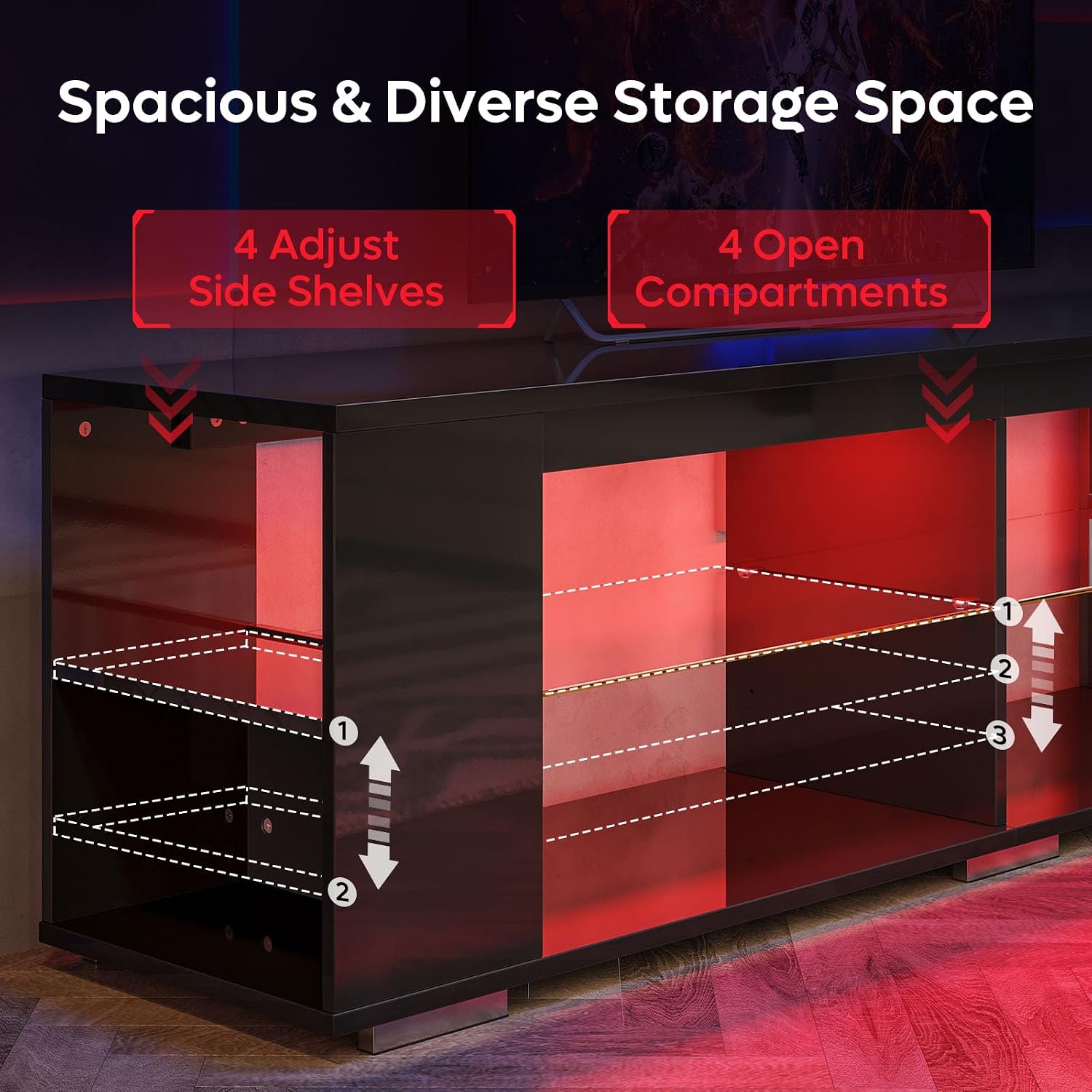
Figure 4.1: Illustration of adjustable glass shelves and open compartments, highlighting the 3-height adjustment options.

Figure 4.2: Detailed dimensions and weight capacities for the TV stand, including the top surface (100 lbs) and individual shelves (33 lbs).
5. Operating the LED Lights
Your Pinmoco TV Stand features integrated RGB LED lighting with remote control for customizable ambiance.
Remote Control Functions:
- Power Button: Turns the LED lights On/Off.
- Color Selection: Choose from 7 distinct colors (e.g., Red, Green, Blue, White, Yellow, Cyan, Purple).
- Mode Selection: Cycle through 22 dynamic lighting modes (e.g., fade, jump, strobe, flash).
- Brightness Adjustment: Increase or decrease the intensity of the lights.
- Speed Adjustment: For dynamic modes, adjust the speed of the light transitions.
Ensure the remote control has working batteries and is pointed towards the LED receiver for optimal operation.
6. Maintenance
Proper care will ensure the longevity and appearance of your TV stand.
- Cleaning: Wipe surfaces with a soft, damp cloth. Avoid abrasive cleaners or harsh chemicals that may damage the high-gloss finish. For glass shelves, use a glass cleaner.
- Spills: Immediately wipe up any spills to prevent staining or damage to the wood material.
- Sunlight Exposure: Avoid prolonged direct sunlight exposure, which can cause fading or discoloration over time.
- Hardware Check: Periodically check all screws and fasteners to ensure they remain tight. Re-tighten if necessary.
7. Troubleshooting
| Problem | Possible Cause | Solution |
|---|---|---|
| LED lights not turning on. |
|
|
| Remote control not responding. |
|
|
| Stand feels wobbly or unstable. |
|
|
8. Specifications
| Brand | Pinmoco |
| Model Number | L103880Y-YBLK |
| Material | Wood (P2 Board), Tempered Glass |
| Color | Black (High Gloss Finish) |
| Product Dimensions (L x W x H) | 71 x 15 x 20 inches (180.34 x 38.1 x 50.8 cm) |
| Item Weight | 74 pounds (33.57 kg) |
| Weight Capacity (Top Surface) | 100 lbs (45 kg) |
| Weight Capacity (Each Shelf) | 33 lbs (15 kg) |
| Special Feature | Adjustable Shelves, RGB LED Lights with Remote Control |
| ASIN | B0FF4D989M |
| GTIN | 00810187172915 |

Figure 8.1: The Pinmoco 70 Inch High Gloss TV Stand, showcasing its sleek design and integrated LED lighting.
9. Warranty and Support
Pinmoco stands behind the quality of its products. For specific warranty information regarding your 70 Inch High Gloss TV Stand, please refer to the warranty card included with your purchase or contact the seller directly.
For technical support, missing parts, or any questions regarding assembly or operation, please contact Pinmoco Direct customer service through the platform where you made your purchase or visit the official Pinmoco store page.
Seller: Pinmoco Direct
We recommend keeping your purchase receipt as proof of purchase for any warranty claims.
Ask a question about this manual
Ask about setup, troubleshooting, compatibility, parts, safety, or missing instructions. Manuals+ will review the question and use this page’s manual context to help answer it.