Introduction
This manual provides instructions for the UGREEN 2-in-7-Out USB 3.0 Switch. This device allows two computers to share up to seven USB peripherals, including USB-A and USB-C devices. It is designed to streamline your workspace by enabling easy switching between two host computers for shared access to keyboards, mice, printers, and other USB devices.
Product Overview
Key Features
- 2-In 7-Out Connectivity: Connects 2 computers to 7 USB devices (4 USB-A + 3 USB-C).
- High-Speed Data Transfer: USB 3.0 ports support data transfer speeds up to 5Gbps, backward compatible with USB 2.0.
- Plug & Play: No drivers required for Windows, macOS, Chrome OS, and Linux.
- Wide Compatibility: Works with both USB-C and USB-A computers, includes USB-C to USB-A adapters.
- Stable Power Supply: Includes a power adapter and charging cable to ensure stable performance for high-power devices.
- Easy Switching: Switch between computers using a button on the device or an external desktop controller.
What's in the Box
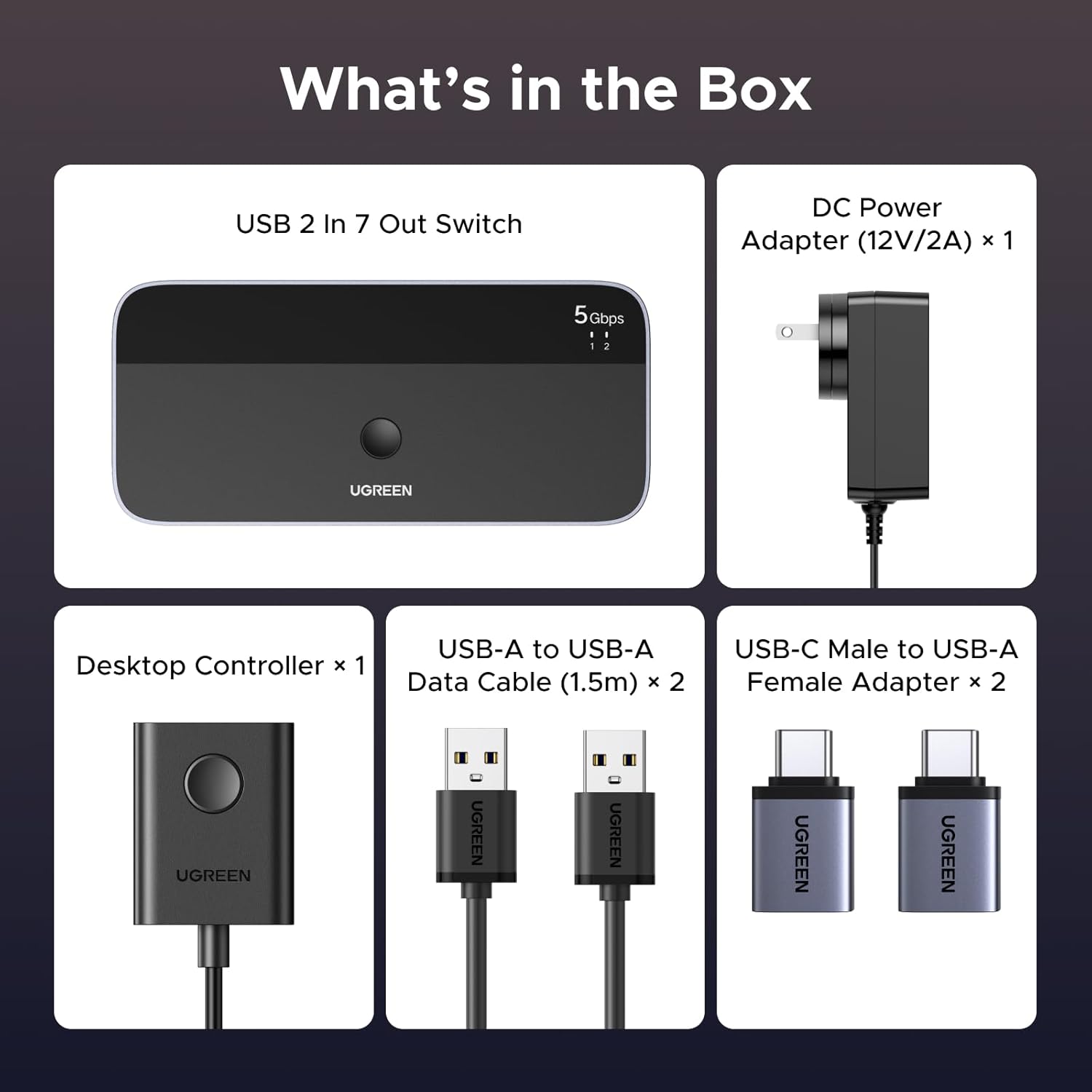
Image: The contents of the product box, including the USB switch, power adapter, USB-A to USB-A data cables, USB-C male to USB-A female adapters, and a desktop controller.
- UGREEN 2-in-7-Out USB 3.0 Switch x 1
- DC Power Adapter (12V/2A) x 1
- USB-A to USB-A Data Cable (1.5m) x 2
- USB-C Male to USB-A Female Adapter x 2
- Desktop Controller x 1
Setup Instructions
- Connect Power: Connect the included DC 12V/2A power adapter to the "DC 12V" port on the UGREEN USB Switch. Plug the power adapter into a wall outlet. This ensures stable operation, especially for high-power USB devices.

Image: The USB switch connected to its power adapter and an external hard drive, illustrating the power supply connection.
- Connect Host Computers: Use the provided USB-A to USB-A data cables to connect your two computers to the "PC 1" and "PC 2" input ports on the back of the switch.
- If your computer has a USB-C port, use the included USB-C Male to USB-A Female Adapter to convert the USB-A cable for connection.

Image: Illustration demonstrating how to connect the switch to computers using either USB-A or USB-C ports with the provided adapters.
- Connect USB Peripherals: Connect your USB devices (keyboard, mouse, printer, flash drives, external hard drives, etc.) to the available USB-A (5Gbps) and USB-C (5Gbps) output ports on the front of the switch.

Image: A visual representation of the setup, showing two input PCs and multiple output USB devices connected to the switch.
- Connect Desktop Controller (Optional): If desired, connect the external desktop controller to the "Control" port on the front of the switch for convenient remote switching.
Operating Instructions
The UGREEN USB Switch allows you to easily switch control of your connected USB peripherals between two host computers.
- Switching Between Computers:
- Using the Button on the Switch: Press the large circular button on the top of the UGREEN USB Switch to toggle between PC 1 and PC 2.
- Using the Desktop Controller: Press the button on the external desktop controller to switch between PC 1 and PC 2.

Image: Demonstrates both the main unit button and the external desktop controller for switching between connected computers.
- LED Indicators: The LED indicators on the top of the switch will illuminate to show which computer (PC 1 or PC 2) is currently active and has control of the connected USB devices.
- Data Transfer: When a computer is selected, all connected USB devices will function as if directly connected to that computer. Data transfer speeds up to 5Gbps are supported for USB 3.0 devices.
Note: This is a manual switch and does not support automatic switching. The USB ports are primarily for data transfer and are not recommended for charging devices.
Maintenance
- Keep the device in a dry environment, away from moisture and extreme temperatures.
- Clean the device with a soft, dry cloth. Do not use liquid cleaners or aerosols.
- Avoid dropping or subjecting the device to strong impacts.
- Ensure proper ventilation around the switch to prevent overheating.
Troubleshooting
| Problem | Possible Solution |
|---|---|
| Devices not recognized or intermittent connection. |
|
| High-power devices (e.g., external hard drives) not working. |
|
| Switching button unresponsive. |
|
| Slow data transfer speeds. |
|
Specifications
| Feature | Detail |
|---|---|
| Model | UGREEN 2-in-7-Out USB 3.0 Switch |
| Input Ports | 2 x USB-A (for host computers) |
| Output Ports | 4 x USB-A (5Gbps), 3 x USB-C (5Gbps) |
| Data Transfer Speed | Up to 5Gbps (USB 3.0) |
| Power Input | DC 12V/2A (Power Adapter Included) |
| Compatibility | Windows, macOS, Chrome OS, Linux |
| Special Features | Plug and Play, Powered, LED Indication, Desktop Controller |
| Dimensions | 7.8 x 6.89 x 2.13 inches (Package) |
| Item Weight | 1.61 pounds |
Warranty and Support
UGREEN products come with a standard manufacturer's warranty. For specific warranty details, technical support, or customer service inquiries, please refer to the official UGREEN website or contact their customer support directly. Please have your product model and purchase information ready when contacting support.
UGREEN Official Website: www.ugreen.com


