
MXV 70 Inches White-white
MXV Fireplace TV Stand User Manual
Model: 70 Inches White-white
Introduction
Thank you for choosing the MXV Fireplace TV Stand. This product is designed to enhance your living space with both functional storage and the ambiance of an electric fireplace. This manual provides essential information for the safe and efficient operation, assembly, and maintenance of your new TV stand.
Important Note: This item is shipped in two separate packages. If you receive only one package initially, please be assured that the second package is still in transit and will arrive shortly.
Product Overview
The MXV Fireplace TV Stand is a versatile entertainment center capable of accommodating TVs up to 80 inches. It features a built-in electric fireplace with adjustable settings, integrated LED lighting, and ample storage solutions including cabinets and open shelving.

Figure 1: MXV Fireplace TV Stand in a modern setting with blue LED lighting.

Figure 2: MXV Fireplace TV Stand showcasing warm LED lighting and a cozy ambiance.
Setup and Assembly
While specific assembly steps are not provided in this manual, please refer to the detailed assembly instructions included in your product packaging. Ensure all components are present before beginning assembly. It is recommended to assemble the unit on a soft, clean surface to prevent scratches.
Key Features for Setup:
- Two-Package Delivery: As noted, the product ships in two separate boxes. Please ensure both packages have arrived before starting assembly.
- Cable Management: The TV stand includes pre-drilled cable management holes to help organize and conceal wires for a tidy setup.
- Spacious Design: Designed to accommodate TVs up to 80 inches, providing a stable and wide surface for your television.
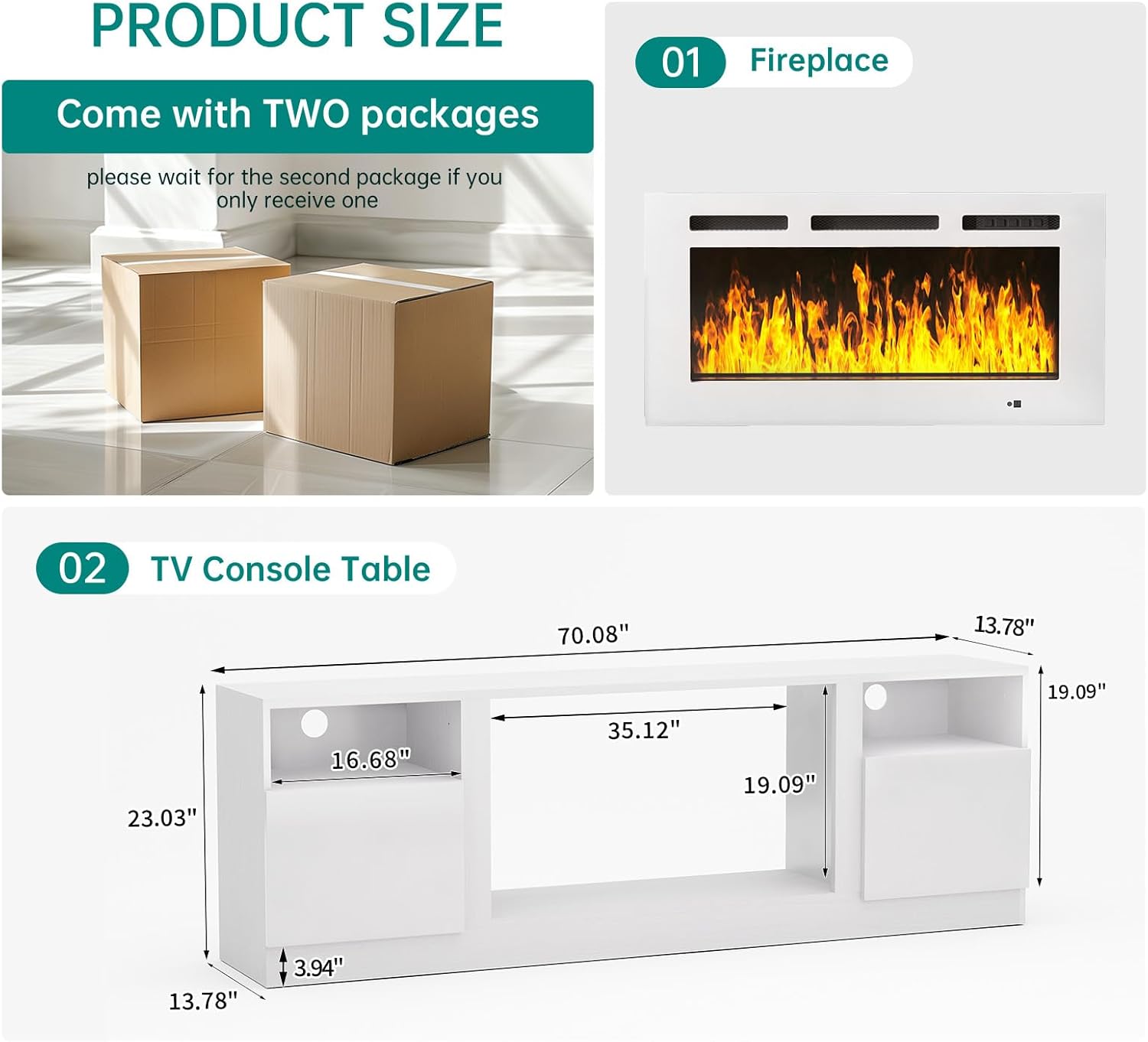
Figure 3: Product dimensions for the TV console table and the fireplace unit.
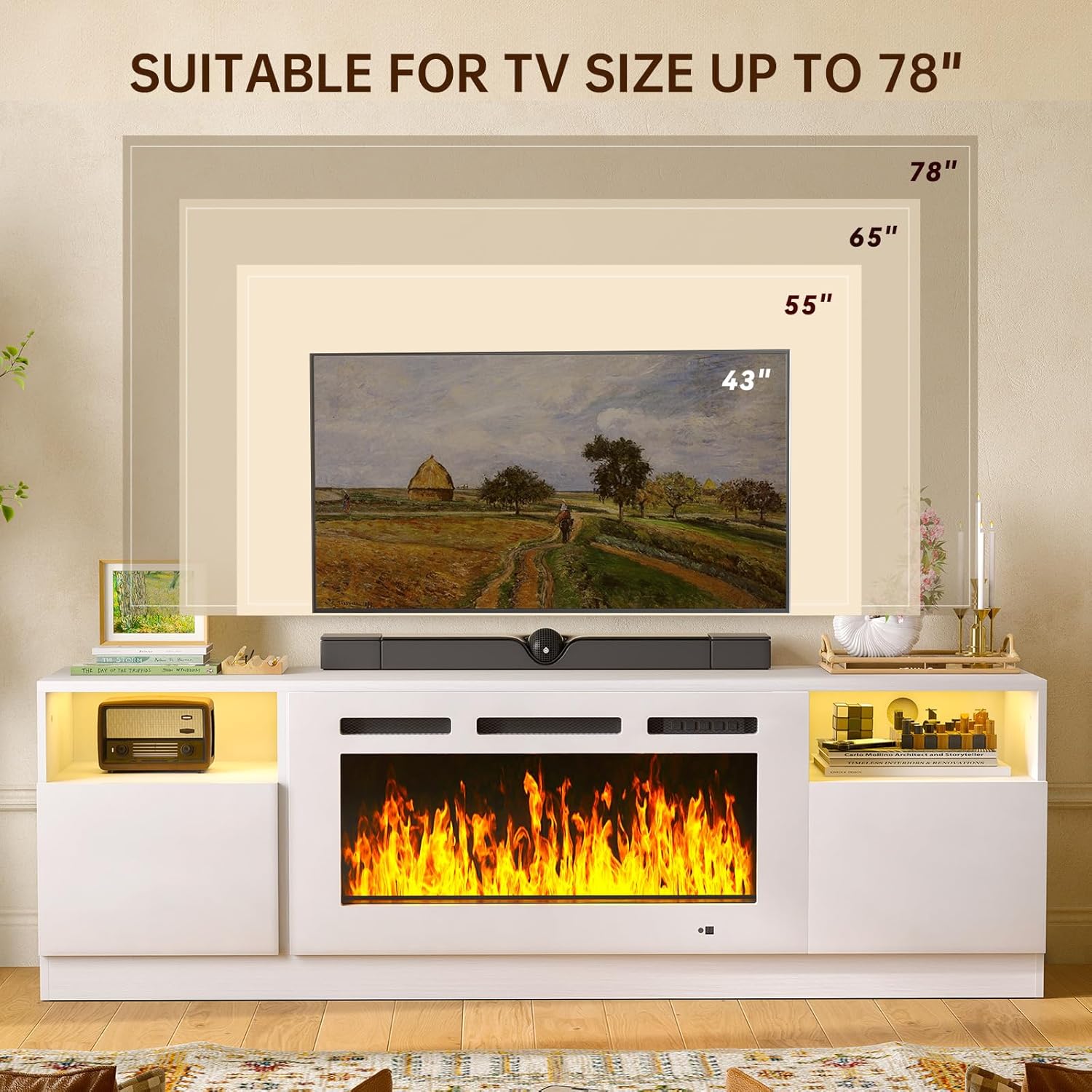
Figure 4: The TV stand is suitable for televisions up to 78 inches in size.

Figure 5: Details of the TV stand's features including highlight doors, upper shelf space, and cable management holes.
Operating Instructions
Electric Fireplace Operation:
The integrated electric fireplace offers a realistic flame effect with customizable settings.
- Flame Colors: Choose from 12 changeable realistic flame colors to match your mood or decor.
- Brightness Levels: Adjust the flame brightness with 5 available levels, from dim to bright.
- Temperature Control: The fireplace heater can be set to maintain a comfortable room temperature between 62°F and 82°F.
- Timer Function: Utilize the timer feature to set the fireplace to operate for a duration of 0 to 8 hours.
- Power Outlets & USB Ports: The TV stand includes three built-in 125V/12A power outlets and two 5V/2.1A USB ports for convenient device charging and power supply.

Figure 6: Detailed view of the fireplace control panel and its functions.

Figure 7: Visual representation of the 12 flame colors and 5 brightness levels.
Safety Information
Your safety is paramount. The electric fireplace is equipped with safety features to ensure secure operation:
- Cut-off Device: An automatic cut-off device is integrated to prevent overheating.
- Certifications: The fireplace is CSA & ETL certified, ensuring it meets recognized safety standards.
- Always ensure proper ventilation around the fireplace unit.
- Do not block the air intake or exhaust vents of the fireplace.
- Keep flammable materials at a safe distance from the fireplace.
- Unplug the unit from the power outlet before performing any maintenance or cleaning.
Maintenance
To ensure the longevity and appearance of your MXV Fireplace TV Stand, follow these general maintenance guidelines:
- Cleaning: Wipe surfaces with a soft, damp cloth. Avoid harsh chemicals or abrasive cleaners that may damage the finish.
- Dusting: Regularly dust the unit to prevent buildup, especially around the fireplace vents.
- Fireplace Care: The electric fireplace typically requires minimal maintenance. Refer to the fireplace's specific manual (if provided separately) for detailed cleaning instructions for the flame effect components.
- Power Cords: Periodically inspect power cords for any signs of damage. If damaged, discontinue use and contact customer support.
Troubleshooting
If you encounter any issues with your MXV Fireplace TV Stand, consider the following common troubleshooting steps:
- Fireplace Not Turning On: Ensure the unit is properly plugged into a working power outlet. Check if the power button on the control panel or remote is pressed.
- No Heat Output: Verify that the heater function is activated and the temperature setting is above the current room temperature. Check for any obstructions around the heater vents.
- LED Lights Not Working: Ensure all connections are secure. If the issue persists, contact customer support.
- Remote Control Issues: Check and replace the batteries in the remote control. Ensure there are no obstructions between the remote and the fireplace sensor.
For persistent issues or problems not listed here, please contact MXV customer support.
Specifications
| Feature | Detail |
|---|---|
| Brand | MXV |
| Model | 70 Inches White-white |
| ASIN | B0FF48HF5P |
| Color | White-white |
| Size | 70 Inches |
| Shape | Rectangular |
| Special Feature | Unlit (refers to the stand itself, not the fireplace) |
| Power Outlets | 3 x 125V/12A |
| USB Ports | 2 x 5V/2.1A |
| Fireplace Flame Colors | 12 changeable |
| Fireplace Brightness | 5 levels |
| Fireplace Temperature Range | 62°F - 82°F |
| Fireplace Timer | 0 - 8 hours |
| Certifications | CSA & ETL |
| Manufacturer | MXV |
| Date First Available | June 23, 2025 |
Warranty and Support
Specific warranty details are not provided in this manual. For information regarding warranty coverage, product support, or to purchase replacement parts, please refer to the documentation included with your product or contact MXV customer service directly through their official website or the retailer where the product was purchased.
Related documents70 Inches White-white


Ask a question about this manual
Ask about setup, troubleshooting, compatibility, parts, safety, or missing instructions. Manuals+ will review the question and use this page’s manual context to help answer it.