
1. Introduction
This manual provides detailed instructions for the STASRC Surpass Hobby Pocket-RC 130A Sensored Brushless Electronic Speed Controller (ESC) and its dedicated Program Card. This system is designed for 1/10 scale remote control cars, offering precise control and robust performance. Please read this manual thoroughly before operating the product to ensure correct usage and optimal performance.
2. Safety Information
No specific safety warnings are applicable beyond general precautions for handling electronic components and RC models. Always ensure proper ventilation, avoid short circuits, and disconnect power when not in use or during maintenance. Keep out of reach of children under 12 months, as recommended by the manufacturer.
3. Product Features
- High Performance: 130A continuous current, 240A peak current.
- Sensored Operation: Provides smooth and precise motor control.
- Wide Voltage Range: Supports 6V to 11V input voltage.
- Overheating Protection: Integrated motor and ESC overheating protection functions to enhance reliability and durability.
- Adjustable Parameters: Customizable throttle and brake PWM frequencies for fine-tuning performance.
- Removable Cooling Fan: High-performance fan (23000rpm/7.2V) for efficient heat dissipation, easy to clean and maintain.
- Compact Design: ESC dimensions of 44.5x39.5x31mm (including fan) and a weight of 88.2g (including wire).
- Dedicated Program Card: For easy and precise adjustment of ESC parameters.

Image 3.1: Diagram illustrating the motor and ESC overheating protection features. This system helps prevent damage under high load conditions.

Image 3.2: The ESC allows independent adjustment of throttle and brake PWM frequencies, enabling precise control and customization for various driving conditions.

Image 3.3: The ESC features a high-performance removable cooling fan and an aluminum heatsink, designed for easy maintenance and improved durability.
4. Package Contents
The product package includes the following items:
- 1x SURPASS 130A Sensored Brushless ESC
- 1x ESC Program Card
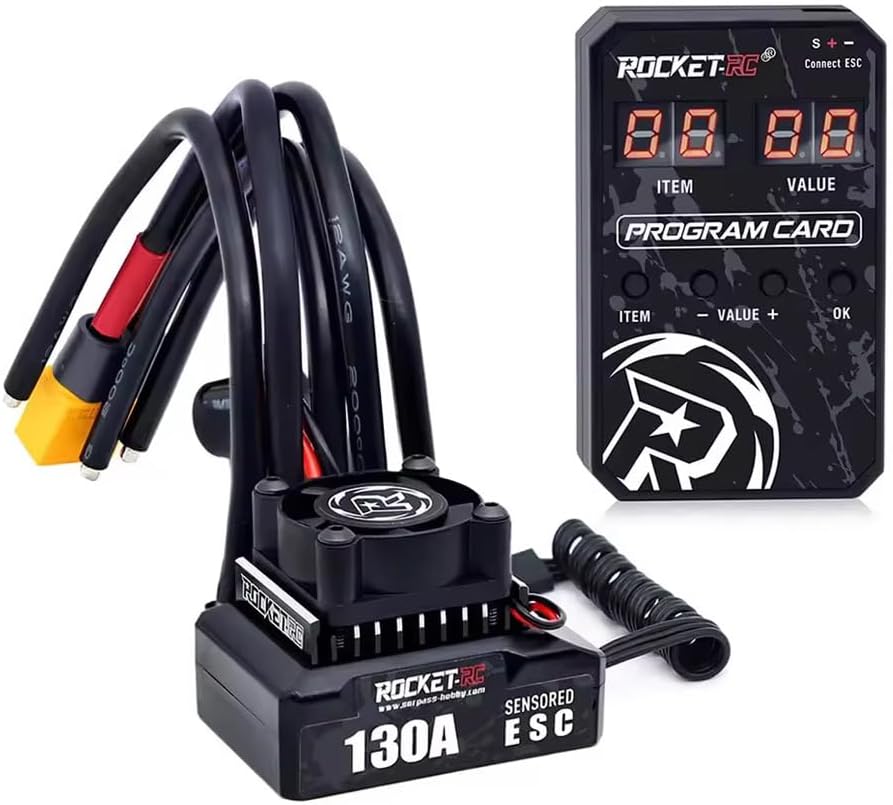
Image 4.1: The complete package including the 130A Sensored Brushless ESC and the Program Card.
5. Specifications
5.1. ESC Specifications
- Continuous Current: 100A
- Peak Current: 240A
- Input Voltage: 6V~11V
- Dimensions (including fan): 44.5 x 39.5 x 31 mm (1.75 x 1.56 x 1.22 inches)
- Weight (including wire): 88.2g (6.2 ounces)
- Manufacturer: SURPASS
5.2. Program Card Specifications
- Dimensions: 70 x 43 x 13 mm
- Weight: 24g
- Power Supply Mode: ESC BEC
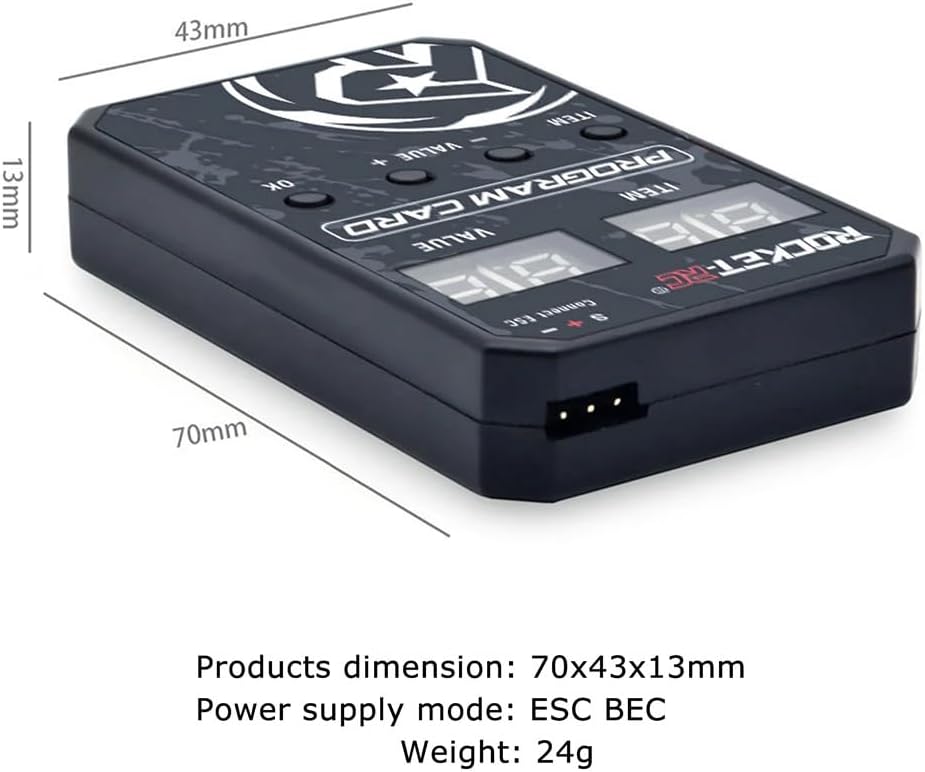
Image 5.1: The Program Card displaying its dimensions and power supply method.
6. Setup and Installation
Follow these steps to properly install and connect your ESC and Program Card:
- Connect Motor to ESC: Connect the three motor phase wires (A, B, C) from your brushless motor to the corresponding output terminals on the ESC. Ensure a secure connection. For sensored motors, connect the sensor cable from the motor to the 'SENSOR' port on the ESC.
- Connect ESC to Receiver: Plug the ESC's throttle cable (usually a 3-pin servo connector) into the throttle channel (CH2) of your RC receiver.
- Connect Battery: Connect your battery pack to the ESC's power input connectors. Ensure correct polarity (red to positive, black to negative).
- Power On: Turn on your RC transmitter first, then turn on the ESC using its power switch.

Image 6.1: Close-up view of the ESC showing the sensor port and motor phase connections (A, B, C).
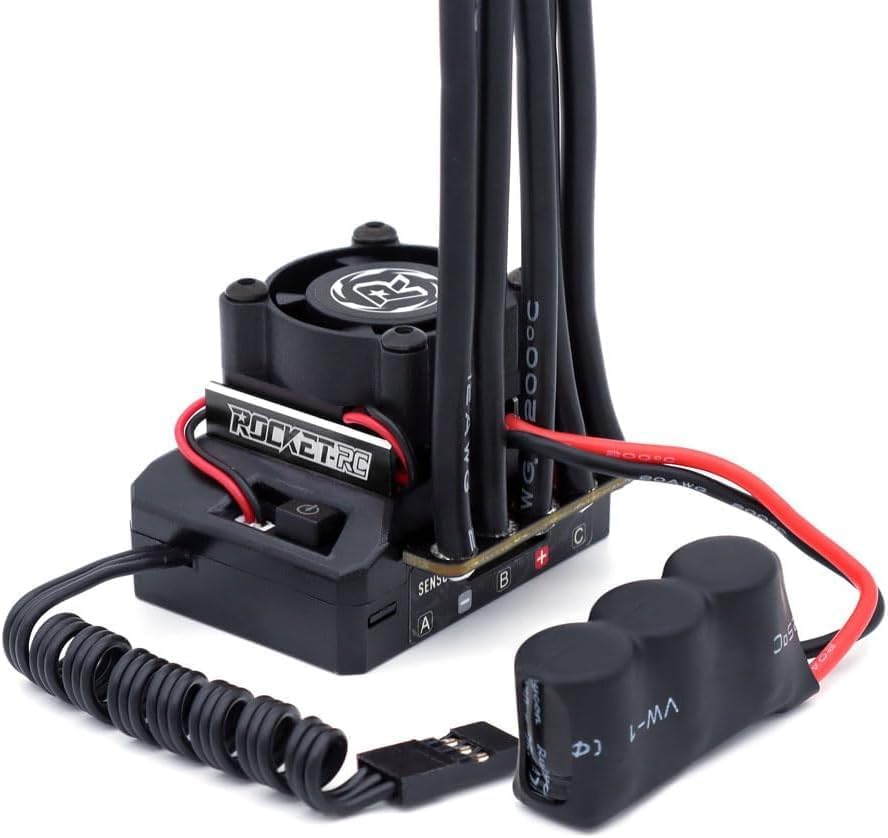
Image 6.2: The ESC connected with its capacitor pack and the receiver connection wire.
7. Operating Instructions: Using the Program Card
The Program Card allows for easy adjustment of the ESC's parameters. Follow these steps to customize your ESC settings:
- Connect Program Card: Begin by connecting the ESC battery wires to a charged battery. Then, connect the BEC wire (3-pin port) from the ESC to the 'S+-' port (3-pin port) on the Program Card.
- Automatic Recognition: Turn on the ESC. The Program Card will automatically read the ESC settings, and the setting items will display from 1 to 15 successively, indicating a successful connection.
- Troubleshooting Connection: If the settings are not displayed, it means the connection is unsuccessful. Please turn off the ESC, reconnect the Program Card, and turn on the ESC again until the connection is successful.
- Navigating Parameters: Use the four buttons on the Program Card to adjust settings:
- ITEM button: Moves to the next item.
- VALUE - button: Decreases the current item's value.
- VALUE + button: Increases the current item's value.
- OK button: Confirms your selected value.

Image 7.1: Instructions for connecting the Program Card to the ESC and an overview of the button functions for parameter adjustment.

Image 7.2: The back of the Program Card detailing the list of adjustable parameters and their ranges, including Running Mode, Battery Type, Cutoff Voltage, Overheat Protection, Neutral Range, Motor Direction, and various throttle/brake settings.
8. Maintenance
Regular maintenance ensures the longevity and optimal performance of your ESC and Program Card:
- Cleaning: Periodically clean the ESC and Program Card to remove dust, dirt, and debris. Use a soft brush or compressed air. Avoid using liquids directly on electronic components.
- Fan Inspection: Check the cooling fan for obstructions or damage. The fan is removable for easier cleaning.
- Cable Inspection: Regularly inspect all wires and connectors for signs of wear, fraying, or damage. Replace any damaged components immediately.
- Storage: Store the ESC and Program Card in a dry, cool place away from direct sunlight and extreme temperatures when not in use.

Image 8.1: An exploded view demonstrating the removable cooling fan, which facilitates cleaning and maintenance of the heatsink.
9. Troubleshooting
If you encounter issues with your ESC, consider the following common troubleshooting steps:
- No Power/No Response:
- Ensure the battery is fully charged and properly connected with correct polarity.
- Check all connections between the ESC, motor, receiver, and battery for looseness or damage.
- Verify the ESC's power switch is in the 'ON' position.
- Motor Not Spinning/Erratic Behavior:
- Confirm the motor phase wires (A, B, C) are correctly connected.
- If using a sensored motor, ensure the sensor cable is securely connected.
- Check the throttle trim on your transmitter.
- Recalibrate the ESC with your transmitter if necessary.
- Overheating:
- Ensure the cooling fan is clean and operating correctly.
- Check for proper ventilation around the ESC in your RC car.
- Verify that the motor and gearing are appropriate for the vehicle and driving conditions.
- Program Card Connection Issues:
- Ensure the ESC is powered on and the BEC wire is correctly inserted into the 'S+-' port of the Program Card.
- If the display does not show settings, power cycle the ESC and reconnect the Program Card.
10. Warranty and Support
For warranty information or technical support, please refer to the documentation provided with your purchase or contact the manufacturer, SURPASS, directly through their official channels. Keep your proof of purchase for any warranty claims.


