
1. Product Overview
The eufy Security SoloCam S340 is a wireless outdoor security camera featuring dual-camera technology, 3K resolution, and 8x zoom capabilities. It is solar-powered for continuous operation and offers 360° pan and tilt surveillance to eliminate blind spots. The system includes a HomeBase S380 for local storage, ensuring no monthly fees for video retention. Advanced AI features provide intelligent detection and tracking.
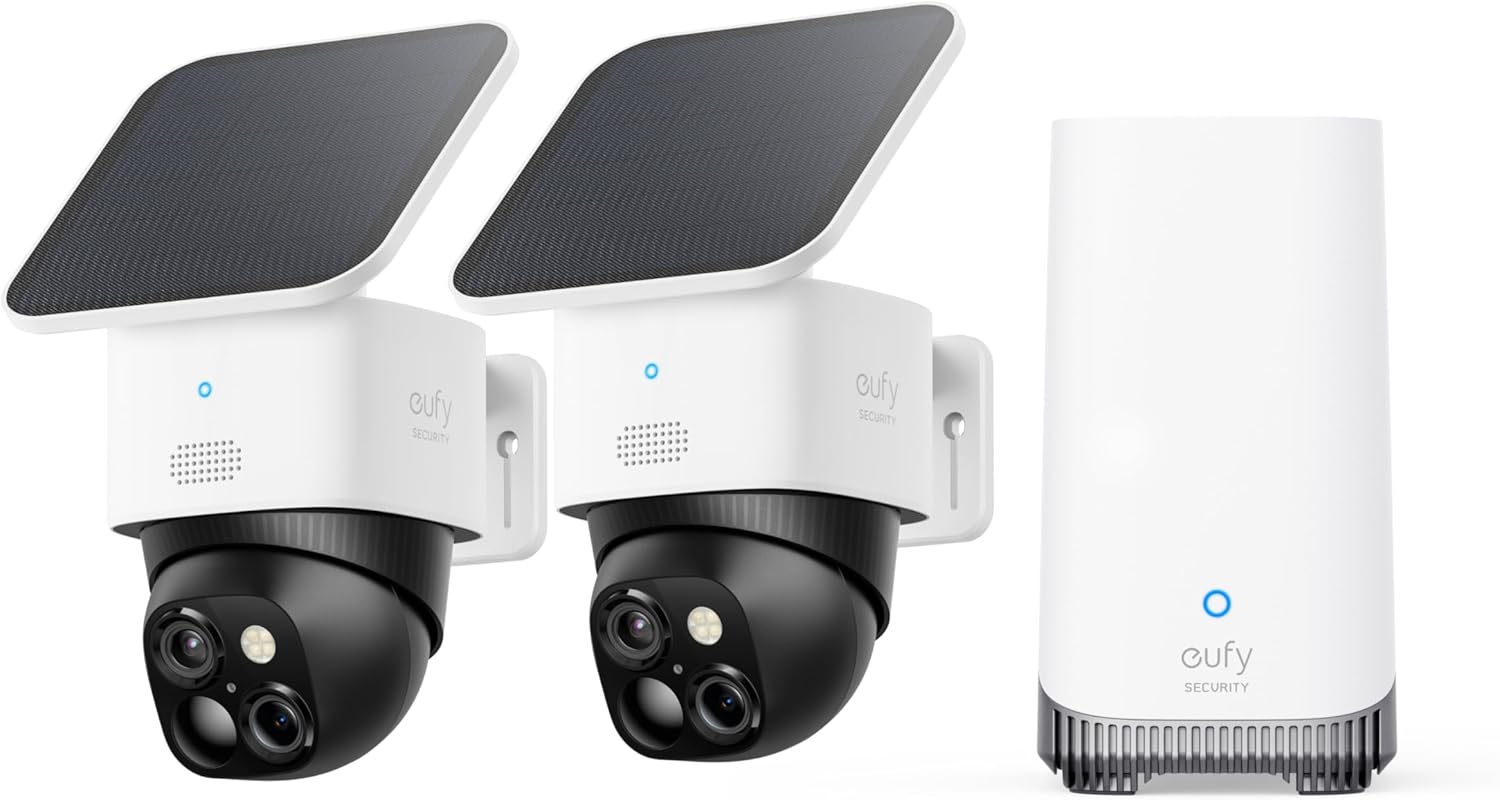
Image 1.1: The eufy Security SoloCam S340 camera and HomeBase S380 unit.
2. What's in the Box
The eufy Security SoloCam S340 2-Cam Kit includes the following components:
- 2 × SoloCam S340 Camera
- 1 × HomeBase S380
- 2 × Removable Solar Panel
- 2 × Camera Mounting Brackets
- 1 × Power Adapter (for HomeBase)
- 1 × USB-C Charging Cable (for camera initial charge/backup)
- Mounting Screw Packs
- Quick Start Guide

Image 2.1: Unboxed components of the eufy Security SoloCam S340 2-Cam Kit.
3. Setup
Before installation, ensure all components are present and the cameras are fully charged. Download and install the eufy Security app on your smartphone. The app will guide you through connecting the HomeBase S380 to your network and pairing the SoloCam S340 cameras.
3.1 Initial Camera Charging
Although solar-powered, it is recommended to fully charge the cameras via the USB-C port before first use to ensure optimal performance from the start.
3.2 HomeBase S380 Connection
- Connect the HomeBase S380 to a power outlet using the provided power adapter.
- Connect the HomeBase S380 to your router via an Ethernet cable (if not using Wi-Fi).
- Follow the in-app instructions to set up your HomeBase and connect it to your Wi-Fi network.
Video 3.1: A user demonstrating the setup process for the eufy HomeBase S380, including connecting cables and navigating the app interface. The video shows the physical unit and its ports.
3.3 Camera Pairing
- In the eufy Security app, select "Add Device" and choose "SoloCam S340".
- Press the SYNC button on the camera for 2 seconds until you hear a beep and the LED flashes blue.
- Scan the QR code displayed in the app with the camera lens to complete pairing.
4. Installation
The SoloCam S340 offers versatile installation options due to its wire-free design and solar panel. Choose a location that provides optimal sunlight exposure for the solar panel and a clear view of the area you wish to monitor.
4.1 Mounting the Camera
The camera can be mounted vertically on a wall or horizontally on a ceiling. The included mounting brackets support both configurations. Ensure the mounting surface is sturdy enough to support the camera.
- Vertical Installation: Ideal for full 360° pan and tilt coverage.
- Horizontal Installation: Suitable for specific area monitoring.

Image 4.1: Diagram illustrating vertical and horizontal mounting methods for the SoloCam S340.
4.2 Solar Panel Placement
The removable solar panel can be attached directly to the camera or mounted separately using the provided USB-C extension cable. For optimal charging, position the solar panel in an area that receives at least 2 hours of direct sunlight daily.
Video 4.2: Demonstration of installing the eufy SoloCam S340 onto corners and poles, highlighting the flexibility of solar panel placement.
5. Operating Instructions
Control and monitor your SoloCam S340 and HomeBase S380 using the eufy Security app.
5.1 Live View and Playback
- Open the eufy Security app and select your camera to view the live feed.
- Use the pan and tilt controls within the app to adjust the camera's viewing angle (360° horizontal, 70° vertical).
- Access recorded events from the HomeBase storage via the app's playback feature.
Video 5.1: A user demonstrating the live view and pan/tilt controls of the eufy SoloCam S340 via the mobile app, showing clear footage and responsive camera movement.
5.2 Motion Detection and AI Tracking
- Configure motion detection zones and sensitivity settings in the app.
- Enable AI tracking for automatic following of detected subjects (human, vehicle, pet).
- Receive instant notifications on your smartphone when motion is detected.

Image 5.2: Illustration of the AI motion tracking feature, showing the camera following a person in a backyard.
5.3 Two-Way Audio and Siren
- Use the two-way audio feature to communicate with visitors or deter intruders.
- Activate the built-in siren remotely via the app to scare off unwanted guests.
6. Features
- Enhanced Dual-Camera: Features a 3K wide-angle lens (135° FOV, f/1.6 aperture) and a 2K telephoto lens (8x hybrid zoom, f/1.6 aperture) for clear, detailed views up to 40 ft (12 m).
- Solar-Powered: Equipped with a removable solar panel that provides continuous power with just 2 hours of direct sunlight daily.
- 360° Pan & Tilt: Offers full home coverage with 360° horizontal and 70° vertical rotation, eliminating blind spots.
- Local Storage: Built-in local storage (up to 16TB with HomeBase S380 expansion) means no monthly fees for video storage.
- AI-Powered Tracking: On-device AI for facial recognition, human, vehicle, and pet detection, with 95% alert accuracy.
- Color Night Vision: The f/1.6 aperture allows 20% more light for details after dark, providing clear visuals up to 26 ft (8 m) at night.
- Weatherproof Design: Built to withstand various weather conditions, ensuring reliable outdoor performance.
- Voice Assistant Compatible: Integrates with Amazon Alexa and Google Voice Assistant for convenient control.

Image 6.1: Visual representation of the dual-camera system with 3K wide-angle and 8x hybrid zoom lenses.
7. Maintenance
Regular maintenance ensures the longevity and optimal performance of your eufy Security SoloCam S340 and HomeBase S380.
- Clean Lenses: Periodically wipe the camera lenses with a soft, dry cloth to remove dust and smudges.
- Solar Panel Cleaning: Ensure the solar panel is free from dirt, leaves, or snow to maintain charging efficiency.
- Firmware Updates: Keep your camera and HomeBase firmware updated via the eufy Security app for new features and security enhancements.
- Battery Monitoring: Monitor battery levels in the app, especially during prolonged cloudy periods or winter, to ensure continuous operation.
8. Troubleshooting
| Problem | Possible Solution |
|---|---|
| Camera not connecting to HomeBase. | Ensure HomeBase is powered on and connected to the internet. Move camera closer to HomeBase. Re-pair the camera via the app. |
| Poor video quality. | Check Wi-Fi signal strength. Clean camera lenses. Ensure sufficient lighting for night vision. |
| Battery draining quickly. | Ensure solar panel receives adequate direct sunlight. Reduce motion detection sensitivity or frequency of recordings. |
| False motion alerts. | Adjust motion detection zones to exclude busy areas. Lower motion detection sensitivity. |
9. Specifications
| Feature | Detail |
|---|---|
| Model Name | SoloCam S340 2+1 (E8170) |
| Video Capture Resolution | 3K |
| Zoom | 8x Hybrid Zoom |
| Pan & Tilt | 360° Horizontal, 70° Vertical |
| Power Source | Solar Powered, Battery Powered |
| Connectivity Technology | Wireless (Wi-Fi) |
| Local Storage | Built-in (expandable up to 16TB with HomeBase S380) |
| Indoor/Outdoor Usage | Outdoor |
| Compatible Devices | Smartphone (Amazon Alexa, Google Voice Assistant) |
10. Warranty and Support
eufy Security products typically come with a manufacturer's warranty. For specific warranty details, product support, or service inquiries, please refer to the official eufy Security website or contact their customer service team. Keep your purchase receipt for warranty claims.
For additional support, visit the eufy Security product page on Amazon.


