
Nasitip KD-4
Nasitip 12V Electric Tractor with Trailer (Model KD-4) - Instruction Manual
Your guide to safe and enjoyable operation.
Introduction
Thank you for choosing the Nasitip 12V Electric Tractor with Trailer. This manual provides essential information for the safe assembly, operation, and maintenance of your new ride-on toy. Please read it thoroughly before use and retain it for future reference.

Image: The Nasitip 12V Electric Tractor with Trailer, showcasing its vibrant green color and robust design.
1. Setup and Assembly
1.1 What's in the Box
- Kids ride-on car
- Remote control
- Detachable Trailer
- 12V Battery (pre-installed)
- Charger
- Assembly hardware (screws, washers, hubcaps)
- Instruction Manual
1.2 Assembly Instructions
Follow these steps carefully for proper assembly. An assembly video is provided for visual guidance.
Video: Detailed installation guide for the Nasitip Electric Tractor, demonstrating step-by-step assembly of components like wheels, steering wheel, and trailer.
- Install Linkage: Secure the linkage with 4 screws.
- Driving Wheels Assembly: Attach the driving wheels using a small washer, screw, and hubcap. Repeat for the other side.
- Front Wheel Assembly: Attach the front wheels using a big washer, wheel, small washer, lock nut, and hubcaps. Repeat for the other side.
- Steering Wheel Assembly: Insert the steering wheel and secure it with screws.
- Connect Battery: Connect the battery wires.
- Install Seat: Place the seat and secure it with 5 screws.
- Trailer Assembly: Insert the round tube, big washer, wheel, small washer, lock nut, and hubcaps. Tighten the two lock nuts simultaneously, then install the hubcaps.
- Attach Trailer: Connect the assembled trailer to the tractor using the provided hitch mechanism.
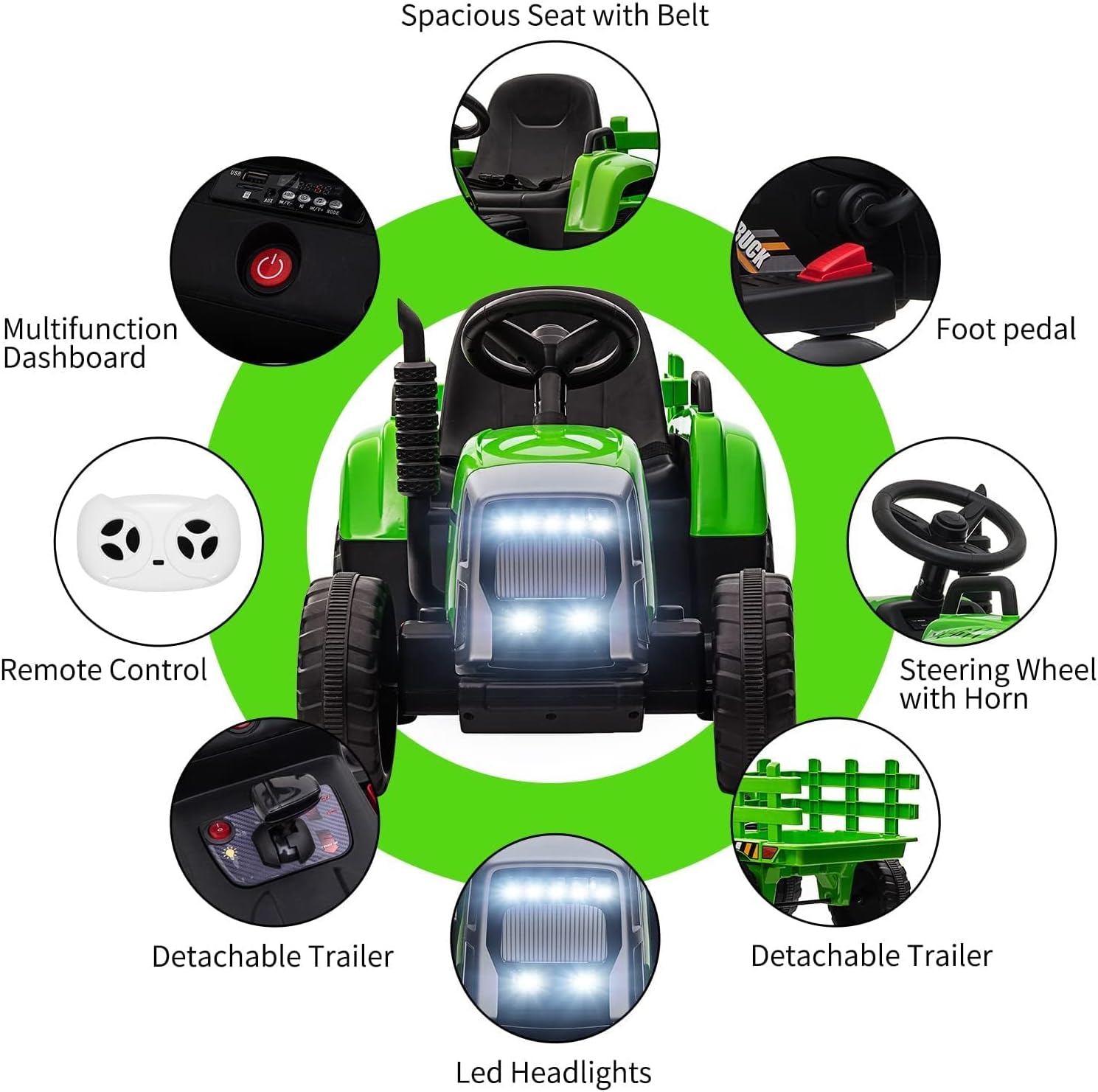
Image: A circular diagram highlighting various features of the tractor, such as the multifunction dashboard, remote control, detachable trailer, LED headlights, spacious seat with belt, and foot pedal.
1.3 Initial Charging
Before first use, fully charge the 12V battery for 8-12 hours. The charging port is typically located on the side of the tractor. Ensure the tractor is turned off during charging.
2. Operating Instructions
2.1 Controls and Features
- Power Button: Press to turn the tractor on/off.
- Gear Shift: Select between high/low speed and forward/reverse.
- Foot Pedal: Press to accelerate. Release to brake.
- Steering Wheel: Turn left or right to steer. Includes a horn button.
- 7-LED Headlights: Activate for visibility.
- MP3 Player/USB Port: Connect your device to play audio. The dashboard includes a battery indicator.
- Safety Belt: Always secure the adjustable safety belt before operation.
- Handrails: Located beside the seat for added security.

Image: A diagram illustrating the functions of the 2.4GHz Parent Remote Control, including forward, back, high/normal/slow speed, stop, right, left, and indicator lights.
2.2 Parental Remote Control
The 2.4GHz remote control allows parents to override manual operation for safety. Use the remote to control direction and speed. The remote control mode has priority over manual mode.
Video: A demonstration of the Nasitip kids ride-on tractor toy, highlighting its features and movement, including remote control operation.
The tractor features a slow start function for gentle acceleration, enhancing safety for young riders.
3. Maintenance
3.1 Battery Care
- Recharge time is 8-12 hours. Do not overcharge.
- Charge the battery after each use.
- If storing for extended periods, charge the battery monthly to prolong its lifespan.
- Do not allow the battery to completely drain.
3.2 Cleaning and Storage
- Wipe the tractor with a damp cloth. Do not use harsh chemicals or abrasive cleaners.
- Store the tractor in a dry, cool place away from direct sunlight and moisture.
- Protect the tractor from rain and snow.
4. Troubleshooting
| Problem | Possible Cause | Solution |
|---|---|---|
| Tractor does not move. | Battery is low or disconnected. | Charge the battery or check connections. |
| Tractor moves slowly. | Low battery, overloaded, or rough terrain. | Charge battery, reduce load, or move to smoother terrain. |
| Remote control not working. | Remote battery low or not paired. | Replace remote batteries or re-pair according to instructions. |
| Unusual noises. | Loose parts or debris in wheels. | Inspect and tighten parts, clear debris. |
5. Specifications
- Model Number: KD-4
- Brand: Nasitip
- Product Dimensions: 54" (L) x 20" (W) x 21" (H)
- Item Weight: 30.4 pounds
- Weight Capacity: 66 lbs
- Battery: 12V (included)
- Motor: 35W
- Tire Type: EVA Tire (for this model)
- Recharge Time: 8-12 hours
- Recommended Age: 3 years and up
- Safety Certification: ASTM F963 CPSIA
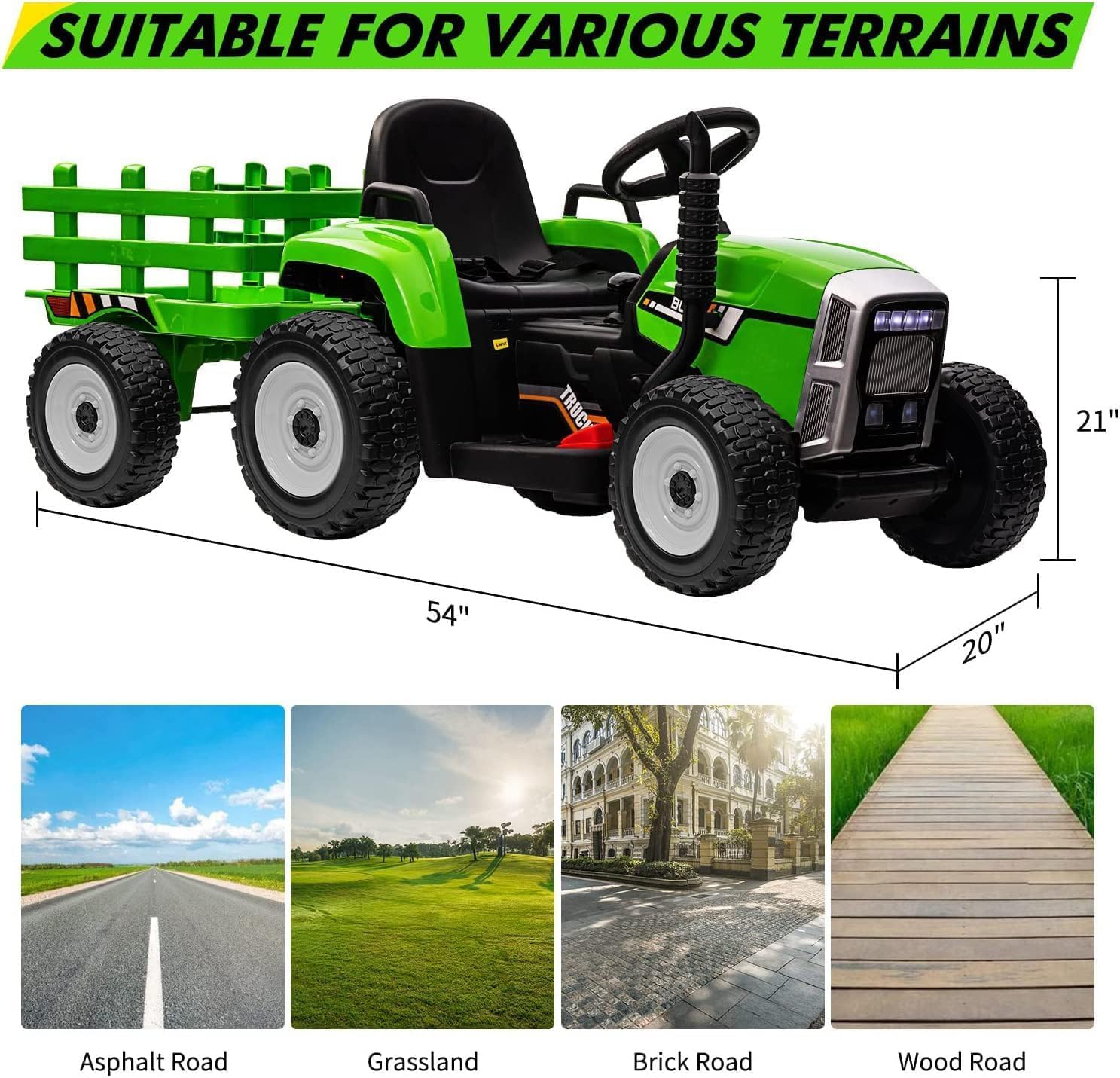
Image: The tractor is shown on different surfaces, illustrating its suitability for various terrains like asphalt, grassland, brick roads, and wooden paths.
6. Warranty and Support
For warranty information, technical support, or replacement parts, please contact Nasitip customer service directly. Refer to the product packaging or the official Nasitip website for contact details.
Related documentsKD-4


Ask a question about this manual
Ask about setup, troubleshooting, compatibility, parts, safety, or missing instructions. Manuals+ will review the question and use this page’s manual context to help answer it.