
1. Introduction
The YONHAN 15A Battery Charger (Model RJ-C121001A) is a versatile and intelligent device designed for charging, repairing, and maintaining various 12V and 24V lead-acid batteries, including LiFePO4, AGM, GEL, EFB, Wet, MF, STD, and deep-cycle types. Featuring adjustable current from 0A to 15A, advanced safety protections, and a multi-stage charging process, this charger ensures optimal battery performance and extended lifespan. It is suitable for a wide range of vehicles and equipment, from motorcycles and cars to RVs and trucks.
2. Safety Information
Always read and understand all safety instructions before using the charger. Failure to do so may result in electric shock, fire, or serious injury.
- Ventilation: Ensure adequate ventilation during charging. Do not operate in a confined area or restrict ventilation.
- Eye Protection: Always wear eye protection when working near batteries.
- Skin Protection: Wear protective gloves and clothing to prevent contact with battery acid.
- Flammable Materials: Keep sparks, flames, and smoking materials away from the battery and charger. Batteries produce explosive gases during operation.
- Connections: Connect the charger to the battery terminals correctly (red to positive, black to negative). The charger features reverse polarity protection to prevent damage from incorrect connections.
- Disconnecting: Always disconnect the AC power from the charger before disconnecting the battery clamps.
- Damaged Equipment: Do not operate the charger if it has been damaged in any way.
- Children: Keep the charger and battery out of reach of children.
- Compatibility: This charger is compatible with 12V/24V lead-acid batteries (LiFePO4, AGM, GEL, EFB, Wet, MF, STD, deep-cycle).
3. Features
- 6-in-1 Smart Charger with Adjustable Current: Offers precise charging modes with adjustable current from 0A to 15A, suitable for various battery sizes (4Ah to 250Ah).
- SUPPLY Mode (Zero-Volt Recovery & 12V DC Power Supply): Engineered for LiFePO4 batteries, capable of reviving completely discharged batteries (as low as 0 volts). Can also function as a stable 12V DC power source for emergency recovery and maintenance.
- Trickle Battery Charger and Maintainer: Advanced 10-stage multi-function charging process with comprehensive safety features including reverse polarity, short circuit, over-charge, over-heat, over-voltage, over-current, spark-free control, and temperature compensation.
- High-Efficient Repair Technology: Utilizes powerful pulse repair technology to break down corrosive sulfate crystals, restoring old, idle, or underperforming batteries and extending their lifespan.
- Automatic Voltage Detection: Automatically detects 12V or 24V battery systems.
- Temperature Compensation: Smart temperature compensation adjusts charging voltage based on ambient temperature for safer, all-season charging.
- Intelligent Display: Provides real-time charging status, voltage, current, and temperature readings.

Image: YONHAN 15A Battery Charger highlighting its automatic smart features and power supply function.

Image: Diagram illustrating the 10 built-in safety protections of the YONHAN 15A Battery Charger.
4. Setup
- Prepare the Battery: Ensure the battery terminals are clean and free of corrosion. If necessary, clean them with a wire brush.
- Connect the Charger:
- Connect the RED (+) positive charger clamp to the POSITIVE (+) battery terminal.
- Connect the BLACK (-) negative charger clamp to the NEGATIVE (-) battery terminal.
- Plug into Power: Plug the charger's AC power cord into a suitable electrical outlet (100-240V AC, 50/60Hz).
- Power On: Turn on the charger using the power switch, if available, or it may power on automatically upon connection.
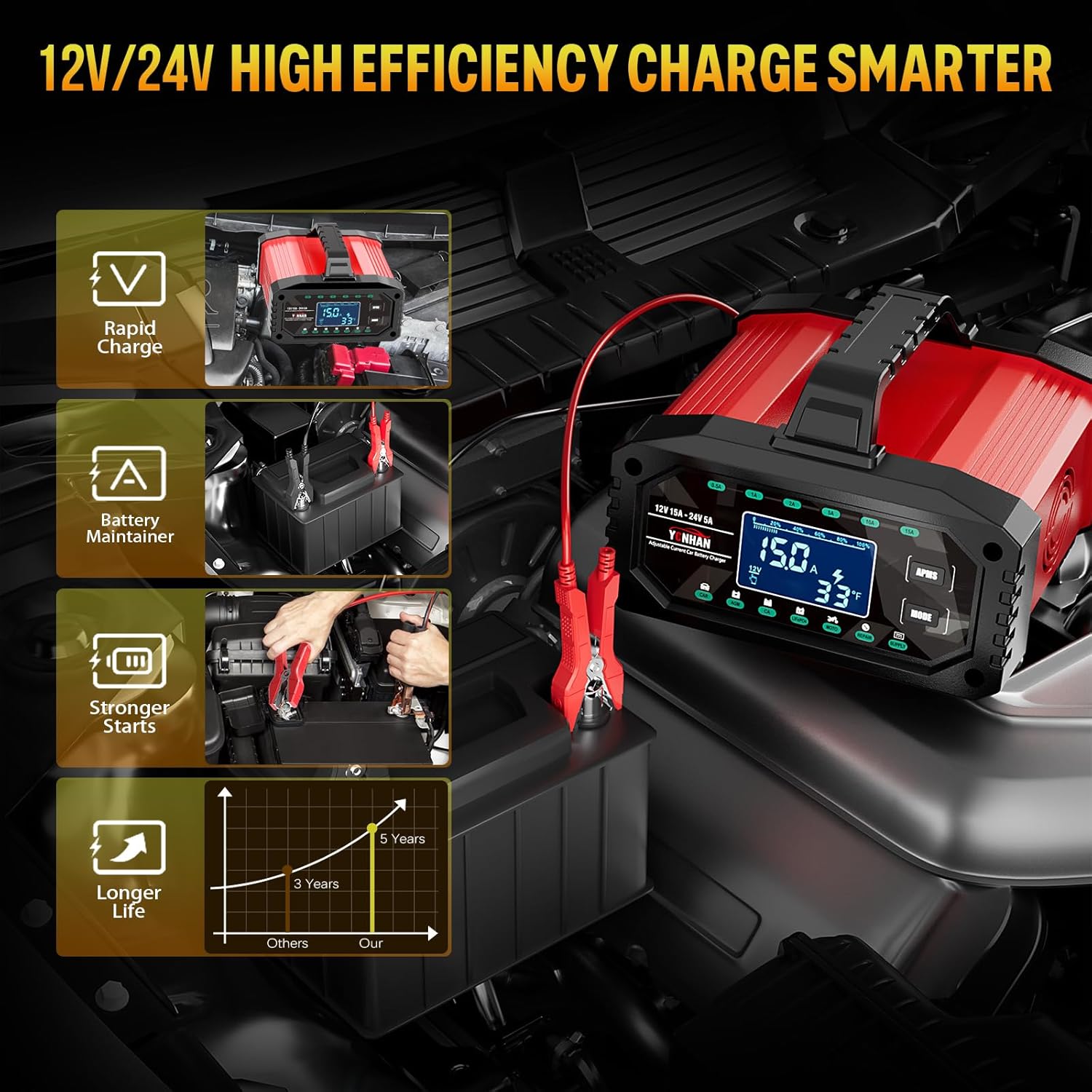
Image: The YONHAN 15A Battery Charger with its clamps connected to a car battery in an engine bay.
5. Operating Instructions
- Automatic Detection: Upon connection, the charger will automatically detect the battery voltage (12V or 24V) and display it on the screen.
- Mode Selection: Press the 'MODE' button to cycle through the available charging modes: Car, Motorcycle, AGM/GEL, LiFePO4, Repair, and SUPPLY. Select the mode appropriate for your battery type.
- Current Selection (if applicable): For adjustable current models, use the 'AMPS' button to select the desired charging current (e.g., 1A, 5A, 10A, 15A). Refer to the battery's capacity for optimal current selection.
- Start Charging: The charger will typically begin charging automatically after mode selection. The display will show real-time charging status, including voltage, current, and temperature.
- Charging Completion: The charger will automatically stop charging when the battery is full and switch to maintenance mode (trickle charging) to prevent overcharging. The display will indicate 'FUL' or 100% charge.
- SUPPLY Mode: To use as a 12V DC power supply or for zero-volt recovery, select 'SUPPLY' mode. This mode provides manual control for specific battery recovery scenarios.

Image: The intelligent display of the YONHAN 15A Battery Charger showing real-time charging status.
Video: Official YONHAN video demonstrating the adjustable current and various modes of the car battery charger.
6. Maintenance
- Trickle Charging: The charger automatically enters trickle charge mode once the battery is fully charged, maintaining optimal battery health without overcharging.
- Pulse Repair: For old, idle, or sulfated batteries, use the 'Repair' mode. This technology helps to restore battery capacity and extend its overall lifespan.
- Cleaning: Keep the charger clean and dry. Wipe the exterior with a soft, damp cloth. Do not use harsh chemicals or abrasives.
- Storage: Store the charger in a cool, dry place when not in use. Ensure cables are neatly wrapped to prevent damage.

Image: Illustration of the 'One Key Repair' function of the YONHAN 15A Battery Charger, addressing battery issues like poor feeding and high internal resistance.
7. Troubleshooting
- Charger Not Turning On: Check the AC power connection and ensure the power switch is in the 'ON' position.
- No Charging Indication: Verify that the battery clamps are securely connected to the correct battery terminals (positive to positive, negative to negative). The charger has reverse polarity protection, which will prevent charging if connected incorrectly.
- Error Message on Display: Refer to the user manual for specific error codes and their corresponding troubleshooting steps. Common errors may include incorrect battery type selection or a severely damaged battery.
- Slow Charging: Ensure the correct charging current is selected for your battery's capacity. Check for any loose connections or extreme temperatures.
8. Specifications
| Model Number | RJ-C121001A |
| Input Voltage | 100-240V AC, 50/60Hz |
| Output Voltage | 12V / 24V (Auto-detection) |
| Max Output Current | 15A (12V), 8A (24V) |
| Adjustable Current | 0A to 15A |
| Battery Capacity Range | 4Ah - 250Ah |
| Compatible Battery Types | LiFePO4, AGM, GEL, EFB, Wet, MF, STD, Deep Cycle Lead-Acid Batteries |
| Protection Features | Reverse Polarity, Short Circuit, Over-Charge, Over-Heat, Over-Voltage, Over-Current, Spark-Free, Temperature Compensation |
| Product Dimensions | 4.3 x 9.5 x 8.2 inches |
| Item Weight | 2 pounds |
9. Warranty and Support
For warranty information, technical support, or service inquiries, please contact YONHAN customer service directly through their official website or the retailer where the product was purchased. Keep your purchase receipt as proof of purchase.