
Genérico FS-L1216M
Genérico FOL Bluetooth TWS Speaker with Wireless Microphone FS-L1216M
User Manual
1. Introduction
Thank you for purchasing the Genérico FOL Bluetooth TWS Speaker FS-L1216M. This portable audio system is designed to deliver powerful sound with deep bass and clear treble, featuring True Wireless Speaker (TWS) technology for stereo pairing, a wireless microphone for karaoke, and multiple connectivity options including Bluetooth, USB, AUX, and FM Radio. This manual provides essential information for safe operation, setup, and maintenance of your device.
2. Safety Instructions
- Do not expose the device to rain, moisture, or extreme temperatures.
- Do not disassemble or modify the speaker. Refer all servicing to qualified personnel.
- Keep the speaker away from heat sources and direct sunlight.
- Use only the provided charging cable.
- Avoid placing heavy objects on the speaker.
- Clean only with a dry, soft cloth. Do not use liquid cleaners.
3. Package Contents
Please check the box for the following items:
- Genérico FOL Bluetooth TWS Speaker FS-L1216M
- Wireless Microphone
- Charging Cable (Interlock reinforced)
- User Manual (this document)
4. Product Overview
Familiarize yourself with the speaker's components and controls.
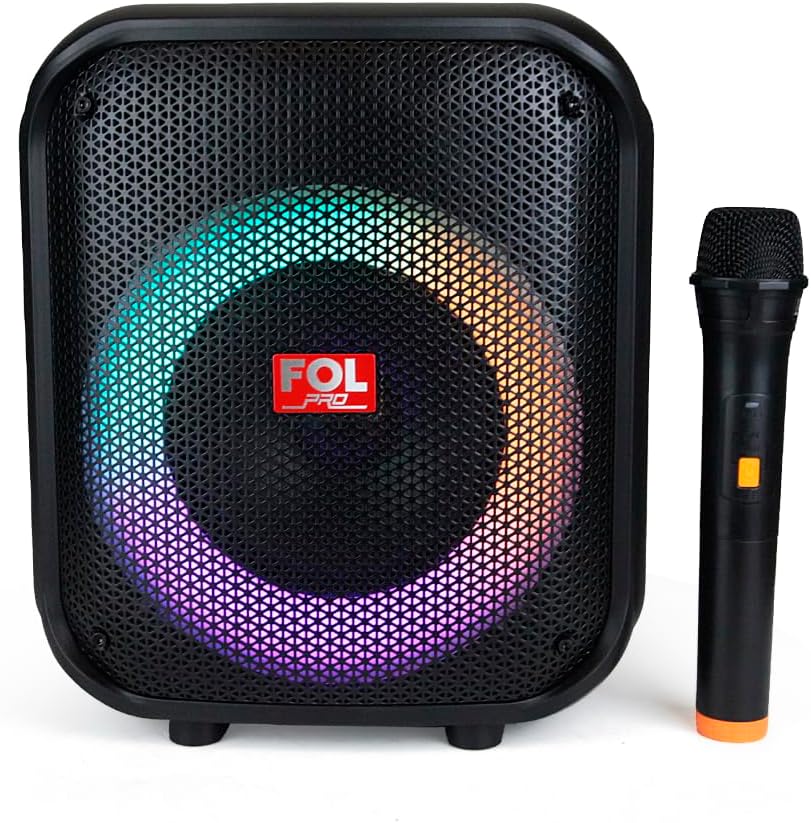
Figure 4.1: Front view of the speaker with its wireless microphone, showcasing the RGB lighting around the main speaker cone.

Figure 4.2: Top control panel showing buttons for recording, microphone volume/echo, light control, mode selection, EQ, power, and playback controls.
Control Panel Functions:
- REC/DEL: Record audio / Delete recording.
- MIC/ECHO: Adjust microphone volume / Adjust echo effect.
- Light Button: Control RGB lighting modes.
- MODE: Switch between Bluetooth, USB, AUX, and FM Radio modes.
- EQ: Equalizer settings.
- Power Button: Turn the speaker On/Off.
- Playback Controls: Previous track, Play/Pause, Next track.
- Volume +/-: Increase/Decrease main volume.
5. Setup
5.1 Charging the Speaker
- Connect the provided interlock reinforced charging cable to the speaker's charging port.
- Plug the other end into a suitable power outlet.
- The charging indicator will illuminate. The 2000mAh battery provides over 3 hours of autonomy.
- Disconnect the charger once fully charged.
5.2 Initial Power On
Press and hold the Power Button on the top panel for a few seconds until the speaker powers on and you hear an audible prompt.
6. Operating Instructions
6.1 Bluetooth Connection (Single Speaker)
- Turn on the speaker. It will automatically enter Bluetooth pairing mode, indicated by a flashing Bluetooth icon or audible prompt.
- Enable Bluetooth on your mobile device (smartphone, tablet, etc.).
- Search for "FS-L1216M" or similar in your device's Bluetooth list and select it to pair.
- Once connected, you will hear a confirmation sound. You can now play audio from your device.
6.2 True Wireless Speaker (TWS) Pairing (Two Speakers)
To achieve a stereo sound experience, you can pair two FS-L1216M speakers together:
- Ensure both speakers are powered on and in Bluetooth mode, but not yet connected to any device.
- On one of the speakers (this will be the primary speaker), press and hold the Play/Pause button for a few seconds to initiate TWS pairing.
- The speakers will attempt to connect to each other. Once successfully paired, you will hear a confirmation sound.
- Now, connect your mobile device to the primary speaker via Bluetooth as described in section 6.1. Audio will play through both speakers in stereo.
6.3 USB Playback
- Insert a USB flash drive containing MP3 audio files into the USB port.
- The speaker will automatically switch to USB mode and begin playing. If not, press the MODE button to select USB mode.
- Use the Playback Controls (Previous/Next/Play/Pause) to manage your music.
6.4 Auxiliary Input (AUX)
- Connect an audio device (e.g., smartphone, MP3 player) to the speaker's 3.5mm AUX input using an audio cable (not included).
- Press the MODE button to select AUX mode.
- Control playback from your connected audio device.
6.5 FM Radio
- Press the MODE button to switch to FM Radio mode.
- Press the Play/Pause button to automatically scan and save available FM stations.
- Use the Previous/Next track buttons to navigate between saved stations.
6.6 Using the Wireless Microphone
- Ensure the wireless microphone is charged and powered on. It should automatically connect to the speaker.
- Speak into the microphone. Adjust the microphone volume using the MIC/ECHO button.
- Press the MIC/ECHO button repeatedly to cycle through echo levels.
- For recording, press the REC button. Press again to stop recording. Recordings are saved to the USB drive if inserted.
The speaker also features an additional 6.3mm input for a wired microphone (not included).
6.7 RGB Lighting Control
Press the Light Button on the top panel to cycle through different RGB lighting modes or to turn the lights off.
7. Maintenance
- Cleaning: Use a soft, dry cloth to wipe the speaker's surface. Do not use abrasive cleaners or solvents.
- Storage: When not in use for extended periods, store the speaker in a cool, dry place away from direct sunlight and extreme temperatures.
- Battery Care: To prolong battery life, avoid fully discharging the battery frequently. Charge the speaker regularly, even if not in use.
8. Troubleshooting
| Problem | Possible Cause | Solution |
|---|---|---|
| Speaker does not turn on. | Battery is low or dead. | Charge the speaker using the provided cable. |
| No sound. | Volume is too low; Incorrect mode selected; Device not paired. | Increase volume; Press MODE button to select correct input; Re-pair Bluetooth device. |
| Bluetooth connection unstable. | Device is too far from speaker; Interference. | Move device closer to speaker (within 10m); Avoid obstacles; Turn off other Bluetooth devices. |
| Microphone not working. | Microphone battery low; Microphone not powered on or paired. | Charge/replace microphone batteries; Ensure microphone is powered on and within range. |
| FM Radio reception is poor. | Weak signal. | Reposition the speaker. |
9. Specifications
| Feature | Detail |
|---|---|
| Model | FS-L1216M |
| Output Power | 50W |
| Speaker Configuration | 6.5" Woofer + 2 x 2.25" Tweeters |
| Connectivity | Bluetooth, TWS, USB, AUX (3.5mm), FM Radio |
| Microphone Input | Wireless Microphone included, 6.3mm wired microphone input |
| Battery Capacity | 2000mAh |
| Battery Life | More than 3 hours (at moderate volume) |
| Lighting | RGB Illumination |
| Material | Plastic |
| Dimensions (L x W x H) | 40 x 30 x 45 cm |
| Weight | 2.5 kg |
| Recommended Use | Karaoke |
Ask a question about this manual
Ask about setup, troubleshooting, compatibility, parts, safety, or missing instructions. Manuals+ will review the question and use this page’s manual context to help answer it.