
Introduction
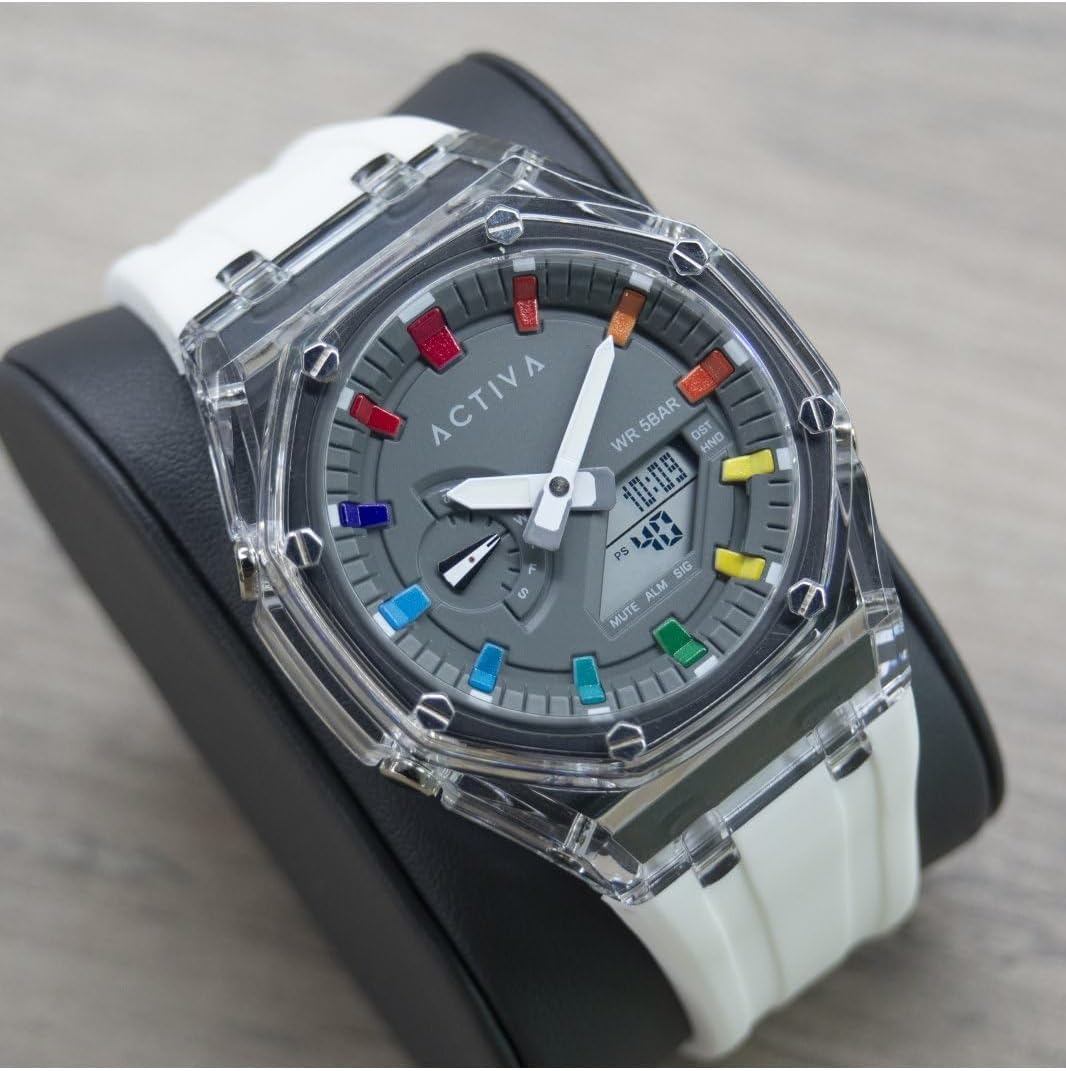
Thank you for choosing the Activa Digital ACW2100-003 Digital Quartz Watch. This manual provides essential information for the proper setup, operation, and maintenance of your new timepiece. Please read it thoroughly to ensure optimal performance and longevity of your watch.
Safety Information
- Avoid exposing the watch to extreme temperatures (hot or cold) for extended periods.
- Do not attempt to open the watch case or replace the battery yourself, as this may void the warranty and damage the watch.
- Keep the watch away from strong magnetic fields, which can affect the accuracy of the quartz movement.
- Clean the watch with a soft, dry cloth. Avoid using chemical cleaners.
Product Overview
The Activa Digital ACW2100-003 is a robust digital quartz watch designed for daily wear. It features a durable plastic case, a clear digital display, and a comfortable silicone band. The watch is water-resistant up to 5 bars (50 meters), making it suitable for showering and swimming in shallow water, but not for diving.

Key Components:
- Digital Display: Shows time, date, and other functions.
- Function Buttons: Typically located on the sides of the watch for setting and mode changes. (Specific button functions will be detailed in the 'Operating' section).
- Watch Case: Made of durable plastic.
- Watch Band: Made of comfortable silicone.
Setup
Setting Time and Date:
The exact procedure for setting the time and date may vary slightly depending on the specific button configuration. Generally, digital watches follow these steps:
- Enter Setting Mode: Press and hold the 'MODE' or 'SET' button (usually on the bottom left or top left) until a digit on the display starts flashing.
- Adjust Values: Use the 'ADJUST' or 'START/STOP' button (usually on the top right or bottom right) to increase or decrease the flashing digit (e.g., hours, minutes, year, month, day).
- Navigate Between Settings: Press the 'MODE' or 'SET' button again to move to the next setting (e.g., from hours to minutes, then to date).
- Exit Setting Mode: Once all settings are adjusted, press the 'MODE' or 'SET' button one last time, or wait for a few seconds for the watch to automatically exit the setting mode.
Operating
Basic Functions:
- Time Display: The primary mode shows the current time (hours, minutes, seconds) and often the day of the week and date.
- Alarm Function: To set an alarm, navigate to the alarm mode (often indicated by 'ALM'). Use the setting buttons to set the desired alarm time. An alarm icon will typically appear when activated.
- Stopwatch Function: To use the stopwatch, navigate to the stopwatch mode (often indicated by 'STW' or 'CHR'). Press a designated button (e.g., 'START/STOP') to begin and end timing, and another (e.g., 'RESET') to clear the time.
- Backlight: Many digital watches include a backlight for visibility in low-light conditions. Press a specific button (often labeled 'LIGHT' or a dedicated button on the top left) to activate it.
Water Resistance:
Your Activa Digital ACW2100-003 watch has a water resistance rating of 5 bars (50 meters). This means it is suitable for:
- Daily use and accidental splashes.
- Showering.
- Swimming in shallow water.
It is not suitable for:
- Snorkeling or diving.
- Operating buttons while submerged in water.
- Exposure to hot water or steam (e.g., hot tubs, saunas), as this can compromise the seals.
Maintenance
Cleaning:
To maintain the appearance of your watch:
- Wipe the watch case and band regularly with a soft, slightly damp cloth.
- For the silicone band, mild soap and water can be used, then rinse thoroughly and dry completely.
- Avoid harsh chemicals, solvents, or abrasive cleaners, as these can damage the watch materials.
Battery Replacement:
The watch is powered by a long-lasting quartz battery. When the display becomes dim or the watch stops functioning, it's time for a battery replacement. It is highly recommended to have the battery replaced by a qualified watch technician to ensure the water resistance seal is properly maintained.
Storage:
When not in use, store your watch in a cool, dry place away from direct sunlight and extreme temperatures.
Troubleshooting
| Problem | Possible Cause | Solution |
|---|---|---|
| Watch display is blank or dim. | Low or dead battery. | Replace the battery (recommended by a professional). |
| Time is inaccurate. | Incorrect time setting; exposure to strong magnetic fields. | Reset the time; keep away from magnets. |
| Water inside the watch. | Water resistance compromised (e.g., buttons pressed underwater, exposure to hot water/steam, damaged seal). | Immediately take the watch to a professional for inspection and repair. Do not attempt to dry it yourself. |
| Buttons are unresponsive. | Dirt or debris under buttons; internal malfunction. | Clean around buttons; if issue persists, contact support. |
Specifications
| Feature | Detail |
|---|---|
| Model Number | ACW2100-003 |
| Brand | Invicta (Activa Digital Collection) |
| Movement Type | Electronic Quartz |
| Display Type | Digital |
| Case Material | PC (Plastic) |
| Case Diameter | 44.2 Millimeters |
| Case Thickness | 14.1 Millimeters |
| Band Material Type | Silicone |
| Band Width | 20 Millimeters |
| Water Resistance Depth | 50 Meters (5 Bar) |
| Item Weight | 353.8 Grams (packaged) |
Warranty
Your Activa Digital ACW2100-003 watch comes with a 2-year Activa warranty. This warranty covers manufacturing defects under normal use. It does not cover damage resulting from improper handling, accidents, unauthorized repairs, or normal wear and tear. Please retain your proof of purchase for warranty claims.
Support
For further assistance, technical support, or warranty claims, please refer to the contact information provided with your purchase or visit the official Invicta/Activa website. When contacting support, please have your watch model number (ACW2100-003) and proof of purchase readily available.
Packaging


