
1. Product Overview
The INVICTA Attiva x Digital ACW8105MC-005 is a men's digital watch designed for durability and precise timekeeping. It features a 45mm plastic case with a black dial, powered by a reliable quartz movement. This model offers water resistance up to 3 bar, making it suitable for everyday use.
Key features include:
- 45mm plastic case with a black dial.
- Precise quartz movement for accurate timekeeping.
- Water resistance up to 3 bar (30 meters / 100 feet).
- Part of the Attiva x Invicta Digital collection.
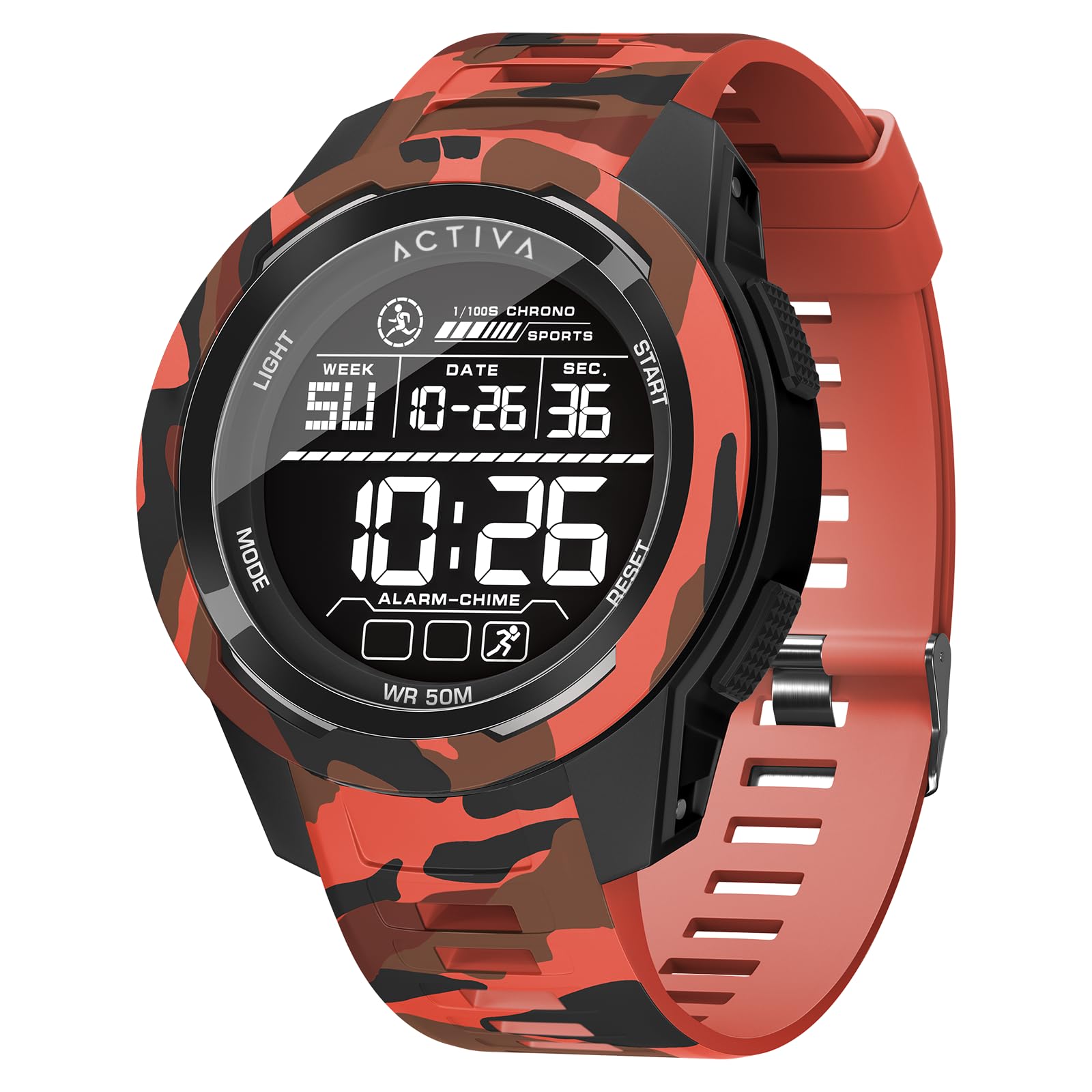
Image 1.1: Front view of the INVICTA Attiva x Digital ACW8105MC-005 watch, showcasing its black digital display and robust plastic casing.
2. Setup
2.1 Initial Inspection
Upon unpacking your watch, carefully inspect it for any visible damage. Remove any protective films from the watch face or case back.
2.2 Setting Time and Date
Digital watches typically have 2-4 buttons for operation. While specific button functions may vary, the general procedure for setting time and date is as follows:
- Enter Setting Mode: Press and hold the MODE button (often located on the bottom left) until the time display starts flashing, indicating you are in setting mode.
- Select Item: Press the MODE button repeatedly to cycle through the settings: seconds, hours, minutes, month, day, year.
- Adjust Value: Use the ADJUST or SET button (often top right) to increase or decrease the flashing value.
- Confirm and Exit: Once all settings are correct, press the MODE button again or the LIGHT button (if available) to exit the setting mode.
Note: Refer to the specific button labels on your watch for precise operation.
3. Operating Instructions
3.1 Time Display
The watch primarily displays the current time (hours, minutes, seconds). Some models may offer 12-hour or 24-hour format options, which can usually be toggled in the setting mode.
3.2 Alarm Function
To set the alarm:
- Press the MODE button until the alarm display appears (often indicated by "AL" or a bell icon).
- Press and hold the ADJUST button until the alarm time starts flashing.
- Use the ADJUST or SET button to set the desired alarm hour and minute.
- Press MODE to confirm and exit.
- To activate/deactivate the alarm, press the ADJUST button while in alarm mode. An alarm icon will typically appear when active.
3.3 Stopwatch Function
To use the stopwatch:
- Press the MODE button until the stopwatch display appears (often indicated by "ST" or "STOP").
- Press the START/STOP button (often top right) to begin timing.
- Press the START/STOP button again to pause/resume timing.
- Press the RESET button (often bottom right) to clear the stopwatch to zero.
3.4 Backlight
If your watch features a backlight, press the LIGHT button (usually top left) to illuminate the display in low-light conditions. The backlight typically stays on for a few seconds.
4. Maintenance
4.1 Water Resistance
This watch is water resistant up to 3 bar (30 meters / 100 feet). This rating means it is suitable for everyday use and can withstand splashes, rain, and brief immersion in water. It is NOT suitable for showering, swimming, diving, or snorkeling. Do not operate buttons while the watch is wet or submerged.
4.2 Cleaning
To clean your watch, wipe it gently with a soft, dry cloth. For stubborn dirt, a slightly damp cloth can be used, followed by immediate drying. Avoid using chemical cleaners, solvents, or abrasive materials, as these can damage the watch case and strap.
4.3 Battery Replacement
The watch is powered by a quartz movement, which requires a battery. When the display becomes dim or the watch stops functioning, the battery may need replacement. It is recommended to have the battery replaced by a qualified watch technician to ensure proper sealing and maintain water resistance.
5. Troubleshooting
- Display is blank or dim:
The battery may be depleted. Replace the battery as described in Section 4.3. If the issue persists after battery replacement, contact support.
- Time is incorrect:
The time may need to be reset. Follow the instructions in Section 2.2. Ensure you are setting the correct AM/PM if using a 12-hour format.
- Buttons are unresponsive:
Ensure the watch is not in a locked mode (some watches have a button lock feature). If the watch was recently exposed to water, ensure it is completely dry. If the issue persists, a reset (if available) or professional inspection may be required.
- Alarm does not sound:
Verify that the alarm function is activated (check for the alarm icon on the display). Ensure the alarm time is set correctly.
6. Specifications
| Model Number | ACW8105MC-005 |
| Movement | Quartz |
| Case Material | Plastic |
| Dial Color | Black |
| Case Diameter | 45 mm |
| Water Resistance | 3 bar (30 meters / 100 feet) |
| Manufacturer | Activa x Invicta |
| Package Dimensions | 11.3 x 9.91 x 9.19 cm; 353.8 grams |
7. Warranty and Support
7.1 Warranty Information
This INVICTA Attiva x Digital watch comes with a 2-year Activa x Invicta warranty. This warranty covers manufacturing defects under normal use. It does not cover damage resulting from improper use, accidents, unauthorized repairs, or normal wear and tear.
7.2 Customer Support
For warranty claims, technical assistance, or any questions regarding your watch, please refer to the official Invicta website or contact their customer service department. Keep your proof of purchase for warranty validation.
You can often find contact information and FAQs on the official Invicta Store or their corporate website.

