
1. Introduction
This manual provides essential information for using your new vivo T4 Ultra 5G smartphone. Please read it carefully to ensure proper operation and to maximize the device's capabilities. Keep this manual for future reference.
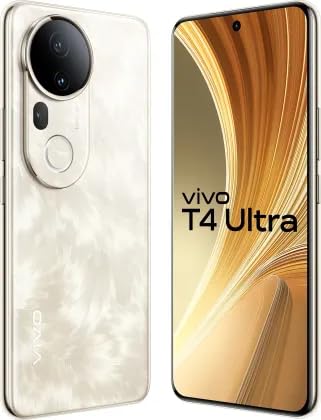
Figure 1.1: Front view of the vivo T4 Ultra 5G smartphone, showcasing its full display.
2. Setup
2.1 Unboxing
Upon opening the package, verify that all standard components are present:
- vivo T4 Ultra 5G Smartphone
- USB Type-C Cable
- Power Adapter
- SIM Ejector Tool
- Quick Start Guide
- Protective Case (may vary by region)
2.2 Inserting the SIM Card
- Locate the SIM card tray on the side of your device.
- Insert the SIM ejector tool into the small hole next to the tray and press gently until the tray pops out.
- Place your Nano-SIM card(s) into the tray with the gold contacts facing down. Ensure proper orientation.
- Carefully push the tray back into the slot until it is flush with the phone's body.
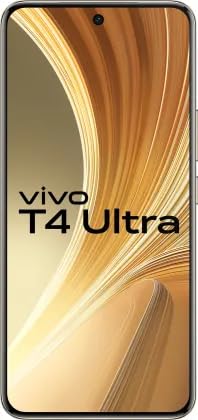
Figure 2.1: Side view of the vivo T4 Ultra 5G, indicating the location of the SIM card tray and physical buttons.
2.3 Charging the Battery
Before first use, fully charge your device. Connect the USB Type-C cable to the phone's charging port and the other end to the power adapter. Plug the adapter into a wall outlet. The charging indicator will appear on the screen.
2.4 Powering On/Off
- To Power On: Press and hold the Power button until the vivo logo appears.
- To Power Off: Press and hold the Power button, then select 'Power off' from the options on the screen.
- To Restart: Press and hold the Power button, then select 'Restart' from the options.
3. Operating Your Device
3.1 Basic Navigation
The vivo T4 Ultra 5G operates on Android. Use touch gestures such as tap, swipe, pinch-to-zoom, and long-press to navigate the interface, open apps, and interact with content.
3.2 Display Features
Experience vibrant visuals on the 6.67-inch Full HD+ AMOLED display with a resolution of 2800 x 1260 pixels and a 120Hz refresh rate for smooth scrolling. The display offers up to 5000 nits local peak brightness for clear visibility even in bright conditions.

Figure 3.1: The vivo T4 Ultra 5G display, emphasizing its high brightness and AMOLED technology.
3.3 Camera Usage
The device features a versatile camera system:
- Rear Camera: A triple camera setup with 50MP main, 8MP ultra-wide, and 50MP Periscope lenses. The Periscope lens offers advanced optical zoom capabilities.
- Front Camera: A 32MP sensor for high-quality selfies and video calls.
- Video Recording: Supports video capture up to 4K (3840 x 2160) resolution.
To access the camera, tap the Camera icon on your home screen. Select modes like Photo, Video, Portrait, or Pro from the interface. Tap the shutter button to capture images or start/stop video recording.
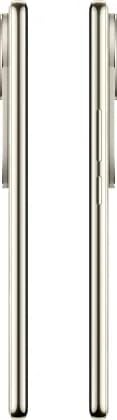
Figure 3.2: Rear view of the vivo T4 Ultra 5G, highlighting the advanced triple camera system.

Figure 3.3: The vivo T4 Ultra 5G's camera capabilities, featuring a 100x Zoom Periscope Lens.
3.4 Performance and Connectivity
The vivo T4 Ultra 5G is powered by the Mediatek Dimensity 9300+ Processor, ensuring smooth performance for gaming and multitasking. It comes with 8GB of RAM and 256GB of internal storage. Enjoy fast downloads and seamless streaming with 5G cellular technology.

Figure 3.4: The MediaTek Dimensity 9300+ Processor, highlighting software update commitments.
3.5 Battery Management
The device is equipped with a 5500mAh battery. To optimize battery life:
- Reduce screen brightness.
- Close unused applications running in the background.
- Disable Wi-Fi, Bluetooth, or GPS when not in use.
- Enable power-saving modes from the settings menu.

Figure 3.5: The vivo T4 Ultra 5G, emphasizing its large 5500mAh battery.
4. Maintenance
4.1 Cleaning Your Device
Use a soft, lint-free cloth to clean the screen and body of your phone. Avoid using harsh chemicals or abrasive materials. For stubborn smudges, slightly dampen the cloth with water or a screen cleaner designed for electronics.
4.2 Software Updates
Regularly check for and install software updates to ensure optimal performance, security, and access to new features. vivo commits to 3 years of Android updates and 4 years of security updates for this model. You can check for updates in Settings > System > System update.
4.3 Water Resistance
The vivo T4 Ultra 5G is designed to be water resistant. However, water resistance is not a permanent condition and may decrease over time with normal wear. Avoid intentionally submerging the device in water or exposing it to high-pressure water jets.
5. Troubleshooting
If you encounter issues with your device, try the following common solutions:
- Device Not Responding: Press and hold the Power button for about 10-15 seconds to force a restart.
- App Crashing: Close the app and reopen it. If the issue persists, clear the app's cache (Settings > Apps > [App Name] > Storage > Clear cache).
- Network Issues: Toggle Airplane Mode on and off. Check your SIM card insertion. Contact your network provider if problems persist.
- Battery Draining Quickly: Review battery usage in Settings to identify power-hungry apps. Reduce screen brightness and disable unnecessary features.
- Factory Reset: As a last resort, you can perform a factory reset (Settings > System > Reset options > Erase all data). Warning: This will erase all data on your phone. Back up important data before proceeding.
6. Specifications
| Feature | Detail |
|---|---|
| Brand | vivo |
| Model | T4 Ultra 5G |
| Operating System | Android |
| Processor | Mediatek Dimensity 9300+ (3.4 GHz) |
| RAM | 8 GB |
| Internal Storage | 256 GB |
| Display Size | 6.67 Inches |
| Display Type | AMOLED |
| Resolution | 2800 x 1260 (Full HD+) |
| Refresh Rate | 120 Hz |
| Rear Camera | 50 MP + 8 MP + 50 MP Periscope Triple Camera |
| Front Camera | 32 MP |
| Video Capture Resolution | 3840 x 2160 (4K) |
| Battery Capacity | 5500 mAh |
| Cellular Technology | 5G |
| SIM Card Slot Count | Single SIM (Nano) |
| Biometric Security | Fingerprint Recognition |
| Water Resistance Level | Water Resistant |
| Item Weight | 190 Grams |
| Item Dimensions | 16.1 x 7.5 x 0.8 Centimeters |
7. Support & Warranty
7.1 Customer Support
For any queries, technical assistance, or service requests, please contact vivo customer care:
- Customer Care: 1800-208-3388
- Manufacturer: PLOT NO 08, SECTOR 24, YAMUNA EXPRESSWAY AREA GAUTAM BUDDHA NAGAR UTTAR PRADESH 201310
- Packer: Vivo Mobile India Pvt. Ltd. Address: Greater Noida, Uttar Pradesh, India
7.2 Warranty Information
Your vivo T4 Ultra 5G comes with a standard manufacturer's warranty. Please refer to the warranty card included in your product packaging for specific terms, conditions, and duration of coverage. Keep your proof of purchase for warranty claims.


