
Introduction
This manual provides detailed instructions for the assembly, operation, and maintenance of your MXV 59-inch Fireplace TV Stand. Please read all instructions carefully before assembly and use to ensure safe and proper functioning of the product.

Figure 1: MXV 59-inch Fireplace TV Stand, Grey finish.
Safety Information
WARNING: Failure to follow these safety instructions may result in fire, electric shock, or injury.
- Always unplug the electric fireplace from the power outlet before cleaning, performing maintenance, or moving the unit.
- Do not place the TV stand near flammable materials or in areas with excessive moisture.
- Ensure the power cord is not pinched or damaged. Do not run the cord under carpeting.
- Keep children and pets away from the electric fireplace when it is operating, especially when the heater function is active.
- Do not block the air vents of the electric fireplace.
- Only use the TV stand on a flat, stable surface to prevent tipping.
- Do not overload the shelves or top surface of the TV stand.
Package Contents
Before beginning assembly, verify that all parts and hardware are present. Refer to the included assembly manual for a complete list of components.
- TV Stand Panels (Engineered Wood)
- Electric Fireplace Insert
- Hardware Pack (screws, dowels, cam locks, etc.)
- Adjustable Shelves
- Glass Cabinet Doors
- Assembly Instructions Manual

Figure 2: The product is delivered in two separate packages.
Assembly Instructions
Your MXV Fireplace TV Stand comes with a comprehensive, step-by-step assembly manual. All parts and hardware are clearly numbered for easy identification. Please follow the instructions provided in the separate assembly manual for detailed guidance.
- Tools Required: Typically, a screwdriver and a hammer are needed. Power tools are not recommended as they may damage the engineered wood.
- Two-Person Assembly: Assembly is easier and safer with two people due to the size and weight of the components.
- Assembly Area: Ensure you have a large, clear area for assembly to prevent damage to the product or your flooring.

Figure 3: Detail of adjustable shelf and cable management port.
Setup
- Placement: Position the assembled TV stand on a level surface in your desired location, ensuring adequate clearance from walls and other furniture for proper ventilation of the fireplace.
- Electrical Connection: Once the fireplace insert is securely installed within the TV stand, plug the fireplace power cord into a standard 120V AC grounded outlet. Do not use extension cords or power strips.
- TV Placement: Place your television on the top surface. The 59-inch model can accommodate TVs up to 65 inches.
- Cable Management: Utilize the integrated cable ports to route and organize your TV and media device cables, maintaining a tidy appearance.
Operating Instructions
Electric Fireplace Operation
The electric fireplace can be operated using the control panel on the unit or the included remote control.
- Power On/Off: Press the power button to turn the fireplace on or off.
- Flame Brightness: Adjust the flame brightness through 5 available settings to suit your preference.
- Flame Color: Select from 12 different flame colors to customize the ambiance.
- Heater Function: Activate the heater to provide warmth. The heater has settings for 1000W or 1500W and can maintain temperatures between 60°F and 99°F.
- Timer: Set the operational timer for 0 to 9 hours, allowing the fireplace to automatically turn off after the set duration.
- Child Lock Protection: Engage the child lock feature to prevent accidental changes to settings. Refer to the fireplace manual for specific instructions on activating and deactivating this feature.
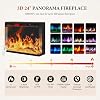
Figure 4: Electric fireplace features and control options.

Figure 5: The 3-sided glass design provides a wide view of the flame effect.
LED Lighting Operation
The TV stand features integrated LED light strips with multiple color options.
- Color Selection: Choose from 12 different LED colors to illuminate the cabinet interiors.
- Brightness Control: Adjust the brightness of the LED lights.
- Remote Control: The LED lights can be controlled via a dedicated remote or integrated controls.

Figure 6: LED lighting options and remote control functionality.
Maintenance
- Cleaning: Wipe surfaces with a soft, damp cloth. Avoid harsh chemicals or abrasive cleaners that may damage the finish.
- Dusting: Regularly dust the unit to prevent buildup, especially around the fireplace vents.
- Fireplace Glass: Clean the glass panel of the electric fireplace with a glass cleaner suitable for electronics, applied to a cloth first, not directly to the unit.
- Electrical Components: Periodically check the power cord for any signs of damage.
Troubleshooting
| Problem | Possible Cause | Solution |
|---|---|---|
| Fireplace does not turn on. | No power, power cord unplugged, circuit breaker tripped. | Ensure the unit is plugged into a working outlet. Check the circuit breaker. |
| No heat output. | Heater function not activated, thermostat set too low. | Activate the heater function and adjust the temperature setting. |
| Flame effect not visible. | Flame effect turned off, brightness set to minimum. | Turn on the flame effect and increase brightness. |
| LED lights not working. | LED lights turned off, power connection issue. | Ensure LED lights are powered on. Check connections. |
If you encounter issues not listed here, please consult the detailed fireplace manual or contact customer support.
Specifications
| Brand: | MXV |
| Model Number: | MXVH21022GR+FC407BK01A-LC |
| Overall Dimensions: | 59 x 13.8 x 31.5 inches (L x W x H) |
| Material: | Engineered Wood |
| Color: | Grey |
| Item Weight: | Approximately 16 ounces (Note: This seems to be a placeholder or incorrect weight from the source data, actual product weight will be significantly higher for a TV stand) |
| Fireplace Dimensions: | 24.0"L x 7.1"W x 18.1"H |
| Heater Power: | 1000W / 1500W |
| Flame Brightness Settings: | 5 levels |
| Flame Colors: | 12 colors |
| LED Backlight Colors: | 12 colors |
| Timer: | 0-9 hours |
| Max TV Size: | Up to 65 inches |

Figure 7: Detailed product dimensions.
Warranty and Support
For warranty information, please refer to the documentation included with your purchase or contact the retailer where the product was acquired. For technical support or assistance with parts, please contact MXV customer service through the contact information provided in your purchase documentation.