
1. Introduction
The Pknight CR041R MK II is a versatile 4-port bi-directional Art-Net/sACN to DMX512 converter designed for professional stage lighting control. This device facilitates seamless conversion between Ethernet-based lighting protocols (Art-Net, sACN) and DMX512, allowing for flexible integration into various lighting systems. It supports multiple power options and offers independent configuration for each DMX port.
2. Product Overview
2.1 Key Features
- sACN Multicast and Priority Support: Integrates sACN multicast and priority control for smooth operation in multi-source lighting environments.
- Triple Power Options: Can be powered via PowerCON AC (90–240V), 5V USB-C, or IEEE 802.3af Power over Ethernet (PoE).
- Intuitive Onboard Menu: Features a 1.8-inch color TFT display and a four-button interface for standalone configuration, universe mapping, and signal status monitoring without a PC.
- Versatile Mounting: Supports truss, wall, or flat-surface installation, allowing for horizontal or vertical deployment.
- Bi-directional Protocol Conversion: Each port supports both DMX input and output, enabling conversion from Art-Net/sACN to DMX512 or DMX512 to network.
- Compact and Durable Design: Housed in a rugged metal enclosure with a compact form factor and lockable RJ45 (etherCON) for secure data connections.
2.2 Component Identification
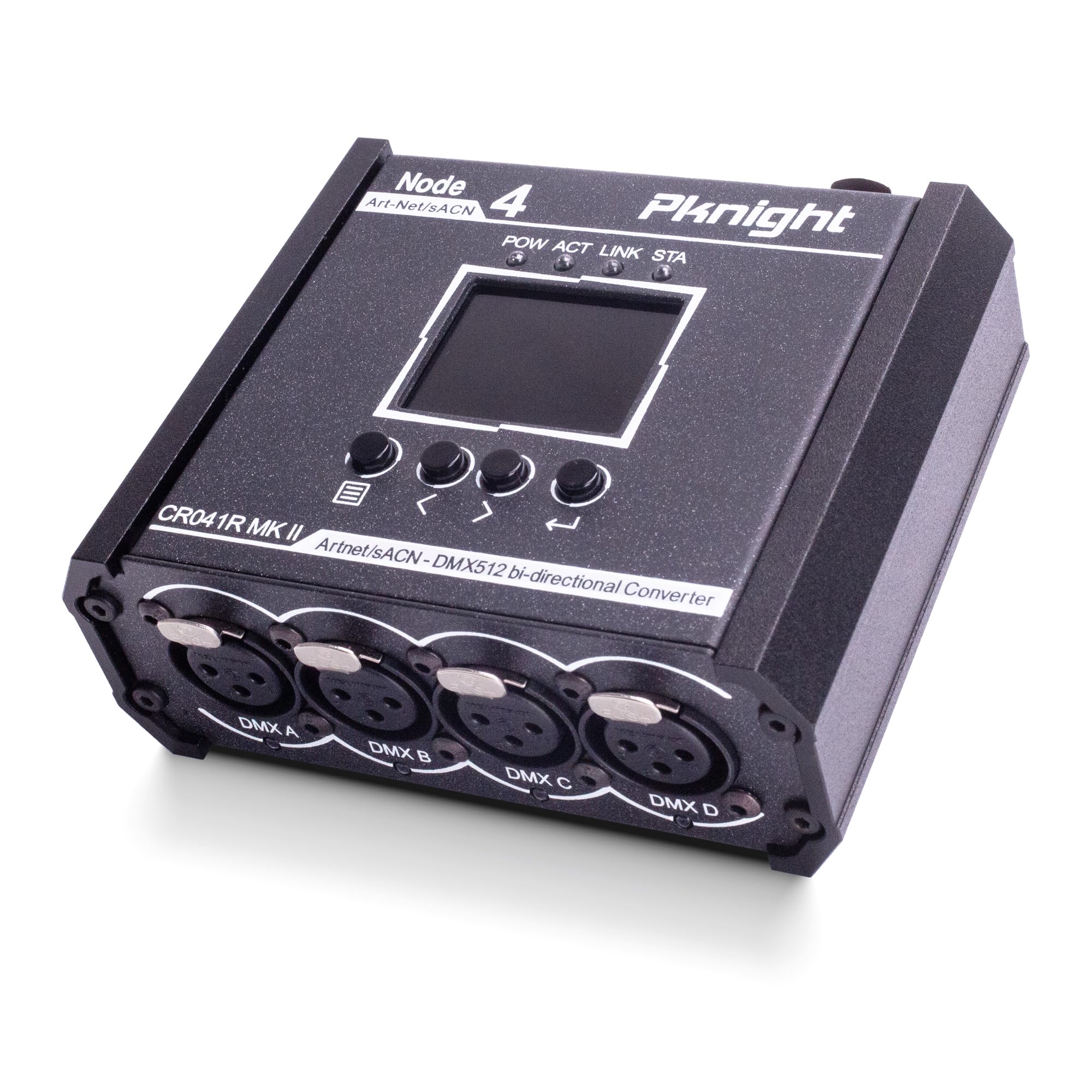
Figure 1: Front view of the Pknight CR041R MK II converter, showing the display and control buttons.

Figure 2: Top panel of the converter, highlighting the PoE, USB-C, and PowerCON AC power input options.

Figure 3: Bottom panel of the converter, showing the four DMX ports (A-D) and their signal indicator lights.
3. Setup
3.1 Powering the Device
The CR041R MK II offers three power input options:
- PowerCON AC: Connect to a standard AC mains supply (90–240V) using the provided PowerCON cable.
- USB-C: Use a 5V USB-C power source for mobile or temporary setups.
- Power over Ethernet (PoE): Connect to an IEEE 802.3af compliant PoE switch or injector via the Art-Net/sACN RJ45 port.
3.2 Network Connection
Connect the device to your local area network (LAN) using a standard Ethernet cable via the lockable RJ45 port. This port supports Art-Net and sACN protocols for data transmission.

Figure 4: Detail of the lockable RJ45 Ethernet port for secure network connectivity.
4. Operation
4.1 Onboard Menu Navigation
The device features a 1.8-inch color TFT display and four control buttons for navigation and configuration. Use the buttons to scroll through menus, select options, and confirm settings.

Figure 5: The device display showing current IP address and DMX universe mapping status.
For additional video tutorials and information, scan the QR code or visit: https://qrco.de/CR-MK-II-Series-Playlist
4.2 Network Configuration
Access the "Network" menu to configure the device's communication parameters. You can set the IP address, subnet mask, gateway, and remote IP for unicast mode. Options include Auto DHCP or manual IP entry (e.g., 10.X.X.X, 2.X.X.X, 192.168.1.X).

Figure 6: Network configuration menu for setting IP addresses.
4.3 DMX Universe Configuration
Each of the four DMX ports can be independently configured for DMX input or output, protocol (Art-Net or sACN), and data merge mode (HTP/LTP). You can assign unique Net, Sub, and Universe addresses to each port.
- Net (0-127): Sets the Art-Net network address.
- Sub (0-15): Defines the subnet address within the selected Net.
- Port # (1-4): Configure direction (Input/Output), protocol (Art-Net/sACN), and merge mode (HTP/LTP).

Figure 7: Independent configuration settings for each DMX port.
4.4 sACN Priority
When multiple sACN sources are present, the device automatically follows the sACN source with the highest priority. This ensures smooth switching between controllers without flicker or interruption in your lighting system.
4.5 Bi-directional DMX512 to Art-Net/sACN Address Mapping Tool
Pknight provides an online tool to easily calculate both forward (Art-Net/sACN to DMX) and reverse (DMX to Art-Net/sACN) mappings. This tool helps in accurately routing DMX data by converting Universe Index to Net/Subnet/Universe values and vice-versa, including multicast address calculations.
5. Mounting Options
The CR041R MK II is designed for flexible installation. It can be mounted on a truss using standard truss hook clamps (M10 recommended), or securely attached to a wall or flat surface using the included metal mounting bracket and screws. The device can be oriented horizontally or vertically.

Figure 8: Examples of truss and wall mounting configurations.
6. Specifications
| Specification | Detail |
|---|---|
| Model Number | CR041R MK II |
| Item Weight | 1.21 pounds (0.55 kg) |
| Product Dimensions | 1.8 x 4.33 x 4.5 inches (4.57 x 10.99 x 11.43 cm) |
| DMX Ports | 4 (3-pin XLR) |
| Protocols Supported | Art-Net, sACN, DMX512 |
| Power Input | PowerCON AC (90-240V), USB-C (5V), PoE (IEEE 802.3af) |
| Display | 1.8-inch Color TFT |
7. Package Contents
The following items are included in the package:
- 1 x CR041R MK II Controller Unit
- 1 x PowerCON AC Power Cable (plug version varies by region)
- 1 x Metal Mounting Bracket
- 6 x Mounting Screws
8. Troubleshooting
If you encounter issues with your Pknight CR041R MK II, consider the following:
- No Power: Verify that the power cable is securely connected and the power source is active. Check all three power options (PowerCON, USB-C, PoE) if applicable.
- No DMX Signal: Ensure DMX cables are correctly connected. Check the DMX port indicator lights (Green for Output, Orange for Input with signal, Off for Input without signal). Verify DMX universe and protocol settings in the menu.
- Network Connectivity Issues: Confirm the Ethernet cable is properly connected to the lockable RJ45 port. Check network settings (IP address, subnet mask) in the device menu. Ensure your network switch supports PoE if using that power option.
- Incorrect DMX Output: Review the DMX Universe settings for each port, including direction, protocol, and merge mode. Ensure the Art-Net/sACN controller is sending data to the correct Net/Sub/Universe.
- Firmware Update: Check the Pknight website for the latest firmware updates and instructions if experiencing persistent issues.
9. Warranty and Support
Pknight Products, LLC is committed to providing excellent customer support. If you encounter any issues during setup or operation, or if you have any questions or feedback, please feel free to contact us. Our support team will respond to your inquiry within 24 hours.
For warranty information, please refer to the documentation included with your purchase or visit the official Pknight website.
10. Product Video
Official product video demonstrating the features and functionality of the Pknight CR041R MK II 4-Port Bi-Directional Art-Net/sACN to DMX512 Converter, including power options, port configuration, and sACN priority.


