
1. Introduction
Thank you for choosing the STF G Track Ultra Portable Speaker. This manual provides essential information for the safe and efficient operation of your device. Please read it thoroughly before use and retain it for future reference. This portable speaker features a 4-inch driver, 20W output, RGB LED lighting, True Wireless Stereo (TWS) functionality, Bluetooth 5 connectivity, and multiple playback options including USB, Micro SD, Aux, FM radio, and microphone input.
2. Package Contents
Verify that all items are present in the package:
- STF G Track Ultra Portable Speaker
- USB Type-C Charging Cable
- Auxiliary 3.5mm Audio Cable
- User Manual
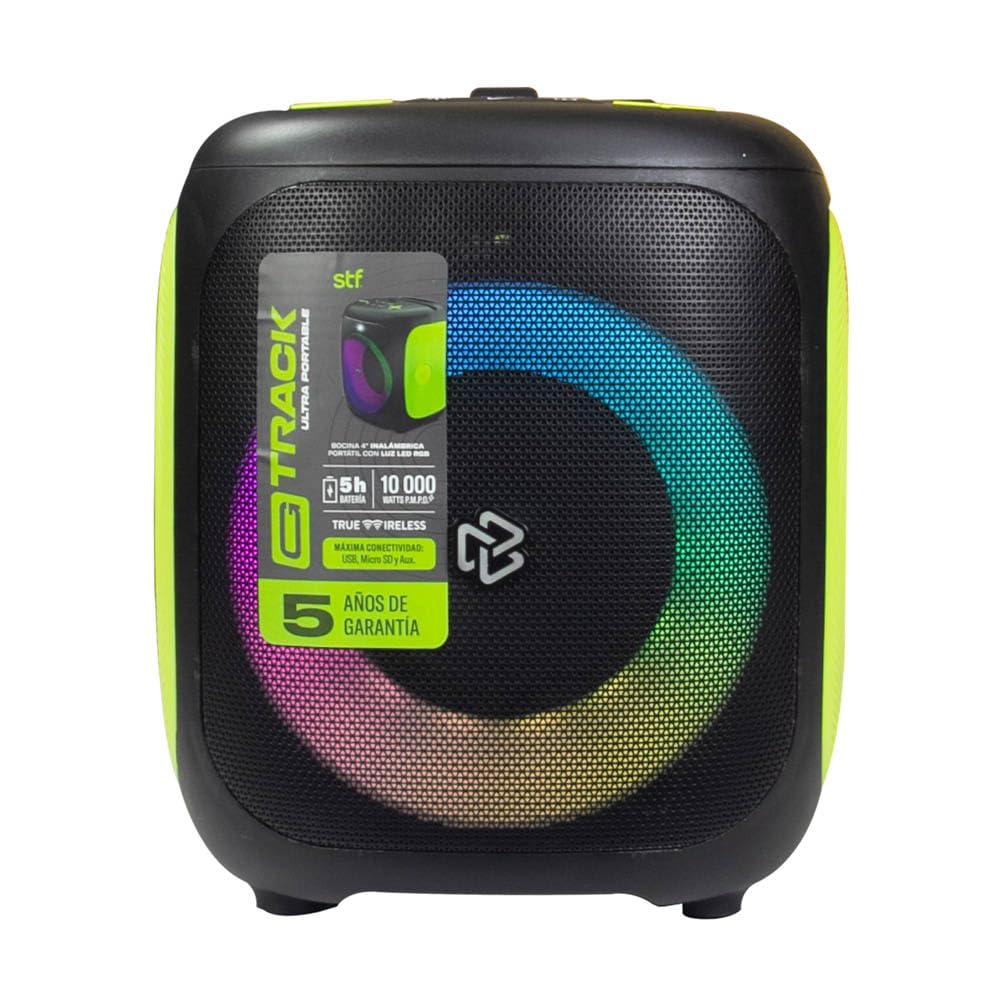
Image 2.1: STF G Track Ultra Portable Speaker with its charging cable, auxiliary cable, and user manual.
3. Product Overview
3.1 Control Panel
The control panel is located on the top of the speaker and provides access to all primary functions.

Image 3.1: Top control panel with buttons for mode, menu, power, volume, LED, play/pause, and EQ.
- M (Mode) Button: Switches between Bluetooth, USB, Micro SD, Aux, and FM radio modes.
- MENU Button: Accesses additional settings or functions depending on the mode.
- Power Button (⑁): Press and hold to power on/off. Short press to play/pause in music modes.
- Volume Down (-) / Previous Track: Short press for previous track, long press to decrease volume.
- Volume Up (+) / Next Track: Short press for next track, long press to increase volume.
- LED Button (☀): Controls the RGB lighting effects.
- Play/Pause Button (▶): Plays or pauses audio playback.
- EQ Button (EQ 1.2.3): Cycles through equalizer presets.
3.2 Ports and Connections
The connection ports are typically located on the rear or side of the speaker.

Image 3.2: Rear view of the speaker, highlighting the bass port and potential charging/input ports (not visible in this specific image, but typically located near the bottom or side).
- USB Port: For USB flash drive playback.
- Micro SD Card Slot: For Micro SD card playback.
- AUX Input (3.5mm): For connecting external audio devices via an auxiliary cable.
- Microphone Input: For connecting a wired microphone.
- USB Type-C Charging Port: For charging the speaker's internal battery.
4. Setup
4.1 Charging the Speaker
- Connect the provided USB Type-C cable to the speaker's charging port.
- Connect the other end of the USB cable to a compatible USB power adapter (5V/1A recommended, not included) or a computer's USB port.
- The charging indicator light will illuminate, typically red, during charging.
- Once fully charged, the indicator light will change color or turn off (refer to specific product LED behavior). A full charge provides approximately 5 hours of playback.
4.2 Power On/Off
- To power on, press and hold the Power button (⑁) for approximately 2-3 seconds until you hear an audible prompt or see the LED lights activate.
- To power off, press and hold the Power button (⑁) again for approximately 2-3 seconds.
4.3 Bluetooth Pairing
- Ensure the speaker is powered on and in Bluetooth mode. If not, press the 'M' (Mode) button until you hear the Bluetooth prompt. The LED indicator will typically flash, indicating it's in pairing mode.
- On your mobile device (smartphone, tablet, computer), enable Bluetooth and search for available devices.
- Select "STF G Track" from the list of found devices.
- Once paired, you will hear a confirmation sound, and the LED indicator will stop flashing and remain solid.
- The speaker will automatically reconnect to the last paired device when powered on, if the device's Bluetooth is active and within range.
4.4 True Wireless Stereo (TWS) Pairing
TWS allows you to connect two STF G Track speakers for a stereo sound experience.
- Ensure both STF G Track speakers are powered on and in Bluetooth mode, but not yet connected to any device.
- On one of the speakers (this will be the primary speaker), press and hold the 'M' (Mode) button for approximately 3-5 seconds. You should hear a pairing tone.
- The two speakers will automatically search for and connect to each other. Once connected, you will hear a confirmation sound.
- Now, on your mobile device, search for Bluetooth devices and connect to the primary speaker (e.g., "STF G Track"). Both speakers will now play audio in stereo.
5. Operating Instructions
5.1 Music Playback (USB, Micro SD, Aux)
- USB/Micro SD: Insert a USB flash drive or Micro SD card (with supported audio files) into the corresponding port. The speaker will automatically switch to USB/Micro SD mode and begin playback. Use the Play/Pause, Next, and Previous buttons to control playback.
- Auxiliary Input: Connect an external audio device (e.g., MP3 player, smartphone) to the speaker's 3.5mm AUX input using the provided auxiliary cable. Press the 'M' (Mode) button until you select AUX mode. Control playback from your connected device.
5.2 FM Radio
- Press the 'M' (Mode) button repeatedly until you select FM radio mode.
- To automatically scan and save available stations, press and hold the Play/Pause button (▶). The speaker will scan and store stations.
- Use the Next (+) and Previous (-) buttons to navigate between saved FM stations.
5.3 Microphone Usage
- Connect a wired microphone (not included) to the microphone input port on the speaker.
- Adjust the microphone volume using the speaker's volume controls or any dedicated microphone volume knob if available.
5.4 LED Light Control
- Press the LED button (☀) to cycle through different RGB lighting modes or to turn the lights off.
5.5 Equalizer (EQ)
- Press the EQ button (EQ 1.2.3) to switch between available equalizer presets (e.g., Pop, Rock, Jazz, Classic, Flat) to optimize the sound for different music genres.
6. Maintenance
- Cleaning: Use a soft, dry cloth to clean the speaker's exterior. Do not use abrasive cleaners, waxes, or solvents.
- Storage: Store the speaker in a cool, dry place away from direct sunlight and extreme temperatures.
- Battery Care: To prolong battery life, avoid fully discharging the battery frequently. Charge the speaker regularly, even if not in use for extended periods.
- Water Resistance: This speaker is not waterproof. Avoid exposure to water or excessive moisture.
7. Troubleshooting
| Problem | Possible Cause | Solution |
|---|---|---|
| Speaker does not power on. | Low battery. | Charge the speaker using the provided USB Type-C cable. |
| No sound. | Volume too low; incorrect mode selected; device not connected. | Increase volume; press 'M' to select correct input mode; ensure Bluetooth device is paired or AUX cable is fully inserted. |
| Bluetooth pairing fails. | Speaker not in pairing mode; device too far; interference. | Ensure speaker is in Bluetooth pairing mode (flashing LED); move device closer to speaker; turn off other Bluetooth devices. |
| TWS pairing fails. | Speakers already connected to a device; incorrect pairing procedure. | Disconnect both speakers from any Bluetooth devices. Follow TWS pairing steps carefully. |
| FM radio reception is poor. | Weak signal; environmental interference. | Relocate the speaker to an area with better reception. |
8. Specifications
| Model Name | ST-S49667 |
| Speaker Type | Portable |
| Speaker Size | 4 Inches |
| Maximum Output Power | 20 Watts |
| Frequency Response | 100Hz - 20kHz |
| Sound Pressure Level (SPL) | 95 dBSPL |
| Bluetooth Version | Bluetooth 5 |
| Wireless Range | Up to 10 meters (33 feet) |
| Battery Capacity | 3000 mAh |
| Average Battery Life | Up to 5 hours (at moderate volume) |
| Charging Port | USB Type-C |
| Connectivity Options | Bluetooth, USB, Micro SD, Aux 3.5mm, FM Radio, Microphone Input |
| Control Method | Tactile Buttons |
| Special Features | RGB LED Lighting, True Wireless Stereo (TWS) |
9. Warranty and Support
This product comes with a standard warranty. Please refer to the warranty card included in your package for detailed terms and conditions. For technical support, troubleshooting assistance, or warranty claims, please contact STF customer service through their official website or the contact information provided on your warranty documentation.
Warranty Type: Standard
10. Product Video Overview
Video 10.1: An official product video providing a general overview of the STF G Track Ultra Portable Speaker's features and design.

