Introduction
The Shark Matrix Plus UR2650WS is a versatile 2-in-1 robot designed for comprehensive home cleaning. It functions as both a powerful vacuum for carpets and hard floors and a sonic mop for hard surfaces. This manual provides essential information for setting up, operating, maintaining, and troubleshooting your robot vacuum and mop.
Key features include Sonic Mopping, which scrubs hard floors 100 times per minute for effective stain removal, and Matrix Clean technology, which ensures thorough coverage with precise grid cleaning. The robot also features a Self-Empty HEPA Base that holds up to 30 days of debris, 360° LiDAR vision for accurate home mapping and obstacle avoidance, and a self-cleaning brushroll ideal for pet hair.
Setup
Follow these steps for initial setup of your Shark Matrix Plus Robot Vacuum and Mop:
- Unboxing: Carefully remove all components from the packaging. Ensure all accessories, including the robot, self-empty base, cleaning solution, side brushes, and mopping pads, are present.
- Base Placement: Place the Self-Empty Base against a wall in an open area with good Wi-Fi signal. Ensure there is adequate space around the base for the robot to maneuver.
- Initial Charge: Place the robot onto the charging contacts of the Self-Empty Base. Allow the robot to fully charge before its first use. The indicator lights on the robot will show charging status.
- App Installation: Download the SharkClean app from your smartphone's app store. Follow the in-app instructions to connect your robot to your home Wi-Fi network and complete the initial mapping of your home.
- Water Tank (for Mopping): For mopping functions, fill the integrated water tank on the robot with water and the recommended Shark Multi-Surface Cleaning Solution.
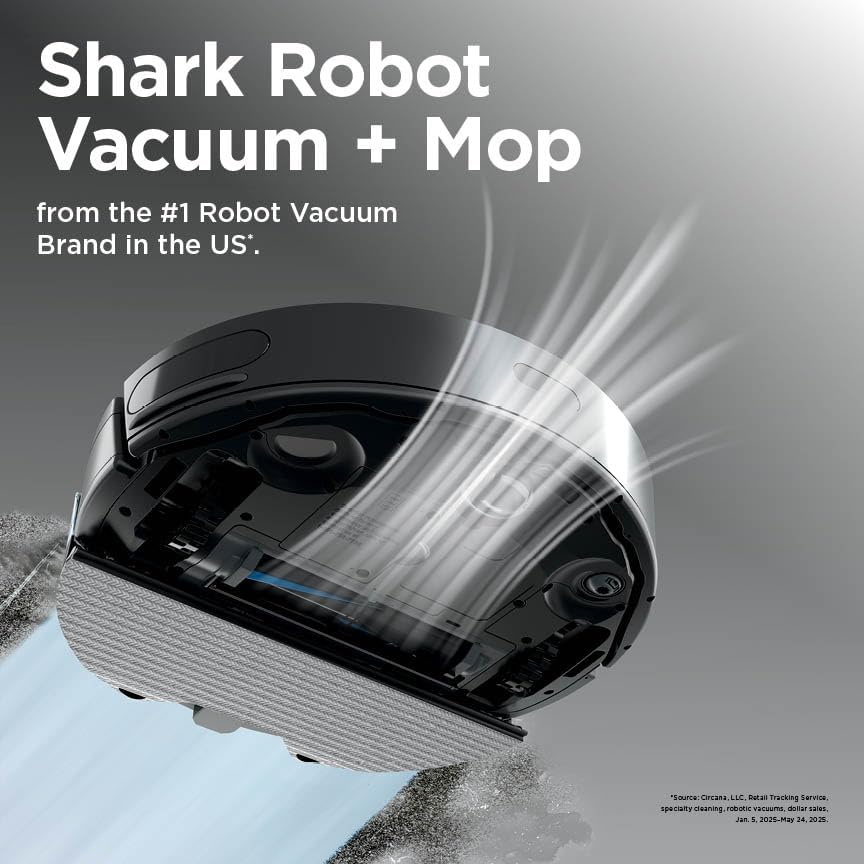
Figure 1: Shark Matrix Plus Robot Vacuum and Self-Empty Base.

Figure 2: Shark Matrix Plus Robot Vacuum with Self-Empty Base and water tank for mopping.
Operating Instructions
Your Shark Matrix Plus Robot Vacuum and Mop offers several operating modes for efficient cleaning:
- Starting a Clean: You can initiate a cleaning cycle directly from the robot by pressing the 'Clean' button, or through the SharkClean app for more customized options.
- Matrix Clean: This mode ensures no spots are missed by cleaning in a precise matrix grid, taking multiple passes over dirt and debris for deep cleaning coverage. Activate via the app.
- Sonic Mopping: For hard floors, the robot scrubs 100 times per minute. For extra deep cleaning, use the Matrix Mop feature in the app to target specific zones.
- CleanEdge Detect: The robot uses blasts of air and corner recognition to remove debris from edges and corners, pulling it into the cleaning path for enhanced edge cleaning.
- Recharge & Resume: If the battery runs low during a cleaning cycle, the robot will automatically return to its base to recharge and then resume cleaning exactly where it left off.
- App Control: Use the SharkClean app to set cleaning schedules, initiate on-demand cleaning, define no-go zones, or select specific rooms for cleaning. Voice commands via Amazon Alexa or Google Assistant are also supported.

Figure 3: Robot vacuum demonstrating powerful suction on a hard floor.

Figure 4: Robot vacuum performing sonic mopping on a hard floor.

Figure 5: Diagram illustrating Matrix Clean technology for thorough cleaning.
Video 1: Official product video demonstrating the Shark Matrix Plus 2-in-1 Robot Vacuum and Mop features, including Matrix Clean and Sonic Mopping.
Features
- Incredible Suction and Sonic Mopping: The robot provides powerful vacuuming on all floor types and simultaneously sonic mops hard floors, scrubbing 100 times per minute to remove stuck-on stains.
- Matrix Clean Technology: Cleans in a precise matrix grid, making multiple passes over dirt and debris for comprehensive coverage, ensuring no spots are missed.
- CleanEdge Detect: Utilizes air blasts and corner recognition to dislodge debris from edges and corners, directing it into the cleaning path for superior edge cleaning.
- HEPA Filtration & Anti-Allergen Seal: The Self-Empty Base features True HEPA filtration, capturing and trapping 99.97% of dust and allergens down to 0.3 microns, with an Anti-Allergen Complete Seal.
- Self-Emptying Base: The bagless base automatically empties the robot's dustbin, holding up to 30 days of dirt and debris, reducing the frequency of manual emptying.
- Self-Cleaning Brushroll: Designed to dig deep into carpets and effectively engage hard floors, picking up debris, hair, and dirt. Its anti-hair wrap design minimizes tangles.
- Precision Home Mapping: 360° LiDAR vision quickly and accurately maps your home, allowing the robot to clean methodically, detect, and avoid objects, adapting to daily changes.
- Perfect for Homes with Pets: Combines powerful suction, sonic mopping, and the self-cleaning brushroll to efficiently pick up pet hair and eliminate stuck-on pet messes.

Figure 6: Robot vacuum using CleanEdge Detect to clean along a wall and in corners.

Figure 7: Self-Empty Base with HEPA filtration system, trapping dust and allergens.

Figure 8: Robot vacuum effectively cleaning pet hair in a home environment.

Figure 9: 360° LiDAR vision for precise home mapping and navigation.
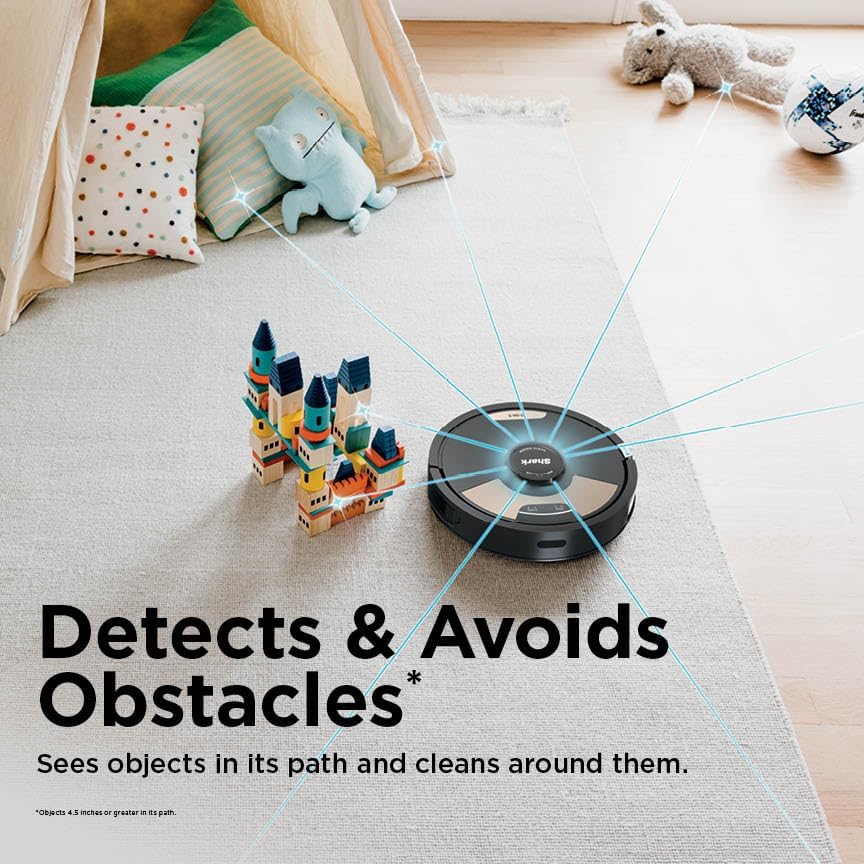
Figure 10: Robot vacuum detecting and avoiding obstacles in its cleaning path.
Maintenance
Regular maintenance ensures optimal performance of your Shark Matrix Plus Robot Vacuum and Mop:
- Emptying the Self-Empty Base: The bagless base holds up to 30 days of debris. Monitor the fill level through the indicator window and empty as needed.
- Cleaning the Water Tank: After each mopping session, empty any remaining water and cleaning solution from the robot's water tank. Rinse the tank thoroughly.
- Cleaning Mop Pads: The washable antimicrobial mopping pads should be removed and cleaned after each mopping cycle. They can be hand-washed or machine-washed according to instructions.
- Cleaning the Brushroll: Periodically check the self-cleaning brushroll for any tangled hair or debris. Remove the brushroll and clean it as necessary to maintain effective suction.
- Filter Maintenance: The HEPA filter in the Self-Empty Base should be cleaned monthly by tapping out loose debris. Replace the filter every 6 months or as recommended.
Figure 11: Self-empty base for automatic dust disposal.
Troubleshooting
If you encounter issues with your robot vacuum, consider the following common solutions:
- Robot Not Charging: Ensure the Self-Empty Base is plugged in and the robot is correctly aligned with the charging contacts. Clean the charging contacts on both the robot and the base.
- Poor Suction: Check the dustbin for fullness and empty it. Clean the brushroll for any obstructions or tangled hair. Inspect and clean the HEPA filter.
- Robot Getting Stuck: Clear any loose cables, rugs, or small objects from the cleaning path. Ensure the LiDAR sensor on top of the robot is clean and unobstructed.
- Mopping Issues: Verify the water tank is filled with water and cleaning solution. Ensure the mopping pads are correctly attached and clean.
- App Connectivity Problems: Ensure your Wi-Fi network is stable and the robot is within range. Restart your router, smartphone, and the robot.
Specifications
| Specification | Detail |
|---|---|
| Brand | Shark |
| Model Name | Matrix Plus Robot Vacuum and Mop with Self-Empty HEPA Base |
| Special Feature | Wet/Dry |
| Color | Black |
| Product Dimensions | 19.5"L x 13.2"W x 11.8"H |
| Included Components | (1) Shark Matrix 2-in-1 Robot, (1) HEPA Self-Empty Base, (1) Shark MultiSurface Cleaning Solution, (2) Side Brushes, (4) Washable Antimicrobial Mopping Pads |
| Filter Type | Cloth |
| Battery Life | 110 minutes |
| Voltage | 14.4 Volts |
| Capacity | 0.22 Quarts |
| Power Source | Battery Powered |
| Are Batteries Included | Yes |
| Control Method | App |
| Form Factor | Robotic |
| Global Trade Identification Number | 10622356657881 |
| UPC | 622356657884 |
| Manufacture Year | 2025 |
| Smart Home Compatibility | Smart Home Compatible |
| Item Weight | 14.42 pounds |
| Manufacturer | SharkNinja |
| ASIN | B0FDX7GFQX |
| Item model number | UR2650WS |
| Batteries required | Yes |
| Surface Recommendation | Carpets & Hardfloors |
Warranty & Support
For warranty information, product registration, and customer support, please refer to the official SharkNinja website or the documentation included with your product. You can also contact Shark customer service directly for assistance.


