
1. Introduction
The Cayin RU9 is a high-performance portable USB DAC and headphone amplifier designed to deliver exceptional audio quality. It combines advanced vacuum tube technology with robust digital and analog circuitry, offering a versatile listening experience for various audio setups.
The RU9 has been recognized for its innovation and performance, receiving an award in the Headphone Amplifier (Portable type, ¥75,000 to under ¥100,000 category) at the VGP2026 Audio-Visual Awards, one of Japan's largest audio-visual awards.

Image 1.1: The Cayin RU9 Portable Nutube USB DAC/Amplifier, showcasing its sleek design and display.
2. Key Features
The Cayin RU9 integrates cutting-edge vacuum tube technology with high-performance circuitry. It features a 5th generation Nutube 6P1 vacuum tube and a 3-stage amplification architecture for precise audio processing. Utilizing carefully selected Toshiba 2SK209 JFETs, Texas Instruments OPA1662 op-amps, and Nexperia power transistors, it delivers clear, low-distortion output through a 4-channel fully differential balanced amplification circuit.
- Nutube 6P1 Vacuum Tube: Features a 5th generation Nutube 6P1 for rich, analog sound characteristics.
- Three Sound Signatures: Switch between Classic Vacuum Tube, Modern Vacuum Tube, and Solid-State sound modes.
- Hyper Mode: Activated in DC mode, this feature maximizes output power and enhances soundstage and dynamics.
- Advanced DAC Chip: Equipped with the latest XMOS XU316 chip, supporting native DSD512 and PCM 32bit/768kHz.
- Dual AK4493SEQ DAC: Features a dual AK4493SEQ DAC in monaural mode for superior digital-to-analog conversion.
- 4-Channel Balanced Amplifier: A fully differential balanced amplification circuit ensures clear and low-distortion output.
- Versatile Outputs: Includes 3.5mm and 4.4mm headphone and line outputs with adjustable gain and output levels.
- Bluetooth 5.1: Supports high-quality codecs such as LDAC, aptX HD, aptX LL, AAC, and SBC via Qualcomm QCC5125.
- Multiple Power Modes: Operates in Battery mode, DC mode (external power), and Dongle mode.
- Magnetic Attachment: Designed for smooth attachment to smartphones and tablets using magnets.
- Durable Construction: Unibody CNC-machined aluminum chassis for effective heat dissipation and durability.
- Vibration Suppression: A specially designed anti-vibration module eliminates microphonic noise from the Nutube.

Image 2.1: An overview of the Cayin RU9's key features, including its sound modes, chipsets, and connectivity options.
2.1 Nutube Technology
The RU9 integrates with the Cayin 5th Generation Nutube 6P1. This allows users to switch between two distinct vacuum tube sound profiles and a solid-state sound, offering a customizable audio experience.

Image 2.2: Close-up view of the Nutube 6P1 vacuum tube integrated into the RU9.
2.2 Hyper Mode
Hyper Mode is automatically activated when the device is in DC mode (connected to an external power source). By increasing the amplifier's quiescent current and operating voltage, Hyper Mode achieves higher transparency, a broader soundstage, and powerful dynamics. This mode is ideal for maximizing the RU9's audio performance.
2.3 Digital Audio Processing
The RU9 features the latest generation XMOS XU316 chip, built on a 16-core 32-bit RISC architecture. This provides excellent parallel processing capabilities, supporting native DSD512 and PCM up to 32bit/768kHz. It also incorporates a dual AK4493SEQ DAC configuration for precise digital-to-analog conversion.

Image 2.3: Illustration of the XMOS XU316 chip, responsible for high-resolution audio processing.

Image 2.4: Depiction of the dual AK4493SEQ DAC configuration for balanced audio output.
2.4 Connectivity
The RU9 is designed for various applications, offering flexible audio output and digital audio standards. It includes 3.5mm and 4.4mm headphone jacks with 3-level gain settings, and 3.5mm and 4.4mm line outputs with 3-level output level switching. Supported digital audio standards include S/PDIF input and output, and USB Audio DAC compatible with UAC1.0 and UAC2.0. The UAC1.0 (driverless mode) is compatible with gaming consoles. Bluetooth 5.1 with Qualcomm QCC5125 supports LDAC, aptX HD, aptX LL, AAC, and SBC codecs.

Image 2.5: Rear view of the Cayin RU9 showing various input/output ports and power options.
3. Setup
3.1 Powering On/Off
- To Power On: Press and hold the power button (usually located on the side or top) until the screen illuminates.
- To Power Off: Press and hold the power button until the device shuts down.
3.2 Connecting to a Source Device (USB)
The RU9 can be connected to various devices such as smartphones, tablets, and computers via USB. Use the provided USB cable for connection.
- Connect one end of the USB cable to the RU9's USB-C port.
- Connect the other end to your source device (e.g., smartphone, tablet, PC).
- The RU9 will automatically detect the connection and enter the appropriate USB Audio mode.

Image 3.1: The Cayin RU9 connected to a smartphone, demonstrating its portable use.
3.3 Bluetooth Pairing
To connect the RU9 via Bluetooth:
- Ensure the RU9 is powered on.
- Navigate to the Bluetooth settings on the RU9 (refer to the on-screen menu).
- Enable Bluetooth pairing mode on the RU9.
- On your source device (e.g., smartphone), search for available Bluetooth devices and select "Cayin RU9".
- Confirm pairing on both devices if prompted.
3.4 Magnetic Attachment
The RU9 features a magnetic design for easy attachment to compatible smartphones or tablets. A magnetic PU leather case is included to facilitate this feature and protect the device.

Image 3.2: The magnetic attachment feature of the Cayin RU9, allowing it to securely connect to a smartphone or tablet.
4. Operation
4.1 Volume Control
The RU9 features a high-precision volume control (JRC NJW1195A). Use the dedicated volume knob or buttons on the device to adjust the output level to your headphones or line-out connection.
4.2 Switching Sound Modes
The RU9 offers three distinct sound signatures: Classic Vacuum Tube, Modern Vacuum Tube, and Solid-State. Use the 'TIMBRE' button (or navigate through the menu) to cycle through these modes and select your preferred sound profile.
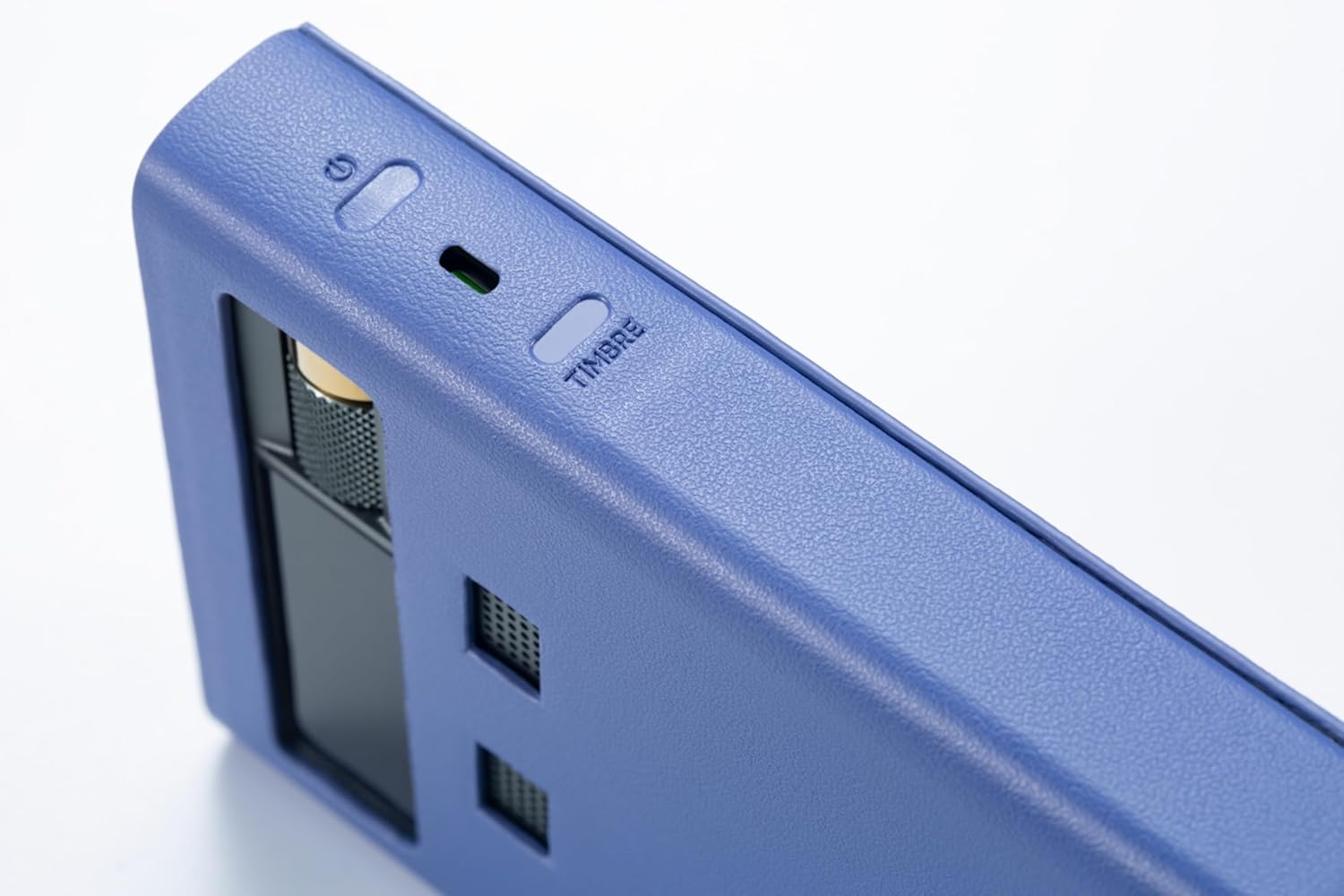
Image 4.1: Close-up of the power button and the 'TIMBRE' button on the Cayin RU9, used for switching sound modes.
4.3 Gain Settings
The 3.5mm and 4.4mm headphone outputs feature a 3-level gain setting. This allows you to match the output power to the sensitivity of your headphones. Adjust the gain setting via the device's menu to prevent distortion or ensure sufficient volume.
4.4 Line Output Level
The 3.5mm and 4.4mm line outputs offer 3-level output level switching. This is useful when connecting the RU9 to external amplifiers or active speakers, allowing you to optimize the signal level for the connected equipment.
5. Maintenance
5.1 Cleaning
To maintain the appearance and functionality of your RU9:
- Wipe the exterior with a soft, dry, lint-free cloth.
- Avoid using harsh chemicals, solvents, or abrasive cleaners.
- Keep the ports free from dust and debris.
5.2 Battery Care
The RU9 contains a Lithium Polymer battery. To prolong battery life:
- Avoid fully discharging the battery frequently.
- Store the device in a cool, dry place when not in use for extended periods.
- Charge the device regularly, even if not used, to maintain battery health.
5.3 Storage
When storing the RU9, especially for long periods, ensure it is kept in a protective environment, away from extreme temperatures, humidity, and direct sunlight. The included magnetic PU leather case offers good protection.
6. Troubleshooting
If you encounter issues with your Cayin RU9, please refer to the following common troubleshooting steps:
| Problem | Possible Cause | Solution |
|---|---|---|
| No sound output | Incorrect connection, low volume, wrong output selected, device not powered on. | Check all cable connections. Increase volume. Ensure correct output (headphone/line out) is selected. Verify the device is powered on. |
| Device not recognized by computer/smartphone | Faulty USB cable, incorrect USB mode, driver issues. | Try a different USB cable. Ensure the RU9 is in USB DAC mode. For PC, check if drivers are installed (if required for UAC2.0). Try connecting to a different USB port or device. |
| Bluetooth pairing issues | RU9 not in pairing mode, device too far, interference. | Ensure RU9 is in Bluetooth pairing mode. Move devices closer. Turn off other Bluetooth devices to reduce interference. |
| Noise during DSD playback (especially on iOS) | Specific software/OS compatibility, DSD output format. | If experiencing noise with DSD playback on iOS (e.g., iPhone 15 Pro Max with HF Player), try setting the DSD output format to PCM instead of native DSD or DoP. This issue may be specific to certain iOS versions or applications. Android devices typically do not exhibit this behavior. |
| Short battery life | High volume usage, Hyper Mode active, aging battery. | Reduce volume. Use Battery mode instead of DC mode with Hyper Mode if portability is prioritized. Ensure regular charging. |
If the problem persists after trying these solutions, please contact customer support.
7. Specifications
| Feature | Detail |
|---|---|
| Model | RU9 |
| Manufacturer | Cayin |
| DAC Chip | Dual AK4493SEQ |
| USB Controller | XMOS XU316 (16-core, 32-bit RISC) |
| Vacuum Tube | Nutube 6P1 (5th Generation) |
| Supported Audio Formats | Native DSD512, PCM 32bit/768kHz |
| Bluetooth Version | 5.1 (Qualcomm QCC5125) |
| Bluetooth Codecs | LDAC, aptX HD, aptX LL, AAC, SBC |
| Headphone Outputs | 3.5mm (Single-Ended), 4.4mm (Balanced) |
| Line Outputs | 3.5mm, 4.4mm (3-level adjustable) |
| Digital Inputs/Outputs | S/PDIF (Coaxial), USB Audio (UAC1.0/UAC2.0) |
| Battery Type | Lithium Polymer (included) |
| Approximate Playback Time | Up to 4.7 hours (Battery mode) |
| Dimensions | 18.3 x 10.6 x 4.6 cm (Package Size) |
| Weight | 370 g |
| Included Accessories | Magnetic PU leather case x1 |
8. Warranty and Support
The Cayin RU9 comes with a standard manufacturer's warranty. For specific warranty terms and conditions, please refer to the documentation included with your purchase or visit the official Cayin website.
For technical support, service, or inquiries, please contact your authorized Cayin dealer or the official Cayin customer support channels. Please have your product model and purchase information ready when seeking support.


