
1. Introduction
Thank you for purchasing the WZYBUTA 14R Professional 295W Moving Head Beam Light. This manual provides essential information for the safe and efficient operation of your new lighting fixture. Please read this manual thoroughly before installation and use, and retain it for future reference.

Figure 1: Front view of the WZYBUTA 14R Professional 295W Moving Head Beam Light.
2. Safety Information
Always observe the following safety precautions to prevent electric shock, fire, or injury:
- Ensure the power supply voltage matches the device's requirements.
- Disconnect power before any service or maintenance.
- Do not operate the device if the power cord is damaged.
- Avoid direct eye exposure to the light source.
- Install in a well-ventilated area, away from flammable materials.
- Maintain a minimum distance of 0.5 meters from the device to any objects.
- Ensure the fixture is securely mounted using appropriate hardware.
3. Package Contents
Verify that all items are present and in good condition upon unpacking:
- Moving Head Light (1 unit)
- Power Cord (1 unit)
- Signal Cable (1 unit)
- Quick-lock Light Hook Bracket (2 units)
- Instruction Manual (1 unit)

Figure 2: Included accessories and components in the package.
4. Product Overview
The WZYBUTA 14R Professional 295W Moving Head Beam Light is designed for dynamic stage effects, featuring a powerful HID light source and versatile control options.
Key Features:
- Light Source: 295W HID lamp (10000K color temperature, CRI≥80, 2000h lifespan) and 31pcs 0.5W RGB LED rings.
- Optical System: 130mm optical aperture, 4° ultra-narrow beam angle, 630000Lux at 5m.
- Movement: 540° X-axis (Pan) and 270° Y-axis (Tilt) rotation with 1.2° fine-tuning accuracy.
- Effects: 14+1 color wheel, 13+1 gobo wheel, 8+18 facet prism system (360° rotatable), rainbow and fog effects, 1-20Hz adjustable strobe.
- Control: Auto, Sound-activated, Master-Slave, DMX16/22 channel, RDM protocol compatible.
- Display: LCD display for settings.

Figure 3: Detailed view of the optical lens, cooling system, and pan/tilt mechanism.
5. Installation
5.1 Mounting
The fixture can be mounted in various orientations (hanging, truss, floor) using the provided quick-lock light hook brackets. Ensure the mounting surface or truss can support the weight of the fixture (24.8 lbs / 11.25 kg) and any additional equipment.
- Attach the quick-lock brackets securely to the bottom of the fixture.
- Use appropriate clamps (not included) to secure the brackets to a truss or other mounting structure.
- Always use a safety cable (not included) as a secondary attachment to prevent accidental drops.
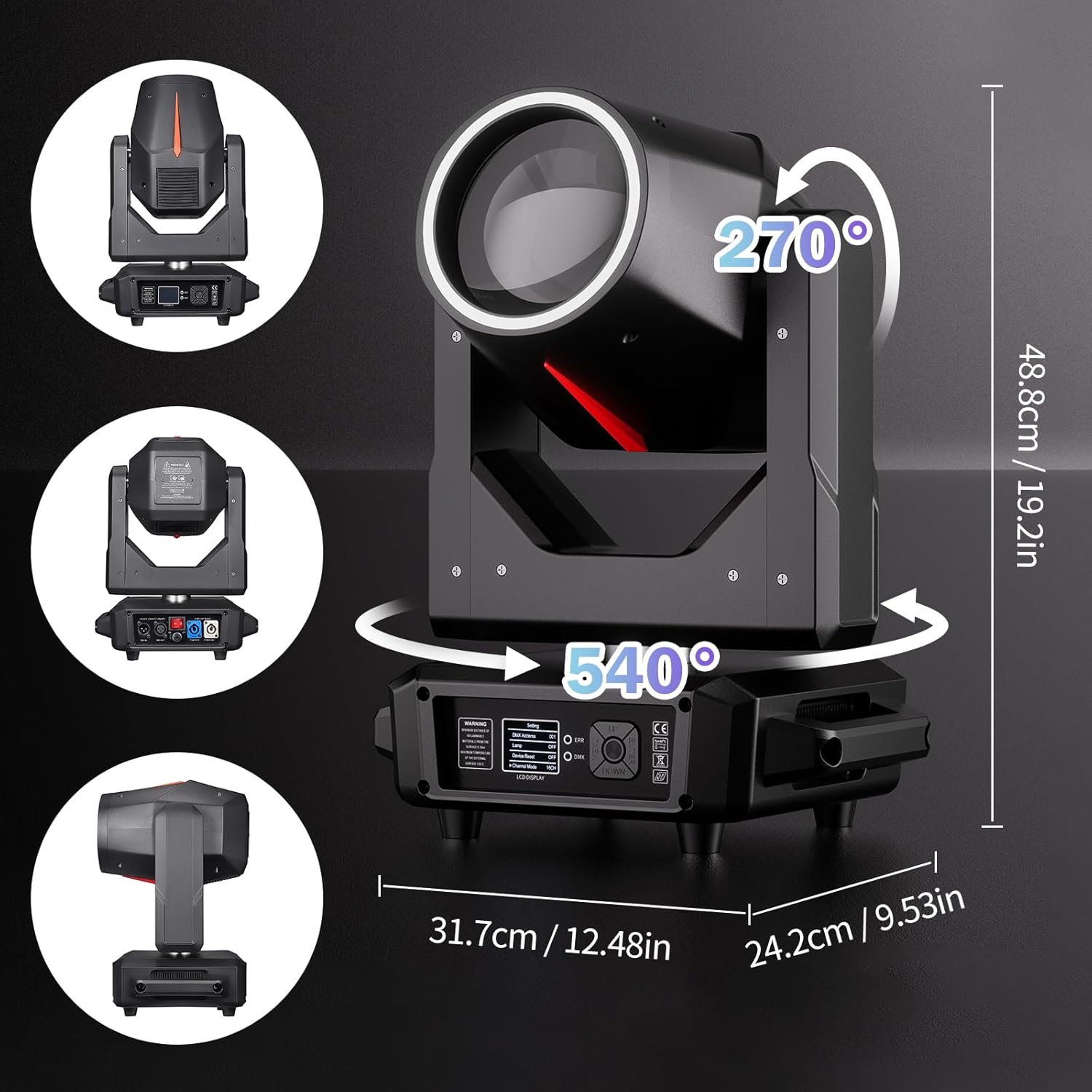
Figure 4: Product dimensions for installation planning.
5.2 Connections
Connect the power and DMX cables as follows:
- Power: Connect the provided power cord to the 'POWER IN' socket on the fixture and then to a suitable AC100V-240V 50/60Hz power outlet.
- DMX Control: For DMX operation, connect a 3-pin XLR DMX cable from your DMX controller to the 'DMX IN' socket. To daisy-chain multiple fixtures, connect from the 'DMX OUT' of the first fixture to the 'DMX IN' of the next.
6. Operation
6.1 Control Panel and LCD Display
The fixture features an LCD display and control buttons for menu navigation and settings adjustment. Use the MENU, UP, DOWN, and ENTER buttons to configure the device.
Video 1: This video demonstrates the various features and operational modes of the WZYBUTA 14R Professional Moving Head Beam Light, including DMX control, pan/tilt movement, color and gobo effects, and strobe functions.
6.2 Control Modes
The fixture supports multiple control modes:
- DMX Mode (16/22 Channels): Connect to a DMX512 controller. Set the DMX address and channel mode (16CH or 22CH) via the LCD display. Refer to the DMX chart in the full manual for channel functions.
- Auto Mode: The fixture runs through pre-programmed light shows automatically. Select 'Auto' from the run mode menu.
- Sound-Activated Mode: The light reacts to sound input via its built-in microphone. Select 'Sound' from the run mode menu.
- Master-Slave Mode: Link multiple fixtures where one acts as the master and others as slaves, synchronizing their movements and effects. Connect DMX cables in a daisy chain. Set the master unit to 'Auto' or 'Sound' mode, and slave units to 'Slave' mode.
6.3 Lighting Effects
- Pan/Tilt Movement: The fixture offers 540° pan and 270° tilt movement. These can be controlled via DMX for precise positioning.
- Color Wheel: Features a 14+1 color wheel for a wide range of colors.
- Gobo Wheel: Includes a 13+1 fixed gobo wheel for various pattern projections.
- Prism Effects: An 8+18 facet prism system allows for splitting the beam into multiple patterns, rotatable 360°.
- Strobe: Adjustable strobe speed from 1 to 20 flashes per second.
- Dimming: 0-100% linear dimming for smooth intensity control.
- RGB LED Halo: A 360° color-changing RGB LED halo around the main lens provides additional dynamic effects.

Figure 5: Beam and zoom effects demonstration.

Figure 6: 13+1 Color Wheel effects.

Figure 7: 14 Gobo patterns.

Figure 8: Professional built-in effects wheel.

Figure 9: 0-100% smooth dimming.
7. Maintenance
Regular maintenance ensures optimal performance and extends the lifespan of your fixture.
- Cleaning: Periodically clean the lenses and exterior with a soft, lint-free cloth. Do not use abrasive cleaners.
- Inspection: Regularly check all mounting hardware, cables, and connections for signs of wear or damage. Replace any damaged components immediately.
- Cooling System: Ensure the cooling vents are clear of dust and debris to prevent overheating.
8. Troubleshooting
If you encounter issues, refer to the following common problems and solutions:
| Problem | Possible Cause | Solution |
|---|---|---|
| Fixture does not power on | No power supply; faulty cable | Check power connection and outlet; replace power cable if damaged. |
| No DMX control | Incorrect DMX address; faulty DMX cable; incorrect channel mode | Verify DMX address and channel mode; check DMX cable connections; ensure DMX controller is functioning. |
| Movement erratic or unresponsive | DMX signal issues; internal error | Check DMX connections; power cycle the fixture; perform a device reset via the LCD menu. |
| Light output weak or inconsistent | Dirty lens; lamp nearing end of life | Clean the optical lens; contact support for lamp replacement if necessary. |
For issues not covered here, please contact WZYBUTA customer support.
9. Specifications
| Feature | Detail |
|---|---|
| Input Voltage | AC100V-240V 50/60Hz |
| Light Source | 295W HID + 31 RGB LEDs |
| Optical Aperture | 130mm |
| Light Output Angle | 4° |
| Color Temperature | 10000 Kelvin |
| CRI Index | ≥80 |
| Optimal Projection Distance | 3-10 meters |
| Illuminance | 630000Lux@5M |
| Average Life of HID | 2000 hours |
| Flash (Strobe) | 1-20Hz |
| Color Disk | 14+1 color, forward and reverse flow |
| Fixed Pattern Disk | 13+1 pattern, forward and reverse flow |
| Colorful Atomization | Rainbow + Atomization |
| Prism | 8/18-prism, 0-360° rotatable |
| Focus | Electronic focus |
| X-axis (Pan) | 540° |
| Y-axis (Tilt) | 270° |
| Operation Mode | Automatic, Voice Control, Master-Slave, DMX |
| Control Channel | 16/22CH |
| Data Connection | 3-core XLR input/output |
| Display | LCD display |
| Protection Level | IP20 |
| Working Environment | -20°C ~ 40°C |
| Material | Sheet metal structure/nylon shell |
| Product Size | 31.7 x 24.2 x 48.8 cm (12.48 x 9.53 x 19.21 inches) |
| Net Weight | 11.25 kg (24.8 lbs) |
10. Warranty and Support
WZYBUTA products are manufactured to high-quality standards. For warranty information, technical support, or service inquiries, please refer to the contact information provided with your purchase or visit the official WZYBUTA website.
Please retain your proof of purchase for warranty claims.


