
1. Introduction
Thank you for choosing the Hocosyme C-CZ-400W-H Infrared Heater. This manual provides essential information for the safe and efficient operation, installation, and maintenance of your new heater. Please read these instructions thoroughly before use and retain them for future reference.
2. Safety Information
To reduce the risk of fire, electric shock, or injury, always follow these basic safety precautions:
- Read all instructions before using this heater.
- This heater is hot when in use. To avoid burns, do not let bare skin touch hot surfaces. Keep combustible materials, such as furniture, pillows, bedding, papers, clothes, and curtains, at least 1 meter (3 feet) from the front of the heater and keep them away from the sides and rear.
- Extreme caution is necessary when any heater is used by or near children or invalids and whenever the heater is left operating and unattended.
- Do not operate any heater with a damaged cord or plug or after the heater malfunctions, has been dropped, or damaged in any manner. Return heater to authorized service facility for examination, electrical or mechanical adjustment, or repair.
- Do not use outdoors. This heater is for indoor use only.
- Do not run cord under carpeting. Do not cover cord with throw rugs, runners, or similar coverings. Arrange cord away from traffic area and where it will not be tripped over.
- To disconnect heater, turn controls to off, then remove plug from outlet.
- Do not insert or allow foreign objects to enter any ventilation or exhaust opening as this may cause an electric shock or fire, or damage the heater.
- To prevent a possible fire, do not block air intakes or exhaust in any manner. Do not use on soft surfaces, like a bed, where openings may become blocked.
- This heater has hot and arcing or sparking parts inside. Do not use it in areas where gasoline, paint, or flammable vapors or liquids are used or stored.
- Use this heater only as described in this manual. Any other use not recommended by the manufacturer may cause fire, electric shock, or injury to persons.
- Always plug heaters directly into a wall outlet/receptacle. Never use with an extension cord or relocatable power tap (outlet/power strip).
- The heater is rated IP54, meaning it is protected against dust and splashing water. However, it should not be submerged or exposed to direct water jets.
3. Product Overview
The Hocosyme C-CZ-400W-H is a 400W infrared heater designed for efficient and comfortable indoor heating. It features a smart touch thermostat for precise temperature control and offers flexible installation options.

Figure 1: Smart Thermostat Features
This image displays the smart thermostat unit, highlighting its key features: 3 operation modes, touch switch functionality, quick heating capability, adjustable thermostat settings, and integrated safety features.

Figure 2: Mounting Options and Key Benefits
This image illustrates the versatility of the heater, showing both wall-mounted and floor-standing (with roller bracket) configurations. It also highlights benefits such as silent operation, no humidity consumption, no fire hazard, and an IP54 waterproof rating.
4. Package Contents
Please check the package for the following items:
- Hocosyme Infrared Heater Unit
- Smart Touch Thermostat (integrated or separate, depending on model variant)
- Wall Mounting Kit (screws, anchors)
- User Manual
- Optional: Roller Bracket Support (may be sold separately or included with specific models)
5. Setup and Installation
5.1 Wall Mounting
- Choose Location: Select a suitable wall location, ensuring it is away from combustible materials and has a clear space around the heater (at least 1 meter from front, sides, and rear). Ensure the wall material can support the heater's weight (approximately 4.35 kg).
- Mark Drilling Points: Use the provided mounting template or measure the mounting holes on the back of the heater. Mark the drilling points on the wall.
- Drill Holes: Drill holes at the marked points using an appropriate drill bit for your wall type. Insert wall anchors if necessary.
- Attach Brackets: Secure the mounting brackets to the wall using the provided screws.
- Mount Heater: Carefully lift the heater and align its mounting slots with the brackets. Slide the heater onto the brackets until it is securely in place.
- Connect Power: Plug the heater into a standard 230V AC electrical outlet. Ensure the outlet is easily accessible.

Figure 3: Wall-Mounted Heater
This image shows the infrared heater neatly installed on a wall, demonstrating its discreet and space-saving design.
5.2 Roller Bracket Support (Optional)
If using the optional roller bracket support for floor standing, attach the brackets to the bottom of the heater according to the instructions provided with the roller kit. Ensure all wheels are securely fastened and can move freely.
6. Operating Instructions
6.1 Powering On/Off
- Ensure the heater is properly plugged into a 230V AC outlet.
- Press the power button on the smart thermostat to turn the heater ON or OFF. The digital display will illuminate when the heater is active.
6.2 Using the Smart Touch Thermostat
The integrated smart thermostat allows for precise temperature control and offers multiple operating modes.
- Temperature Adjustment: Use the '+' and '-' buttons on the thermostat to set your desired room temperature. The display will show the target temperature.
- Operation Modes: The thermostat typically offers 3 operation modes (e.g., Comfort, Eco, Anti-freeze). Refer to the thermostat's specific interface for cycling through these modes. Each mode adjusts the heating behavior to optimize comfort or energy saving.
- Quick Heating: The infrared heater provides rapid heating, reaching operating temperature up to 120°C within 1 to 3 minutes. The room temperature will increase quickly, often within seconds for initial warmth.

Figure 4: Infrared Heating Distribution
This diagram illustrates how infrared rays from the heater spread evenly throughout a room, providing rapid and consistent warmth. It highlights the quick heating capability, reaching up to 120 degrees Celsius in 3 seconds.
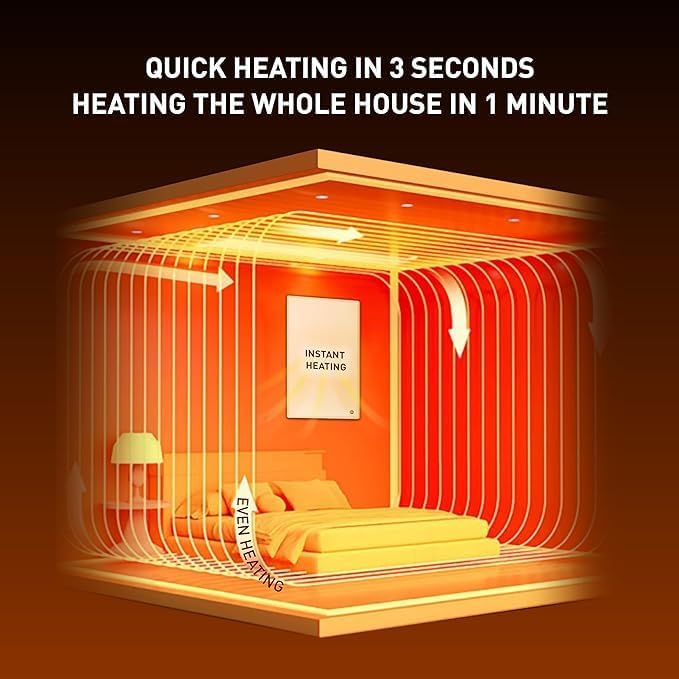
Figure 5: Rapid Room Heating
This image visually represents the heater's efficiency, showing how it can provide quick heating in 3 seconds and warm an entire room within 1 minute through even heat distribution.
7. Maintenance
Proper maintenance ensures the longevity and efficient operation of your heater.
- Cleaning: Always unplug the heater and allow it to cool completely before cleaning. Use a soft, damp cloth to wipe the exterior surfaces. Do not use abrasive cleaners, solvents, or harsh chemicals, as these can damage the finish. Ensure no water enters the internal components.
- Storage: If storing the heater for an extended period, unplug it and clean it thoroughly. Store it in a cool, dry place, preferably in its original packaging, to protect it from dust and damage.
- Inspection: Periodically check the power cord and plug for any signs of damage. If any damage is found, discontinue use and contact customer support.
8. Troubleshooting
If you encounter issues with your heater, please refer to the following troubleshooting guide:
| Problem | Possible Cause | Solution |
|---|---|---|
| Heater does not turn on. | No power supply. Power button not pressed. | Ensure the heater is securely plugged into a working 230V AC outlet. Check the circuit breaker. Press the power button on the thermostat. |
| Heater is on but not heating. | Thermostat set too low. Room temperature already reached. | Increase the target temperature on the thermostat. The heater will only activate if the room temperature is below the set temperature. |
| Thermostat display is blank. | No power to the unit. Thermostat malfunction. | Check power supply as above. If power is present and display remains blank, contact customer support. |
| Unusual smell or noise. | New unit burning off manufacturing residues. Internal fault. | A slight odor is normal for the first few uses. If the smell persists or is strong, or if unusual noises occur, unplug the heater immediately and contact customer support. |
9. Specifications
| Feature | Specification |
|---|---|
| Brand | Hocosyme |
| Model Number | C-CZ-400W-H |
| Power Output | 400 Watts |
| Voltage | 230 Volts (AC) |
| Dimensions (Product) | 600P x 22l x 600H millimeters (approx. 60 x 2.2 x 60 cm) |
| Dimensions (Package) | 72.4 x 65 x 5.5 cm |
| Item Weight | 4.35 Kilograms |
| Color | White |
| Special Feature | Programmable Thermostat |
| Form Factor | Wall-mounted (also compatible with floor stand) |
| Indoor/Outdoor Use | Indoor |
| Heating Method | Radiant (Infrared) |
| IP Rating | IP54 (Protected against dust and splashing water) |
10. Warranty and Support
Hocosyme products are manufactured to high-quality standards. For information regarding warranty coverage, please refer to the warranty card included with your purchase or contact your retailer. If you require technical assistance or have questions not covered in this manual, please contact Hocosyme customer support through the retailer's platform or the official brand website.