
OBEST MD10
OBEST MD10 Thumb Action Camera User Manual
Model: MD10 (B0FDWKFR13)
Introduction
Thank you for choosing the OBEST MD10 Thumb Action Camera. This compact and versatile camera is designed to capture your adventures in high definition. Featuring 1080P video recording, a 120-degree wide-angle lens, and WiFi connectivity for real-time streaming, it's perfect for cycling, vlogging, POV shots, and various outdoor activities. This manual provides essential information on setting up, operating, and maintaining your camera to ensure optimal performance.
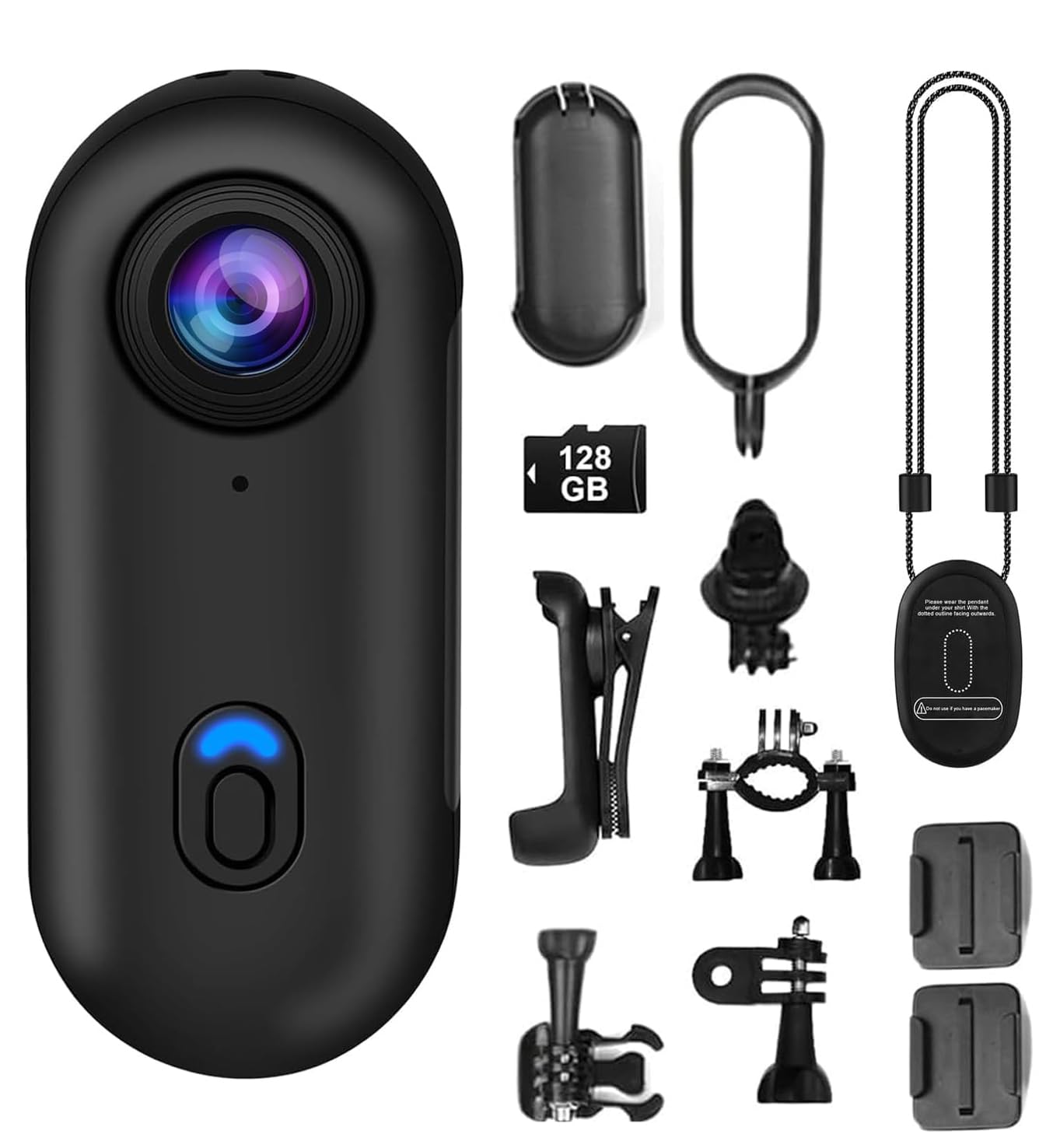
What's in the Box

This image displays the OBEST MD10 Thumb Action Camera along with all its included accessories, providing a visual guide to the package contents.
- OBEST MD10 Thumb Action Camera
- Waterproof Housing (IP68, up to 30m)
- Magnetic Lanyard
- 360° Rotating Clip
- Bicycle Mount
- Helmet Mount
- USB Charging Cable
- 128GB MicroSD Card (pre-installed or included separately)
- Reset Pin
Product Overview
Front view of the OBEST MD10 Thumb Action Camera, highlighting its compact design and main lens.
The OBEST MD10 camera features a minimalist design for ease of use. Key components include the wide-angle lens, power/mode button, status indicator lights, microphone, USB charging port, and a MicroSD card slot. Familiarize yourself with these components before operation.
Initial Setup
1. Charging the Camera

This image illustrates the OBEST MD10 camera connected to a power source for continuous recording, detailing its 800mAh battery capacity, 120-minute charging time, and 150-minute recording duration.
Before first use, fully charge the camera. Connect the camera to a USB power source using the provided USB cable. The indicator light will show charging status. A full charge takes approximately 120 minutes. The built-in 800mAh battery provides about 150 minutes of continuous recording. The camera supports simultaneous charging and recording.
2. Inserting the MicroSD Card
Locate the MicroSD card slot on the camera. Gently insert the included 128GB MicroSD card with the gold contacts facing down until it clicks into place. The camera supports MicroSD cards up to 256GB. Ensure the card is formatted to FAT32 for optimal performance. If the card is not recognized, try reformatting it on a computer.
3. Powering On/Off
To power on, press and hold the power button for a few seconds until the indicator light illuminates. To power off, press and hold the power button again until the indicator light turns off.
Operating Instructions
1. Recording Video

This image illustrates the camera's video playback interface and different recording modes, including photo, video, and audio recording.
Once powered on, the camera typically defaults to video recording mode. Press the power/mode button briefly to start recording. The indicator light will flash to confirm recording is in progress. Press the button again to stop recording. Videos are saved in 1080P resolution (1920x1080) in MP4 format.
2. Taking Photos
To switch to photo mode (if available via app or specific button press, consult app for details), then press the power/mode button briefly to capture a still image. Photos are captured at 4032 x 3024 resolution.
3. WiFi Connectivity and App Usage

The image demonstrates the camera's real-time streaming capability through its mobile application, showing a wide 120-degree field of view and users viewing content on smartphones and tablets.
The camera features built-in WiFi for real-time transmission to your smartphone. Download the dedicated mobile application (refer to the packaging or quick start guide for app name). Turn on the camera's WiFi, connect your phone to the camera's WiFi network, and open the app. You can view live footage, download recorded videos and photos, and share them directly from your phone.
4. Waterproof Housing Usage

A user is shown using the OBEST MD10 camera with its IP68 waterproof housing for underwater photography, capable of depths up to 30 meters.
For underwater activities or use in wet conditions, place the camera inside the provided IP68 waterproof housing. Ensure the housing is properly sealed before submersion. The housing protects the camera up to a depth of 30 meters, making it suitable for swimming, snorkeling, and diving.
5. Mounting Options

This image demonstrates the magnetic mounting feature and the 360-degree rotating clip, showing how the camera can be securely attached to clothing or metallic surfaces.

This image showcases the different mounting accessories included with the OBEST MD10 camera, such as the magnetic lanyard, 360-degree rotating clip, and mounts for bicycles and helmets.
The OBEST MD10 camera comes with a variety of mounting accessories for versatile use:
- Magnetic Lanyard: Wear the camera around your neck for hands-free recording. The strong magnet ensures secure attachment.
- 360° Rotating Clip: Attach the camera to clothing, backpacks, or pockets for flexible POV angles.
- Bicycle and Helmet Mounts: Securely fasten the camera to your bike handlebars or helmet for capturing action sports.
Care and Maintenance
1. Cleaning
Wipe the camera body with a soft, dry cloth. For the lens, use a specialized lens cleaning cloth and solution to avoid scratches. Do not use harsh chemicals or abrasive materials.
2. Storage
Store the camera in a cool, dry place away from direct sunlight and extreme temperatures. If storing for extended periods, ensure the battery is partially charged (around 50%) to prolong its lifespan. Remove the MicroSD card if not in use.
Troubleshooting Guide
| Problem | Possible Cause | Solution |
|---|---|---|
| Camera does not power on | Low battery; System crash | Charge the camera fully; Use a reset pin to press the reset button. |
| Cannot record video/take photos | No MicroSD card; Card full; Card error | Insert MicroSD card; Delete files or replace card; Format card (backup data first). |
| WiFi connection unstable or disconnects | Interference; App issue; Distance from camera | Ensure no strong interference sources; Restart camera and app; Stay within close range of the camera. |
| Short battery life | Frequent WiFi use; Cold environment; Battery degradation | Minimize WiFi usage when not needed; Operate in moderate temperatures; Battery life naturally decreases over time. |
| Poor audio quality | Microphone obstruction; Environmental noise | Ensure microphone is clear; Record in quieter environments. Note: This camera is primarily for video, audio quality may vary. |
Technical Specifications
| Feature | Specification |
|---|---|
| Brand | OBEST |
| Model | MD10 |
| Video Capture Resolution | 1080p (1920x1080) |
| Effective Still Image Resolution | 12 MP (4032 x 3024) |
| Lens Type | Wide-angle (120°) |
| Connectivity Technology | Wi-Fi |
| Memory Type | MicroSD (up to 256GB, 128GB included) |
| Water Resistance Level | Waterproof (with IP68 housing, up to 30m) |
| Battery Life (Average) | 150 minutes |
| Battery Capacity | 800 mAh |
| Charging Time | Approximately 120 minutes |
| Video Format | MP4 |
| Image Aspect Ratio | 16:9 |
| Special Feature | Real-time WiFi transmission |
| Compatible Devices | Smartphone, Desktop computer, Laptop |
Warranty and Support
The OBEST MD10 Thumb Action Camera comes with a 6-month product warranty from the date of purchase. This warranty covers manufacturing defects and malfunctions under normal use. It does not cover damage caused by misuse, accidents, unauthorized modifications, or natural disasters.
For technical support, warranty claims, or any questions regarding your product, please refer to the contact information provided with your purchase or visit the official OBEST website. Please have your purchase receipt and product model number (MD10) ready when contacting support.
Ask a question about this manual
Ask about setup, troubleshooting, compatibility, parts, safety, or missing instructions. Manuals+ will review the question and use this page’s manual context to help answer it.