
1. Introduction
Welcome to the BLKE Max Mini Phone XS18 Pro user manual. This guide provides essential information to help you get started with your new mini smartphone, including setup, operation, maintenance, and troubleshooting.
2. What's in the Box
Please check the contents of your package. If any items are missing or damaged, contact customer support.
- Mini Smartphone (1 unit)
- Phone Case (1 unit)
- Screen Protector (1 unit)
- Type-C Cable (1 unit)
- Ejection Pin (1 unit)
- User Manual (1 unit)
3. Device Overview
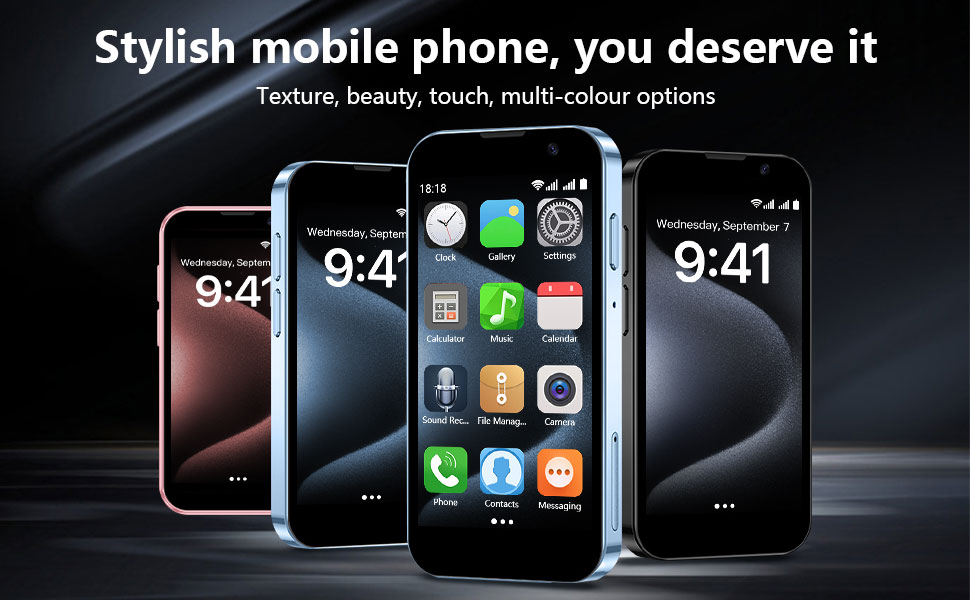
Compact Design: The BLKE Max Mini Phone features a compact body with a thickness of 10.6mm, weighing 67g, and a 3.0-inch HD screen. Its small size allows for easy portability and comfortable one-hand operation.

HD Dual Camera: Equipped with a 5MP rear camera and a 3MP front camera for capturing photos and videos.
4. Setup Instructions
-
Insert SIM Card and Memory Card:
Locate the SIM card tray on the side of the phone. Use the provided ejection pin to open the tray. Insert your Nano-SIM card(s) and an optional microSD card (up to 128GB, not included) into the designated slots. Ensure the cards are correctly oriented before reinserting the tray.
Video: Demonstrates inserting SIM and TF cards into the mini phone. This video shows the physical handling and insertion process for the cards.
-
Power On:
Press and hold the power button (usually on the right side) until the screen lights up. Follow the on-screen prompts to complete the initial setup, including language selection, Wi-Fi connection, and Google account login.
-
Charge the Device:
Connect the provided Type-C cable to the charging port at the bottom of the phone and plug the other end into a compatible USB power adapter. The battery indicator will show charging status. For optimal battery life, fully charge the device before first use.
5. Operating Instructions
5.1 Basic Navigation
- Touch Screen: Tap to select, swipe to scroll, pinch to zoom.
- Home Button: Returns to the home screen.
- Back Button: Returns to the previous screen.
- Recent Apps Button: Displays recently used applications.
5.2 Making Calls and Sending Messages
Once a SIM card is inserted and activated, you can make calls and send SMS messages using the Phone and Messaging applications. Ensure your SIM card's frequency is compatible with the device (2G GSM 850/900/1800/1900 & 3G WCDMA B1/B2/B5/B8).
5.3 App Installation
The device runs on Android 9.0 and supports app downloads from the Google Play Store. Connect to Wi-Fi for faster and more reliable app downloads.
Video: Shows the compact size of the smartphone and its ability to run various applications. This video highlights the phone's functionality despite its small form factor.
Video: Demonstrates the mini smartphone's 3.0-inch HD screen and its capability to display apps and content. This video emphasizes the screen quality and user interface.
5.4 Camera Usage
The phone includes a 3MP front camera and a 5MP rear camera. Open the Camera application to take photos and record videos. Facial recognition is available for security features.

Image: Illustrates the privacy protection features, including password unlocking and face recognition, available on the device.
6. Features
- Compact and Portable: Measures 3.54 inches long and 1.97 inches wide, designed for easy carrying.
- Unlocked for Global Use: Supports 2G GSM (850/900/1800/1900) and 3G WCDMA (B1/B2/B5/B8) networks. Verify SIM card frequency compatibility.
- Android 9.0 System: Powered by a quad-core processor, allowing smooth operation of various applications.
- Dual Cameras: Features a 3MP front camera and a 5MP rear camera.
- Enhanced Security: Includes facial recognition for data and device security.
- Dual SIM Support: Allows the use of two SIM cards simultaneously.
- Expandable Storage: Supports memory card expansion for additional storage of photos, videos, and music.
- Type-C Charging: Equipped with a Type-C port for convenient and fast charging.
7. Maintenance
- Cleaning: Use a soft, dry cloth to clean the screen and body of the phone. Avoid using harsh chemicals or abrasive materials.
- Software Updates: Regularly check for and install system updates to ensure optimal performance and security.
- Battery Care: Avoid extreme temperatures. Do not allow the battery to fully discharge frequently. Use the provided Type-C cable for charging.
- Storage Management: Periodically clear unnecessary files and applications to maintain device speed and free up storage space.
8. Troubleshooting
| Problem | Solution |
|---|---|
| Device does not power on. | Ensure the battery is charged. Connect the charger and try again. If the issue persists, perform a hard reset by holding the power button for 10-15 seconds. |
| Cannot connect to Wi-Fi. | Check if Wi-Fi is enabled in settings. Verify the Wi-Fi password. Restart the phone and the Wi-Fi router. |
| SIM card not detected. | Ensure the SIM card is correctly inserted into the tray. Restart the phone. Verify that your SIM card is active and compatible with the device's network bands. |
| Apps are slow or crashing. | Close background applications. Clear app cache. Ensure sufficient storage space is available. Restart the device. |
| Battery drains quickly. | Reduce screen brightness. Disable unused features like Bluetooth or GPS. Close background apps. Limit usage of power-intensive applications. |
9. Specifications
| Feature | Detail |
|---|---|
| Model Name | XS18 Pro |
| Operating System | Android 9.0 |
| Screen Size | 3.0 Inches |
| Resolution | 480 x 854 |
| RAM Memory Installed Size | 16 GB (Internal) |
| Memory Storage Capacity | 16 GB (Internal, expandable via microSD) |
| Cellular Technology | 3G (2G GSM 850/900/1800/1900 & 3G WCDMA B1/B2/B5/B8) |
| Wireless Carrier | Unlocked |
| Connectivity Technologies | Bluetooth, USB, Wi-Fi |
| Special Features | Dual SIM, Expandable Memory, Face ID |
| Rear Camera | 5MP |
| Front Camera | 3MP |
| Battery Power Rating | 2000 mAh |
| Phone Talk Time | Up to 12 Hours |
| Product Dimensions | 3.7 x 1.8 x 0.5 inches |
| Item Weight | 3.35 ounces (95 Grams) |
| Audio Jack | No headphone jack |
10. Warranty and Support
For warranty information and customer support, please refer to the documentation included with your product or visit the official BLKE Max website. Keep your purchase receipt for warranty claims.
Return Policy: The product typically includes a 30-day refund/replacement policy. Please check with your retailer for specific terms.