
1. Introduction
Thank you for choosing the TopMate ES11 3-Wheel Electric Scooter. This manual provides essential information for the safe operation, assembly, maintenance, and troubleshooting of your scooter. Please read this manual thoroughly before using the product to ensure proper function and to prevent injury or damage.

Figure 1.1: The TopMate ES11 3-Wheel Electric Scooter. This image displays the scooter in its fully assembled, ready-to-use state, highlighting its three-wheel design, ergonomic seat, handlebars, and front basket.
2. Safety Information
Your safety is paramount. Always adhere to the following safety guidelines:
- Always wear a helmet and appropriate safety gear (e.g., knee and elbow pads) when operating the scooter.
- Ensure all components are securely fastened and in good working order before each ride.
- Do not exceed the maximum weight capacity of 300 lbs (136 kg).
- Avoid riding in adverse weather conditions, such as heavy rain, snow, or ice.
- Operate the scooter on smooth, dry surfaces. Be cautious on uneven terrain, gravel, or dirt roads.
- Maintain a safe speed and always be aware of your surroundings, including pedestrians and other vehicles.
- Do not operate the scooter under the influence of alcohol or drugs.
- Familiarize yourself with local laws and regulations regarding electric scooter use.
- Keep hands and feet on the designated footrests and handlebars during operation.
3. Package Contents
Upon unpacking, please verify that all the following items are included:
- TopMate ES11 3-Wheel Electric Scooter (main unit)
- Removable Lithium Battery (48V 10.4Ah)
- Battery Charger
- Detachable Front Basket
- User Manual
- Assembly Tools (if required for minor assembly)
4. Setup and Initial Assembly
The TopMate ES11 scooter is designed for quick setup. Follow these steps for initial preparation:
- Unfolding the Scooter: Carefully unfold the scooter from its compact state. Ensure all locking mechanisms click into place securely. Refer to the folding sequence image for guidance.
- Attaching the Basket: Secure the detachable front basket to the designated mounting points on the handlebars.
- Installing the Battery: Insert the fully charged removable lithium battery into its compartment. Ensure it is properly seated and locked.
- Initial Charge: For optimal performance, fully charge the battery before the first use. Refer to Section 6 for detailed charging instructions.
- Pre-Ride Check: Before riding, inspect the tires, brakes, and all connections to ensure they are secure and functional.

Figure 4.1: Visual guide demonstrating the one-step folding and unfolding process of the TopMate ES11 scooter. The image shows the scooter transitioning from an unfolded state to a compact, folded state, suitable for transport or storage.
5. Operating Instructions
Familiarize yourself with the controls and operating modes of your TopMate ES11 scooter.
5.1. Controls and Display

Figure 5.1: Close-up view of the scooter's handlebars, showing the brake levers, throttle, and the digital display unit. The display provides information such as speed, battery level, and selected speed mode.
- Power Button: Located on the display unit, press to turn the scooter on/off.
- Throttle: Typically on the right handlebar, used to accelerate.
- Brake Levers: Located on both handlebars, used to apply brakes.
- Display: Shows current speed, battery level, and selected speed mode.
5.2. Speed Modes
The ES11 features a 3-speed system and a dedicated 'Shopping Mode'.
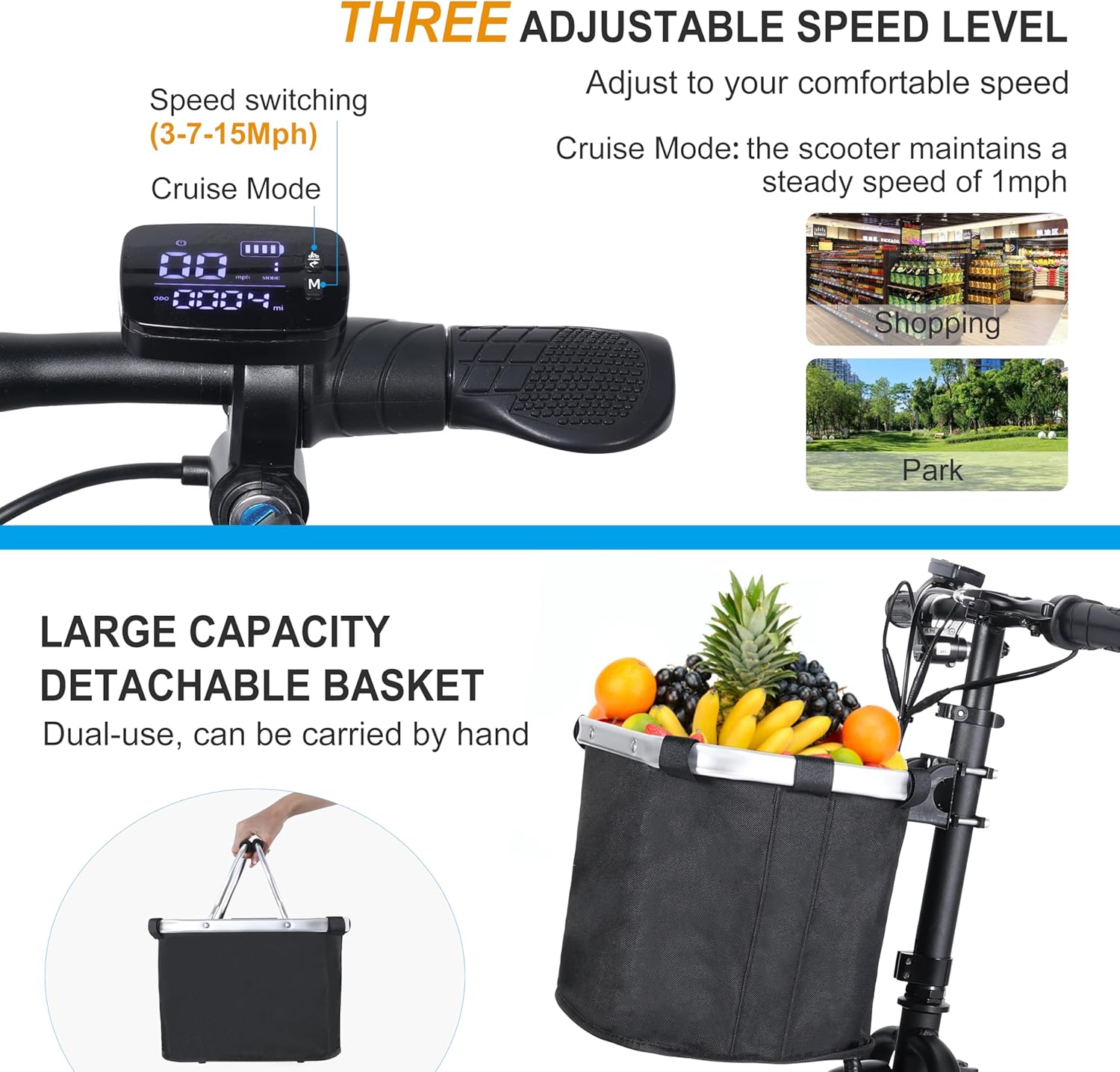
Figure 5.2: This image illustrates the three adjustable speed levels (3-7-15 MPH) and the 'Cruise Mode' (1 MPH) displayed on the scooter's dashboard. It also highlights the large capacity detachable basket, emphasizing its dual-use functionality as a handheld tote.
- Adjustable Speeds: Cycle through three speed settings (3 MPH, 7 MPH, 15 MPH) using the speed control button on the handlebars to match your comfort and environment.
- Shopping Mode (1 MPH): Activate this gentle speed mode for navigating crowded areas like stores or busy sidewalks. The scooter maintains a steady 1 MPH.
- Reverse Button: A dedicated button allows for reverse movement at approximately 2 MPH, aiding maneuverability.
5.3. Riding on Various Terrains
The 10-inch road tires are designed for versatility.
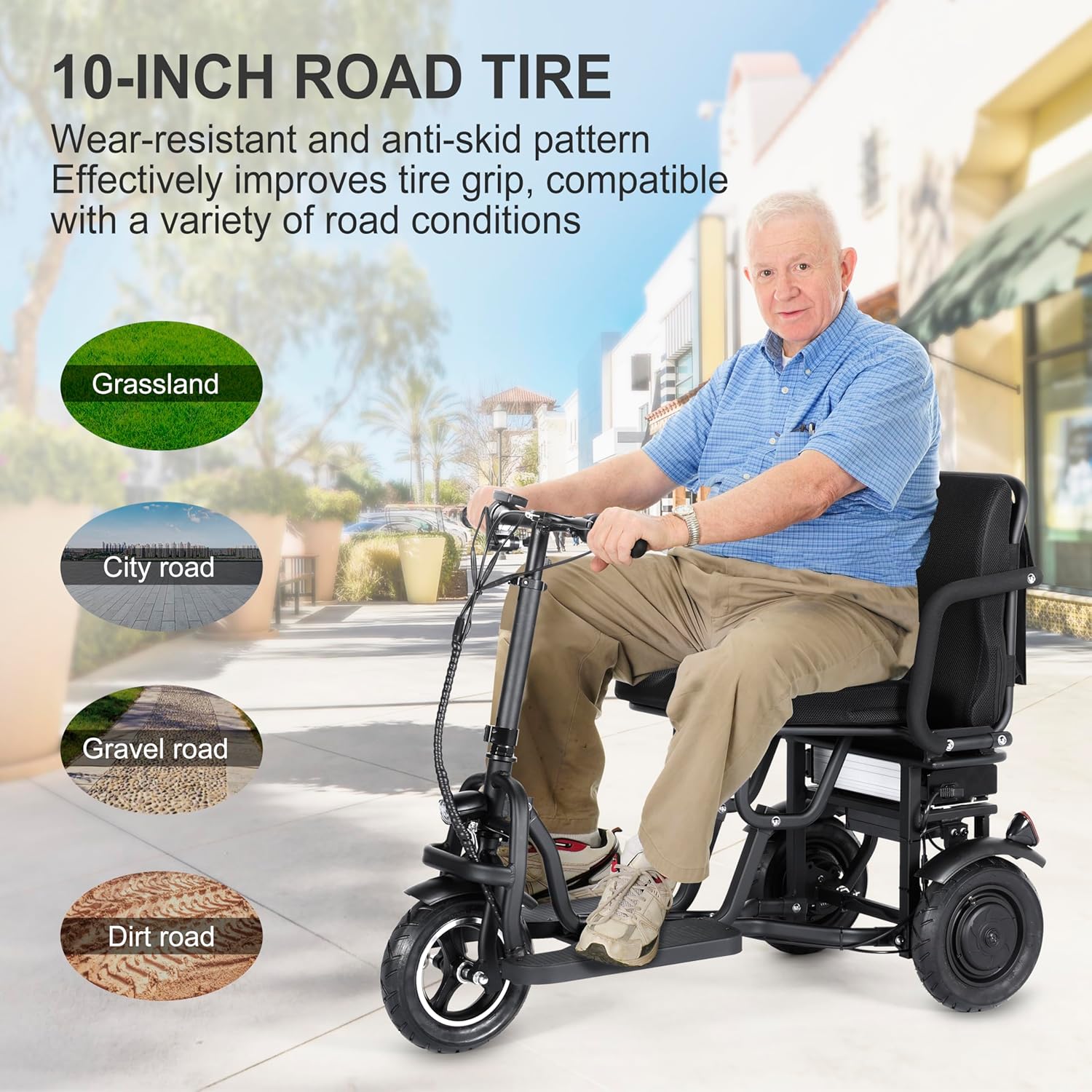
Figure 5.3: An individual riding the TopMate ES11 scooter, demonstrating its use. The image also features icons indicating suitability for various road conditions: grassland, city road, gravel road, and dirt road, highlighting the wear-resistant and anti-skid pattern of the 10-inch tires.
- The 10-inch road tires with wear-resistant and anti-skid patterns provide superior grip on various surfaces.
- Suitable for pavement, city roads, and light trails. Exercise caution on gravel or dirt roads.
- The dual 350W motors (700W total) allow for climbing slopes up to 15 degrees.
6. Battery Information and Charging
The TopMate ES11 is equipped with a removable 48V 10.4Ah lithium battery.
6.1. Battery Removal and Charging

Figure 6.1: This image details the removable lithium battery and its charging process. It shows the battery connected to a charger, with indicators for battery capacity (48V 10.4Ah), range (16-20 miles), charging current (2A), and charging time (5-6 hours).
- The battery can be charged while installed in the scooter or removed for convenient charging indoors.
- Connect the charger to the battery's charging port, then plug the charger into a standard wall outlet.
- A full charge typically takes 5-6 hours. The charger indicator light will change when charging is complete.
- The battery provides an estimated range of 16-20 miles per charge, depending on terrain, rider weight, and speed.
6.2. Battery Care
- Avoid completely draining the battery. Charge it regularly, even if not in frequent use.
- Store the battery in a cool, dry place, away from direct sunlight and extreme temperatures.
- Use only the official TopMate charger provided with your scooter.
7. Folding and Storage
The ES11 features a one-step folding mechanism for easy transport and storage.

Figure 7.1: A man demonstrating the ease of folding the TopMate ES11 scooter and placing it into a car trunk. The image highlights the scooter's compact size when folded, making it convenient for transport and storage.
- To fold, locate the folding latch mechanism (refer to Figure 4.1). Engage the mechanism and carefully fold the scooter until it locks into its compact position.
- When folded, the scooter weighs approximately 56 lbs (excluding the battery), making it manageable for lifting into car trunks or closets.
- Store the scooter in a dry, secure location when not in use.
8. Maintenance
Regular maintenance ensures the longevity and safe operation of your scooter.
- Cleaning: Wipe the scooter with a damp cloth. Avoid using high-pressure water or harsh chemicals.
- Tires: Regularly check tire pressure and for any signs of wear or damage. The 10-inch road tires are designed for durability.
- Brakes: Inspect brake levers and cables for proper function and adjustment. Ensure brakes respond effectively.
- Fasteners: Periodically check all screws, bolts, and quick-release mechanisms to ensure they are tight and secure.
- Battery: Follow battery care guidelines in Section 6.2.
9. Troubleshooting
If you encounter issues with your scooter, refer to the following common troubleshooting tips:
- Scooter Not Turning On: Check if the battery is properly installed and charged. Ensure the power button is pressed firmly.
- Loss of Power/Reduced Range: The battery may need charging. Check battery connections. Extreme temperatures can affect battery performance.
- Brakes Not Responding: Inspect brake cables for looseness or damage. Adjust brake tension if necessary.
- Unusual Noises: Stop riding immediately and inspect for loose parts, debris in wheels, or damaged components.
- Display Not Working: Ensure all electrical connections are secure. If the issue persists, contact customer support.
For issues not covered here, please contact TopMate customer support.
10. Specifications
Detailed technical specifications for the TopMate ES11 Electric Scooter.

Figure 10.1: This image provides a detailed diagram of the TopMate ES11 scooter's dimensions in both its unfolded and folded states, including measurements in centimeters and inches for length, height, and width.
| Feature | Specification |
|---|---|
| Model Name | ES11 |
| Brand | TopMate |
| Motor Power | Dual 350W Motors (700W Total) |
| Max Speed | Up to 15 MPH (24 km/h) |
| Torque | 24 NM |
| Climbing Angle | Up to 15° |
| Battery Type | Removable 48V 10.4Ah Lithium Battery |
| Range Per Charge | 16-20 Miles (25-32 km) |
| Charging Time | 5-6 Hours |
| Weight Capacity | 300 lbs (136 kg) |
| Scooter Weight | 56 lbs (25.4 kg) (battery excluded) |
| Material | High-Strength Aluminum Alloy |
| Wheel Size | 10 Inches |
| Color | Black |
11. Warranty and Support
TopMate offers a 2-year guarantee for the ES11 electric scooter. For warranty claims, technical support, or replacement parts, please contact TopMate customer service through the retailer where the product was purchased or visit the official TopMate website.
Please retain your proof of purchase for warranty validation.


