
1. Product Overview
This manual provides detailed instructions for the L-faster 4WD motor kit, designed to convert standard carts, lawnmowers, or trolleys into electric-powered vehicles. The 1000W kit includes four 250W brushed geared motors and is capable of driving loads up to 300kg. A 1400W kit variant is also available, capable of driving up to 500kg.
Please note that this kit does not include wheels. Users must select and purchase appropriate wheels separately. The kit offers two speed options: 75 RPM and 120 RPM. Ensure you select the correct speed for your application.
The included 4WD remote controller allows for comprehensive control of the motors, enabling forward, backward, left turn, right turn, and cruise functions. Two types of remote controls are available: the 'ESC small' is a single-hand remote, and the 'ESC big' is a two-hands remote that requires 4 AA batteries (not included). Motor brackets are optional and must be purchased if required for your installation.
2. Components Included
The L-faster 4WD 1000W Motor Kit typically includes the following components:
- 4x 24V 250W brushed geared motors (Model: MY1016Z-W)
- 1x 4WD controller
- 1x Wireless remote control (either single-hand or two-hands, depending on selection)
- 4x Motor brackets (optional, if selected at purchase)
3. Setup and Installation
Follow these steps for proper installation of your L-faster 4WD motor kit:
- Motor Mounting: Securely attach each of the four motors to your cart, lawnmower, or trolley frame using the provided motor brackets (if purchased). Ensure the mounting is rigid to prevent vibration and misalignment.
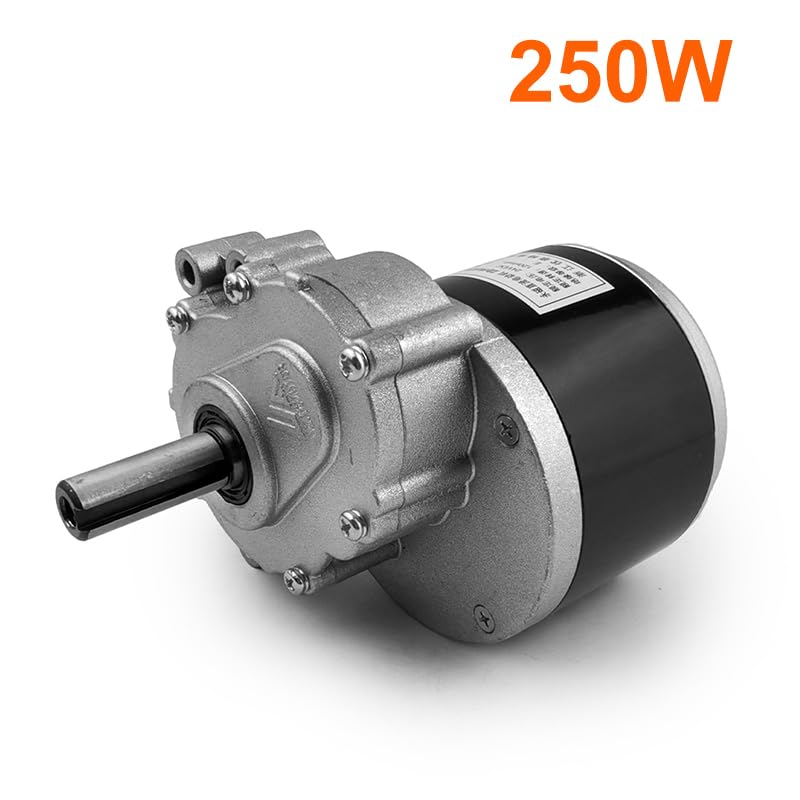
Image 3.1: A single 250W brushed geared motor, part of the 4WD kit.

Image 3.2: Side view of the brushed geared motor, showing the shaft and gear housing.

Image 3.3: Front view of the brushed geared motor, highlighting the output shaft.
- Bracket Dimensions: Refer to the following images for bracket dimensions to ensure proper fit and installation.

Image 3.4: Side view of the motor bracket with key dimensions (134mm height, 163mm length, 50mm width).

Image 3.5: Top view of the motor bracket, showing mounting hole spacing (65mm between centers).

Image 3.6: Close-up view of the motor bracket thickness (5mm).
- Wiring Connections: Connect each motor to the 4WD controller according to the wiring diagram (refer to the controller's specific instructions if provided separately). Ensure all connections are secure and properly insulated.
- Power Supply: Connect the 4WD controller to a compatible 24V DC power source (e.g., battery, not included). Verify correct polarity before powering on.
- Remote Control Setup: If using the 'ESC big' two-hands remote, insert 4 AA batteries. Follow the controller's instructions to pair the wireless remote with the 4WD controller.
4. Operating Instructions
Once the kit is installed and powered, operate it using the wireless remote control:
- Power On/Off: Use the designated power button on the remote or controller to turn the system on or off.
- Forward/Backward: Use the joystick or directional buttons to move the vehicle forward or backward.
- Turning: Use the joystick or directional buttons to steer the vehicle left or right.
- Cruise Function: Activate the cruise control feature (if available on your remote) to maintain a constant speed without continuous input.
- Remote Type: The 'ESC small' remote is designed for single-hand operation, while the 'ESC big' remote is a two-hands model requiring 4 AA batteries for power.
5. Maintenance
Regular maintenance ensures optimal performance and longevity of your motor kit:
- Cleaning: Keep motors and controller free from dirt, dust, and moisture. Use a dry cloth for cleaning.
- Connection Checks: Periodically inspect all electrical connections for tightness and signs of wear or corrosion. Re-secure or replace as necessary.
- Battery Care: If using a separate battery, follow the battery manufacturer's guidelines for charging, storage, and maintenance. Ensure remote control batteries are replaced when low.
- Physical Inspection: Check motor mounts and brackets for any signs of loosening or damage. Tighten fasteners as needed.
6. Troubleshooting
If you encounter issues with your L-faster 4WD motor kit, consider the following troubleshooting steps:
- Motors Not Running:
- Verify the main power supply (battery) is charged and connected correctly.
- Check all wiring connections between the motors and the controller.
- Ensure the remote control has fresh batteries and is properly paired with the controller.
- Uneven Motor Power:
- Inspect individual motor connections for looseness or damage.
- Check for any physical obstructions preventing a motor from rotating freely.
- Remote Control Unresponsive:
- Replace batteries in the remote control.
- Attempt to re-pair the remote control with the 4WD controller according to the pairing instructions.
- Overheating:
- Ensure the motors and controller have adequate ventilation.
- Reduce load or operating time if components become excessively hot.
If problems persist after performing these checks, contact the seller or manufacturer for further assistance.
7. Specifications
Detailed specifications for the L-faster 24V 250W Brushed Geared Motor (Model MY1016Z-W):

Image 7.1: Technical drawing and data table for the MY1016Z-W motor.
| Specification | Value |
|---|---|
| Model | MY1016Z-W |
| Rated Voltage | 24V DC |
| Rated Output Power | 250W (per motor) |
| Type | Brushed Gear Reduction |
| Output Speed Options | 75 RPM / 120 RPM |
| Shaft Diameter | 17mm |
| Shaft Length | 44mm |
| Net Weight (per motor) | 2.8 KG (for 250W) / 3.1 KG (for 350W) |
| Material | Aluminum |
| Application | Wheelchair DC motor (general type) |
8. Warranty and Support
For information regarding product warranty, please refer to the terms and conditions provided by your point of purchase or contact the seller directly. Specific warranty details are not included in this manual.
For technical support or assistance with installation and operation, please reach out to the L-faster customer service or the retailer from whom you purchased the product.