
T4TREAM VSC48CVD
T4TREAM VSC48CVD Makeup Vanity Desk User Manual
Model: VSC48CVD - Antique White
Introduction
Thank you for choosing the T4TREAM VSC48CVD Makeup Vanity Desk. This manual provides essential information for the safe assembly, operation, and maintenance of your new vanity desk. Please read these instructions carefully before beginning assembly and retain them for future reference.

An overview of the T4TREAM Makeup Vanity Desk, showcasing its antique white finish, three-way mirror with integrated lighting, and overall design.
Safety Information
To ensure safe use and prevent damage, please observe the following:
- Always assemble the product on a soft, clean surface to prevent scratches.
- Ensure all parts are securely fastened before use. Periodically check and tighten all connections.
- Do not overload drawers or shelves. Distribute weight evenly.
- Keep electrical components (mirror lights, charging station) away from water.
- Use only the provided power cord and ensure it is properly connected to a suitable power outlet.
- Keep small parts and packaging materials away from children and pets.
Package Contents
Please refer to the detailed parts list included in your product packaging to ensure all components are present before beginning assembly. If any parts are missing or damaged, please contact customer support.
Setup and Assembly
Assembly of the T4TREAM Makeup Vanity Desk requires careful attention to the provided instructions. It is recommended to have two people for assembly. All parts are numbered for easy identification.
- Unpack and Identify Parts: Carefully remove all components from the packaging. Lay them out on a clean, soft surface. Verify all parts against the included parts list.
- Assemble the Base Structure: Follow the step-by-step diagrams to connect the main frame components. Ensure all screws and fasteners are tightened securely.
- Install Drawers and Cabinets: Insert drawer slides and assemble drawers according to the instructions. Attach cabinet doors and hinges.
- Attach the Tabletop: Secure the main tabletop to the assembled base.
- Mount the Mirror Unit: Carefully attach the three-way mirror unit to the designated area on the tabletop. Connect any electrical wiring as instructed.
- Install Charging Station: Integrate the charging station into its designated slot and connect its power cable.
- Final Checks: Once assembled, gently move the vanity to its desired location. Ensure stability and check all connections for tightness.

Detailed diagram illustrating the height, width, and depth of the vanity desk, including mirror and drawer dimensions.
Operating Instructions
1. Three-Way Mirror Lighting System
The integrated mirror features adjustable LED lighting with multiple modes to suit your needs.
- Power On/Off: Tap the touch control button on the mirror to turn the lights on or off.
- Change Lighting Mode: Tap the touch control button repeatedly to cycle through the three color modes: Cold Daylight, Natural Light, and Warm Light.
- Adjust Brightness: Press and hold the touch control button to adjust the brightness level from 0% to 100%. Release when the desired brightness is reached.
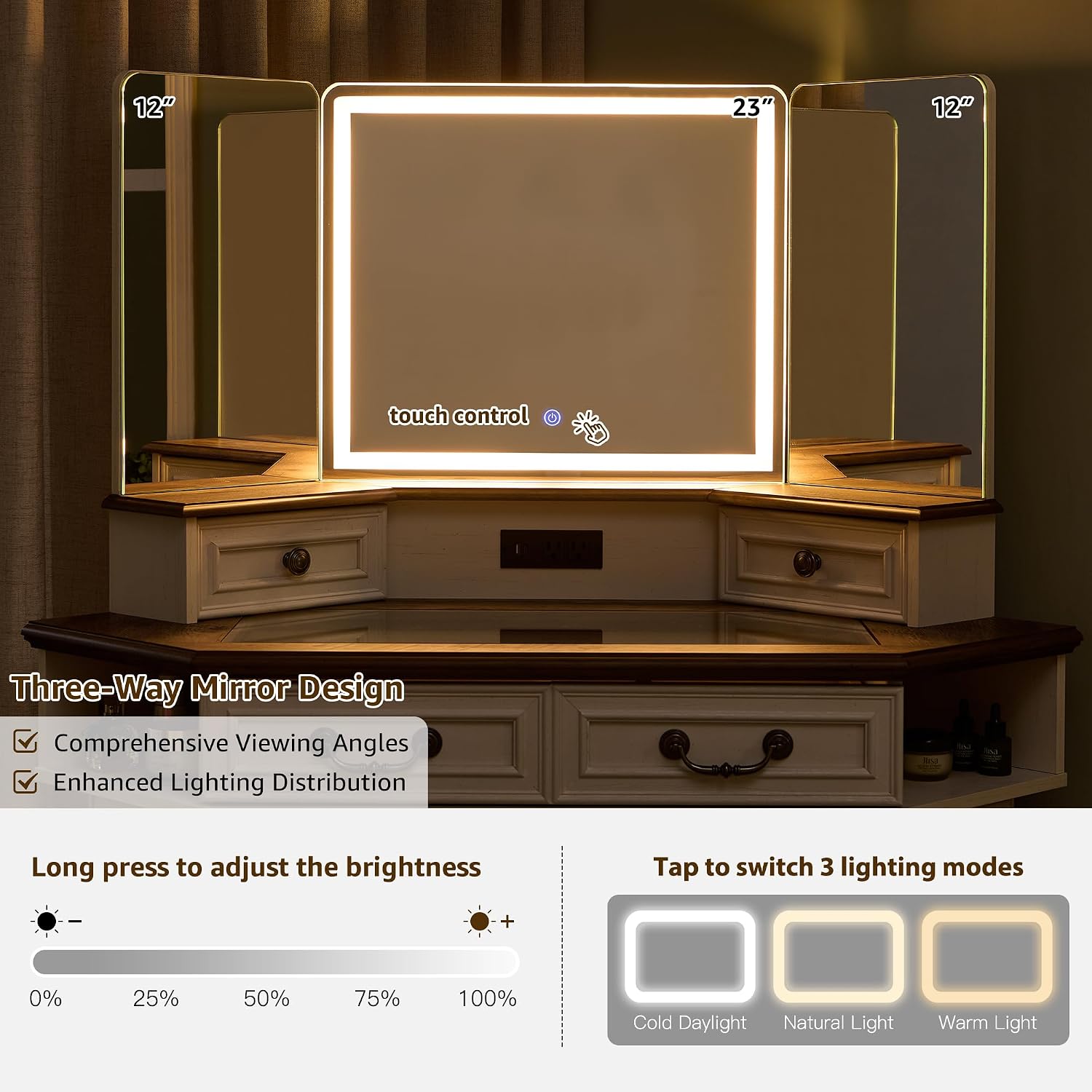
A detailed view of the three-way mirror, demonstrating the touch control interface for adjusting brightness and switching between cold daylight, natural light, and warm light modes.
2. Built-in Charging Station
The vanity desk includes a convenient charging station for your electronic devices.
- AC Outlets: Two 125V/12A AC outlets are available for powering hair dryers, curling irons, or other small appliances.
- USB Ports: One 5V/2.1A USB port and one 5V/2.1A Type-C port are provided for charging smartphones, tablets, and other compatible devices.
- Power Connection: Ensure the vanity's main power cord is securely plugged into a wall outlet for the charging station to function.
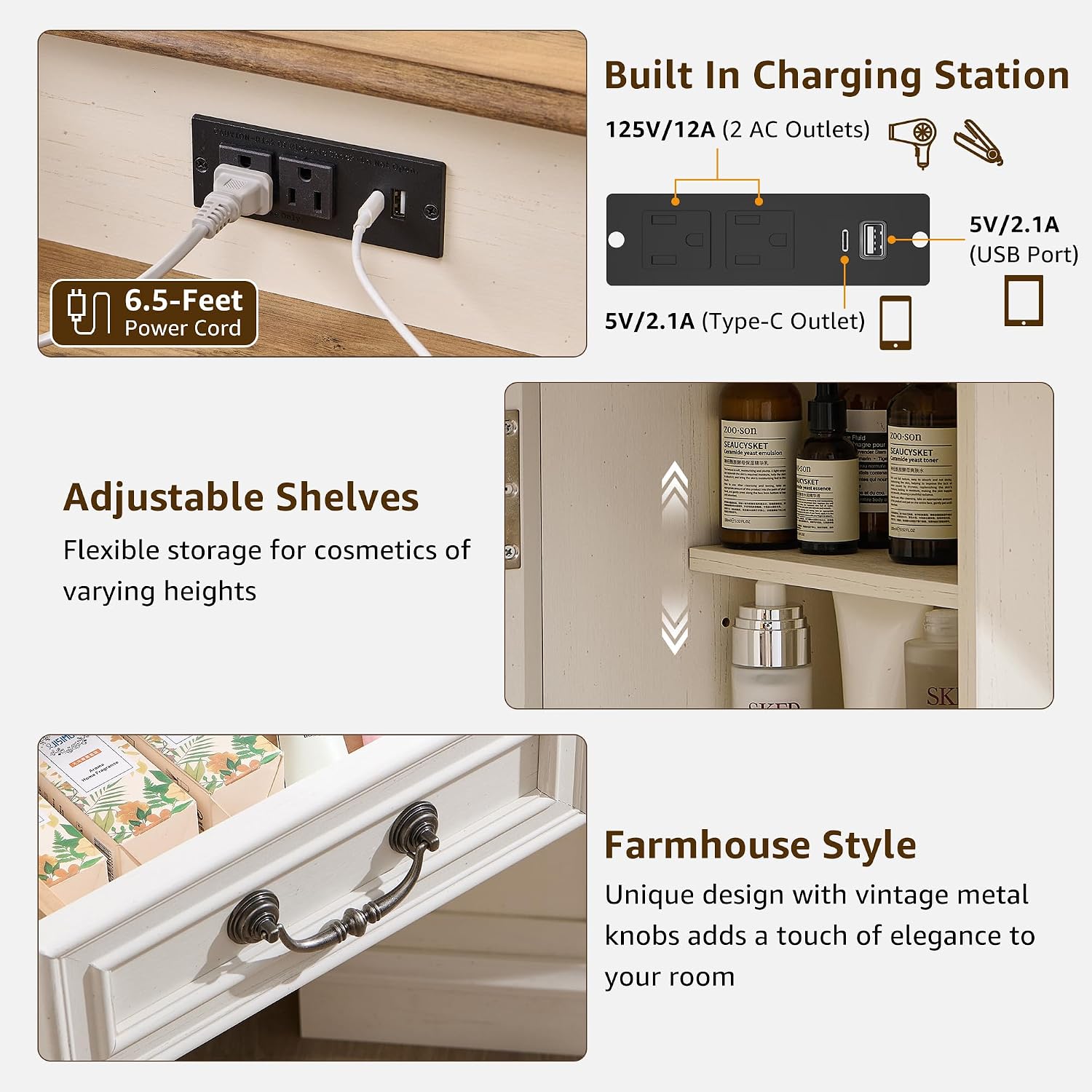
A detailed view of the integrated charging station, featuring two AC outlets, one USB port, and one Type-C port for convenient power access for various devices.
3. Storage Features
The vanity desk offers various storage solutions to keep your items organized.
- Transparent Tempered Glass Tabletop: Provides a clear view of items stored in the drawer beneath, aiding in quick access and organization.
- Drawers: Includes two top drawers and one 28-inch wide middle drawer for cosmetics and accessories.
- Side Cabinets: Dual storage cabinets with adjustable shelves offer flexible storage for items of varying heights.
- Semi-Open Side Cubbies: Two semi-open cubbies provide additional accessible storage space.

This image highlights the extensive storage capacity of the vanity, showing open side cabinets with adjustable shelves and drawers filled with cosmetics.

This image shows the transparent tempered glass tabletop, allowing a clear view of stored items in the drawer beneath, enhancing organization and accessibility.
Maintenance
Proper care will extend the life and appearance of your vanity desk.
- Cleaning: Wipe surfaces with a soft, damp cloth. Avoid harsh chemicals or abrasive cleaners. For the glass top, use a glass cleaner.
- Dusting: Regularly dust with a dry, soft cloth.
- Spills: Clean spills immediately to prevent staining, especially on the wood surfaces.
- Mirror Care: Clean the mirror with a non-abrasive glass cleaner and a soft cloth. Do not spray cleaner directly onto the mirror to avoid liquid seeping into electrical components.
- Electrical Components: Ensure the charging station and mirror lights are unplugged before cleaning.
Troubleshooting
| Problem | Possible Cause | Solution |
| Mirror lights do not turn on. | Power cord not plugged in; loose connection; faulty outlet. | Ensure the power cord is securely plugged into a working outlet. Check all electrical connections. |
| Charging station is not working. | Vanity power cord not plugged in; device not compatible; faulty cable. | Verify the vanity is plugged into a live outlet. Ensure your device and charging cable are functional. |
| Drawers are stiff or do not slide smoothly. | Improper assembly of drawer slides; obstruction. | Review assembly instructions for drawer slides. Check for any objects obstructing the drawer path. |
| Vanity feels unstable. | Loose fasteners; uneven floor. | Check and tighten all screws and bolts. If the floor is uneven, use shims under the legs for stability. |
Specifications
| Model Number | VSC48CVD |
| Brand | T4TREAM |
| Color | Antique White |
| Product Dimensions | 21.44"D x 48"W x 56"H |
| Item Weight | 139 pounds |
| Frame Material | Engineered Wood |
| Furniture Finish | Oak |
| Assembly Required | Yes |
| Charging Station | 2 AC Outlets (125V/12A), 1 USB Port (5V/2.1A), 1 Type-C Port (5V/2.1A) |
| Mirror Features | 3-Way Mirror, Adjustable LED Lights (Cold Daylight, Natural Light, Warm Light), Adjustable Brightness |
Warranty and Support
T4TREAM products are designed for quality and durability. For specific warranty details, please refer to the warranty card included with your purchase or visit the official T4TREAM website. If you encounter any issues or have questions regarding your vanity desk, please contact T4TREAM customer support for assistance.
You can typically find contact information on the product packaging or by visiting the T4TREAM Store on Amazon.
Ask a question about this manual
Ask about setup, troubleshooting, compatibility, parts, safety, or missing instructions. Manuals+ will review the question and use this page’s manual context to help answer it.