
Introduction
This manual provides essential instructions for the proper setup, operation, and maintenance of your Losfom Z11 4K Body Camera. Please read this manual thoroughly before using the device to ensure optimal performance and longevity. The Losfom Z11 is a compact, wearable camera designed for high-quality audio and video recording, featuring 4K resolution, night vision, and dual battery support.
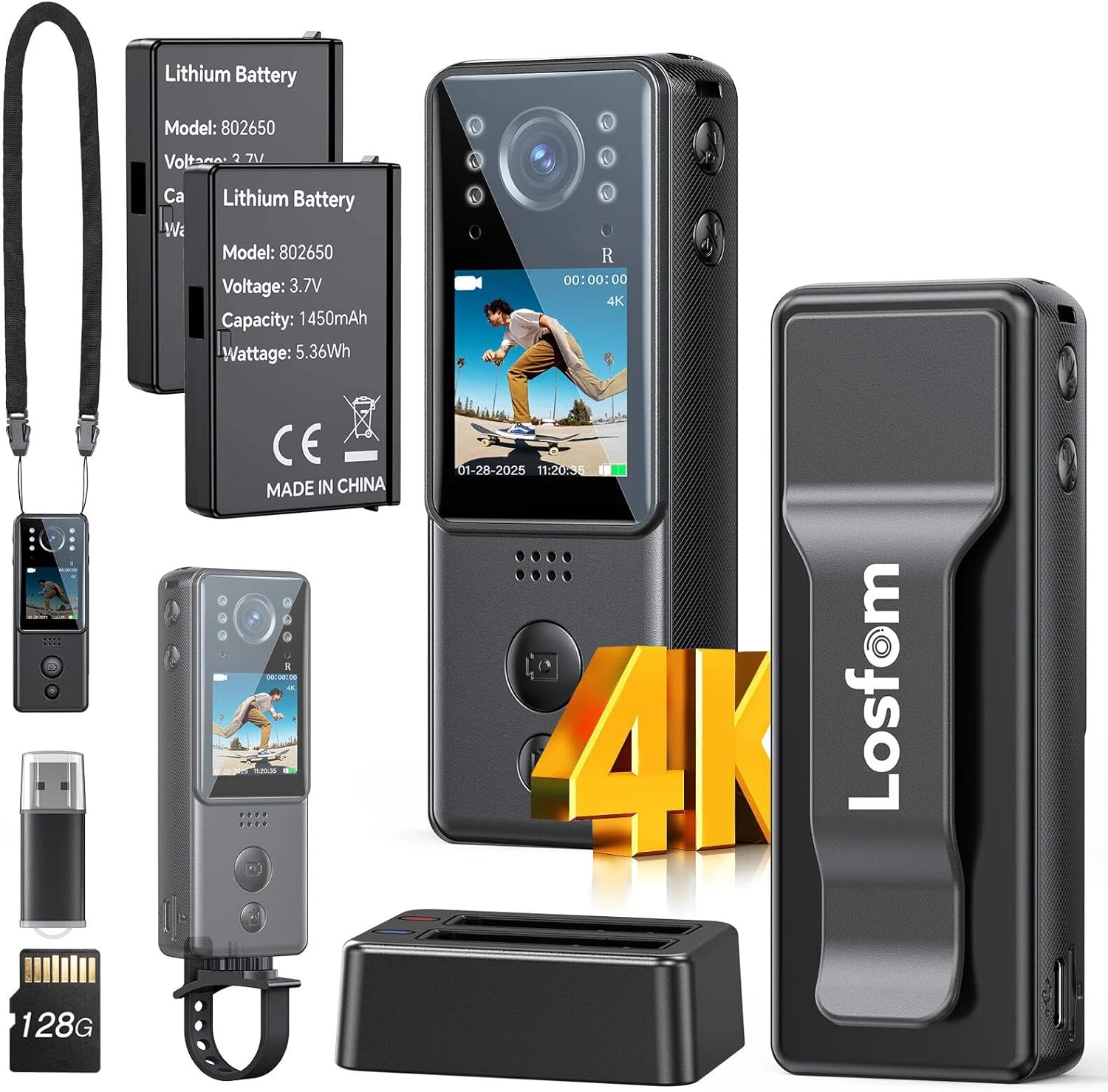
What's in the Box
- Losfom Z11 4K Body Camera
- Two 1400mAh Rechargeable Batteries (one pre-installed)
- Charging Dock
- Bike Mount
- Lanyard
- USB Charging Cable
- Micro SD Card (capacity may vary by package)
Setup
1. Charging Batteries
The Losfom Z11 comes with two 1400mAh rechargeable batteries. One battery is typically pre-installed in the camera, and a spare is provided. Use the included charging dock to charge both batteries simultaneously.
- Insert the batteries into the designated slots on the charging dock.
- Connect the USB charging cable to the charging dock and a power source (e.g., USB wall adapter, computer USB port).
- The indicator lights on the dock will show the charging status. Once fully charged, remove the batteries.


2. Inserting the Micro SD Card
The camera requires a Micro SD card for storing recordings. A card is typically included with your purchase.
- Locate the Micro SD card slot on the side of the camera.
- Gently insert the Micro SD card into the slot until it clicks into place. Ensure the card is inserted in the correct orientation.
- To remove, gently press the card inward until it springs out.
3. Attaching Accessories
The Losfom Z11 offers various wearing and mounting options for different scenarios.
- Back Clip: Attach the camera to your uniform, shirt pocket, or belt for hands-free recording.
- Neck Lanyard: Wear the camera around your neck for easy access and portability.
- Bike Mount: Use the included mount to secure the camera to bicycle handlebars for outdoor activities.


Operating Instructions
1. Power On/Off
- To power on, press and hold the Power button until the screen illuminates.
- To power off, press and hold the Power button until the device shuts down.
2. Recording Video and Taking Photos
The camera features dedicated buttons for video and photo capture.
- Video Recording: Press the Video button once to start recording. Press it again to stop. The screen will indicate recording status.
- Photo Capture: Press the Photo button once to take a still image.


3. Night Vision
The camera is equipped with 6 IR lights for enhanced night vision capabilities, allowing for clear recordings in low-light or total darkness.
- Refer to the on-screen menu or dedicated button (if available) to activate or deactivate night vision mode.
- Ensure no obstructions block the IR lights for optimal performance.

4. Adjusting Camera Angle
The camera features a 180° rotating lens, allowing you to adjust the recording angle as needed. Gently pivot the top section of the camera to achieve the desired view.
5. Reviewing and Transferring Files
You can review recordings directly on the camera's 1.3-inch LCD screen or transfer them to a computer for larger viewing and storage.
- On-Device Review: Use the navigation buttons below the screen to browse and play back recorded videos and photos.
- File Transfer: Connect the camera to your computer using the provided USB cable. The camera will appear as a removable disk drive. You can then copy files directly from the Micro SD card to your computer. Alternatively, remove the Micro SD card and insert it into a card reader connected to your computer.

Maintenance
- Battery Care: To prolong battery life, avoid fully discharging the batteries frequently. Store them in a cool, dry place when not in use.
- Cleaning: Use a soft, dry cloth to clean the camera body and lens. Avoid using harsh chemicals or abrasive materials.
- Storage: Store the camera in a protective case or pouch to prevent scratches and damage. Keep it away from extreme temperatures and humidity.
Troubleshooting
| Issue | Possible Solution |
|---|---|
| Camera does not power on. | Ensure batteries are fully charged and correctly inserted. Try using the spare battery. |
| Cannot record video/take photos. | Check if a Micro SD card is inserted and has sufficient free space. Ensure the camera is not in playback mode. |
| Poor video quality. | Ensure the lens is clean. Check recording resolution settings (set to 4K for best quality). Ensure adequate lighting or activate night vision if in low light. |
| Files not transferring to computer. | Verify the USB cable connection. Try a different USB port or computer. Ensure the camera is powered on when connected. |
Specifications
| Feature | Detail |
|---|---|
| Brand | Losfom |
| Model Number | Z11 |
| Video Capture Resolution | 4K |
| Photo Sensor Technology | CMOS |
| Flash Memory Type | Micro SD |
| Screen Size | 1.3 Inches |
| Special Features | HD Resolution, Portable, 6 IR Night Vision Lights, Dual Batteries |
| Item Weight | 1.2 pounds |
| Package Dimensions | 5.91 x 3.86 x 2.72 inches |
| Batteries | 2 A batteries required (1400mAh Lithium) |
| Video Capture Format | MOV |
| Supported Audio Format | AAC |
| Connectivity Technology | Wired |
Warranty and Support
For warranty information, technical support, or service inquiries, please refer to the official Losfom website or contact their customer service directly. Keep your purchase receipt as proof of purchase for any warranty claims.


