
1. Introduction
Thank you for purchasing the 7artisans 10mm F3.5 Ultra Wide Angle APS-C Mirrorless Lens. This manual provides essential information for the proper use, maintenance, and care of your new lens. Please read it thoroughly before use to ensure optimal performance and longevity of the product.

Image 1.1: 7artisans 10mm F3.5 Lens Overview
2. Package Contents
Verify that all items listed below are included in your package:
- 7artisans 10mm F3.5 Lens x1
- Lens Front Cover x1
- Lens Back Cover x1
- User Manual x1
- Lens Packaging Box x1

Image 2.1: Package Contents
3. Lens Components
Familiarize yourself with the main components of your 7artisans 10mm F3.5 lens:
- Filter Installation Latch: For attaching filters.
- Focusing Ring: Used to manually adjust the focus.
- Aperture Ring: Used to manually set the aperture (F3.5 to F16/F22).
- Lens Mount: Connects the lens to the camera body.
- Depth of Field Scale: Provides a visual guide for depth of field at various apertures.

Image 3.1: Lens Structure and Components
4. Setup and Installation
To attach the 7artisans 10mm F3.5 lens to your Fuji X-mount camera:
- Ensure your camera is powered off.
- Remove the rear lens cap from the 7artisans lens and the body cap from your camera.
- Align the red dot on the lens mount with the corresponding mark on your camera's lens mount.
- Gently insert the lens into the camera mount and rotate it clockwise until it clicks into place. Do not force the lens.
- Replace the front lens cap when not in use.
Compatible Fuji X-Mount Camera Models:
- X-H series: X-H1, X-H2, X-H2S, X-T5
- X-T series: X-T5, X-T4, X-T3, X-T2, X-T1, X-T50, X-T30, X-T30 II, X-T20, X-T200, X-T100
- X-S series: X-S10, X-S20
- X-PRO series: X-PRO2, X-Pro3
- X-E series: X-E4, X-E3, X-E2, X-E1
- X-A series: X-A1, X-A2, X-A3, X-A5, X-A7, X-A10, X-A20, X-M5
Video 4.1: Demonstrates the mounting of the 7artisans 10mm F3.5 lens onto various mirrorless camera bodies, showcasing its compact size and ease of attachment.
5. Operating the Lens
5.1 Manual Focus
This is a manual focus lens. Rotate the focusing ring to achieve sharp focus. Utilize your camera's focus peaking or magnification features for precise focusing, especially at wider apertures.
5.2 Aperture Control
The lens features a variable aperture from F3.5 to F22. Rotate the aperture ring to select your desired f-stop. A wider aperture (smaller f-number like F3.5) allows more light and creates a shallower depth of field, while a narrower aperture (larger f-number like F16/F22) allows less light, increases depth of field, and can produce a distinct 10-point starburst effect from bright light sources.
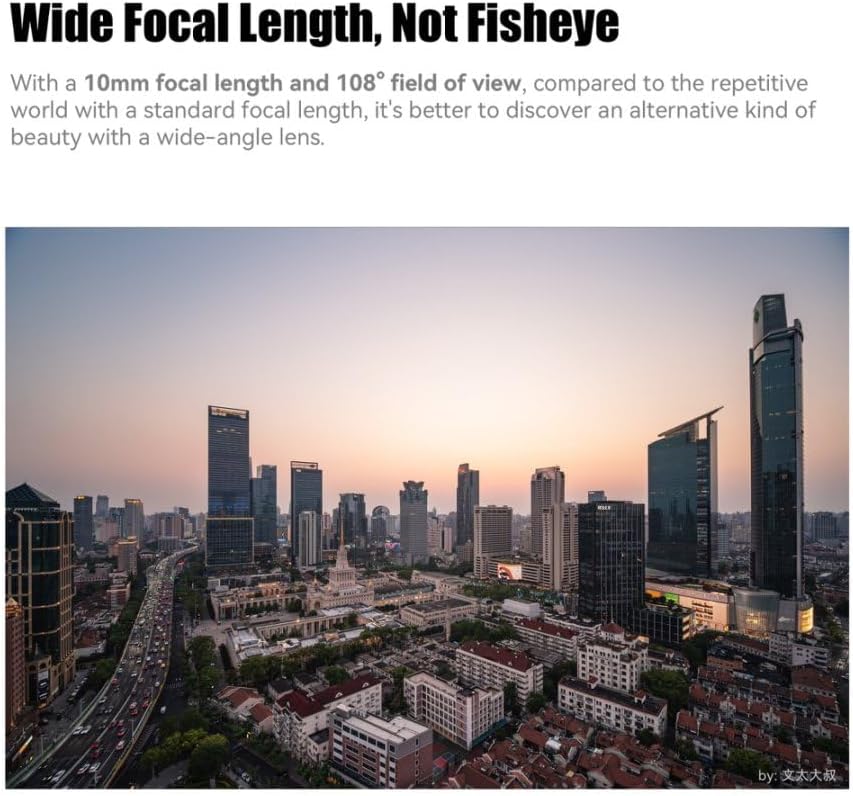
Image 5.1: Wide Focal Length, Not Fisheye

Image 5.2: Wide-angle Style Portrait

Image 5.3: Ten Needles of Brilliant Starlight
5.3 Non-Fisheye Wide-Angle Perspective
The 10mm focal length provides an ultra-wide field of view (109.5 degrees) without the typical distortion of a fisheye lens. This makes it suitable for architectural photography, landscapes, and creative portraits where straight lines and natural perspectives are desired.

Image 5.4: Straight Out Aesthetics
6. Maintenance and Care
Proper care will extend the life and performance of your lens:
- Cleaning: Use a soft, clean microfiber cloth specifically designed for optics to clean the lens elements. For stubborn smudges, use a small amount of lens cleaning fluid applied to the cloth, not directly to the lens.
- Dust: Use a blower brush to remove dust from the lens surface before wiping.
- Storage: Store the lens in a dry, cool place away from direct sunlight and extreme temperatures. Always attach the front and rear lens caps when not in use.
- Avoid Moisture: The lens is not water-resistant. Avoid exposure to rain, splashes, or high humidity.
7. Troubleshooting
If you encounter issues with your lens, consider the following:
- Soft Images: Ensure accurate manual focus. At wider apertures (e.g., F3.5), corners may exhibit some softness, which is common for ultra-wide lenses. Stopping down the aperture (e.g., to F5.6 or F8) can improve corner sharpness.
- Lens Flare/Ghosting: When shooting directly into strong light sources, some lens flare or ghosting may occur. This can be used creatively or minimized by adjusting your shooting angle or using a lens hood (if compatible).
- Distortion Correction: While designed to be non-fisheye, minor optical distortions can be further corrected in post-processing using a lens correction profile.
Lens Correction File Usage:
For optimal results, a lens correction file can be applied in post-processing software like Adobe Camera Raw or Lightroom. This helps to correct any minor optical distortions and chromatic aberrations.
- Windows Storage Path: C:Users\Administrator\AppData\Roaming\Adobe\CameraRaw\LensProfiles\1.0
- Mac OS Storage Path: Macintosh HD/Library/Application Support/Adobe/CameraRaw/LensProfiles/1.0
In CameraRaw, select "7artisans" for creation and "7artisans 10mm F3.5" for the model.

Image 7.1: Lens Correction Example
8. Specifications
| Feature | Description |
|---|---|
| Brand | 7artisans |
| Model Name | 7artisans 10mm F3.5 |
| Focal Length | 10 Millimeters |
| Maximum Aperture | F3.5 |
| Minimum Aperture | F22 |
| Lens Type | Wide Angle, Prime |
| Compatible Mountings | FUJIFILM X MOUNT APS-C |
| Focus Type | Manual Focus |
| Image Stabilization | No image stabilization |
| Real Angle Of View | 109.5 Degrees |
| Water Resistance Level | Not Water Resistant |
| Weight (approx.) | 130 grams (from product description) |
9. Warranty and Support
The 7artisans 10mm F3.5 lens comes with a 1-year warranty from the date of purchase. Please retain your proof of purchase for warranty claims.
For further assistance, technical support, or warranty inquiries, please visit the official 7artisans store or contact their customer service:
