
1. Introduction
Thank you for choosing the EasyAcc Q22 Dehumidifier. This device is designed to efficiently remove excess moisture from small spaces, helping to prevent mold, mildew, and musty odors. Its compact design, silent operation, and energy-saving features make it ideal for bedrooms, bathrooms, closets, and other small areas up to 20 square meters. Please read this manual thoroughly before use to ensure proper operation and maintenance.
2. Important Safety Instructions
Always follow basic safety precautions when using electrical appliances to reduce the risk of fire, electric shock, and injury.
- Ensure the power supply voltage matches the rating label on the dehumidifier.
- Do not operate the dehumidifier with a damaged cord or plug. If the cord or plug is damaged, contact customer support.
- Do not immerse the unit, power cord, or plug in water or other liquids.
- Keep the dehumidifier away from heat sources such as radiators, heaters, stoves, or other heat-producing appliances.
- Do not block air inlets or outlets. Ensure there is at least 10 cm (4 inches) of clear space around the unit for proper airflow.
- Always place the dehumidifier on a stable, flat surface.
- Unplug the unit before cleaning, performing maintenance, or when not in use for extended periods.
- This appliance is not intended for use by persons (including children) with reduced physical, sensory, or mental capabilities, or lack of experience and knowledge, unless they have been given supervision or instruction concerning use of the appliance by a person responsible for their safety.
- Children should be supervised to ensure that they do not play with the appliance.
- Do not use the dehumidifier in areas where flammable liquids or gases are stored.
- Empty the water tank regularly to prevent overflow. The unit features an automatic shut-off when the tank is full.
3. Package Contents
Please check the package for the following items:
- EasyAcc Q22 Dehumidifier
- Power Adapter
- User Manual (this document)
- Dust Bag (for storage)
4. Product Overview
Familiarize yourself with the components of your EasyAcc Q22 Dehumidifier.

Figure 4.1: Internal Components. This image illustrates the internal structure of the dehumidifier, highlighting the dual core cooling system designed for efficient moisture removal, even in colder conditions.

Figure 4.2: Airflow Design. The dehumidifier features a 3X larger air inlet design for enhanced air circulation and faster moisture extraction.
Key Components:
- Air Inlet Grille: Located on the back/sides, draws in humid air.
- Air Outlet: Located on the top, releases dry air.
- Control Panel: Buttons for power, mode selection, and light control.
- Water Tank: Removable 2-liter tank for collected water. Visible for easy monitoring.
- Power Port: For connecting the power adapter.
5. Setup
Follow these steps to set up your dehumidifier for first use:
- Unpack: Carefully remove the dehumidifier and all accessories from the packaging. Retain packaging for future storage or transport.
- Placement: Place the dehumidifier on a firm, level surface in the desired room. Ensure there is at least 10 cm (4 inches) of space around all sides for unrestricted airflow. Avoid placing it directly against walls or furniture.
- Power Connection: Connect the power adapter to the power port on the back of the dehumidifier. Plug the other end of the adapter into a suitable electrical outlet.
- Water Tank: Ensure the water tank is correctly inserted into the unit. The dehumidifier will not operate if the tank is not properly seated or is full.
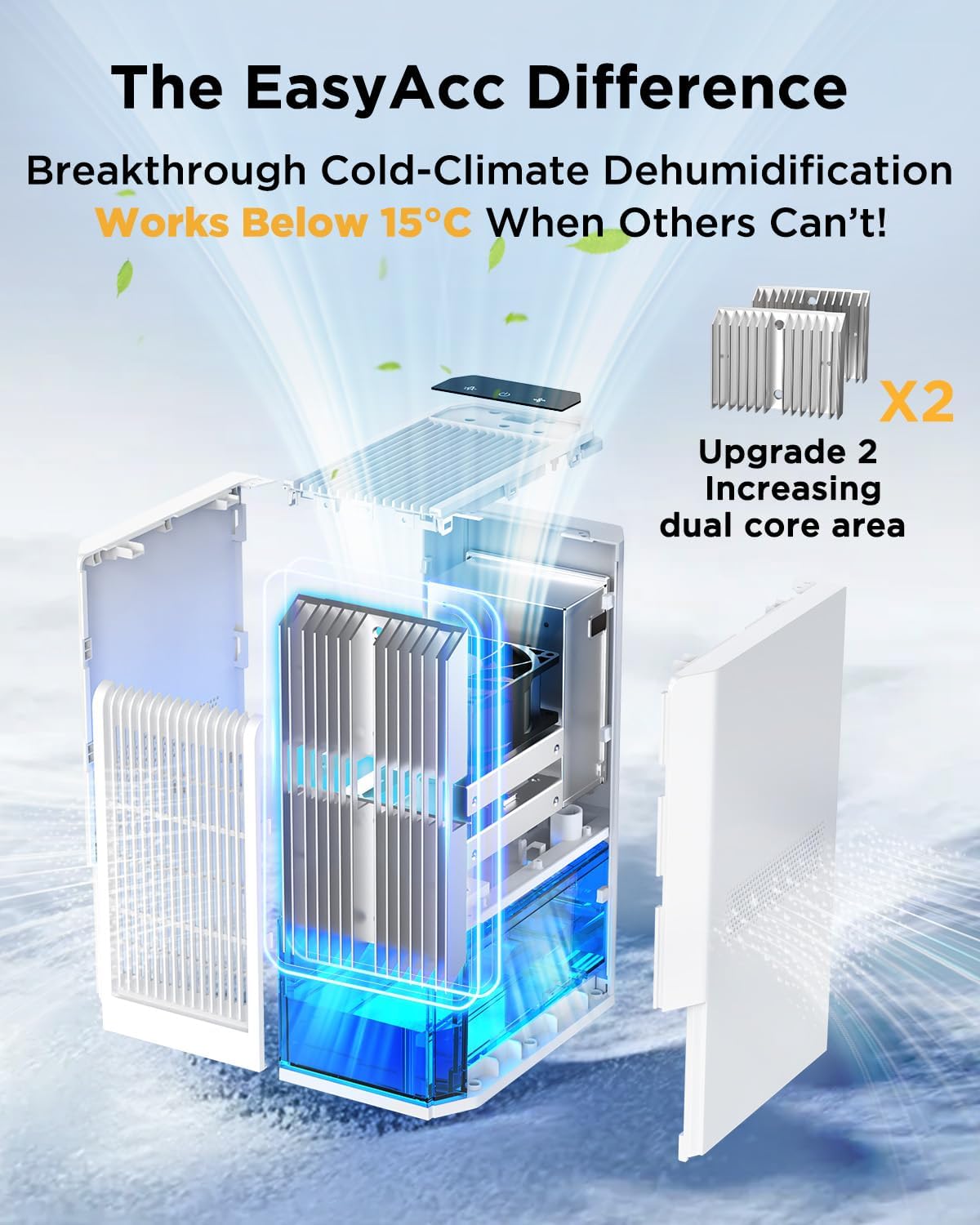
Figure 5.1: Proper Placement. Place the dehumidifier on a flat surface, ensuring adequate space for air circulation.
6. Operating Instructions
6.1 Control Panel

Figure 6.1: Control Panel. The control panel features intuitive touch buttons for various functions.
- Power Button (On/Off): Press to turn the unit on or off.
- Mode Button (Powerful/Sleep): Press to switch between Powerful Mode and Sleep Mode.
- Colorful Light Button: Press to cycle through 7 ambient light colors or turn the light off.
6.2 Operating Modes

Figure 6.2: Operating Modes. The dehumidifier offers two distinct modes for different needs.
- Powerful Mode: Provides maximum dehumidification for faster moisture removal. The fan operates at a higher speed, resulting in a noise level of 30-45dB. Ideal for daytime use or when rapid dehumidification is needed.
- Sleep Mode: Operates at a lower fan speed for ultra-quiet performance, with a noise level below 30dB. This mode is suitable for nighttime use or in quiet environments where minimal disturbance is desired.
6.3 Emptying the Water Tank
The dehumidifier will automatically shut off when the 2-liter water tank is full, and an indicator light may illuminate. Follow these steps to empty the tank:
Figure 6.3: Automatic Shut-off. The unit stops operation when the water tank is full to prevent overflow.
- Gently pull out the water tank from the front of the dehumidifier.
- Carefully carry the tank to a sink or drain.
- Pour out the collected water.
- Rinse the tank with clean water if necessary, but do not use harsh detergents.
- Slide the empty water tank back into the dehumidifier until it clicks securely into place. The unit will resume operation if the power is on and the tank is correctly inserted.
7. Maintenance
Regular cleaning and maintenance will ensure optimal performance and extend the lifespan of your dehumidifier.
7.1 Cleaning the Exterior
- Before cleaning, always unplug the dehumidifier from the power outlet.
- Wipe the exterior of the unit with a soft, damp cloth.
- Do not use abrasive cleaners, solvents, or harsh chemicals, as these can damage the surface.
- Ensure the unit is completely dry before plugging it back in.
7.2 Cleaning the Air Filter (if applicable)
While this model is designed for low maintenance, regularly check the air inlet grilles for dust accumulation. If dust is visible:
- Unplug the unit.
- Use a soft brush or a vacuum cleaner with a brush attachment to gently remove dust from the air inlet grilles.
- Do not attempt to disassemble the unit to clean internal components unless specifically instructed by customer support.
7.3 Storage
- If storing the dehumidifier for an extended period, empty and clean the water tank.
- Clean the exterior of the unit.
- Place the dehumidifier in the provided dust bag (if included) and store it in a cool, dry place.
8. Troubleshooting
If you encounter any issues with your dehumidifier, please refer to the following table before contacting customer support.
| Problem | Possible Cause | Solution |
|---|---|---|
| Dehumidifier does not turn on. |
|
|
| No water collected or low collection rate. |
|
|
| Unit is noisy. |
|
|
| Unusual odor. | Dust or mold accumulation. | Clean the air inlets and water tank. Ensure the room is well-ventilated. |
9. Specifications
| Feature | Specification |
|---|---|
| Model | Q22 |
| Brand | EasyAcc |
| Dehumidification Capacity | Up to 1000 ml/day (at 30°C, 80% RH) |
| Water Tank Capacity | 2 Liters |
| Rated Power | 85 Watts |
| Energy Consumption | Approx. 0.85 kWh/day |
| Operating Modes | Powerful Mode, Sleep Mode |
| Noise Level | Powerful Mode: 30-45dB, Sleep Mode: <30dB |
| Recommended Room Size | Up to 20 m² (215 sq ft) |
| Dimensions (L x W x H) | 24 x 14.5 x 33 cm (9.4 x 5.7 x 13 inches) |
| Weight | 2.9 kg (6.4 lbs) |
| Material | Acrylonitrile Butadiene Styrene (ABS) |
| Special Features | Automatic Shut-off, 7-Color Ambient Light, Portable |

Figure 9.1: Energy Efficiency. The EasyAcc Q22 is designed for low power consumption, using approximately 0.85 kWh per day.
10. Warranty and Support
EasyAcc products are manufactured to the highest quality standards. For information regarding warranty coverage, please refer to the warranty card included with your purchase or contact EasyAcc customer support. If you have any questions or require assistance with your dehumidifier, please do not hesitate to contact our customer service team. We are committed to providing excellent support.
Contact Information: Please refer to the EasyAcc official website or your purchase documentation for the most up-to-date customer support contact details.


