
Vivitar VES124
Vivitar Snapshot Digital Camera (Model VES124) Instruction Manual
Your guide to capturing vibrant memories with ease.
Introduction
Welcome to the world of digital photography with your new Vivitar Snapshot Digital Camera, Model VES124. This lightweight and user-friendly camera is designed for both spontaneous and planned shoots, allowing you to capture vibrant 44MP photos and crystal-clear 1080p videos with ease. Its compact design, 3x digital zoom, 2.4-inch preview screen, and rechargeable lithium-ion battery make it an ideal companion for all your creative adventures.
What's Included
Your Vivitar Snapshot Digital Camera package includes the following items:
- Vivitar Snapshot Digital Camera (Model VES124)
- USB Charging Cable
- Two (2) Rechargeable Lithium-ion Batteries
- 32GB Micro SD Card
- Camera Strap
- Cleaning Cloth
- User Manual
Getting Started: Initial Setup
- Charge the Battery: Insert one of the provided rechargeable lithium-ion batteries into the camera's battery compartment. Connect the camera to a power source using the USB charging cable. The charging indicator light will show the charging status. Ensure the battery is fully charged before first use.
- Insert SD Card: Open the memory card slot cover. Gently insert the 32GB Micro SD card into the slot until it clicks into place. Ensure it is inserted in the correct orientation.
- Attach Camera Strap: Securely attach the camera strap to the designated loop on the camera body to prevent accidental drops.
- Power On: Press and hold the power button located on the top of the camera until the screen illuminates.

Image: Back view of the Vivitar Snapshot Digital Camera, highlighting the screen and control buttons.
Operating Your Camera
Taking Photos
- Point and Shoot: Frame your subject using the 2.4-inch preview screen. The camera features autofocus with face detection to ensure sharp images.
- Capture: Press the shutter button located on the top of the camera to take a 44MP photo.
- Digital Zoom: Use the 'W' (Wide) and 'T' (Telephoto) buttons to adjust the 3x digital zoom for closer shots.
- Selfie Mode: The camera features a front screen for easy self-portraits. Switch to selfie mode to view yourself on the front display.
Recording Videos
- Start Recording: Switch the camera to video mode (refer to the menu for mode selection). Press the shutter button to begin recording 1080p videos at 30 frames per second.
- Anti-Shake: The built-in anti-shake feature helps stabilize your footage, especially when filming handheld or while moving.
- Stop Recording: Press the shutter button again to stop recording.
Reviewing and Managing Media
- Playback: Use the playback button (often indicated by a play icon) to view your captured photos and videos on the 2.4-inch screen.
- Delete: While in playback mode, select the unwanted media and use the delete button (trash can icon) to remove it.
Adjusting Settings
Access the camera's menu to customize various settings:
- Resolution: Adjust photo and video resolution.
- White Balance: Choose from Auto, Cloudy, Daylight, Flash torch, Fluorescent, Incandescent.
- Color Effects: Apply various filters like Color, Gray, Negative, Antique, Red.
- ISO: Adjust light sensitivity (ISO 100-3200).
- Scene Modes: Select from Automatic, Landscape, Portrait, Sports for optimized shooting.
- Self-Timer: Set a delay before taking a photo.
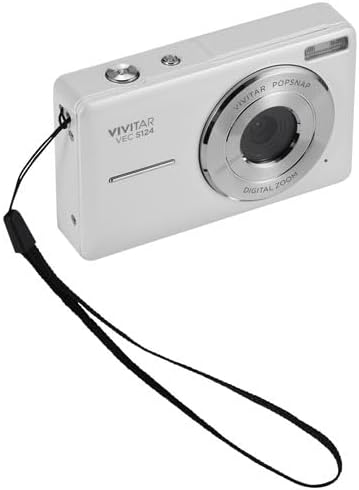
Image: Front view of the Vivitar Snapshot Digital Camera, showing the lens and wrist strap.
Care and Maintenance
- Cleaning: Use the provided cleaning cloth to gently wipe the lens and screen. Avoid abrasive materials or harsh chemicals.
- Battery Care: Store batteries in a cool, dry place. Do not expose them to extreme temperatures. Fully charge batteries before extended storage.
- Storage: When not in use, store the camera in a protective case to prevent dust and scratches.
- Water Resistance: This camera is Not Water Resistant. Avoid exposure to water or high humidity.
Troubleshooting Common Issues
- Camera Not Turning On: Ensure the battery is fully charged and correctly inserted.
- "No Image" or "Card Error": Check if the SD card is properly inserted and not full. Try reformatting the card (this will erase all data).
- Blurry Photos: Ensure the lens is clean. Allow the autofocus to lock onto the subject before fully pressing the shutter button.
- Short Battery Life: Ensure batteries are fully charged. Consider carrying a spare charged battery.
Technical Specifications
| Feature | Detail |
|---|---|
| Model Name | Snapshot (VES124) |
| Effective Still Resolution | 44 MP |
| Video Resolution | 1080p at 30fps |
| Optical Zoom | 3x Digital Zoom |
| Screen Size | 2.4 Inches LCD |
| Photo Sensor Technology | CMOS |
| Focus Features | Autofocus with Face Detection |
| Image Stabilization | No (features anti-shake for video) |
| Battery Type | Lithium Ion (Rechargeable) |
| Connectivity Technology | USB |
| Water Resistance Level | Not Water Resistant |
| Material | Plastic/Composite |
Warranty and Support
Your Vivitar Snapshot Digital Camera (Model VES124) comes with a 30-day limited warranty from the manufacturer, Sakar International Inc. Please retain your proof of purchase for warranty claims.
For further assistance, technical support, or warranty inquiries, please refer to the contact information provided in your product packaging or visit the official Vivitar website.
Related documentsVES124


Ask a question about this manual
Ask about setup, troubleshooting, compatibility, parts, safety, or missing instructions. Manuals+ will review the question and use this page’s manual context to help answer it.